Who Owns a Client Website on a White-Label Platform?
A client website built on a white-label platform has four separate things to own: the domain, the content, the design and code, and the platform account. Here is who owns each by default, what to put in the contract, and how to hand a site over when a client leaves.
It depends on which part you mean, and on what your contract says. A client website has four separate things: the domain name, the content (words, photos, logo), the design and code, and the platform account the site runs on. On a white-label platform the account and the software always belong to the platform, licensed to the agency. The domain belongs to whoever is listed as its registrant. Content the client supplied stays theirs. The design and code the agency created belong, under US copyright law, to the agency unless there is a signed written agreement transferring them. So without a contract that says otherwise, a client who leaves may own their domain and their words but not the site itself. Good agencies settle this in writing at the start.
This guide is general information about US law and common practice, not legal advice. Laws differ by country; have your contract reviewed by a lawyer where you work.
The four things a client thinks of as "my website"
| Part | Who owns it by default | What decides it |
|---|---|---|
| Domain name | The registrant on the registration record, which may not be the person who paid | Whose name and account the domain is registered in |
| Client content: text they wrote, photos they took, their logo | The client | They created it; you only have permission to use it |
| Agency work: design, layout, code, copy you wrote, photos you took | The agency, in the US, unless rights are transferred in a signed writing | Copyright law and your contract |
| The platform: the builder, hosting, editor, templates | The platform company | The platform's terms; the agency holds a licence, not ownership |
Most ownership fights are really about the first and third rows. The domain is the client's business address, and the design is what they think they paid for.
Why the agency owns its work by default (in the US)
Clients often assume that paying for a website makes it theirs. US copyright law does not work that way for outside contractors. Under 17 U.S.C. 101, a "work made for hire" is either work by an employee within the scope of their job, or a specially commissioned work in a short list of categories, and the commissioned route only applies where both parties "expressly agree in a written instrument signed by them". An agency is not the client's employee, and a website does not neatly fit that list of categories, so relying on "work made for hire" wording alone is uncertain.
The dependable route is an assignment. Under 17 U.S.C. 204(a), a transfer of copyright ownership is not valid without a written instrument or note of the transfer signed by the owner of the rights (or their authorised agent). So if you intend the client to own the design and code, your contract should say that you assign those rights, usually on full payment, and it should be signed.
Many agencies choose the opposite: they keep ownership and give the client a licence to use the site while they remain a client. Both are legitimate. What causes disputes is not deciding.
What a white-label platform adds to the picture
On a white-label platform there is a third party: the software company. Its terms decide what can be taken away. Three questions matter:
- Can the site's code or files be exported? If not, "ownership" of the design is mostly theoretical; the client can take screenshots, not a working site.
- Can a site move to another account on the same platform? Some platforms let an agency hand a site to the client's own account; others do not.
- What happens to published sites if the agency stops paying the platform? Clients should not discover this the day it happens.
Ask these before you sign with a platform, and put the answers into your client contract so your promises match what the platform can actually deliver.
The domain: the part that hurts most
A domain registered in the agency's name, or on a staff member's personal account, is the single most common source of bitter handovers. Under ICANN's Transfer Policy, registrars must give the registered name holder the domain's unique AuthInfo code, which is what moves a domain to another registrar. If the agency is the registered holder, the client cannot move the domain without the agency's help.
The clean default, and the one clients trust: register client domains in the client's name, in an account the client controls, and get delegated access for yourself. If you do register on the client's behalf, say in the contract that the domain is the client's and that you will hand over the transfer code on request. Note that ICANN's policy lets a registrar refuse a transfer within 60 days of registration or of a previous transfer, so a handover is not always instant.
Contract clauses to adopt
Copy these as starting points for your lawyer to adapt.
| Clause | What it should say |
|---|---|
| Client materials | The client keeps all rights in content they provide and gives the agency permission to use it for the project. |
| Agency deliverables | Either: "On payment in full, the agency assigns to the client its copyright in the custom design and content created for the client." Or: "The agency keeps ownership and grants the client a licence to use the site while the services continue." |
| Pre-existing and third-party material | Templates, code libraries, stock photos, fonts and the platform itself are not assigned; they stay under their own licences. |
| Domain | Registered in the client's name. If registered by the agency, held for the client, with the transfer code provided on request. |
| Platform | The site runs on a third-party platform licensed to the agency. The client gets no rights in the platform. |
| Exit | On termination, the agency will provide [an export of the site's files / the content and images / a copy of the code] within [X] days, and keep the site live until [date] if fees are paid. |
| Unpaid fees | What is delivered if the client leaves owing money, so the question is settled before anyone is angry. |
| Portfolio use | Whether the agency may show the site in its portfolio. |
If you use a standard agreement, our web design contract template has space for these clauses.
Handing a site over when a client leaves
Handle the exit the way you would want a vendor to handle yours. A graceful handover protects your reputation in a local market where business owners talk to each other.
- Confirm what they are entitled to under the contract, and any money owed.
- Agree a date and keep the site live until then.
- Hand over the domain: the transfer code, or change the account's owner, and confirm the client can log in.
- Export what you promised: code, content and images, and a list of forms and where they deliver.
- List the integrations they will need to recreate: analytics, booking, payments, email marketing.
- Remove your access from their accounts, and theirs from your platform, on the agreed date.
- Write it down: a one-page handover note signed off by the client.
How a platform can make this easier
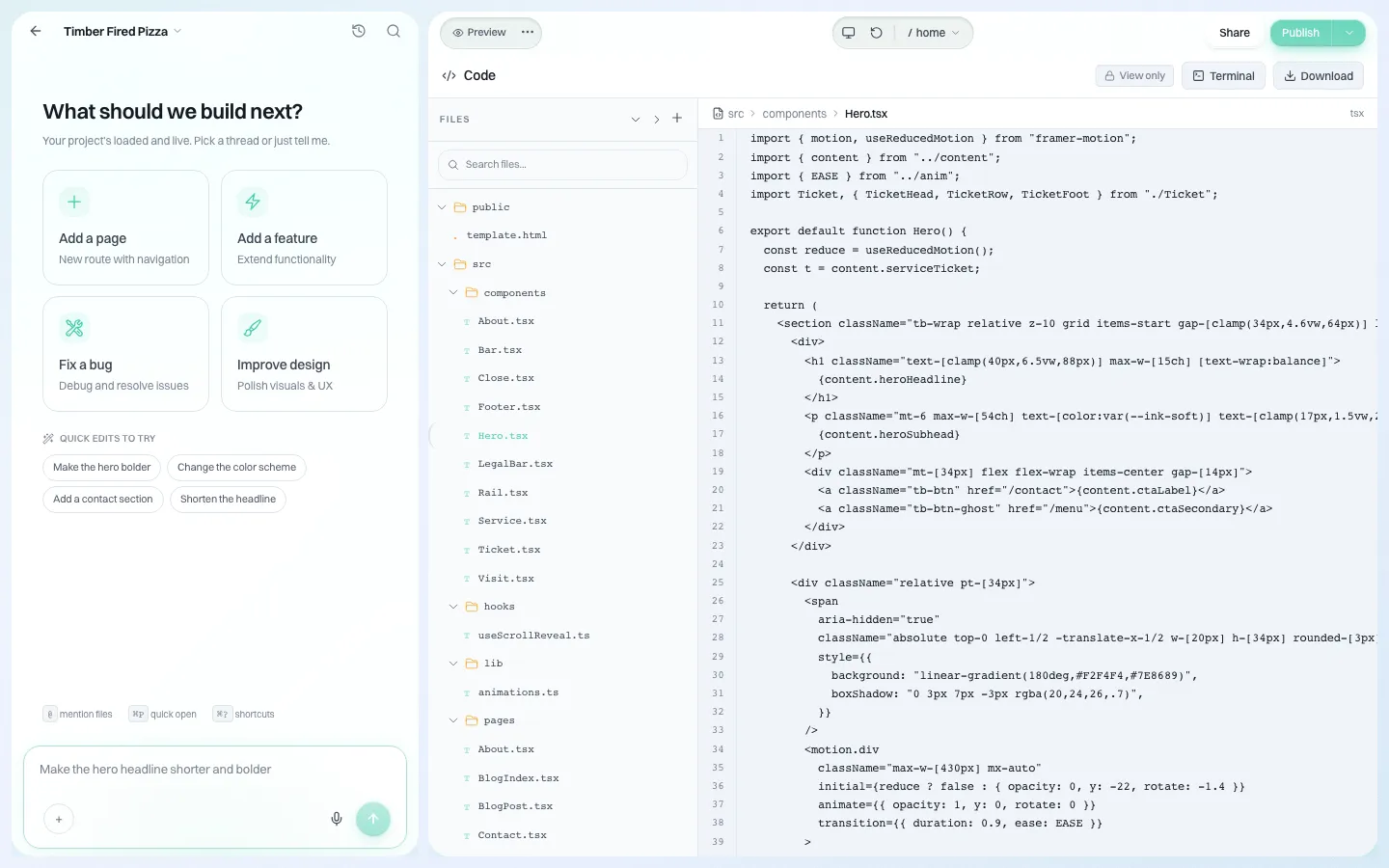
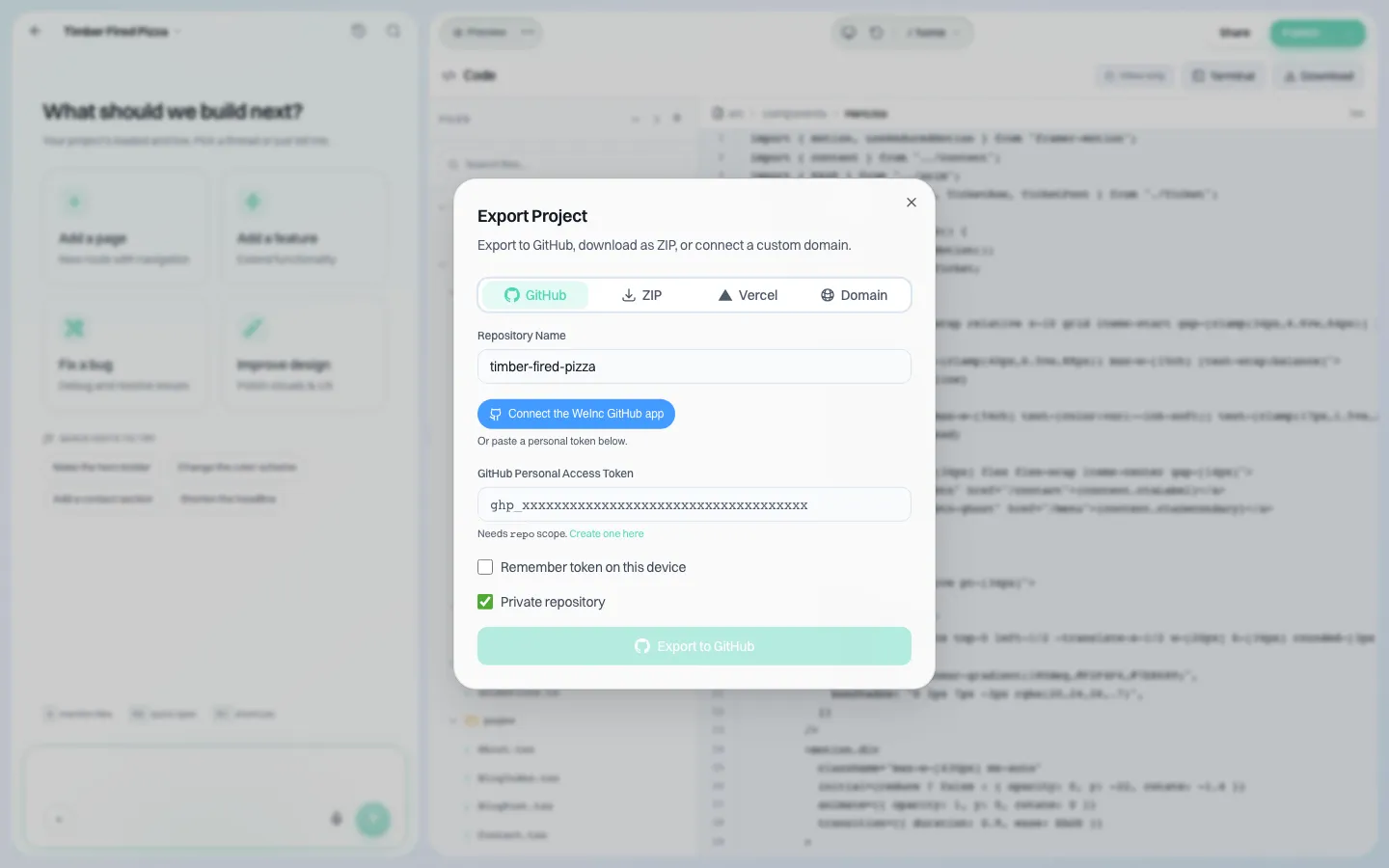
Ownership promises are only as good as what the software lets you deliver. In We.Inc, any site's code can be downloaded as a ZIP from its code panel, or exported to a GitHub repository, so "you can take your site with you" is a promise an agency can keep.
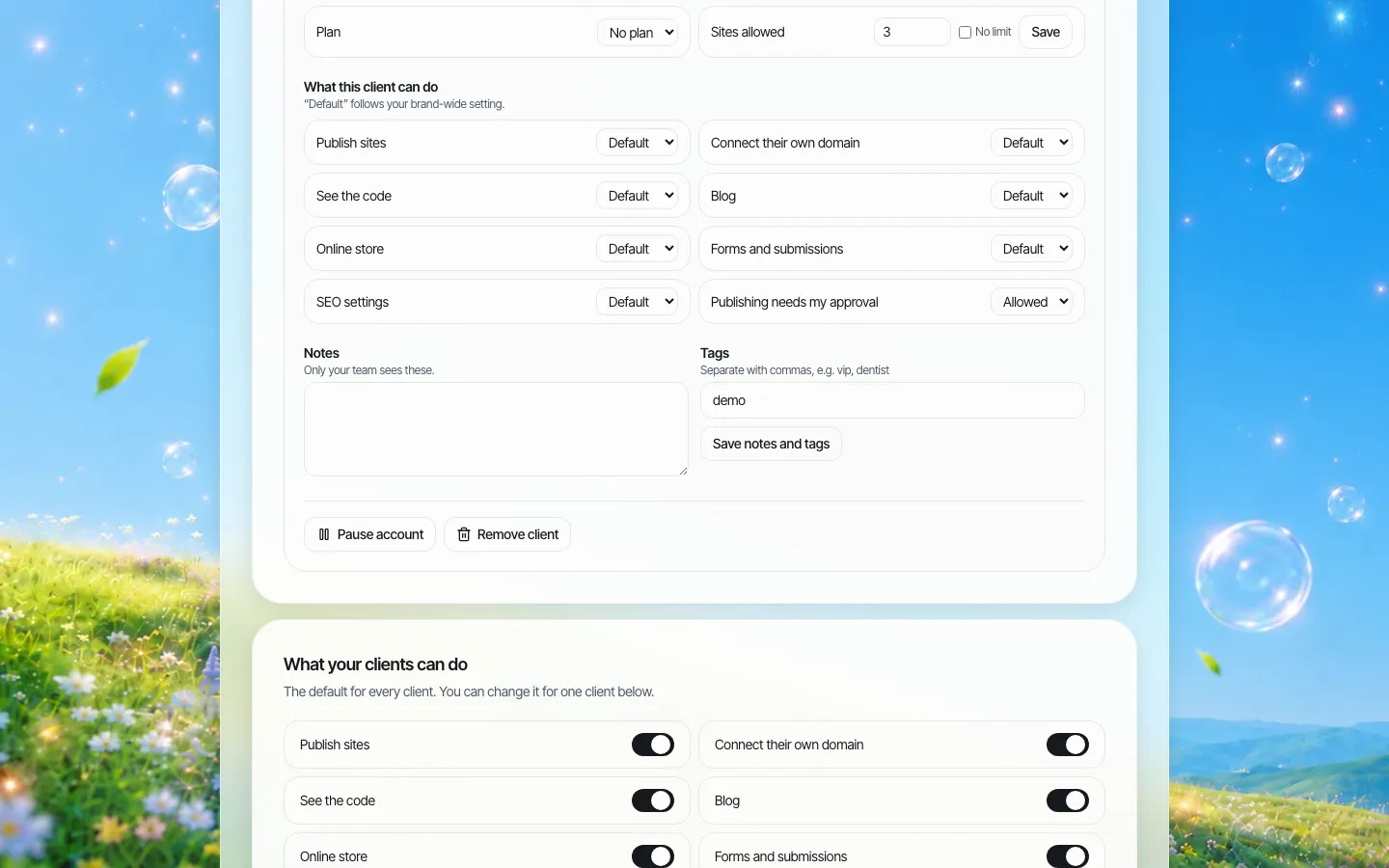
Agencies decide, per client, whether that client may see the code or connect their own domain. That lets you match the platform to the contract: a client on a licence arrangement does not get the code switch; a client who owns their site does.
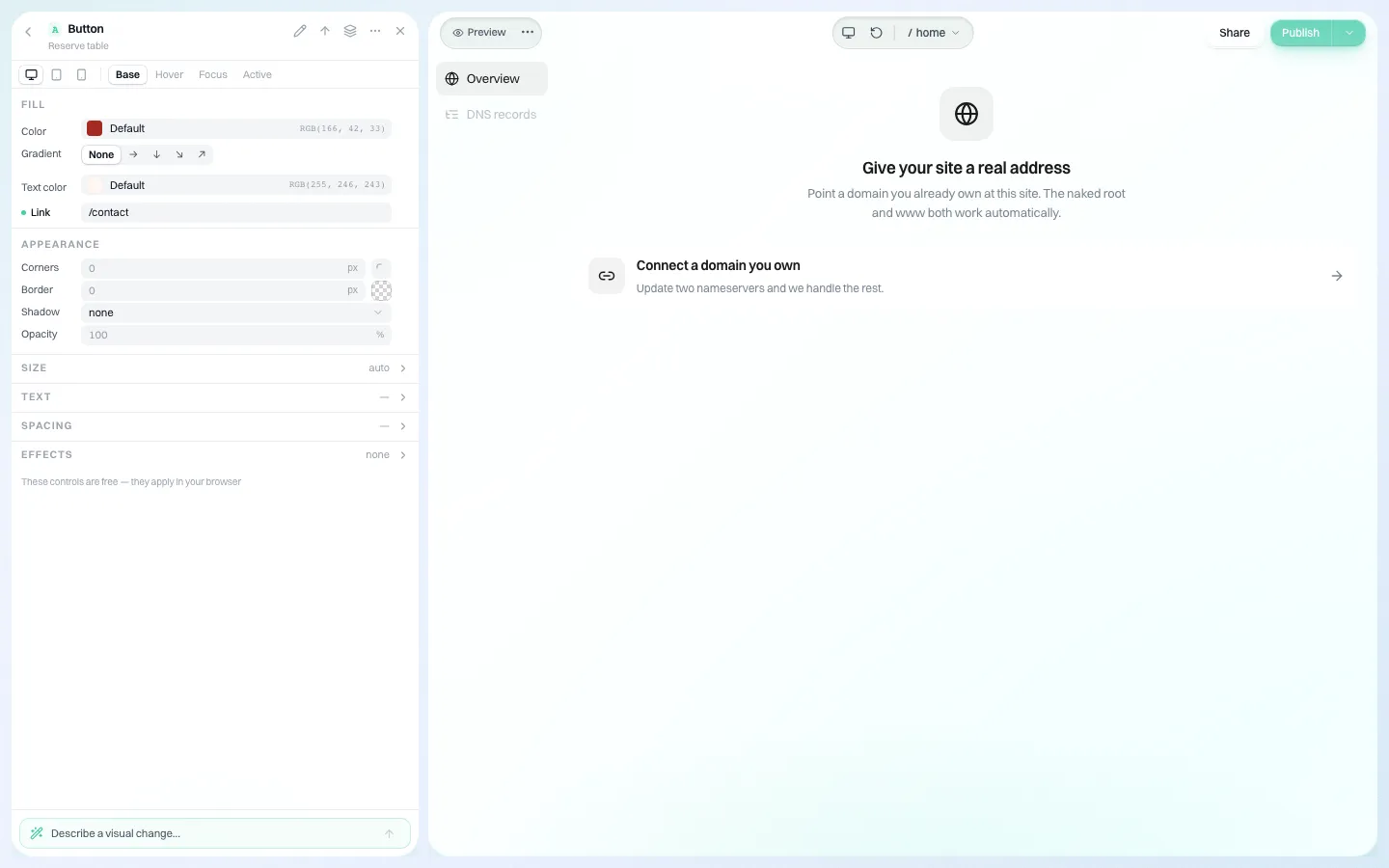
Clients connect a domain they already own, so the domain can stay in their name from day one.
To see how this fits your contracts, book a demo. For the reverse problem, leaving a platform yourself, read our website vendor exit plan.
Sources
Last checked 2026-10-25.
- Legal Information Institute, 17 U.S. Code 101 (definition of "work made for hire").
- Legal Information Institute, 17 U.S. Code 204 (transfers of copyright ownership need a signed writing).
- ICANN, Transfer Policy (AuthInfo codes, 60-day transfer restrictions).
This guide is general information, not legal advice.
Frequently asked questions
Does a client own the website an agency built for them?
Not automatically. In the US, the agency usually owns the copyright in its design and code unless a signed written agreement transfers it. The client owns content they supplied, and the domain belongs to whoever is its registrant.
Who owns the domain name of a client website?
The registrant on the registration record. Register client domains in the client's name, in an account they control, so they can always get the transfer code.
Can a client take their website when they leave an agency?
Only what the contract and the platform allow. If the contract assigns the design and code to the client and the platform can export code, they can take a working copy. Otherwise they may only take their domain and their content.
Is a website a work made for hire?
For an outside agency, it often is not. Commissioned works only qualify in listed categories and with a signed written agreement. An explicit written assignment of rights is the more reliable way to transfer ownership.
Can We.Inc sites be exported if a client leaves?
Yes. A site's code can be downloaded as a ZIP or exported to GitHub, and agencies choose per client whether that client can see the code.
More in Guides
- Why Does My Website Say "Not Secure"?
- Why Is My Website Not Showing on Google? A Step-by-Step Diagnosis | How-to Guide
- WooCommerce vs Shopify: What You Actually Pay and Manage
- The Default WordPress .htaccess File, and Safe Things to Add
- WordPress robots.txt: Default Rules, Editing and Safe Examples
- www vs non-www: Pick One and Redirect the Other
- YAML Comments: How to Comment, and Comment Out, YAML
- YAML Front Matter: Metadata at the Top of a Markdown File
Website builders for the businesses in this article
Related guides and tools
Start building
Product
Who It's For
- For Agencies
- For Freelancers
- For Hosting Providers
- For SaaS Platforms
- For Startups
- For Financial Services
- For Healthcare
Features
Resources
- Blog
- Help Center
- Free Business Tools
- Free UI Components
- Website Templates
- Template Collections
- Website Examples
- Guides
- Comparisons
- Alternatives
- Best Lists
- Reviews
- Pricing Guides
- Use Cases
- Glossary & Guides
- Integrations
- Developers
- Benchmark
- Windows App