School District Website Accessibility: A Title II Plan for the District Site and Every School Site | How-to Guide
How ADA Title II applies to a public school district's websites: which compliance date a district uses, what to do about board packets, calendars, lunch menus and teacher pages, and how to keep 20 school sites from drifting apart.
A public school district rarely has one website. It has the district site, a site for every school, pages for athletics, nutrition, transportation and special education, a board portal, a calendar tool, and often hundreds of teacher pages. Under the Department of Justice's ADA Title II web rule, all of that has to meet WCAG 2.1 Level AA by the district's compliance date. This guide is about the parts that are specific to K-12: working out your date, the documents districts publish every week, the people who publish them, and how to keep many school sites consistent. It is general information, not legal advice.
First, which date is yours
The rule ties the deadline to "total population". A school district is not a special district government for this purpose, which surprises people, because many districts are separately governed. ADA.gov's fact sheet gives the method:
| Type of district | Population you use | What usually follows |
|---|---|---|
| City school district (part of a city) | The city's population | Large city: April 26, 2027. Smaller city: April 26, 2028. |
| County school district | The county's population | Most counties with 50,000+ people: April 26, 2027. |
| Independent school district | The most recent Census Bureau Small Area Income and Poverty Estimates (SAIPE) figure for the district | Look the figure up; do not guess from enrolment. |
Enrolment is not population. A district with 6,000 students can sit inside a county of 300,000 people, and that puts it on the 2027 date. The dates themselves come from the DOJ's April 20, 2026 interim final rule, which moved both deadlines back about a year and left everything else unchanged. Our ADA Title II deadline guide has the full timeline and the five exceptions; we will not repeat them here.
Districts that receive federal education funding also have duties under Section 504 of the Rehabilitation Act (the Department of Education's rules are at 34 CFR part 104, with subpart D covering preschool, elementary and secondary education). Those duties do not wait for a web rule deadline. A parent who cannot read the enrolment form today can raise it today.
Why district sites are harder than city sites
A city website and a district website look similar from the outside. The difference is who publishes and how often.
- Many publishers with other jobs. A school secretary, a coach, a PTA liaison and a principal may all post. None of them were hired to write web content, and turnover each August resets what people know.
- Weekly documents. Board packets, menus, newsletters, bus changes, supply lists and permission slips arrive as PDFs or scanned images, often the night before they are needed.
- A calendar culture. Events, early release days and game schedules live in embedded calendar tools that the district did not build.
- Families on phones. Many parents check the site only on a phone, so reflow and zoom (WCAG 2.1 added both) matter more than on a city site that people visit at a desk.
- Several languages. Translated notices are common, and each translation is another document to check.
- Students as authors. Student newspapers, club pages and project showcases sit on district domains.
The fix is not to test harder at the end. It is to make the accessible way the default way: fewer formats, shared templates, and a check before anything goes live.
Map what you actually run
ADA.gov's first-steps page starts with an inventory: how many websites does the entity have, and what kind of content is on them. For a district, use the table below as the starting sheet. Copy it into a spreadsheet and give each row a named owner.
| Area | Typical content | Who usually posts | Usual weak spots |
|---|---|---|---|
| District home | News, closures, enrolment, contact | Communications office | Image sliders with text baked in, closure alerts as images |
| Board of education | Agendas, packets, minutes, policies, meeting video | Board clerk | Scanned PDFs, uncaptioned livestream archives |
| Each school site | Bell schedules, staff lists, newsletters, events | Office staff, principal | Tables as images, colour-only coding, inconsistent menus |
| Nutrition | Menus, free and reduced-price meal forms | Food services | Menus as calendar-grid PDFs, application forms as PDFs |
| Transportation | Routes, stop times, delays | Transport office | Maps without a text alternative |
| Enrolment and registration | Forms, residency rules, deadlines | Registrar | Fillable PDFs, time-outs on online forms |
| Special education and 504 | Procedures, contacts, parent rights notices | Student services | Long legal notices posted only as PDFs |
| Athletics and activities | Schedules, scores, forms, tickets | Coaches, athletic director | Third-party scheduling and ticket tools |
| Teacher and classroom pages | Syllabi, supply lists, class news | Teachers | Untagged uploads, video without captions |
| Human resources | Job postings, applications, benefits | HR | Vendor application portals |
Once the sheet is full, sort it by how many families each area serves. Enrolment, nutrition, transportation and closures go first, because a family cannot work around them.
Board documents: the hardest weekly habit to change
Board packets are the single biggest source of inaccessible content on most district sites. A packet is often a scan of printed pages, hundreds of pages long, posted days before a meeting. Under the rule, documents posted before your compliance date can be excepted only if nobody uses them to apply for, access or take part in a service. A current agenda that tells the public how to comment at a meeting is in use. A packet posted after your date has to meet the standard.
What works in practice:
- Publish the agenda as a web page. The agenda is short, structured and the part most people read. Put it in HTML with real headings, and link each item to its supporting document.
- Ask staff for source files, not scans. Reports written in a word processor can be exported with tags and headings intact. A scan has to be rebuilt.
- Split the packet. One file per agenda item is easier to fix, easier to read on a phone and easier to find later.
- Caption meeting recordings. Recorded video needs captions; live video needs captions under WCAG 2.1 AA too. Budget for it, because automatic captions on names and motions usually need correcting.
- Separate the archive. Old packets kept only for the record can go in a clearly labelled archive area and stay unchanged. If the current meetings page still links to them as current business, they are not archived.
For the wider question of when a PDF should become a web page at all, see our guide to accessible alternatives to PDFs on public sites.
Menus, calendars and the things families check daily
These are small pages, but they are opened more than anything else on the site.
- Lunch menus. A calendar grid exported as a PDF is hard for a screen reader to follow and tiny on a phone. A simple list by day, with allergens written out rather than shown only as coloured icons, does the same job.
- Bell schedules. Use a real table with header cells, not a picture of a table.
- Closure and delay alerts. Text first. If you add an image, the image repeats the text; it does not replace it.
- Calendars. If an embedded calendar tool is not keyboard-usable, publish the key dates (first day, breaks, early releases, graduation) as a plain page as well. The vendor tool is still content you provide, so press the vendor on it in parallel.
- Supply lists and forms. Short lists belong on the page. Forms families must return belong in an accessible online form or an accessible document, with a phone number for help.
Twenty school sites, one standard
Most districts reached their current state by letting each school build its own site. That gives every principal a voice, but it means twenty navigation menus, twenty colour choices and twenty sets of mistakes. Accessibility is far cheaper when the parts that repeat are built once.
| Decide centrally | Leave to each school |
|---|---|
| Header, navigation pattern, footer, skip link | School name, mascot and photo choices (with alt text) |
| Colour palette with contrast already checked | Which accent colour from the palette to use |
| Fonts and minimum text size | News, events and staff pages |
| Form patterns (labels, errors, help text) | Which forms the school needs |
| Required pages: contact, accessibility statement link, calendar, staff directory | Extra pages for programmes and clubs |
| Who can publish, and whether publishing needs a second person | Who in the school drafts content |
The "Leave to each school" column is what keeps principals on side. They keep their identity. They give up rebuilding the plumbing.
Publishers: training for people who are not web staff
A one-hour session each August, plus a one-page checklist pinned next to the publish button, beats a long annual course. Keep it to what school staff actually do.
The one-page publisher checklist
- Use the heading styles. Do not make text big and bold to look like a heading.
- Describe every photo that carries information. Leave decorative photos without a description.
- Write link text that says where it goes ("Fall sports schedule"), never "click here".
- Do not put words inside images (flyers, banners). If you must post a flyer, post its text on the page too.
- Do not use colour alone to mean something ("items in red are due Friday").
- Upload source documents, not phone photos of paper.
- Caption every video before it goes up, and check the captions on names.
- If unsure, save as a draft and ask the reviewer.
Then make the last line real. A publishing step where someone trained looks at new pages before they go live catches most problems while they are still cheap. It also gives a nervous secretary a safety net instead of a rulebook.
Teacher pages and student work
Classroom pages are where districts lose control, because there can be hundreds of them. Three policies keep them manageable.
- Move graded and individual material into the learning platform. Assignments and grades about a particular student belong behind a sign-in. The public site keeps class overviews and contact details.
- Give teachers one simple page template. A fixed layout with a few editable blocks produces fewer problems than a blank page.
- Treat student publications as district content. The rule's third-party exception covers members of the public who are not acting for the district. Student newspapers published as part of a class are hard to fit into that, so plan on making them accessible, and teach the students how. It is good teaching anyway.
Vendors: athletics, ticketing, calendars, job portals
The rule covers content a public entity provides through "contractual, licensing, or other arrangements", and ADA.gov is blunt that an entity cannot contract its responsibilities away. In K-12 that means the athletics scheduling tool, the ticket seller, the payment page for lunch accounts and the HR application portal all sit on your list. For each, ask:
- Have you tested this product against WCAG 2.1 AA? Can we see the results, including what fails?
- Which known issues will be fixed, and by when?
- Can we test it ourselves before renewal?
- If a parent cannot use it, what is the alternative route, and who answers the phone?
Write the answers into renewals. Our procurement checklist has contract wording you can borrow.
Testing on a district budget
ADA.gov notes that automated tools alone cannot cover every aspect of accessibility, and recommends combining automated and manual checks. A district can do that without a large contract:
| Check | How often | Who |
|---|---|---|
| Automated scan of every site | Monthly | Web or IT staff |
| Keyboard-only pass of templates and top pages (home, enrolment, menus, calendar, closures) | Each term and after any template change | Web staff |
| Screen reader pass of the same pages | Each term | Trained staff member or outside tester |
| Phone check at 200% zoom | After any template change | Anyone |
| Sample of new documents and videos | Weekly | Reviewer in the publishing step |
| Full outside audit | Once before your date, then yearly | Specialist |
Students and staff who use assistive technology every day are often the best testers you have. Ask them, pay or credit them, and take their findings seriously.
An accessibility statement families can use
Put a link to it in the footer of every district and school site. It should say what standard you are working toward, what you know is not yet accessible, and, most importantly, how a family can get the information another way today: a named office, a phone number and an email address that someone reads. Our accessibility statement generator gives you a first draft to edit.
Where We.Inc fits
We.Inc is a white-label website platform. A district could run its own brand on it, with each school as a separate site under that brand. What is true today:
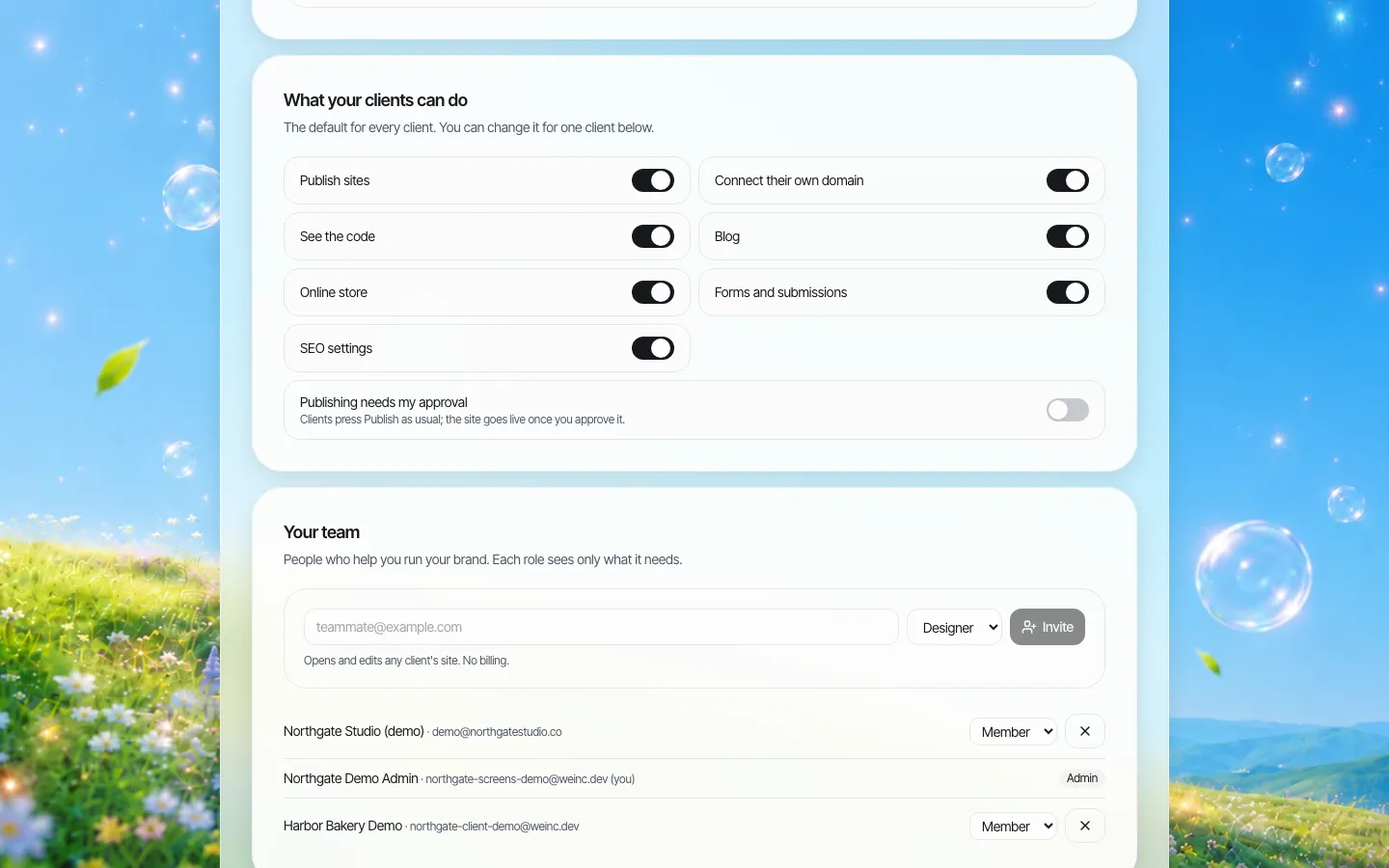
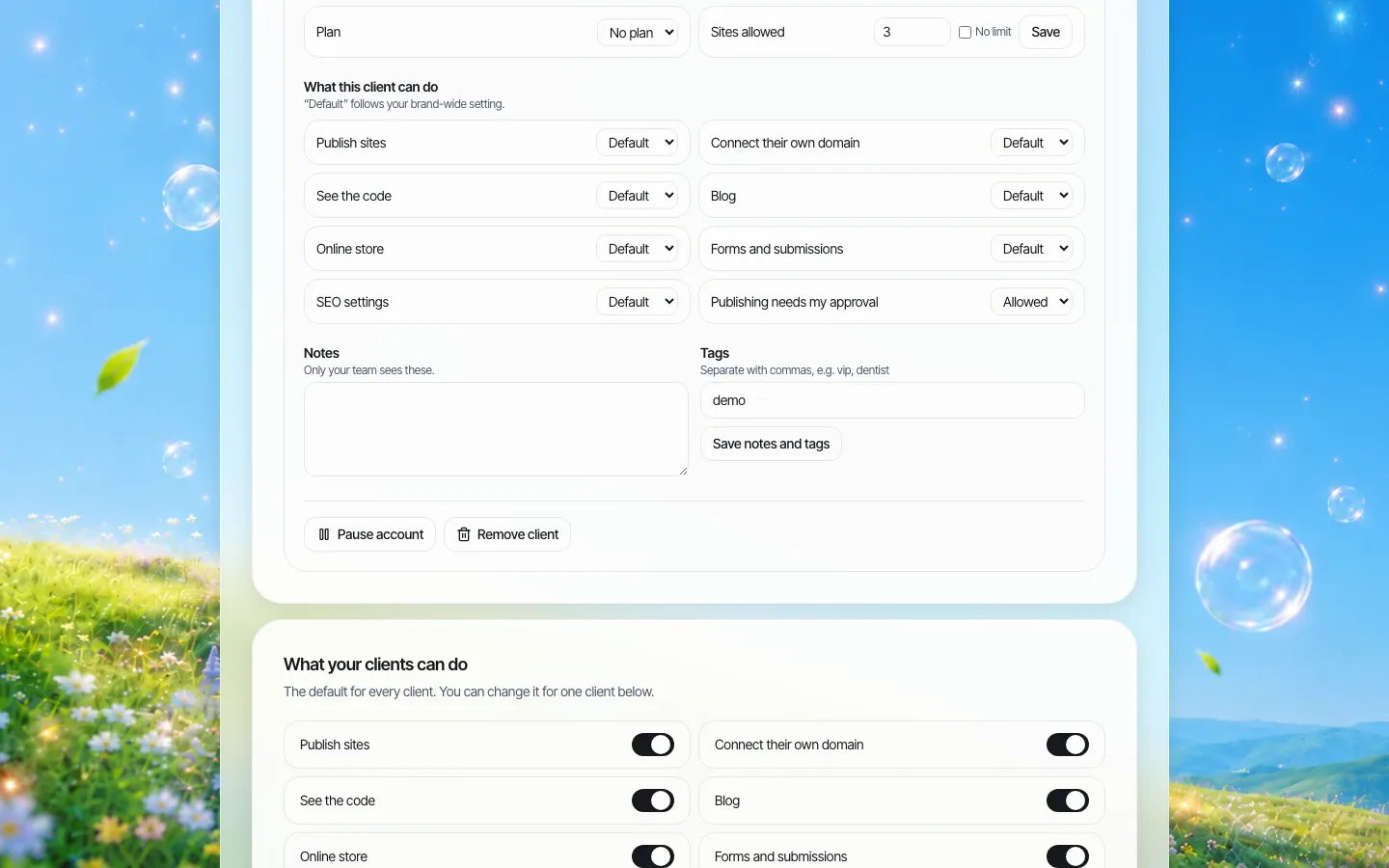
- Team roles of owner, admin and member, plus per-site permissions for things like publishing, connecting a domain and using forms or a blog.
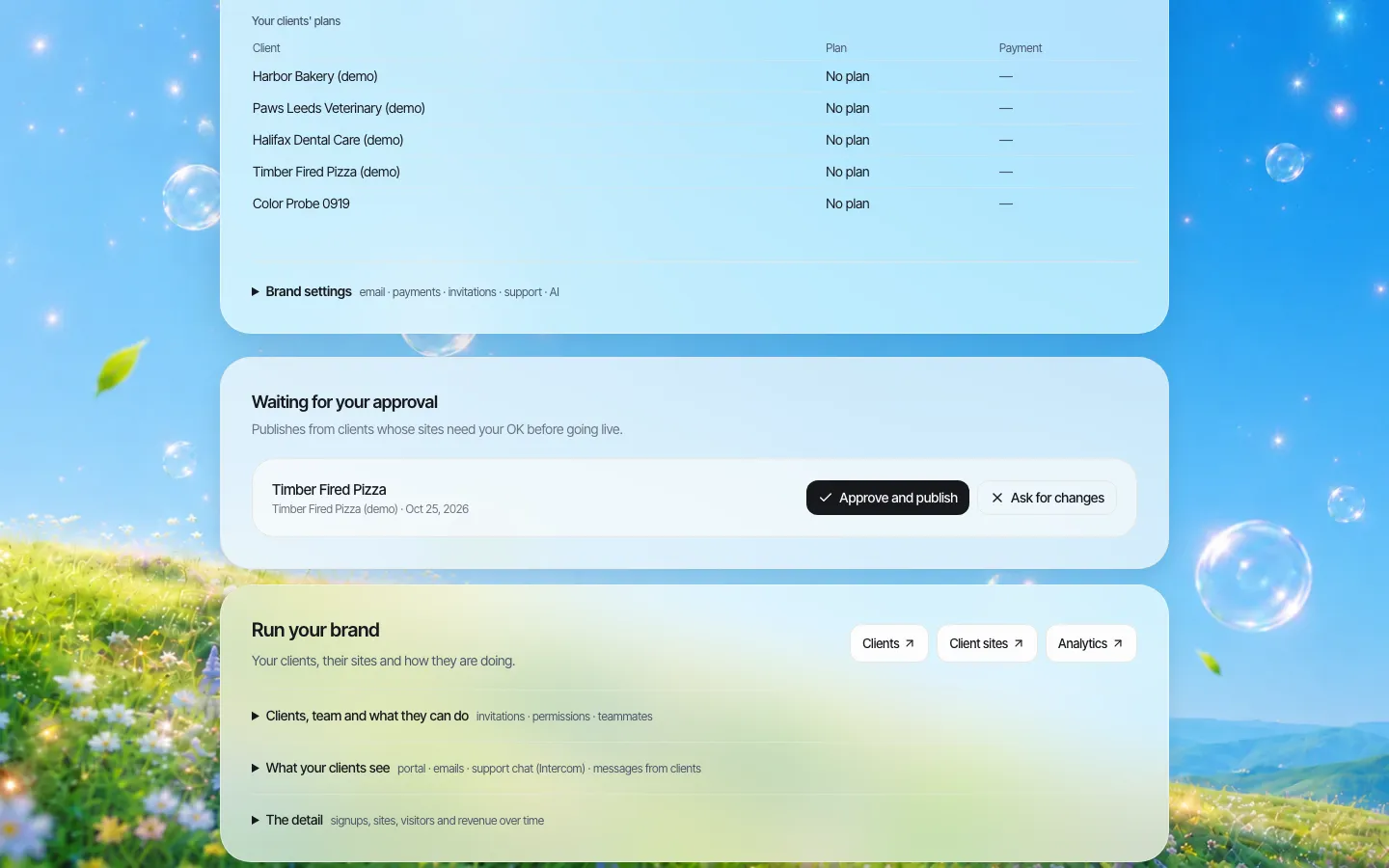
- A setting that requires a single-step approval before a site goes live, with a queue where a reviewer approves or asks for changes.
- An audit log of organisation actions.
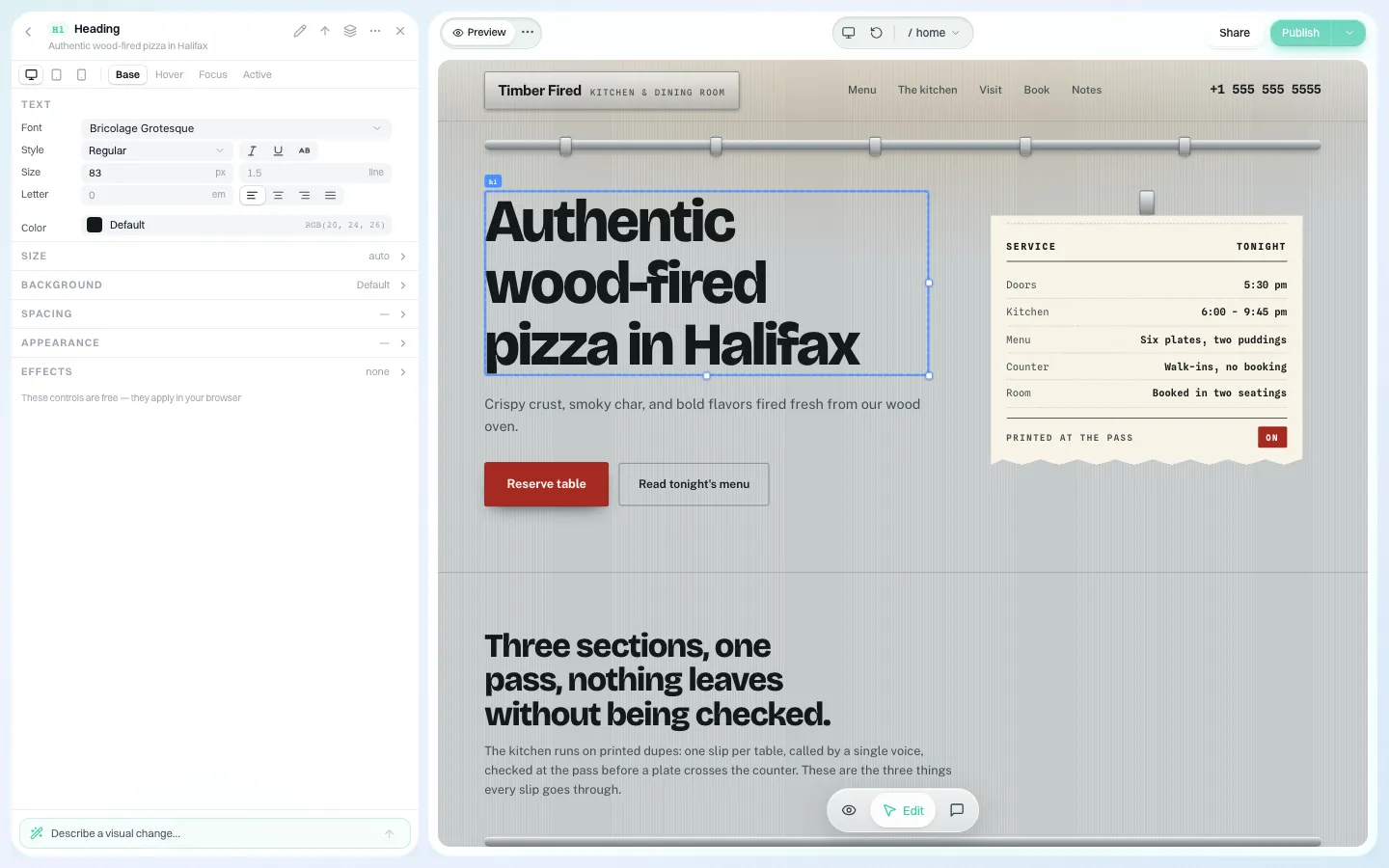
- A visual editor for text, buttons and colours, and full code download or GitHub export, so you are not locked in.
What it does not do: sites are built with AI from templates and prompts, and we do not claim that any site built on the platform conforms to WCAG 2.1 AA. Your district must test every site, and the publishing checklist above still applies. If you want to see how a district and its schools would be set up, book a demo. The public-sector overview is on our government agencies page, and colleges should read the universities page.
Sources
Last checked 2026-10-25.
- ADA.gov, Fact Sheet: New Rule on the Accessibility of Web Content and Mobile Apps Provided by State and Local Governments (school district population, exceptions).
- Federal Register, Extension of Compliance Dates, interim final rule, April 20, 2026 (91 FR 20902).
- ADA.gov, First Steps Toward Complying with the Title II Web and Mobile Application Accessibility Rule.
- eCFR, 34 CFR part 104, Nondiscrimination on the Basis of Handicap in Programs or Activities Receiving Federal Financial Assistance.
- W3C, Web Content Accessibility Guidelines (WCAG) 2.1.
This guide is general information, not legal advice. Check the current rule and speak to your district's counsel about your situation.
Frequently asked questions
Does ADA Title II apply to public school district websites?
Yes. Public school districts are state or local government entities, and the DOJ's web rule lists public schools as covered. District sites, school sites and content provided through vendors must meet WCAG 2.1 Level AA by the district's compliance date.
Which compliance date does a school district use?
A school district is not treated as a special district. A city school district uses the city's population and a county district uses the county's. An independent district uses the latest Census SAIPE estimate. 50,000 or more people means April 26, 2027; fewer means April 26, 2028.
Do board meeting packets have to be accessible?
Packets posted after your compliance date must meet the standard. Older ones can be excepted only if nobody uses them to access a service and, for archives, they are kept unchanged in a labelled archive area. Publishing the agenda as a web page and splitting packets by item makes this manageable.
Are teacher pages and student newspapers covered?
Content the district provides is covered. The third-party exception is for members of the public not acting for the district, so plan on making teacher pages and class publications accessible.
Does We.Inc guarantee school sites will be WCAG compliant?
No. We.Inc provides roles, single-step publishing approval, an audit log and code export, but sites are built with AI and your team must test every site.
More in Guides
- Scroll Animations: Four Effects, Three Ways
- Section 508 vs ADA Title II vs WCAG: Which Applies to Your Website? | How-to Guide
- Self-Hosted AI Agent: What You Run, and What You Must Lock Down
- How to Send a Website Form to Email (5 Methods With Code)
- Sentry Breadcrumbs: The Trail Before an Error
- SEO for Contractors: A Local SEO Checklist for Builders and Remodelers | How-to Guide
- SEO for Dentists: A Practical Local SEO Checklist (2026) | How-to Guide
- SEO for Lawyers: A Practical Local SEO Checklist for Law Firms | How-to Guide
Website builders for the businesses in this article
Related guides and tools
Start building
We.Inc is an AI-powered website builder you can resell under your own brand. Launch a branded client dashboard, bill on Stripe Connect, and deliver AI-generated websites in minutes. White-label pricing is tailored to your volume and setup: book a 30-minute demo for a quote.
Product
- AI Website Builder: Describe a site in plain English; it's live in minutes
- White Label Platform: Your brand, your domain, your margin
- Enterprise: SSO, custom SLAs, and dedicated support
- Developer API: Embed site generation into your SaaS
Who It's For
- For Agencies: Resell under your brand
- For Freelancers: Your own branded builder
- For Hosting Providers: Add a builder to your stack
- For SaaS Platforms: Embed site creation via API
- For Startups
- For Financial Services
- For Healthcare
Features
- Drag & Drop Editor
- Built-in SEO Tools
- Custom Branding
- Client Dashboard
- Reseller Billing (Stripe Connect)
Resources
- Blog
- Help Center
- Free Business Tools
- Free UI Components
- Website Templates
- Template Collections
- Website Examples
- Guides
- Comparisons
- Alternatives
- Best Lists
- Reviews
- Pricing Guides
- Use Cases
- Glossary & Guides
- Integrations
- Developers
- Benchmark
- Windows App