Best Free Restaurant Website Builders (2026)
What is the best website builder for restaurants?
Short answer: It depends on who will build the site. We.Inc suits owners who want the site written for them from a description, with paid plans from $20/mo; Wix (from $17/mo) suits people who build it themselves, Squarespace (from $12/mo) suits photo-led restaurants and WordPress.com suits restaurants that publish a lot.
Key facts
- A restaurant site needs the menu as text, opening hours, address, a tap-to-call number and a link to booking or ordering.
- Online ordering usually comes from the restaurant's ordering or POS provider, linked or embedded in the site.
- Building a site on We.Inc is free for every account, with no card needed.
- Prices were checked on each vendor's pricing page in September 2026.
Summary checked against this page on September 25, 2026.
Disclosure: We.Inc makes one of the products in this list. Build your site free — no card needed.
Restaurant website: menu, hours and ordering, priced November 10, 2026
Most diners visit a restaurant site for four things: the menu, hours, location and a way to order or book. If you already run Toast for your point of sale, its own website product syncs the menu and online ordering with the till; Toast did not show us a price for it, so ask your rep.
Without Toast, Squarespace Core at $17 a month billed yearly takes no cut of online store sales, against 2% on Basic. Hostinger's builder was $1.99 a month on a 48-month Black Friday prepay ($95.52), renewing at $10.99, for the smallest budget.
Who should pick what
- Already on Toast: start with Toast's website so the menu stays in sync.
- Photos sell the room and food: Squarespace.
- Lowest multi-year bill: Hostinger, if you are happy to prepay four years.
- You want the menu, story and pages written for you: We.Inc, from $20 a month.
Sources: Toast online ordering; Squarespace pricing; Hostinger AI builder.
Quick answer: For most small restaurants, any mainstream website builder can hold what diners look for: the menu as text, opening hours, address and map, a tap-to-call number and a link to book or order. Pick We.Inc if you want the site written for you from a description (free to build, no card needed; paid plans from $20/mo). Pick Wix (from $17/mo) if you want to build it yourself with lots of apps, Squarespace (from $12/mo) if your food photos sell the place, and WordPress.com if you plan to publish a lot. Online ordering usually comes from your ordering or POS provider, so check it links in before you choose.
Last updated September 2026.
- We.Inc: Restaurant owners who want a finished site from a short description. Free to build, no card needed. Paid plans from $20/mo (Starter), Pro $49/mo, Max $99/mo
- Wix: Restaurants that want to build the site themselves with lots of apps. Light $17, Core $29, Business $39, Business Elite $159 per month
- Squarespace: Restaurants whose food and room sell on photos. Basic $12, Core $17, Advanced $25 per month billed annually ($19, $27, $36 month to month) (prices checked September 2026)
- WordPress.com: Restaurants that plan lots of pages, events or locations. Personal $4, Premium $8, Business $25, Commerce $45 per month (monthly billing $9 to $70)
- Hostinger: Restaurants on the tightest budget. Premium $1.99 and Unlimited $2.79 per month intro on 48-month terms; renew at $10.99 and $16.99
Restaurant website builders compared for a small restaurant: what the site needs, the trade-offs, a worked example, a worksheet to fill in and prices checked September 2026.
Best Restaurant Website Builders: our ranked picks
1. We.Inc
An AI website builder: you describe your restaurant in a sentence and it writes a complete, editable site with a menu page, hours, location and contact details, then publishes it to your own domain. Good if you want a finished site without learning an editor.
Best for: Restaurant owners who want a finished site from a short description
Pricing: Free to build, no card needed. Paid plans from $20/mo (Starter), Pro $49/mo, Max $99/mo
Pros: AI writes the pages for you, including the menu and hours; Edit by clicking on the page or by asking in chat; Custom domain from the $20/mo Starter plan; Restaurant template designs to start from
Cons: A custom domain needs a paid plan (Starter, $20 a month); No built-in online ordering or table booking; link the tool you already use
2. Wix
A popular do-it-yourself builder with restaurant templates and apps for menus, ordering and reservations. A good all-round choice if you are happy to build the site yourself.
Best for: Restaurants that want to build the site themselves with lots of apps
Pricing: Light $17, Core $29, Business $39, Business Elite $159 per month
Pros: Large template and app library; Restaurant menu and ordering apps; Drag-and-drop editor
Cons: You build and write every page yourself; Apps can add monthly costs; Switching templates once live is hard
3. Squarespace
Design-led templates that make food photos look good. Fewer apps than Wix, but less to go wrong.
Best for: Restaurants whose food and room sell on photos
Pricing: Basic $12, Core $17, Advanced $25 per month billed annually ($19, $27, $36 month to month) (prices checked September 2026)
Pros: Strong templates for photo-led sites; Most features included in the plan; Hosting handled for you
Cons: No free plan; Less flexible layouts; Fewer restaurant-specific apps
4. WordPress.com
The most flexible option if you plan to publish a lot, such as events, a blog or several locations. Takes more setup than the others.
Best for: Restaurants that plan lots of pages, events or locations
Pricing: Personal $4, Premium $8, Business $25, Commerce $45 per month (monthly billing $9 to $70)
Pros: Very flexible; Large theme and plugin ecosystem; Free plan to start
Cons: Steeper learning curve; Plugins need a higher plan; More upkeep
5. Hostinger
A low-cost builder with AI help for layout and text. The intro price needs a long prepaid term and renews higher.
Best for: Restaurants on the tightest budget
Pricing: Premium $1.99 and Unlimited $2.79 per month intro on 48-month terms; renew at $10.99 and $16.99
Pros: Low intro price; AI layout and writing help; Hosting included
Cons: Intro price needs a 48-month term; Fewer integrations; Renews at a higher price
Methodology
We compared each builder on what a small restaurant site has to do: show the menu as real text (not only a PDF), show hours and location clearly on a phone, offer a tap-to-call number, link to booking or ordering, and stay cheap to run after intro offers end. Prices come from each vendor's pricing page, checked in September 2026, in US dollars per month on annual billing unless noted. We have not run paid hands-on tests of every builder, so we do not publish test scores; the worksheet below lets you run the same checks yourself. We.Inc makes one of the products on this list.
How we chose, and our conflict of interest
What we compared: the 5 products in this list, on the criteria in the methodology above. Prices and features come from each vendor's own public pricing and product pages, last checked in September 2026. This is an editorial comparison, not a lab benchmark, and vendors change plans often, so check their pages before you buy.
We.Inc is our own product, and we ranked it first. We think it fits the reader this list is written for, but we are not neutral. Before you decide, try Wix, our second pick, as well.
Where We.Inc is not the best pick: A custom domain needs a paid plan (Starter, $20 a month); No built-in online ordering or table booking; link the tool you already use.
How we research, date and correct pages: editorial policy.
Decision criteria and trade-offs
Build it yourself or have it written for you. Drag-and-drop builders (Wix, Squarespace, WordPress.com) give you full control but you write every page. An AI builder like We.Inc writes the first version from a description, and you edit from there. Choose by how much time you have, not by feature lists.
Ordering and booking. Most restaurants already use an ordering, delivery or reservation provider. Check the builder can link to it or embed it before you pick; switching your ordering system to suit a website builder is rarely worth it.
The menu. Diners read menus on phones. A menu typed as text is easier to read, easier to update and can be found by search engines; a PDF is quick to upload but awkward on a phone. Pick a builder where updating a price takes a minute.
Real cost. Compare the plan you will actually need (custom domain, any apps you add) at its renewal price, not the lowest advertised price. Our website cost calculator adds it up.
Worked example: a one-location Italian restaurant
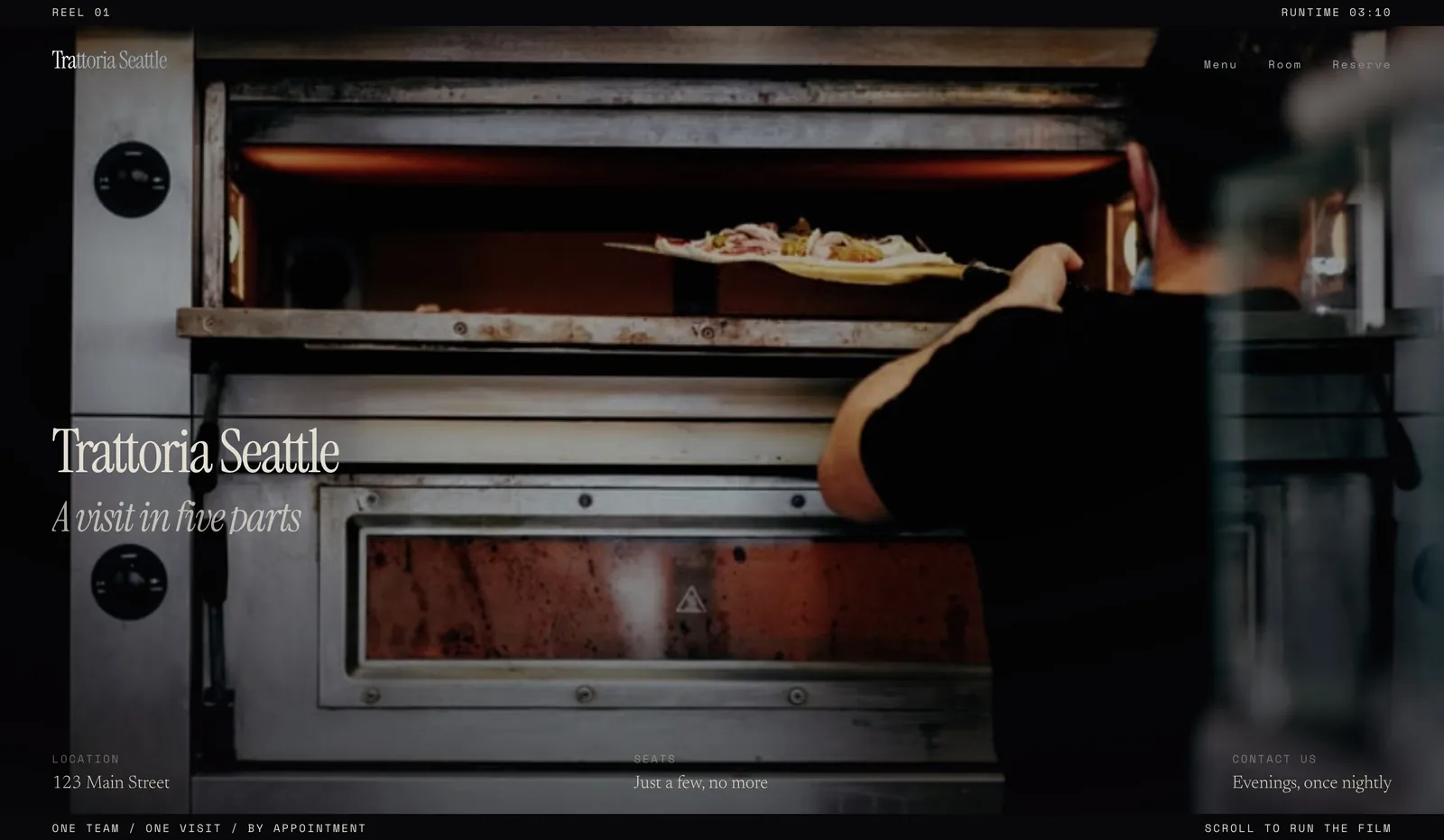
Here is how the worksheet below fills in for a made-up example, a one-location Italian restaurant that takes reservations through an existing booking service and does not deliver. The design shown is a We.Inc-made example design, not a customer site.
Pages: home, menu, about, contact with map. Must-haves: menu as text with prices, hours at the top of every page, tap-to-call, a "Book a table" button that links to the booking service. Nice-to-have: a photo gallery. Budget: a custom domain is needed, so a paid plan on any builder. Updates: menu prices change a few times a year, specials weekly.
Result of the worksheet: any of the builders above can do this job. The deciding question is who will build and update it. If the owner wants the site written for them, an AI builder fits; if a staff member enjoys design, Wix or Squarespace fits. Check your pick on a phone before you launch.
Worksheet: fill this in before you choose
Copy these questions into a note and answer each one. Then try your top two builders on their free plan or trial and tick off what each can do.
1. Which pages do you need (home, menu, about, contact, events, catering, gallery)? 2. How will people order or book, and which provider do you already use? 3. Who will update the menu, and how often? 4. Do you need your own domain now? 5. What is your monthly budget after any intro offer ends? 6. Does the site show hours, address and a tap-to-call number without scrolling on a phone? 7. Can you change a menu price in under five minutes?
When the site is live, run it through our free website grader to check search basics and speed.
Known limitations of this guide
We did not test online ordering or reservation systems themselves, and we do not compare restaurant-only platforms whose prices we could not check. Prices change often, so confirm each vendor's current pricing page before you buy. If you cater as well, the same worksheet works: add a catering enquiry form to question 1.
Conclusion
Start with the worksheet: the right builder is the one that shows your menu and hours clearly on a phone, links to the ordering or booking tool you already use, and that you or your staff will actually keep up to date. Pick We.Inc if you want the site written for you, Wix or Squarespace if you want to build it yourself, and WordPress.com if you will publish a lot. See restaurant example designs at we.inc/website-builder/restaurants.
Frequently asked questions
What is the best website builder for restaurants?
It depends on who will build the site. We.Inc suits owners who want the site written for them from a description (paid plans from $20/mo). Wix suits people who want to build it themselves with apps, Squarespace suits photo-led restaurants, and WordPress.com suits restaurants that will publish a lot.
How much does a restaurant website cost with a builder?
In plan fees, roughly $12 to $29 a month on annual billing for the entry plans compared here (Squarespace Basic $12, Wix Light $17, We.Inc Starter $20 a month), as checked in September 2026. Add a domain, any paid apps and your ordering provider's fees. Our website cost calculator adds it up.
Should my menu be a PDF or a web page?
A web page is better for most restaurants: it is readable on a phone, quicker to update and can be found by search engines. A PDF can sit alongside it as a printable version.
Can I take online orders from my restaurant website?
Usually through your ordering or POS provider, which gives you a link or an embed to add to the site. Some builders, such as Wix, also have ordering apps. Check fees with the provider before you choose.
Is there a free restaurant website builder?
Several builders have free plans on their own address, including Wix and WordPress.com. Building a site on We.Inc is free, with no card needed to start. A custom domain needs a paid plan on all of them.
More in Best Of
- Best Website Builders for Roofers and Roofing Companies (2027)
- Best Website Builders for Salons and Spas (2027)
- Best Website Builders for Senior Living Communities (2027)
- Best Website Builders for Septic Service Companies (2027)
- 10 Best Website Builders for Small Business (2026)
- Best Website Builders for Small Hotels (2027)
- Best Website Builders for Staffing Agencies (2027)
- Best Website Builders for Startups (2026)
Build it yourself
Related guides
How we research, test and update this page: our editorial policy. We.Inc is our own product.
Product
Who It's For
- For Agencies
- For Freelancers
- For Hosting Providers
- For SaaS Platforms
- For Startups
- For Financial Services
- For Healthcare
Features
Resources
- Blog
- Help Center
- Free Business Tools
- Free UI Components
- Website Templates
- Template Collections
- Website Examples
- Guides
- Comparisons
- Alternatives
- Best Lists
- Reviews
- Pricing Guides
- Use Cases
- Glossary & Guides
- Integrations
- Developers
- Benchmark
- Windows App