
Accountant & CPA Website Design: Template and Examples
Accounting and CPA website design that brings in the right clients: example designs, a free accounting web template, must-have pages, client portal and compliance basics, a tax-season plan, costs and a launch checklist.
Browse the templates: Accounting website templates
Short answer (September 2026): good accountant website design tells the right clients, fast, that you understand their situation. Lead with who you serve, give each service its own page, explain how fees work, show credentials and real people, link a secure client portal, and make booking a discovery call the one clear action. Below is a page-by-page template, the must-have pages, security basics, typical costs and a launch checklist.
Looking for accounting website design ideas or a template? Start with the example designs and the free accounting web template below. An accountant website needs to do three things a generic business site does not: show credentials and the professional rules you work under, send clients to a secure portal instead of collecting documents by email, and handle the rush of tax season without overwhelming you. Each has its own section further down.
Build your accounting firm website. Start from a ready-made template on the free plan (up to three published sites), or describe your firm in one prompt and let the We.Inc AI builder draft every page, available from the $20 a month Starter plan. Create your account, see what the accountant website builder sets up, or start from a design: Ledgerline CPA, Granite Partners, Linden Consult.
Choosing an accountant is a trust decision. People are handing over their finances, their deadlines and often their stress. They want to see that you work with people like them, that you are qualified, and roughly what it will cost. A generic "full-service firm" homepage answers none of that.
Accounting firm website design examples
These are example designs made with We.Inc, not real firms. Names and details are placeholders.
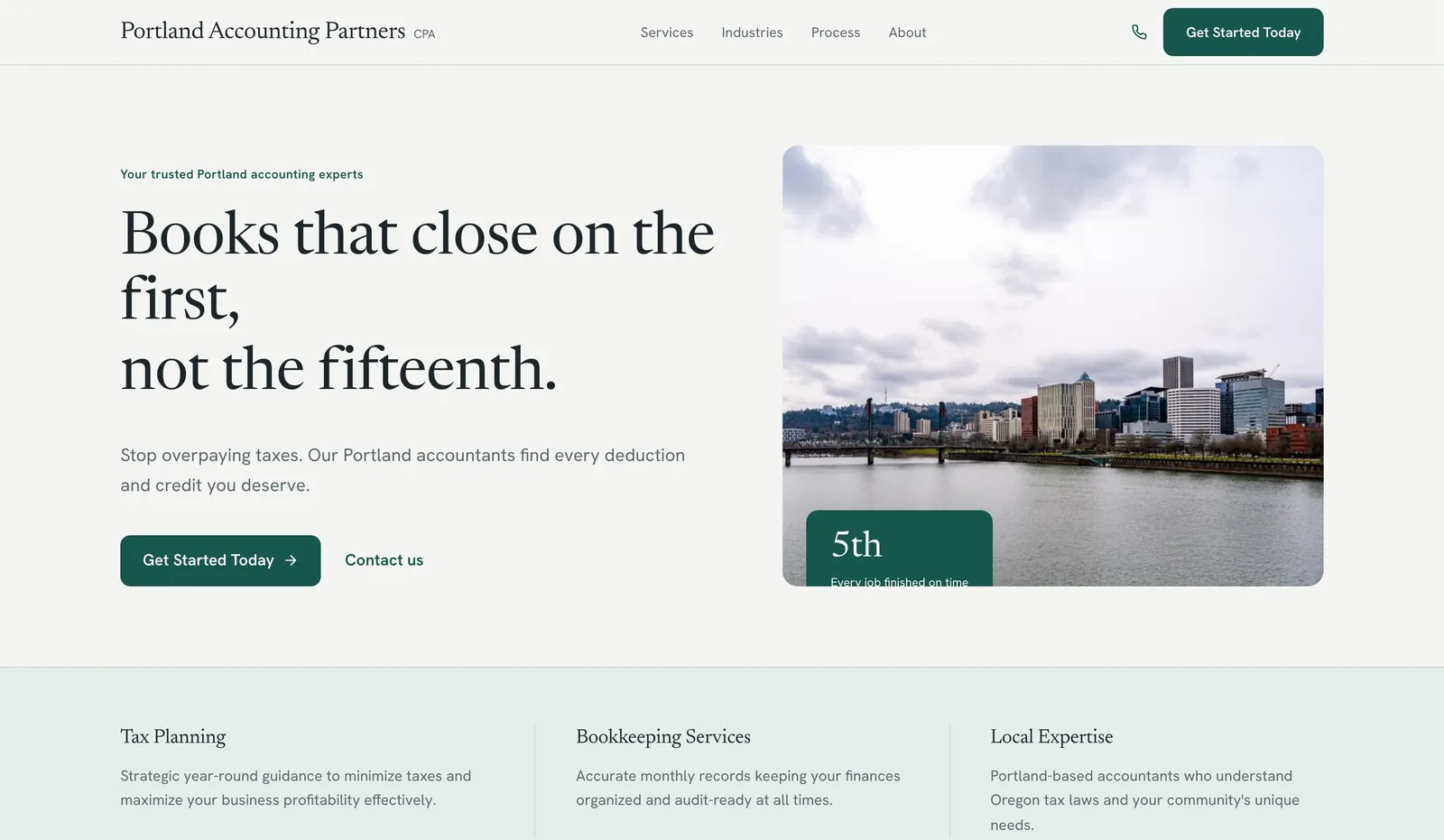
Example design: accounting firm website. Services and a discovery-call button above the fold. Generated from the prompt "a website for an accountant in Portland, Oregon".
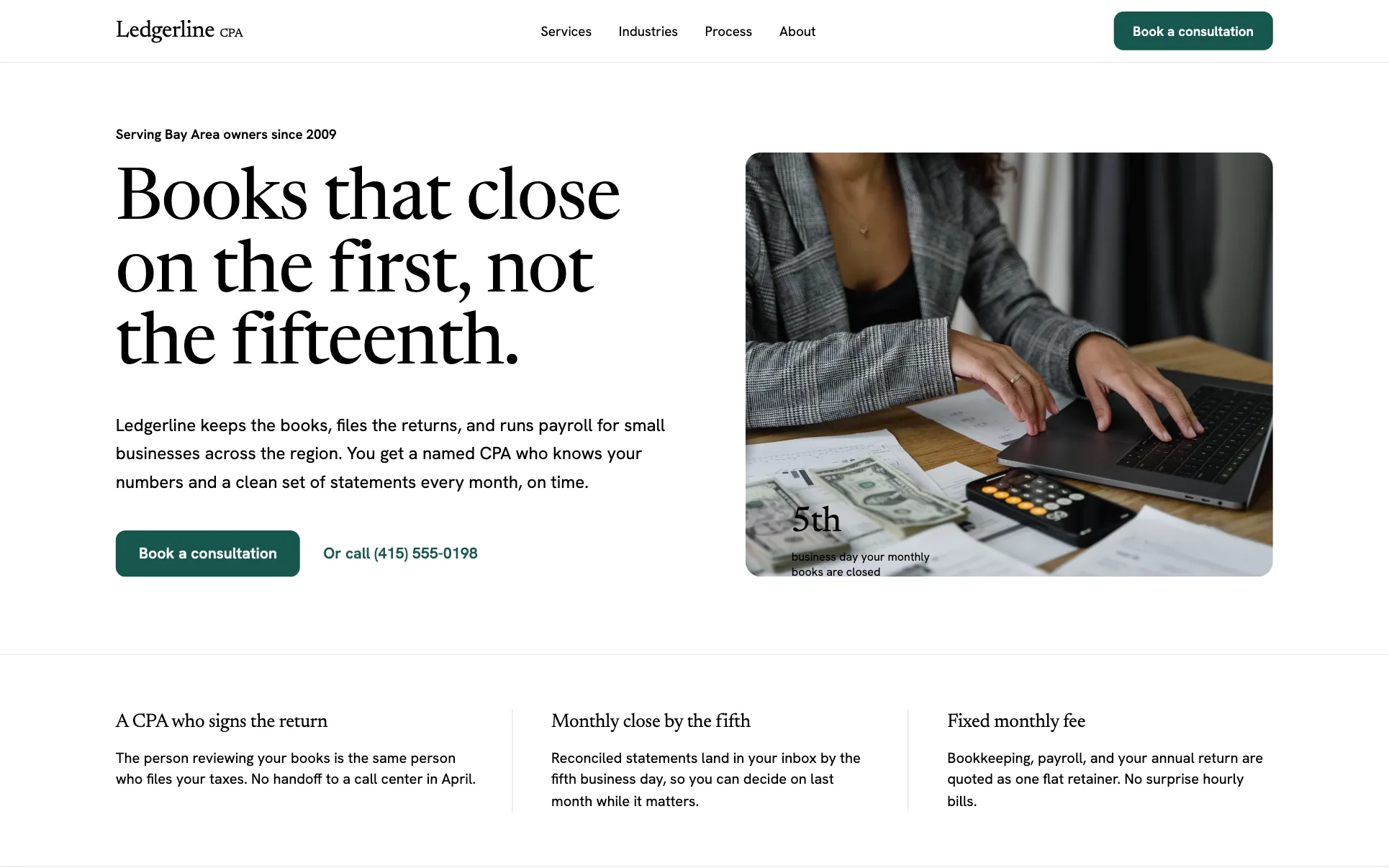
Template design: Ledgerline CPA. A CPA firm layout with service and pricing sections.
Whether you run a solo practice or a multi-partner accounting firm, website design follows the same rules below. Larger firms add a page per partner and per industry served.
What the best accountant websites have in common
- A clear niche or audience. "Accounting for restaurants and hospitality businesses" or "Tax help for freelancers and creators".
- Service pages. Tax preparation, tax planning, bookkeeping, payroll, advisory, entity setup, audit or review.
- Fee transparency. Packages or starting prices, or at least how you price.
- Credentials. CPA, CA, ACCA or EA designations, licences, professional memberships.
- Real people. Partner and team photos with short bios that sound human.
- Secure portal access. A Client login link in the header.
- Proof. Reviews, testimonials or short case examples within your professional rules.
Free accountant website template (copy this structure)
Home page
- Header: logo, Client portal, phone, Book a call.
- Hero: "Accountants for [who] in [City]" with a sub-line like "Tax, bookkeeping and advice from a team that answers your emails." Buttons: Book a discovery call, See services.
- Who we help: three to four audience cards.
- Services: cards linking to each service page.
- How it works: discovery call, proposal, onboarding, ongoing support.
- Pricing snapshot: packages or from prices.
- Team and reviews.
- Final call to action.
Service page (one per service)
- H1: "Small Business Bookkeeping in [City]"
- Who it is for and problems it solves
- What is included, how often, which software you use
- Price or range
- FAQs and a booking button
Industries, resources, about and contact
- Industry pages for niches you serve
- Resources: tax deadlines, checklists, guides
- About: firm story, credentials, team bios
- Contact: phone, email, office address, booking link, portal link
Must-have pages for an accountant website
| Page | What goes on it | Must-have? |
|---|---|---|
| Home | Who you help, services, pricing snapshot, team, call booking | Yes |
| Service pages | One per service with inclusions and price range | Yes |
| Industries or niches | One page per client type you specialise in | Recommended |
| Pricing | Packages, from prices or how you price | Recommended |
| About and team | Credentials, bios, photos | Yes |
| Client portal | Secure upload and login instructions | Yes, if you exchange documents |
| Resources | Deadlines, checklists, guides | Nice to have |
| Contact and booking | Phone, email, address, calendar link | Yes |
Writing copy that wins the right clients
- Speak the client's language. "Stop dreading tax season" beats "comprehensive compliance solutions".
- Be specific about service. Response times, a named contact, monthly check-ins, software you use.
- Explain what happens next. A short onboarding outline removes friction.
- Avoid unsupportable claims. Do not promise refunds or savings you cannot guarantee.
- Mind your professional rules on testimonials and advertising.
Client portal: how to present it on your site
Most practice management and document tools come with a client portal. Your website's job is to send people there safely and explain it:
- One "Client login" link in the header, pointing to the exact portal address. Clients learn to look for it there every year.
- A short portal help page: how to get an invite, how to reset a password, which documents go where and who to contact if they are stuck.
- A clear line on what you never do: for example, "We never ask for your tax documents or ID numbers by email or text." This helps clients spot phishing that imitates your firm.
- Matching links in your emails and on your site, so clients are not trained to click unfamiliar addresses.
Planning your site around tax season
For many firms the weeks before filing deadlines are the busiest of the year. Plan the site for that peak:
| When | What to change on the website |
|---|---|
| Before the season | Publish a document checklist for returning and new clients, open booking for intake appointments, and say whether you are accepting new individual returns |
| During the season | Add a banner with your new-client cut-off date, set expectations on response times, and link the portal prominently |
| Around the deadline | Explain how extensions work with you and what happens if documents arrive late |
| After the season | Switch the banner to planning, bookkeeping and advisory work, and update the deadlines page for next year |
Keep your deadline dates on one page that you review every year, and link to the official tax authority for the rules rather than restating them in detail.
Security and compliance basics
- Never collect sensitive data in a website form. No tax IDs, account numbers or documents through contact forms or email.
- Link a secure portal. Use your practice software's portal and explain how to use it.
- Use HTTPS everywhere and keep any plugins or integrations updated.
- Publish a privacy policy explaining what your site collects.
- Warn clients about phishing. Say how you will and will not contact them about payments.
Accountant website design mistakes
- Trying to serve everyone. "Individuals and businesses of all sizes" gives nobody a reason to choose you.
- One services page. Each service needs a page to rank and explain itself.
- Stock photos of calculators. Real team photos build more trust.
- Hiding contact details. Phone and email should be one click away.
- Stale resources. A tax deadlines page for last year is worse than none.
SEO basics for accountants
- Title pages with service plus city: "Small Business Tax Preparation in Austin, TX | Ledgerline CPA".
- Complete your Google Business Profile with services, hours and photos.
- Keep your name, address and phone identical across your site and directories.
- Publish timely articles on deadlines and changes, reviewed each year.
- Add AccountingService schema with your details.
Accountant website cost
| Route | Typical upfront | Typical ongoing |
|---|---|---|
| AI or DIY website builder | $0 to a few hundred dollars | $0 to about $40 a month |
| Accounting website subscription | Often a setup fee | Roughly $50 to $300+ a month |
| Freelance designer | $1,500 to $6,000 | Hosting plus an optional care plan |
| Specialist agency | $5,000 to $20,000+ | Often a monthly SEO or content retainer |
| Domain | Roughly $10 to $20 a year |
*Typical 2026 ranges, not quotes.*
Features worth adding once the basics work
- Online scheduling tied to your calendar for discovery calls.
- Engagement and proposal software links so new clients can sign and pay online.
- Tax deadline reminders by email for subscribers.
- Calculators for simple estimates such as self-employment tax, with clear disclaimers.
- Industry case studies showing the problem, what you did and the outcome, with permission.
- A "switching accountants" page. Many prospects already have an accountant they are unhappy with. Explain how you handle the handover, records and timing so switching feels easy, even mid-year.
Build your accounting firm website from one prompt
On We.Inc you can publish a ready-made template on the free plan, or upgrade to Starter ($20 a month) and type one prompt, for example "a website for a CPA firm in Austin, Texas, serving small businesses and freelancers, with pages for tax preparation, bookkeeping, payroll and advisory, a pricing page with monthly packages, team bios, a client portal link and a discovery call booking button". The AI builder drafts every page. Add your credentials and prices, then publish.
See the features set up for firms on the accountant website builder page. Also useful: lawyer website design guide for professional services patterns.
Accountant website launch checklist
- Clear statement of who you serve in the first screen
- A page for each service
- Fees, packages or pricing approach explained
- Credentials and licences shown
- Team bios with real photos
- Secure client portal linked, no sensitive fields in forms
- Privacy policy published
- Discovery call booking tested
- Google Business Profile linked and complete
With those in place, your site brings in clients who already know you are the right fit.
Build your accounting firm website
Publish a firm site from a free template, or let the We.Inc AI builder draft every page from one prompt on a paid plan, then edit anything. Create your account, see the accountant website builder, or start from a design: Ledgerline CPA, Granite Partners, Linden Consult.
Frequently asked questions
What is the difference between accountant and CPA website design?
Very little in structure. A CPA firm site usually puts the CPA designation and licensing state in the header or about page and often leans on audit, attest or tax representation services, while a bookkeeping or general accounting practice leads with monthly packages. Both need service pages, fees, credentials, a portal link and a booking button.
What should a website builder for accountants have?
A place to link your client portal from the header, a booking or calendar embed for discovery calls, easy editing so you can update deadline pages each year, forms that do not invite sensitive data, HTTPS, and the ability to add a privacy policy page. Check that you can edit page titles for each service and city.
How should an accounting website change during tax season?
Put a short notice near the top with your intake cut-off date for new clients, what documents to gather, how to book, and whether you are taking new returns at all. After the deadline, switch the notice to extension help or year-round services so the site does not look abandoned.
What should an accountant website include?
Who you serve (individuals, small businesses, specific industries), a page for each service (tax preparation, bookkeeping, payroll, advisory, audit), your credentials and licences, how fees work, a secure client portal link, team bios, reviews or case examples, and a simple way to book a discovery call.
How much does an accounting firm website cost?
Typical 2026 ranges: $0 to about $40 a month on a website builder, roughly $1,500 to $6,000 for a freelance designer, and $5,000 to $20,000 or more for an agency that specialises in accounting firms. Portal and practice management software is a separate cost. A domain costs roughly $10 to $20 a year.
Is there a free accountant website template?
Yes. This article includes a page-by-page accountant website template you can copy. On We.Inc, the free plan lets you publish up to three sites from ready-made templates. Drafting a custom firm site from a prompt with the AI builder starts on the Starter plan at $20 a month.
Should accountants list fees on their website?
Showing starting prices or packages, such as a monthly bookkeeping package or a personal tax return from a set price, attracts clients who fit your pricing and shortens sales calls. If every engagement is custom, explain how you price and give typical ranges.
Should clients upload tax documents through my website?
Not through a general contact form. Link to a secure client portal from your practice management or document software, which encrypts files and controls access. Your website should explain how to use the portal and never ask for tax IDs or financial documents by email or in a form.
How can an accounting firm rank on Google?
Create a page for each service and each niche you serve, include your city in titles, complete your Google Business Profile, keep your details identical across directories, publish useful articles on tax deadlines and changes, and ask satisfied clients for reviews.
More in Blog
- How to Add a Website Builder to Your SaaS Platform
- How Bright Digital Agency Built and Resold 22 Client Sites With We.Inc White-Label
- 88% of Companies Hit by AI Agent Security Breaches. What That Means for Your Website.
- AI Assistant for Business: How to Automate Support, Sales, and Lead Generation
- AI Content Creation: A Practical Workflow for Web Content
- How to Implement AI Customer Service, Step by Step
- AI Slop Websites: How to Spot Them (and Not Build One)
- 6 AI Content Creation Tools Actually Worth Using in 2026
Website builders for the businesses in this article
Related guides and tools
Start building
How we research, test and update this page: our editorial policy. We.Inc is our own product.
Product
Who It's For
- For Agencies
- For Freelancers
- For Hosting Providers
- For SaaS Platforms
- For Startups
- For Financial Services
- For Healthcare
Features
Resources
- Blog
- Help Center
- Free Business Tools
- Free UI Components
- Website Templates
- Template Collections
- Website Examples
- Guides
- Comparisons
- Alternatives
- Best Lists
- Reviews
- Pricing Guides
- Use Cases
- Glossary & Guides
- Integrations
- Developers
- Benchmark
- Windows App