BlogNonprofit Website Design: Build a Site That Inspires Action
Website Building
Nonprofit Website Design: Build a Site That Inspires Action
A step-by-step guide to planning and building a nonprofit website: which pages you actually need, how to structure the donate and volunteer pages, showing impact honestly, accessibility basics, and a pre-launch checklist.
Umair Ali Sadaqat|Last updated September 28, 2026|13 min read
We.Inc is our own product. How we research and update this page
Nonprofit Website Design: Build a Site That Inspires Action
Short answer: A nonprofit website needs, at minimum, a homepage stating the mission, an About or Our Story page, a Programs page, an Impact page, a Donate page, a Get Involved or Volunteer page, and a Contact page. Larger organizations also add a Board or Team page, an Annual Report page, and event pages.
Key facts
The donate button should appear in the header or navigation on every page of a nonprofit site, not just the homepage.
We.Inc's free plan gives up to 3 template sites on a we.inc address with no card required, but it has no AI generation.
The Starter plan at $20 a month lets We.Inc's AI build and revise a nonprofit site and connect the organization's own domain.
Recurring donors are typically more valuable over time than one-time givers, so the guide recommends offering a clear recurring-gift option.
Accessibility basics for a nonprofit site include sufficient color contrast, resizable text, alt text on images, keyboard-usable forms, and captioned video.
Summary checked against this page on September 25, 2026.
A step-by-step guide to planning and building a nonprofit website: which pages you actually need, how to structure the donate and volunteer pages, showing impact honestly, accessibility basics, and a pre-launch checklist.
Short answer: a nonprofit website earns trust and drives donations when it does three things well: states clearly who you help and how, makes giving and volunteering effortless, and proves your impact with specifics instead of vague claims. Everything below is a step-by-step way to plan, build and launch that kind of site.
Your nonprofit's website is your biggest fundraising tool. Learn how to design one that tells your story and drives donations. This guide covers nonprofit website design in practical depth: what it means, how to implement it effectively, and the common mistakes worth avoiding. By the end, you'll have a clear action plan you can start using today.
Nonprofit website design examples
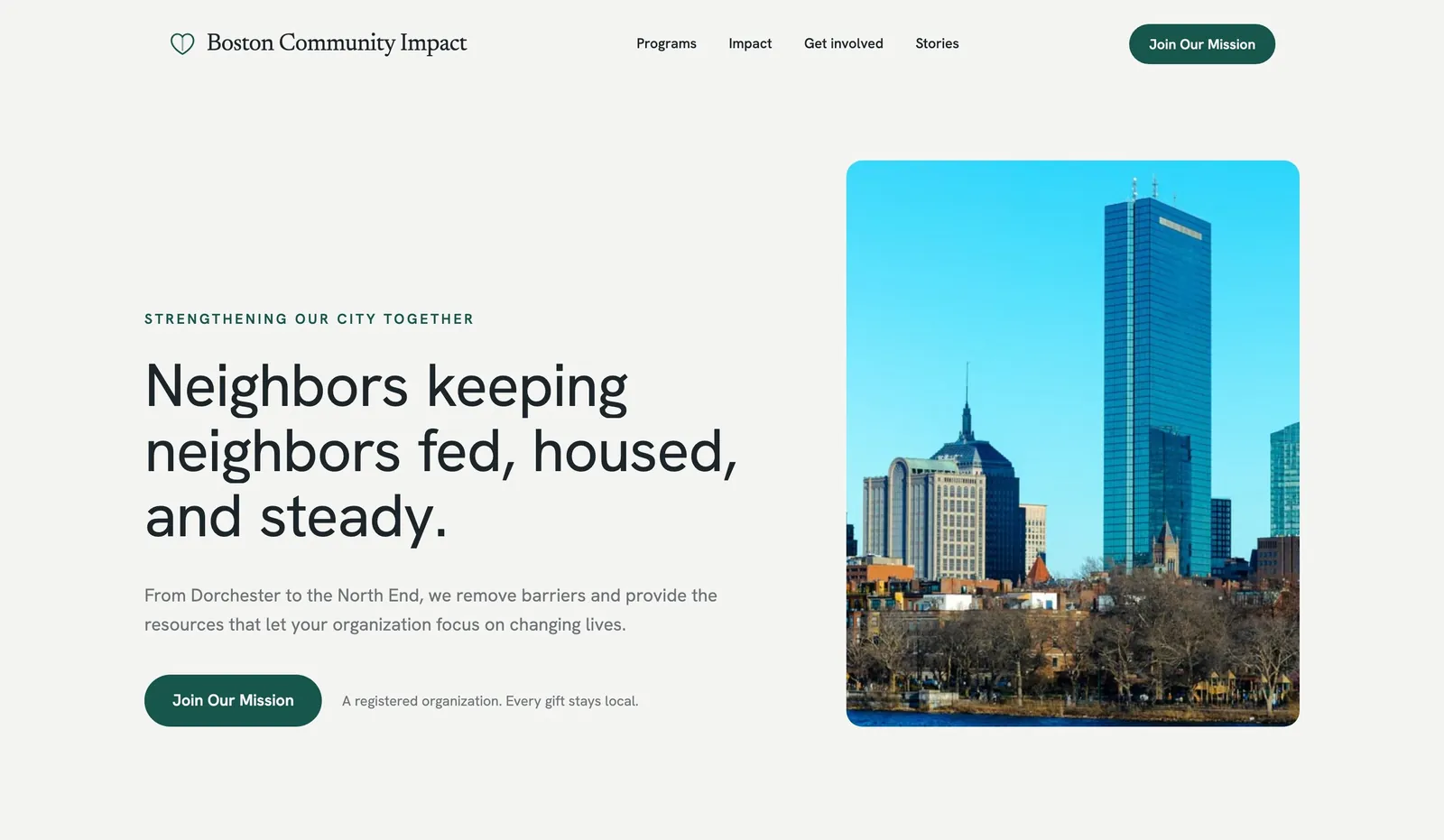
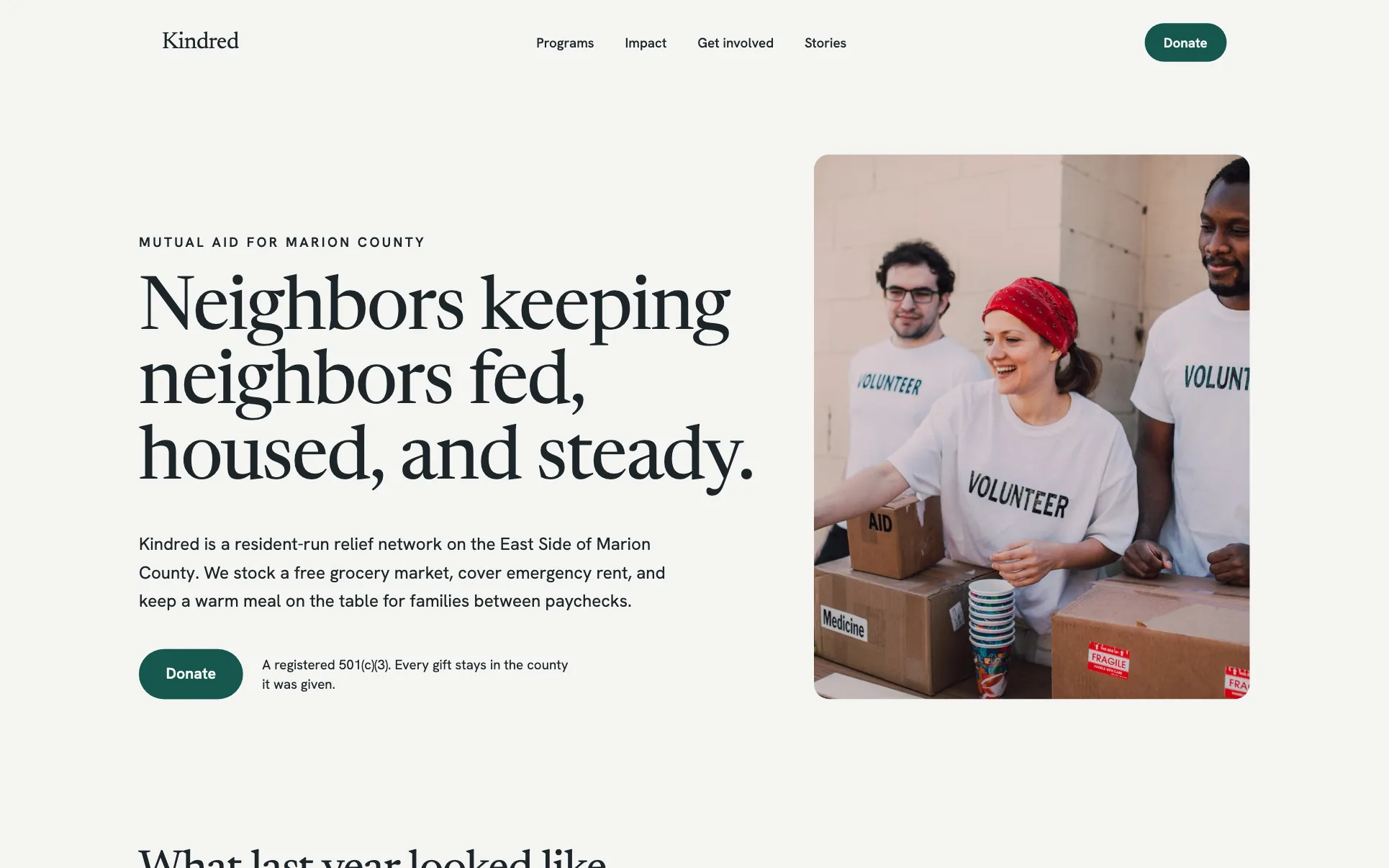
These are example designs made with We.Inc, not real organizations. Names and details are placeholders. They show the patterns this guide recommends: mission first, a visible donate button and a clear volunteer path.
Example design: community nonprofit. Mission in one line, donate button in the header and hero. Generated from the prompt "a website for a nonprofit in Boston".
Example design: education nonprofit. Programs up front and a volunteer sign-up next to the donate button.
Template design: Kindred. A nonprofit layout you can start from on the free plan.
Step 1: Decide what the site has to do
Before you pick colors or a template, write down the two or three actions you most want a visitor to take. For most nonprofits that's some combination of: donate, volunteer, sign up for a newsletter, or attend an event. Every page you build should point toward one of those actions. A nonprofit site with no clear next step reads as a brochure, not a call to action.
Step 2: Map the pages you actually need
You don't need a large site to be effective. A focused set of well-written pages will always outperform a bloated one.
Page
Purpose
Must include
Homepage
State the mission in one sentence, show who you help
Clear headline, primary CTA (donate or volunteer), a proof point
About / Our Story
Build trust and explain why you exist
Founding story, mission statement, link to team/board
Programs / What We Do
Explain your actual work
Specific programs, who benefits, how they work
Impact
Prove the work is real
Outcomes described honestly, photos/stories with permission, a link to reports if you publish them
Donate
Convert intent into action
One-click donate button, recurring-gift option, what the money funds
Get Involved / Volunteer
Capture time, not just money
A simple sign-up form, current opportunities, expectations
Contact
Basic trust and support
Email, physical address if applicable, social links
News / Blog (optional)
Keep the site fresh, support SEO
Recent updates, event recaps, press mentions
If you're not sure how to structure a new site end to end, our general how to make a website guide walks through the mechanics; this page focuses on what's different for a nonprofit.
Step 3: Write the homepage so it explains itself in five seconds
A visitor who lands on your homepage should immediately understand: who you are, who you help, and what they can do about it. Avoid opening with your organization's internal jargon (program names, acronyms, founding year) before you've said what you actually do. Lead with the mission in plain language, then follow with a specific example of your work.
Put your primary call to action — usually "Donate" — above the fold, and repeat a secondary action (volunteer, subscribe) further down the page.
Storytelling through design is a critical component of any solid website building strategy. Getting the fundamentals right here creates a foundation that every other part of the effort builds on. Key things to get right with storytelling through design:
Set measurable targets before starting so you have a baseline for evaluating success
Document your process as you go, it makes training and delegation far easier
Build in regular review points to catch problems before they become costly
Focus on one improvement at a time to isolate what's actually driving changes in results
Identify the one or two inputs that have the highest leverage on outcomes and prioritize those
When storytelling through design calls for a new website, landing page, or web app, We.Inc gets you there fast. You describe what you want in a chat and its AI builds a live, editable site right in the browser, so you can ship without wrestling a design tool first.
Step 4: Design the donate page to remove friction, not add trust badges
The donate page is the single highest-leverage page on the site. A few things consistently help:
Make the amount selection simple. Suggested amounts with a custom-amount option beat a blank field alone, because most people don't know what a "normal" gift looks like.
Explain what the money funds, even briefly ("$X covers a week of program materials for one participant" — only use a real, verifiable figure your organization can stand behind, never an invented one).
Offer a recurring option clearly, since recurring donors are typically more valuable over time than one-time givers.
Keep the payment flow short. Every extra field or page before the payment step loses donors. If your builder or payment processor supports a one-page checkout, use it.
Confirm and thank. A clear confirmation page and follow-up email matter more than most organizations realize — it's often the last thing a donor experiences before deciding whether to give again.
Donation page optimization is a critical component of any solid website building strategy. Getting the fundamentals right here creates a foundation that every other part of the effort builds on. The most effective approach to donation page optimization is systematic rather than reactive. Teams that schedule dedicated time for this, track results consistently, and make incremental adjustments outperform those that treat it as ad hoc work. The single biggest predictor of success is whether you have a documented process, not how sophisticated that process is. Teams move faster on donation page optimization when building the site behind it is not the bottleneck. With We.Inc you generate the page or app by describing it in plain language, then refine it with visual click-to-edit or the built-in code editor.
Step 5: Build the volunteer sign-up flow
Treat volunteer sign-up with the same care as donations — it's a conversion, not an afterthought. Keep the form short (name, email, area of interest, availability), state clearly what happens after someone submits it (a call, an email, a training date), and avoid asking for information you don't need yet. A long application form at the first touchpoint will cost you volunteers before they've even started.
Volunteer sign-up flow is a critical component of any solid website building strategy. Getting the fundamentals right here creates a foundation that every other part of the effort builds on. The most effective approach to volunteer sign-up flow is systematic rather than reactive. Teams that schedule dedicated time for this, track results consistently, and make incremental adjustments outperform those that treat it as ad hoc work. The single biggest predictor of success is whether you have a documented process, not how sophisticated that process is. When volunteer sign-up flow calls for a new website, landing page, or web app, We.Inc gets you there fast. You describe what you want in a chat and its AI builds a live, editable site right in the browser, so you can ship without wrestling a design tool first.
Step 6: Show impact with specifics, not adjectives
"We've made a huge difference" convinces no one. Concrete, verifiable specifics do. If your organization tracks outcomes — people served, programs run, communities reached — state them plainly, and only use numbers you can actually stand behind; never estimate or round up. If you publish an annual report or audited financials, link to the actual document rather than summarizing it in vague terms. Photos and stories from the people you serve, used with clear permission, do more for trust than stock imagery.
Without clear measurement around impact metrics display, it's impossible to know what's working or where to improve. The businesses that improve fastest are those that establish a tracking baseline first and review data on a regular cadence. Key things to get right with impact metrics display:
Start with a small-scale test before committing significant time or budget
Establish a consistent cadence rather than bursts of activity followed by long gaps
Learn from competitors who are succeeding in this area, don't reinvent from scratch
Eliminate friction from the process: every extra step reduces completion rates
Track leading indicators (effort, activity) alongside lagging indicators (results) to catch problems early
If impact metrics display needs a page, store, or app to point people to, We.Inc turns a description into a working site you can publish in minutes. Start from a template, tweak with chat and visual editing, and go live on your own domain with free SSL.
Grant and Sponsor Pages
Grant and sponsor pages are a critical component of any solid website building strategy. Getting the fundamentals right here creates a foundation that every other part of the effort builds on. Key things to get right with grant and sponsor pages:
Start with a small-scale test before committing significant time or budget
Establish a consistent cadence rather than bursts of activity followed by long gaps
Learn from competitors who are succeeding in this area, don't reinvent from scratch
Eliminate friction from the process: every extra step reduces completion rates
Track leading indicators (effort, activity) alongside lagging indicators (results) to catch problems early
Teams move faster on grant and sponsor pages when building the site behind it is not the bottleneck. With We.Inc you generate the page or app by describing it in plain language, then refine it with visual click-to-edit or the built-in code editor.
Step 7: Get the basics of accessibility right
Nonprofits especially can't afford to exclude visitors who use assistive technology. The essentials: sufficient color contrast, text that resizes without breaking the layout, alt text on every meaningful image, forms that work with a keyboard alone, and captions on video content. Our ADA website compliance guide for small businesses covers the practical steps in more depth, and most of it applies directly to nonprofits.
Step 8: Pick a way to build it
You have three broad routes:
A general-purpose website builder — fastest to launch, lowest cost to start, good for organizations without a dedicated web team.
A nonprofit-specific platform — often bundles donation processing and CRM features built for fundraising, at the cost of more setup and usually a higher price point.
A custom-built site with a developer — the most flexible and the most expensive, best reserved for organizations with unusual technical needs.
See our roundup of the best website builders for nonprofits for how the major options compare, and our dedicated pages on building for nonprofits and charities if you want a closer look at features aimed specifically at this use case.
Build it free with We.Inc
If you want to see a working nonprofit site quickly before committing to anything: open We.Inc and type one sentence describing your organization — for example, "a nonprofit website for a food bank, with a donate page, volunteer sign-up, and an impact section." We.Inc's builder generates a working starting point from that description, which you can then edit and reshape.
Be clear on what each plan actually includes: the free plan gives you up to 3 template sites on a we.inc address, with no card required — but it has no AI generation, so you edit the words and photos yourself directly in the editor. To have the AI build and revise the site for you, and to connect your own domain (for example, yourcharity.org instead of a we.inc address), you need the Starter plan at $20/month. Check the pricing page (or start on the free website builder, no card) for the full, current breakdown before deciding. If you'd rather start from a design rather than a description, browse templates first.
Step 9: Pre-launch checklist
Before you announce the new site, go through this list:
[ ] Donate button appears in the header/navigation on every page
[ ] Donate flow tested end to end with a real (small) test transaction
[ ] Volunteer form submits correctly and you receive the notification
[ ] Mission statement is understandable to someone with zero prior context
[ ] Contact information is current and correct
[ ] Images have alt text; color contrast checked
[ ] Site works on a phone, not just a desktop browser
[ ] Social links point to active, current accounts
[ ] Analytics installed so you can see what's working after launch
[ ] A plan for who updates the site after launch (dates, events, news)
The fundamentals of nonprofit website design: build a site that inspires action are within reach for any business willing to invest consistent effort. Start by picking one section from this guide, implement it fully, and measure the outcome before moving to the next. Incremental, validated progress beats trying to do everything at once. If you need a website, store, or web app to support your website building work, We.Inc lets you build one by describing it in a chat. Its AI generates a live, editable site you can refine visually or in code, then publish on your own domain with free SSL. Start your free We.Inc account - no credit card required.
Keeping the site alive after launch
The most common failure mode for nonprofit sites isn't the initial build — it's abandonment. A site with a "2023 gala" banner still showing in 2026 actively damages trust. Assign someone, even informally, to update the news section, refresh impact numbers when they change, and check that the donate flow still works every few months, since payment processor changes can silently break a form. For more general guidance on the full setup, our nonprofit website builder post covers platform-specific detail that complements this planning guide.
Frequently asked questions
What pages does a nonprofit website need?
At minimum: a homepage that states your mission and who you help, an About/Our Story page, a Programs or What We Do page, an Impact page, a Donate page, a Get Involved or Volunteer page, a Contact page, and a News or Blog section if you publish updates. Larger organizations add a Board/Team page, an Annual Report or Financials page, and event pages.
How much does it cost to build a nonprofit website?
It depends heavily on the platform and how much custom design or development you pay for. A DIY builder can cost very little to start; a custom-built site with a developer costs considerably more. Check any provider's current pricing page directly rather than relying on a number quoted elsewhere, since plans and features change.
Do nonprofits get discounts on website builders or hosting?
Some providers offer nonprofit discounts or free tiers, and some, including We.Inc, have a free plan anyone can use to get started. Always confirm current nonprofit-specific offers directly on the provider's pricing or nonprofit page, since these programs change.
Should the donate button be on every page?
Yes. Put a clearly labelled donate button in the main navigation and header on every page, not just the homepage. Visitors who land on a program page or a news article should never have to hunt for how to give.
Does a nonprofit website need to be accessible?
Yes, both ethically and often legally. Many nonprofits serve people with disabilities directly, and accessible design (readable contrast, keyboard navigation, alt text, captioned video) widens who can use your site and who can donate. See the ADA compliance guide linked below for the practical basics.
How we research, test and update this page: our editorial policy. We.Inc is our own product.
We.Inc is an AI-powered website builder you can resell under your own brand. Launch a branded client dashboard, bill on Stripe Connect, and deliver AI-generated websites in minutes. White-label plans start at $99 a month for 25 client sites, with a 7-day free trial and no per-site fees.
Product
AI Website Builder: Describe a site in plain English; it's live in minutes
 Umair Ali Sadaqat|Last updated September 28, 2026|13 min read