
A charity website that shows donors exactly where their gift goes
A charity website should explain your mission in one sentence, show the impact of past giving, make donating easy and invite volunteers. We.inc builds the pages and forms (free templates, or AI from $20/month); donations are processed by a giving tool you link, such as Givebutter, Donorbox or Stripe payment links.
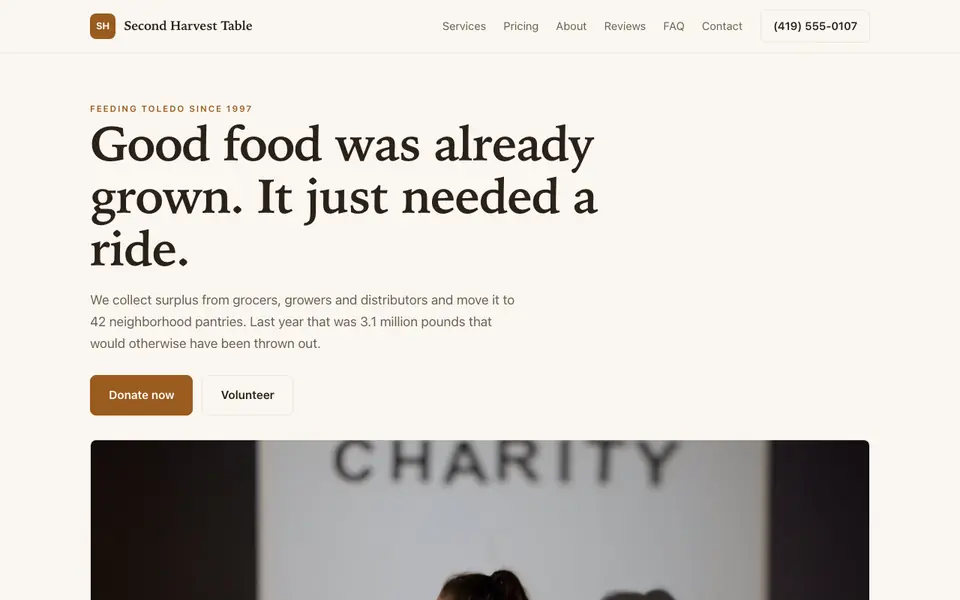
Describe your cause and the AI builds a charity website with your mission, impact stories, a donate button linked to your giving tool, and volunteer sign-up.
Pages every charity website needs
- Home: Mission, one strong story and a donate button above the fold.
- Our Work / Programs: What you actually do, who you serve and where.
- Impact: Stories, photos and outcomes that show donors their money is used well.
- Donate: Ways to give, what gifts fund, and your registration details for tax purposes.
- Volunteer: Roles, time commitment and a sign-up form.
- About / Transparency: Board, staff, annual reports and financials build trust with larger donors.
Try this prompt
A website for a charity in Columbus called Second Plate that rescues surplus food for local shelters, with a mission-first home page, program pages, impact stories, a donate page linking to our Givebutter campaign, a volunteer sign-up form, and a page with our annual reports.
How do I show donors where their money goes?
With concrete examples tied to your real costs. Say what a typical gift pays for, such as a week of meals or a vet visit for a rescued dog, using numbers from your own budget. Add one story about a person or animal helped, shared with permission, and link to your latest annual report for those who want the full picture.
What should a charity home page lead with?
One sentence on who you help and how, then a single clear way to help. Visitors decide quickly whether to stay, so a vague mission statement loses them. Put the donate and volunteer buttons near the top and keep the rest of the page for proof: a recent result, a photo and a short quote.
A real charity site, not a template
This is Second Harvest Table, a charity business we described to the AI in a sentence. See the Second Harvest Table example site.
Start from this design
Three designs that suit a charity website.
- Community Mutual Aid Nonprofit
- Teal Small Business Support Firm
About charity website design on we.inc
A charity website designed around your actual services and prices, not a stock layout. Describe the business and the AI writes and builds every page.
Features designed for your industry
- Donate button: A prominent button linked to your giving platform, on every page and every phone.
- Impact stories: Real stories and programs that show donors what their money does.
- Volunteer sign-up: A form that collects availability and skills and emails them to your coordinator.
Who this charity website design suits
- A local food bank that needs a clear donate page and volunteer shifts
- An animal rescue showing adoptable pets and fundraising appeals
- A small foundation publishing its grants and annual reports
- A volunteer-run charity replacing an out-of-date site no one can edit
What makes a charity website work
Donations run through a giving platform
The AI can build a donate page that takes gifts through your charity's own Stripe account, or you can link a giving tool like Givebutter, Donorbox or PayPal Giving, which adds donor receipts and campaign pages out of the box.
State your registration clearly
If you are a registered 501(c)(3) in the US, or a registered charity elsewhere, show your legal name and registration or EIN number on the donate page. Tax and charitable solicitation rules vary by country and state, so check what applies to you.
Specific asks outperform vague ones
Tie gift levels to real things you fund, such as a week of meals or a vet visit, but only use figures that match your actual costs.
Update impact regularly
A news or stories page updated after each program or event shows donors you are active. Add a new story by chat in a few minutes.
What it costs
Small charities can launch on a free template at a we.inc address. AI building and ongoing edits start at $20/month on Starter, and your own domain adds about $10 to $20 a year. Your giving platform sets its own fees.
Free for 3 template sites, without AI; AI building from $20 a month. Compare plans
Frequently asked questions
Can people donate directly on the website?
Yes. The AI can build a donate page that pays into your charity's own Stripe account, or you can link a giving tool such as Givebutter or Donorbox. Either way the money goes straight to you.
Is there a discount for nonprofits?
The free plan lets any charity publish up to three template sites on a we.inc address without AI. AI features start on Starter at $20/month, and a custom domain requires a paid plan.
Do I need to show my charity registration number?
It is good practice, and in some places it is required when asking for donations. Check the rules for your country and state and add your registration details to the donate page.
Can volunteers sign up online?
Yes. The AI can build a volunteer form that asks for availability and interests and emails each submission to you. For shift scheduling, link a tool like SignUpGenius.
Can I publish annual reports and financials?
Yes. Upload PDFs and link them from a transparency page so larger donors and grant makers can find them easily.
Browse the templates: Nonprofit website templates
Related industries and website guides
- nonprofit website design
- church website builder
- hoa website builder
- memorial website builder
- club websites
- food banks website builder
- charities website examples
- how to make a website
Related website builders: Nonprofits & Community
- nonprofit website design
- church website builder
- hoa website builder
- memorial website builder
- club websites
- food banks website builder
Before you start
Product
Who It's For
- For Agencies
- For Freelancers
- For Hosting Providers
- For SaaS Platforms
- For Startups
- For Financial Services
- For Healthcare
Features
Resources
- Blog
- Help Center
- Free Business Tools
- Free UI Components
- Website Templates
- Template Collections
- Website Examples
- Guides
- Comparisons
- Alternatives
- Best Lists
- Reviews
- Pricing Guides
- Use Cases
- Glossary & Guides
- Integrations
- Developers
- Benchmark
- Windows App