
Welcome your community online.
The simplest way to build a church website is to tell we.inc's AI your church's name, service times, location, ministries, and tone, and let it draft the pages, including a plan-your-visit page for newcomers. AI building and editing starts on the Starter plan at $20 a month; a free template publishes with no AI if your church needs something basic live today.
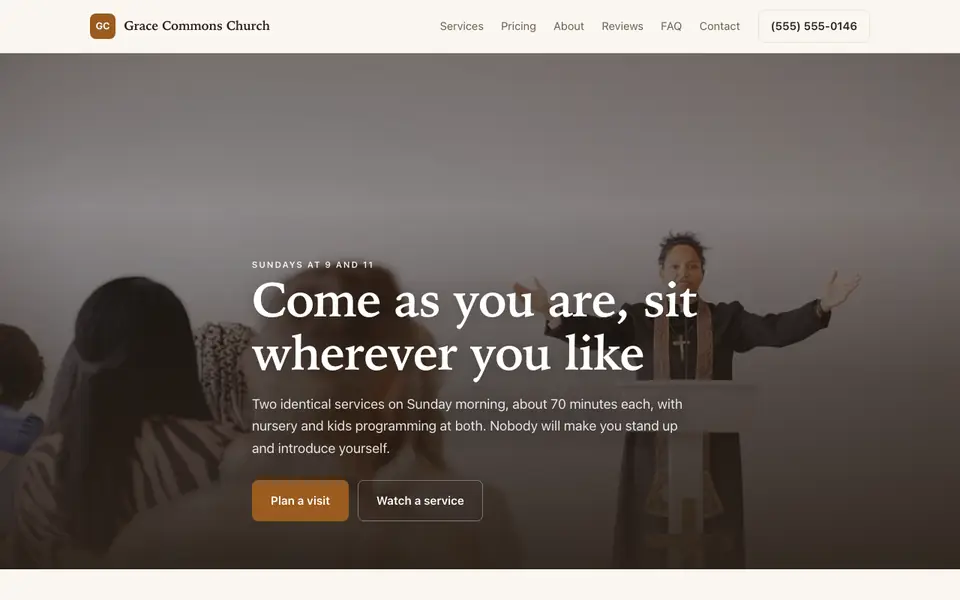
A church website that tells newcomers when to come, what to expect, and how to get involved, and keeps your members up to date on events and sermons.
Pages every church website needs
- Plan Your Visit: Service times, address, parking, what to wear, what happens during a service, and what is available for kids. This is the page a first-time visitor needs most, and it removes the anxiety of walking in blind.
- Service Times & Location: On the homepage and in the footer, not buried. It is the single most searched piece of information on any church site.
- Sermons / Media: Recent sermons (embedded from YouTube, Vimeo, or a podcast host) let visitors hear your pastor before they attend and let members catch up when they miss a week.
- Events & Calendar: Upcoming services, studies, and community events keep members informed and show visitors a living, active congregation.
- Ministries / Get Involved: Kids, youth, small groups, outreach, and volunteer teams. Clear ministry pages help people find their place after the first visit.
- Give: A clear link or embed to your online giving platform makes giving easy for members who no longer carry cash or checks.
Try this prompt
A website for a community church in Tulsa called Riverside Fellowship, with Sunday services at 9 and 11am, a plan-your-visit page, kids and youth ministry pages, a sermons page that embeds our YouTube videos, an events calendar, and a Give button linking to our giving platform.
A real church site, not a template
This is Grace Commons Church, a church business we described to the AI in a sentence. See the Grace Commons Church example site.
Start from this design
Three designs that suit a church website.
- Community Mutual Aid Nonprofit
- Dark DJ and Event Production
About church website design on we.inc
Connect with members and newcomers with a welcoming site sharing your services, events, and mission.
Skip the church web design brief and the six week wait. Tell the AI about the business in a sentence and it builds the whole site, ready to edit.
Features designed for your industry
- Service Times: Display your worship service schedule.
- Events: Share upcoming church events and activities.
- Online Giving: Accept tithes and donations online.
Who this church website design suits
- Local churches
- Ministries
- Religious centers
- Faith communities
- Worship centers
What makes a church website work
Write for the visitor, not the member
Members already know when services are and where to park. The website's most important reader is someone who has never been inside. Avoid insider terms and acronyms, and explain plainly what a first visit looks like.
Keep it current, or it looks closed
An events page still showing last Easter tells visitors nobody is minding the site. On an AI plan, a staff member or volunteer can update events and sermons by asking in chat, with no web skills needed.
Share what you believe, briefly
A short, plain statement of beliefs or denomination helps visitors understand whether your church is right for them. Link to a longer version for those who want detail.
we.inc does not process donations or manage members
The AI builds the pages and a Give button, but it does not process donations, run a member database, or handle event registration payments. Link to or embed a dedicated giving platform such as Tithe.ly, Pushpay, or Givelify, and your church management software, for those.
What it costs
A domain costs about $10 to $20 a year. Online giving platforms and church management software are separate and usually charge their own fees. Most single-campus churches fit comfortably on Starter at $20 a month if they want the AI to write pages and handle weekly updates; multi-campus churches with many ministry pages may fit better on Pro.
Free for 3 template sites, without AI; AI building from $20 a month. Compare plans
Frequently asked questions
How much does a church website cost on we.inc?
A template-based church site is free to publish (no AI, up to three sites, on a we.inc address). Having the AI write your pages and make weekly updates by chat starts at $20 a month on Starter, plus about $10 to $20 a year for your own domain.
Can people give online through our church website?
Yes, through a giving platform. We.inc does not process donations itself, so the AI adds a Give button that links to or embeds the platform you use, such as Tithe.ly, Pushpay, or Givelify.
Can we post sermons on the website?
Yes. The AI can build a sermons page that embeds videos from YouTube or Vimeo or episodes from your podcast host, and you can add new ones each week by asking in chat on an AI plan.
Can volunteers update the site without technical skills?
On an AI plan, updates are made by describing the change in plain English, such as "add the fall picnic on October 12 to the events page." No code or design knowledge is required.
Can we use our own domain name?
Yes. The free plan publishes on a we.inc address; you can connect your own domain (roughly $10 to $20 a year), with SSL and hosting included.
Browse the templates: Church website templates
Related industries and website guides
- nonprofit website design
- hoa website builder
- memorial website builder
- campaign website builder
- Websites for clubs and societies
- food banks website builder
- churches website examples
- how to make a website
Related website builders: Nonprofits & Community
- nonprofit website design
- hoa website builder
- memorial website builder
- campaign website builder
- club websites
- food banks website builder
Before you start
- Lutheran church website example
- Pentecostal church website example
- Church plant website example
- Websites for clubs and societies
Product
Who It's For
- For Agencies
- For Freelancers
- For Hosting Providers
- For SaaS Platforms
- For Startups
- For Financial Services
- For Healthcare
Features
Resources
- Blog
- Help Center
- Free Business Tools
- Free UI Components
- Website Templates
- Template Collections
- Website Examples
- Guides
- Comparisons
- Alternatives
- Best Lists
- Reviews
- Pricing Guides
- Use Cases
- Glossary & Guides
- Integrations
- Developers
- Benchmark
- Windows App