
Pest Control Website Examples: What Works and How to Build Yours
Pest control website design that turns panicked searches into booked inspections: the pages an exterminator needs, how to present treatment plans and safety, typical costs, a launch checklist and a template you can copy.
Short answer (September 2026): good pest control website design calms a stressed homeowner fast: a tap-to-call number and "Book an inspection" button in the first screen, one page per pest with photos to help identify it, clear safety information for kids and pets, service plans with prices, and your licence, insurance and reviews in plain view. Below is a page-by-page template, the must-have pages, typical costs and a launch checklist.
Build your pest control website. Start from a ready-made template on the free plan (up to three published sites), or describe your company in one prompt and let the We.Inc AI builder draft every page, available from the $20 a month Starter plan. Create your account, see what the pest control website builder sets up, or start from a design: Summit Trades, Meridian Property Care, Brightwell Cleaning.
Nobody browses pest control websites for fun. Visitors have just seen droppings in the pantry, bites on their arms or wings on the windowsill. They want to know what it is, whether it is serious, whether you can come soon and whether the treatment is safe for their family. Design around those four questions.
Selection method: what a visitor needs to accomplish
We judge a pest control website by whether a worried homeowner can finish four tasks on a phone without calling:
- Work out which pest they have and whether it is serious.
- See which plan or one-off treatment fits, with a price or how the price is set.
- Find out whether the treatment is safe for their children and pets.
- Book an inspection or call in one tap.
About the example below. Sentry Line Pest Solutions is a fictional demonstration built by We.Inc. Its prices, reviews, homes-on-service count and years in business are sample content, not evidence about any real company. We have not included third-party sites in this version because we could not verify and date screenshots of them for this update. To study real sites yourself, use the checklist in the "Selection method" above on three local competitors.
Annotated example: Sentry Line Pest Solutions (fictional demonstration)
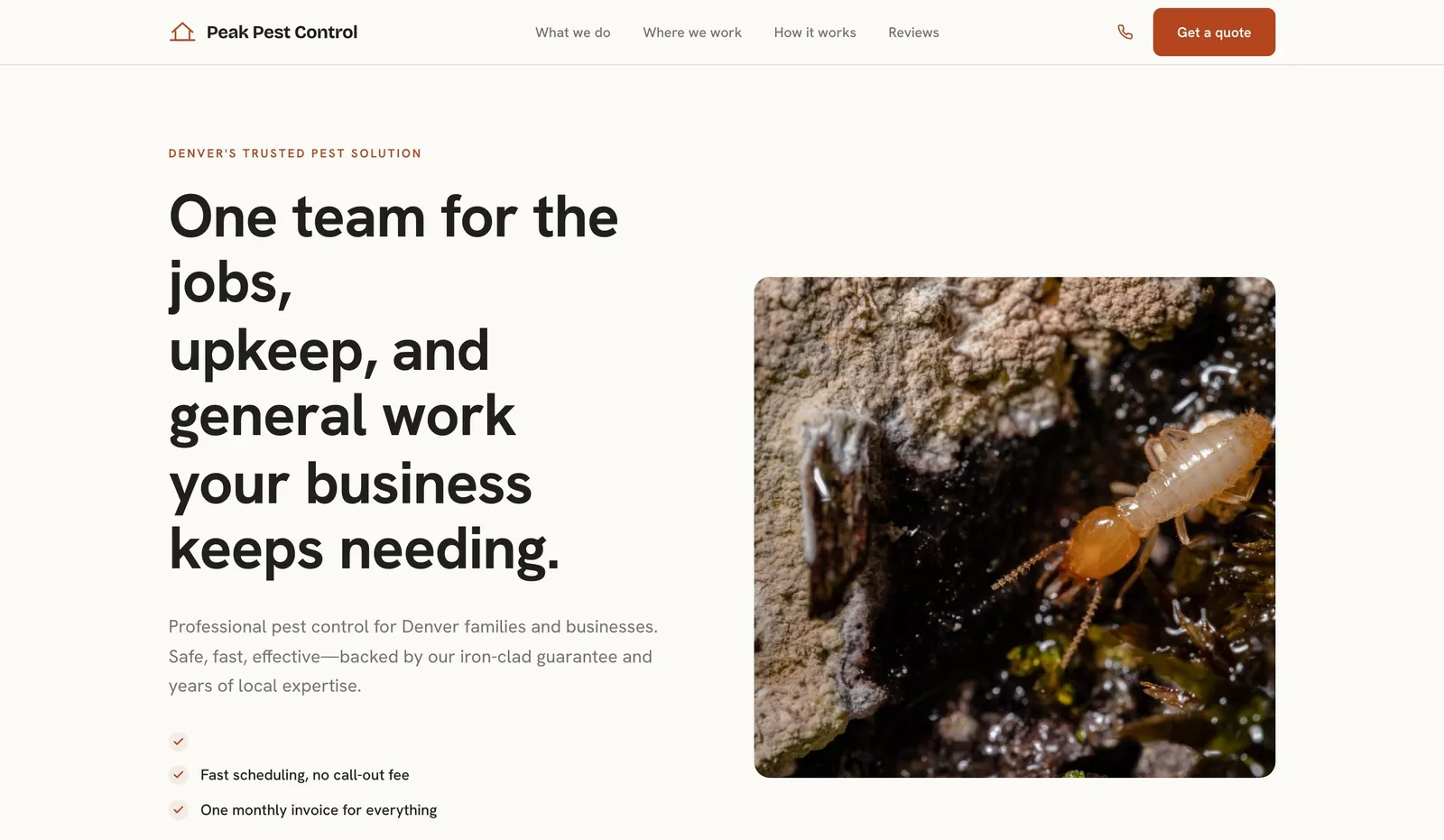
See the full demonstration on the Sentry Line Pest Solutions example page. What it does that you can copy:
- Headline names the local problem: "Scorpions do not take the winter off here", not the company name.
- The guarantee sits in the sub-line: "If they come back between visits, so do we, at no charge." Only use a line like this if it is your real policy.
- Every service shows a price or starting price, including a free termite inspection.
- The FAQ answers the two questions people ask first: safety for pets and kids, and how often you come out.
- The menu is short: Services, Pricing, About, Reviews, FAQ, Contact.

Workflow comparison: quarterly general pest, scorpion program, termite inspection
Each service has a different buyer and needs a different page path:
| Quarterly general pest | Scorpion program | Termite inspection and treatment | |
|---|---|---|---|
| What the visitor worries about | Paying forever for little visible result | Stings, children and pets, pests coming back | Structural damage and a large bill |
| What the page should show | What each visit covers, re-treat policy, cancel terms | What is added (inspection, sealing entry points), how often | Signs to look for, what the inspection involves, warranty terms |
| Form fields worth asking | Address, home size, pests seen | Address, where they were seen, a photo | Address, what was seen (mud tubes, swarmers), a photo |
| Demonstration's sample price line | "$119 per quarter" (sample) | "$149 per quarter" (sample) | "Inspection free, treat from $950" (sample) |
Copyable build brief
A website for [company], a licensed pest control company in [town/area] treating [pests]. Offer [plan names] with what each visit covers, the price and our re-treat policy, plus one-off treatments with starting prices. Give each main pest its own page with photos and signs to look for. State our licence number, the products or methods we use and re-entry times for children and pets. Booking form asks for address, pest, where it was seen and an optional photo. Phone in the header. Use only our real reviews.
Honest platform and feature trade-offs
| What you need | Website builder with templates | AI website builder | Designer or agency |
|---|---|---|---|
| Launch speed | Fast once text and photos are ready | Fast first draft, then fact-check every line | Weeks to months |
| Upfront cost | Low | Low monthly plan | Highest |
| Pest-by-pest pages | You build each page | Drafted from your list, you check the facts | Custom |
| Form with photo upload | Varies by builder, check before choosing | Varies, check before choosing | Custom |
| Online plan sign-up and payment | Often needs a third-party tool | Often needs a third-party tool | Custom |
We did not run a scored, same-scenario test across builders for this article, so check each builder's current features and pricing yourself. On We.Inc, the free plan publishes up to 3 template sites on a we.inc address without AI credits or a custom domain; Starter at $20 a month adds AI building and your own domain (pricing).
Template walkthrough
Templates that suit a pest control business from the We.Inc library: Summit Trades, Meridian Property Care and Brightwell Cleaning, or browse all business website templates.
- Pick a template and replace every sample photo and review.
- Rename service sections to your plans and pests.
- Add prices, or explain how pricing works, and your re-treat policy.
- Add a safety section and your licence number.
- Set the booking form fields from the table above and test it.
- Connect your domain and publish, then check the live site with the free website grader. Budget with the website cost calculator.
Start building this pest control website. Create your account, or read how the We.Inc website builder works.
What the best pest control websites have in common
- Urgency handled well. Phone and booking in the header, same-day or next-day availability stated only if true.
- Pest-by-pest pages. Termites, bed bugs, rodents, cockroaches, ants, wasps and hornets, spiders, mosquitoes, wildlife.
- Identification help. A photo and "signs you have them" list on each pest page.
- Safety up front. What you use, how long to stay out, pet and child guidance, eco options.
- Plans, not just one-offs. Quarterly or monthly plans explained with what is covered and re-treatment guarantees.
- Licence and insurance. Your state licence number and certifications in the footer and About page.
- Local reviews. "Cleared our mice in Oak Park in two visits."
Free pest control website template (copy this structure)
Home page
- Header: logo, phone (tap-to-call), Book an inspection.
- Hero: "Pest control in [Town]" with a sub-line like "Licensed technicians. Family and pet safe options. Same-week inspections." Buttons: Call now, Book inspection.
- Trust bar: licence number, insured, star rating, re-treatment guarantee.
- What's bugging you? A grid of pest cards linking to pest pages.
- How it works: inspection, treatment, follow-up.
- Service plans: three plan cards with prices or from prices.
- Reviews and service area.
- Final call to action.
Pest page (one per pest)
- H1: "[Pest] Control in [Town]", for example "Termite Control in Oak Park"
- Photo and identification tips
- Signs of an infestation and why it matters
- Your treatment approach, visits needed and preparation
- Safety notes for people and pets
- Price range, guarantee and FAQs
- Call and booking buttons
Plans, commercial, about and contact
- Plans: what each covers, visit frequency, re-treatment policy, price
- Commercial: restaurants, offices, property managers, compliance paperwork
- About: licence, certifications, team, story
- Contact: phone, form, hours, service area map
Must-have pages for a pest control website
| Page | What goes on it | Must-have? |
|---|---|---|
| Home | Call, book, pests, plans, trust, reviews | Yes |
| Pest pages | One per pest: identify, signs, treatment, safety, price | Yes |
| Service plans | Coverage, frequency, guarantee, price | Yes |
| Safety and methods | Products, eco options, pets and children | Yes |
| Commercial pest control | Industries served, reporting, contracts | If you serve businesses |
| Service area pages | One per main town | Yes, if you cover several towns |
| About | Licence, team, certifications | Yes |
| Contact and booking | Phone, form, hours, map | Yes |
Writing copy that books inspections
- Reassure first. "Found signs of mice? You're not alone, and it's fixable" lowers panic.
- Be concrete about the process. How many visits, what you do each time, how to prepare.
- Explain guarantees simply. "If they come back between visits, so do we, at no charge" only if that is your policy.
- Use local detail. Seasonal pests in your region, local building types, common problem areas.
- Keep the form tiny. Name, phone, address or town, pest and a photo upload.
Pest control website design mistakes
- Graphic bug photos everywhere. Use clear identification photos on pest pages, not on the home page hero.
- One page for all pests. Each pest is a separate search and a separate worry.
- No safety information. Parents and pet owners will leave to find it elsewhere.
- Hiding plan prices. People compare plans; if yours are invisible, they call someone else.
- Slow pages. Visitors are on their phones, often in the room with the problem.
SEO basics for pest control companies
- Title pages with pest plus town: "Bed Bug Treatment in Oak Park, IL | ClearHome Pest".
- Complete your Google Business Profile with services, service area, hours and photos.
- Keep your name, address and phone identical across your site and directories.
- Publish short identification guides for common local pests.
- Add LocalBusiness schema with your service area.
Pest control website cost
| Route | Typical upfront | Typical ongoing |
|---|---|---|
| AI or DIY website builder | $0 to a few hundred dollars | $0 to about $40 a month |
| Freelance designer | $1,000 to $5,000 | Hosting plus an optional care plan |
| Home services marketing agency | $4,000 to $15,000+ | Often $300 to $2,000+ a month for SEO or ads |
| Domain | Roughly $10 to $20 a year |
*Typical 2026 ranges, not quotes.*
Features worth adding once the basics work
- Photo upload on the form. Customers can send a picture of what they found, so you arrive with the right treatment.
- Seasonal pages. Spring ants, summer wasps, autumn rodents. Time them to local seasons.
- Property manager portal or page explaining contracts, reporting and scheduling for multiple units.
- Prep checklists for bed bug and cockroach treatments, downloadable or printable.
- Online plan sign-up and payment for recurring service.
- Prevention tips page. Simple advice on sealing entry points, storing food and clearing standing water shows expertise and keeps your name in front of homeowners between treatments.
Build your pest control website from one prompt
On We.Inc you can publish a ready-made template on the free plan, or upgrade to Starter ($20 a month) and type one prompt, for example "a website for a licensed pest control company in Oak Park, Illinois, treating termites, bed bugs, rodents, ants and wasps, with quarterly service plans, pet-safe treatment options, town pages and an inspection booking form". The AI builder drafts every page. Add your licence number, photos and prices, then publish.
See the features set up for exterminators on the pest control website builder page. Related guides: cleaning business website and landscaping website design.
Pest control website launch checklist
- Phone and Book inspection in the header, tap-to-call on mobile
- A page for each pest you treat, with identification photos
- Safety information for children and pets
- Service plans with prices or from prices
- Licence number and insurance visible
- Service area pages for main towns
- Form with photo upload tested end to end
- Google Business Profile linked and complete
- Every page checked on a phone
With those in place, your site turns a moment of panic into a booked inspection.
Build your pest control website
Publish a pest control site from a free template, or let the We.Inc AI builder draft every page from one prompt on a paid plan, then edit anything. Create your account, see the pest control website builder, or start from a design: Summit Trades, Meridian Property Care, Brightwell Cleaning.
Frequently asked questions
Is the treatment safe for pets and kids?
Your website should answer this in plain words on every pest page: which products or methods you use, the re-entry time the label gives, and how you keep treatments away from pet bowls, toys and garden beds. Only state what matches the product label and your local rules.
How often do you need to come out?
Say it directly on your plans page: quarterly suits many homes, and some properties need a shorter interval in peak season. Explain when you would recommend more visits and why, so the visitor does not suspect an upsell.
What should a pest control website include?
A tap-to-call number and inspection request button in the header, a page for each pest you treat (termites, bed bugs, rodents, ants, cockroaches, wasps), your licence and insurance, safety information for children and pets, service plans with prices or ranges, reviews that mention the pest and town, and your service area.
How much does a pest control website cost?
Typical 2026 ranges: $0 to about $40 a month on a website builder, roughly $1,000 to $5,000 for a freelance designer, and $4,000 to $15,000 or more for a home services marketing agency, often with a monthly retainer. A domain costs roughly $10 to $20 a year.
Is there a free pest control website template?
Yes. This article includes a page-by-page pest control website template you can copy. On We.Inc, the free plan lets you publish up to three sites from ready-made templates. Drafting a custom site from a prompt with the AI builder starts on the Starter plan at $20 a month.
Should a pest control company list prices online?
List the price of an inspection, starting prices for one-off treatments and the monthly or quarterly price of your service plans. Explain what changes the final price, such as property size and severity. It filters out bargain hunters and speeds up the decision for everyone else.
How should pest control websites talk about chemical safety?
Explain in plain words which products or methods you use, how long people and pets should stay away, and any low-toxicity or integrated pest management options you offer. Only make safety claims that match the product labels and your local regulations.
How can a pest control company rank on Google?
Create a page for each pest and each main town, put both in page titles, complete your Google Business Profile, keep your name, address and phone identical everywhere, ask for reviews after each treatment and publish short guides on identifying common pests in your region.
More in Blog
- How to Check Which PHP Version Your Website Really Runs (Black October)
- PHP2Shell on Shared Hosting and cPanel: What You Can Do and What Your Host Must Do
- PHP2Shell in Docker: Rebuilding PHP Images So the Fix Actually Ships
- Drupal Sites and Black October: Updating PHP Without Breaking Drupal
- Joomla and the PHP2Shell Flaws: Patching Steps for Joomla 3, 4 and 5
- Laravel Apps and PHP2Shell: Patching Forge, Vapor, Octane and Docker Setups
- Magento and Adobe Commerce: Handling the PHP2Shell PHP Flaws
- Still on PHP 7.4, 8.0 or 8.1? Your Options After PHP2Shell
Related guides and tools
Start building
- how to make a website
- website templates
- AI website builder
- free website builder
- website builders by industry
How we research, test and update this page: our editorial policy. We.Inc is our own product.
Product
Who It's For
- For Agencies
- For Freelancers
- For Hosting Providers
- For SaaS Platforms
- For Startups
- For Financial Services
- For Healthcare
Features
Resources
- Blog
- Help Center
- Free Business Tools
- Free UI Components
- Website Templates
- Template Collections
- Website Examples
- Guides
- Comparisons
- Alternatives
- Best Lists
- Reviews
- Pricing Guides
- Use Cases
- Glossary & Guides
- Integrations
- Developers
- Benchmark
- Windows App