
Landscaping Website Design: Templates, Examples & How-To
Landscaping website design that wins clients: how to make a landscaping website step by step, templates and examples, project galleries, hardscaping pages, a seasonal update plan, quote forms, costs and a launch checklist.
Short answer (September 2026): strong landscaping website design is portfolio first: big photos of your real projects, a clear split between design and build work and recurring maintenance, a page per service, your service area, reviews and a short quote form. The best landscaping websites let the work sell itself and make getting a quote take under a minute.
How to make a landscaping website, in short: pick a template built around a big photo gallery, fill it with your own finished projects grouped by type, give design and build, hardscaping and maintenance their own pages, list your towns, and add a quote form that asks for the address and an optional photo. Then change the featured services each season. The step-by-step version, templates and examples follow.
Build your landscaping website. Start free with a template site and publish it on a we.inc address, no card. Or describe your business in one prompt and the We.Inc AI builder drafts the whole site, on paid plans from $20/mo. Start building free, see what the landscaper website builder sets up, or start from this design: Verdure Landscape, Halden Woodworks, Brightpath Co..
Landscaping is one of the most visual trades there is. A homeowner deciding between you and a competitor will mostly judge by photos. Here is how to design a site that turns those photos into booked estimates.
Selection method: what a visitor needs to accomplish
We judge a landscaping website by whether a homeowner can finish four tasks on a phone without calling:
- See finished work of the kind they want (patio, wall, planting).
- Understand roughly what it costs, or how the price is worked out.
- Check that you cover their town.
- Request an estimate in under a minute.
About the examples below. Redbud Landscape Co. is a fictional demonstration built by We.Inc. Its prices, reviews, crew counts and years in business are sample content, not evidence about any real company. We have not included third-party sites in this version because we could not verify and date screenshots of them for this update.
Annotated example: Redbud Landscape Co. (fictional demonstration)
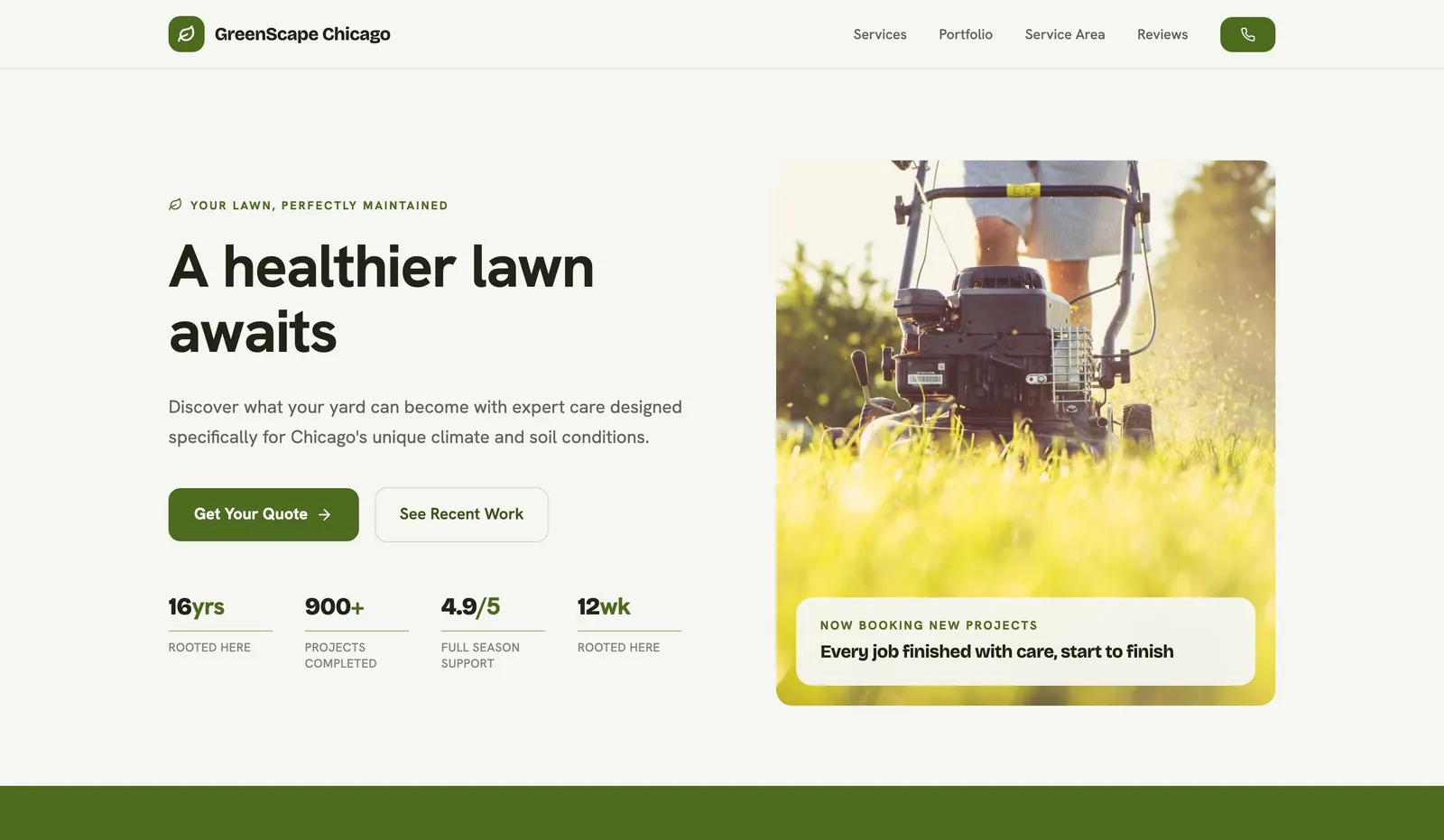
See the full demonstration on the Redbud Landscape Co. example page. What it does that you can copy:
- Headline names the local problem, not the company: "A yard that handles Kansas summers and Kansas clay".
- Two buttons, one for people ready to act ("Get an estimate") and one for people still looking ("See past projects").
- A fact strip under the hero with things a customer can hold the business to: warranty length and free on-site estimates.
- Starting prices on the page for every service, with a one-line note on how install pricing is measured.
- FAQ that handles objections: wait times, warranty, deposits, flooding yards.
- Phone in the header on every scroll position, which matters most on mobile.

Workflow comparison: paver patios, retaining walls, planting
Each service has a different buyer and needs a different page path:
| Paver patios | Retaining walls | Planting and bed renovation | |
|---|---|---|---|
| What the visitor worries about | Heaving, drainage, lead time | Failure, engineering, permits | Plants dying, soil, upkeep |
| What the page should show | Base depth and build steps, photo of finished patio, price per square foot or range | Drainage stone and fabric, when engineering is needed, photos | Plant choices for local soil and sun, warranty terms, before and after |
| Form fields worth asking | Rough size, access for machinery | Wall height and length, slope photo | Bed size, sun or shade, photo |
| Demonstration's sample price line | "From $18 per sq ft" (sample) | "From $34 per face ft" (sample) | "From $1,200" (sample) |
Copyable build brief
A website for [company], a landscaper in [town/area] offering paver patios, retaining walls, planting and bed renovation, and weekly maintenance. Each service gets its own section or page with how the work is done, a starting price or how pricing works, and our own project photos. Show the towns we cover, our warranty terms in plain words, and a quote form asking for address, project type, rough size and an optional photo. Phone number in the header. Use only our real reviews.
Honest platform and feature trade-offs
| What you need | Website builder with templates | AI website builder | Designer or agency |
|---|---|---|---|
| Launch speed | Fast once photos and text are ready | Fast first draft, then fact-check every line | Weeks to months |
| Upfront cost | Low | Low monthly plan | Highest |
| Photo gallery quality | Depends on the template | Depends on your photos | Custom |
| Quote form with photo upload | Varies by builder, check before choosing | Varies, check before choosing | Custom |
| Who updates seasonal offers | You | You, by editing or describing changes | Often billed per change |
We did not run a scored, same-scenario test across builders for this article, so check each builder's current features and pricing yourself. On We.Inc, the free plan publishes up to 3 template sites on a we.inc address without AI credits or a custom domain; Starter at $20 a month adds AI building and your own domain (pricing).
Template walkthrough
Templates that suit a landscaping business from the We.Inc library: Drafthouse, Vista & Marrow and Anchor, or browse all business website templates.
- Pick a template and replace every sample photo with your own projects.
- Rename sections to your services: patios, walls, planting, maintenance.
- Add your starting prices or explain how pricing works.
- Set the quote form fields from the table above and test it.
- Connect your domain and publish.
- Check the live site with the free website grader, and budget with the website cost calculator.
Start building this landscaping website. Create your account, or read how the We.Inc website builder works.
How to make a landscaping website, step by step
- Collect your photos before anything else. Aim for a handful of strong projects in each category you want more of. A landscaping site with few photos looks unfinished however good the design is.
- Decide your two paths. One-off projects (design, planting, hardscaping) and recurring work (mowing, maintenance plans). They need different buttons: "Get an estimate" and "Start a maintenance plan".
- Choose a template with a gallery that filters by project type, not one long scroll.
- Write one page per service, starting with the work you most want to sell next season.
- Build the project gallery using the structure below, with the town and a one-line description for each job.
- Set up the quote form with address first and an optional photo upload, and send yourself a test with a photo from your phone.
- Publish, then plan the first seasonal change so the site never shows snow removal in June.
Structuring a project gallery that sells
Your gallery does most of the selling, so give each project the same short structure:
- Title with type and town: "Bluestone patio and fire pit, Westfield".
- Before and after, taken from the same spot.
- Two or three lines on the brief: what the client wanted and what was difficult about the site, such as a slope, clay soil or poor drainage.
- Materials and plants used, which helps people searching for a specific look.
- A rough size or scope, and a starting price range if you are comfortable sharing it.
- A link to the matching service page and a "Get a quote for something similar" button.
Group the gallery into filters (patios, walls, planting, lawns, lighting) and put your three best projects on the home page.
Hardscaping website design
If patios, walls, steps and outdoor kitchens are most of your work, lean the site towards them:
- Show construction photos (excavation, compacted base, drainage) alongside finished shots. They prove the part customers cannot see.
- Name the materials you install (pavers, natural stone, concrete) and the brands or ranges you offer, if you have them.
- Explain when permits or engineering may be needed for taller walls in general terms, and tell people you will check local rules for their property.
- State your workmanship warranty in plain words, the same way the planting warranty is covered above.
A seasonal update plan for your website
Landscaping demand moves with the weather, so your site should too. A simple yearly rhythm:
| Season | Lead with on the home page | Also update |
|---|---|---|
| Late winter | Design consultations and booking spring installs | Lead times, new gallery projects from last year |
| Spring | Clean-ups, planting, maintenance plan sign-ups | Starting prices for the season |
| Summer | Patios, irrigation, lawn care | Photos of finished spring projects |
| Autumn | Leaf removal, planting, fall clean-ups | Booking for next year's projects |
| Winter | Snow removal (if you offer it) or next year's design work | Remove any offers that have ended |
Put a reminder in your calendar for each change. Ten minutes a season keeps the site looking current.
What the best landscaping websites have in common
- Photos first. A large hero image of a finished project, and a gallery that is easy to browse by project type.
- Two clear paths. "Design and install" for one-off projects, and "lawn care and maintenance" for recurring work. They attract different buyers.
- A named service area. Towns and neighbourhoods listed clearly.
- Easy quotes. A short form asking for address, project type and a rough budget band, with optional photo upload.
- Seasonal relevance. Spring clean-ups, autumn leaf removal, snow removal if you offer it.
- Real reviews naming the project.
Must-have pages and features for a landscaping website
| Page or feature | What to include | Why it matters |
|---|---|---|
| Home page | Hero project photo, services, service area, quote button, phone | First impression and quick path to a quote |
| Portfolio or gallery | Projects grouped by type, before and after, town, short description | Your strongest sales tool |
| Landscape design page | Your design process, consultations, plans, what it costs to start | Qualifies larger projects |
| Installation and hardscaping | Patios, walls, paths, planting, lighting, irrigation | Ranks for each project type |
| Lawn care and maintenance | What is included, frequency, starting prices, sign-up | Recurring revenue |
| Seasonal services | Clean-ups, leaf removal, snow removal | Timely searches |
| Service area | Towns covered, maybe a map | Local relevance |
| Reviews | Real quotes with project and town | Trust |
| About | Owner, crew, years in business, licences or certifications | People hire people |
| Quote form | Name, phone, address, project type, budget band, photo upload | Captures leads |
Landscaping website design tips
- Shoot your work properly. Photograph finished projects in soft morning or late afternoon light, from the same angles as your "before" shots. A good camera phone is enough if you take care.
- Group the gallery. Patios, planting, lawns, lighting, water features. Nobody wants to scroll through 200 mixed photos.
- Tell the story of a project. For your best jobs, write a short case study: the problem, the design, the build and the result.
- Keep navigation simple. Services, Portfolio, About, Reviews, Contact. That is enough.
- Compress images. A photo-heavy site can be very slow. Use modern formats like WebP and resize images before upload. Google's Core Web Vitals guidance treats a Largest Contentful Paint under 2.5 seconds as good.
- Update seasonally. Swap the hero and featured services for spring, summer, autumn and winter.
Selling maintenance plans on your website
Recurring maintenance smooths out the seasons, so give it its own page and a clear offer:
- What is included on each visit: mowing, edging, blowing, weeding, pruning, as applicable.
- Frequency options, such as weekly, fortnightly or monthly, and the season they cover.
- Starting prices by property size, or a quick quote form that asks for the address and lot size.
- Add-ons like fertilising, aeration, mulching or leaf clean-up.
- How billing works, whether per visit, monthly or seasonal, and how to pause or cancel.
- A sign-up button, not just a contact form.
Mention maintenance on every project page too. A homeowner who has just paid for a new garden is the most likely person to pay you to keep it looking that way.
Photography checklist for landscapers
- Shoot "before" photos at every consultation, from spots you can find again.
- Return a few weeks after planting for the "after", when it has filled in.
- Take one wide shot, two medium shots and a detail shot per project.
- Avoid harsh midday light, bins, cars and tools in frame.
Landscaping website templates: how to use one
A template is a head start, not a finished site. When you use one:
- replace every stock photo with your projects,
- rewrite service descriptions to match what you actually do and where,
- add your real starting prices or ranges,
- set up your quote form to email you and send an auto-reply,
- delete sections that do not fit your business.
Quote forms that landscapers actually get replies from
Ask for the address first, so you can check it is in your area, then the project type from a short list, a rough budget band and an optional photo. Add an auto-reply that says when you will be in touch. A fast personal follow-up often matters more than the form itself.
SEO for landscaping websites
- Service and town in page titles: "Patio Installation in Boise, ID | Greenline Landscapes".
- A page per main service with photos and FAQs, not a single list.
- Google Business Profile with project photos, services and service area.
- Image alt text describing the project ("flagstone patio with fire pit in Boise backyard").
- Reviews that mention the project type and town.
The local SEO checklist covers everything else.
Landscaping website cost
| Route | Typical upfront | Typical ongoing | Good fit when |
|---|---|---|---|
| Website builder (DIY or AI) | $0 to a few hundred dollars | $0 to about $40 a month | Owner-operator, small crew |
| Freelance designer | $1,000 to $5,000 | Hosting plus optional care plan | Custom look |
| Agency | $4,000 to $15,000+ | Often a monthly fee for SEO or ads | Larger design and build firm |
| Professional photography | A few hundred dollars and up per shoot | Occasional | High-end projects |
*Typical 2026 ranges, not quotes. Domains add roughly $10 to $20 a year.*
Build your landscaping website from one prompt
An AI website builder is the quickest way to get from nothing to a live site. On We.Inc you write one prompt such as "a website for a landscaping company in Boise that does landscape design, patios and hardscaping, lawn care and seasonal clean-ups, with a project gallery and a quote form", and the builder produces the complete multi-page site. Upload your project photos, add prices and publish. AI building is on paid plans from $20 a month; the free plan lets you publish up to 3 template sites on a we.inc address first.
See what is set up for landscaping businesses on the landscaper website builder page. For the general steps, read how to make a website for your small business, or browse business website templates.
Landscaping website checklist before launch
- Hero photo is your own project
- Portfolio grouped by project type, with towns
- Separate pages for design, installation and maintenance
- Starting prices or ranges shown
- Service area listed
- Quote form tested, photo upload working
- Phone number tap-to-call on mobile
- Images compressed, pages fast on a phone
- Google Business Profile linked
A landscaping site does not need to be complicated. It needs beautiful proof of your work and an easy way to ask for a quote. Start your landscaping site free.
Build your landscaping website free
Type one prompt describing your business, services and area, and the We.Inc AI builder (paid plans from $20 a month) produces a complete landscaping website you can edit and publish. Or start on the free plan with a template site on a we.inc address. Start building this landscaping website, or start from this design: Verdure Landscape, Halden Woodworks, Brightpath Co..
Frequently asked questions
How do I make a landscaping website?
Gather photos of your best finished projects first, then list your services and the towns you cover. Pick a template with a strong gallery, build a home page, a portfolio grouped by project type, one page per main service and a quote form. Add your real reviews, connect a domain and test the quote form on your phone before you publish.
Does a hardscaping company need a different website design?
The structure is the same, but the emphasis shifts. Hardscaping buyers worry about things lasting, so give patios, walls and outdoor kitchens their own pages showing base preparation, drainage and materials, with close-up photos of finished joints and edges as well as wide shots.
How long is the wait for a patio install?
It depends on the company and the season, so a good landscaping website answers it directly: a typical lead time for spring and for autumn, and whether a firm install week is given at signing. Visitors who can see the wait are less likely to call three competitors to ask.
What does the plant warranty actually cover?
Your site should spell it out: which plants are covered, for how long, how many replacements, and what is excluded, such as drought where irrigation was declined or damage from animals. A vague 'guaranteed' line raises more questions than it answers.
What should a landscaping website include?
A portfolio of real projects, clear pages for each service (design, installation, hardscaping, lawn care and maintenance, seasonal clean-ups), your service area, reviews, licence or certifications where relevant, maintenance plan details, and a short quote form with an optional photo upload. Put the phone number and quote button on every page.
What do the best landscaping websites have in common?
Big, high-quality photos of finished work, a clear split between one-off projects and recurring maintenance, simple navigation, a quote form that asks for the address and project type, and reviews that mention the job. They also load fast despite being photo-heavy.
Are landscaping website templates a good idea?
Yes, as long as you replace the stock garden photos with your own work. Templates give you a proven layout for galleries and service pages. Your own photos, service area and prices are what make visitors trust you.
How much does a landscaping website cost?
Typical 2026 ranges: $0 to about $40 a month on a website builder you run yourself, roughly $1,000 to $5,000 for a freelancer, and $4,000 to $15,000 or more for an agency. Photography can be a worthwhile extra cost because landscaping sells on pictures. A domain adds roughly $10 to $20 a year.
Should a landscaping company list prices?
List starting prices for recurring services like mowing or maintenance plans, and typical ranges for common projects like patios or planting beds. Design and build projects vary a lot, so a range plus what affects the price is more useful than a fixed figure.
How can I build a landscaping website fast?
Use an AI website builder. On We.Inc you describe your business in one prompt, including services and service area, and it produces a complete multi-page site. Add your own project photos and publish. AI building needs a paid plan (Starter is $20 a month); the free plan publishes up to 3 template sites on a we.inc address.
More in Blog
- Law Firm Website Development: A Practical Build Guide
- Link Building Strategies That Work in 2026
- Lovable Website Builder Review: Is Lovable Free or Worth It?
- Why Lovable Is Burning Through Your Credits in 2026 (and What to Do About It)
- Med Spa Website Design: Pages, Costs and a Template
- Mobile-First Website Design: A Practical How-To Guide
- Moving Company Website Design: Free Template & Tips
- Musician Website: What to Include and How to Build One in 2026
Website builders for the businesses in this article
Related guides and tools
Start building
How we research, test and update this page: our editorial policy. We.Inc is our own product.
Product
Who It's For
- For Agencies
- For Freelancers
- For Hosting Providers
- For SaaS Platforms
- For Startups
- For Financial Services
- For Healthcare
Features
Resources
- Blog
- Help Center
- Free Business Tools
- Free UI Components
- Website Templates
- Template Collections
- Website Examples
- Guides
- Comparisons
- Alternatives
- Best Lists
- Reviews
- Pricing Guides
- Use Cases
- Glossary & Guides
- Integrations
- Developers
- Benchmark
- Windows App