
Lovable Website Builder Review: Is Lovable Free or Worth It?
Is Lovable free, and is the Lovable website builder worth it for a business site? Free gives 5 credits a day (30 a month max); Pro is $25/mo. Honest review, checked October 2026.
Related: How the We.Inc AI website builder works, with real sites it built
Is Lovable free? Yes, with a small allowance: the free plan gives 5 build credits a day, capped at 30 a month, and no custom domain. Is the Lovable website builder worth it? For an app or a startup landing page, often yes. For an ordinary small business website, usually not: credits go quickly on edits and fixes, and a dedicated website builder handles forms, blogs and SEO with less effort. (Plan details checked on Lovable's own docs on October 24, 2026.)
Lovable is one of the best AI app builders available, but it is a so-so website builder for a typical small business. It will build you a good-looking marketing site from a prompt, yet its credit system, developer-leaning workflow and single-page app output mean more cost and more fiddling than a business owner usually wants. As of September 2026 it has a Free plan (5 credits a day, capped at 30 a month) and Pro at $25 a month for 100 credits.
Start free with a template site; AI builds from one prompt on paid plans from $20/mo. If you want a business website rather than an app, compare a one-prompt build on We.Inc Starter with Lovable.
Is Lovable a good website builder? For a founder who wants an app or a prototype, yes. For a local business that just needs a site with pages, a blog, SEO settings and a domain, the Lovable website builder works but costs more effort than a dedicated website builder. The rest of this review explains why, and gives you a checklist to test it yourself on the free plan.
This is a standalone review of Lovable as a website builder. If you want a head-to-head, read our We.Inc vs Lovable comparison.
What is Lovable?
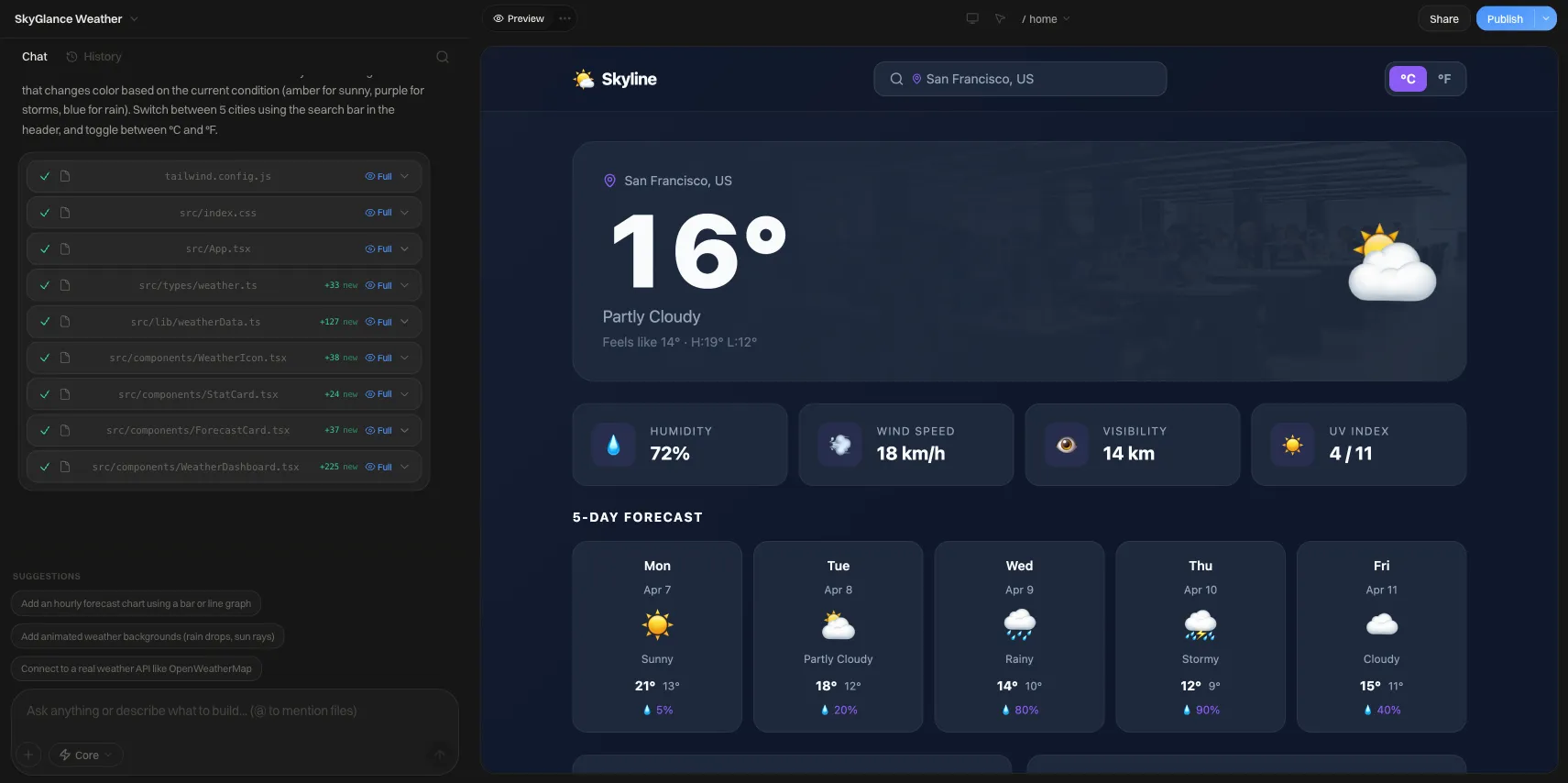
Lovable (lovable.dev) is a chat-based AI tool that writes real React code. You describe what you want, it generates the project, and you keep chatting to change it. It connects to a backend for logins and data, and it can sync code to GitHub. Most people use it to build web apps, internal tools and startup prototypes. Plenty also use it to build landing pages and small business sites.
Lovable pricing (September 2026)
| Lovable Free | Lovable Pro | Lovable Business | We.Inc Free | We.Inc Starter | |
|---|---|---|---|---|---|
| Price | $0 | $25/mo | $50/mo | $0 | $20/mo |
| AI allowance | 5 credits/day, max 30/mo | 100 credits/mo | 100 credits/mo, plus team features | None (AI from $20/mo) | 250 credits/mo |
| Custom domain | No | Yes | Yes | No (we.inc address) | Yes |
| Visual click-to-edit | Limited | Yes | Yes | Yes (template sites) | Yes |
| Code access | Yes | Yes | Yes | Yes | Yes |
| White label for agencies | No | No | No | Tailored quote (book a demo) | Tailored quote (book a demo) |
Credits are the thing to understand. Every change you ask for costs credits. When the AI gets something wrong and you ask it to fix it, that costs credits too. We covered this in detail in our post on Lovable's credit usage changes.
Is Lovable free? What the free plan really covers
Lovable's free plan is a genuine way to try the tool, not a way to run a business site. According to Lovable's plan documentation (checked October 24, 2026):
- Build credits: 5 a day, up to 30 a month. Daily credits expire at the end of each day, so you cannot save them up for one big session.
- Side grants: a small monthly allowance for Lovable Cloud (20 credits), in-app AI features (4 credits) and connectors (1 credit).
- Publishing: you can publish, but custom domains start on Pro.
- Code: GitHub sync is available, so you can keep what you built.
In practice, 5 credits a day is enough to generate a first draft and make a handful of changes. A full multi-page site with several rounds of corrections will usually push you to Pro. For plan-by-plan costs and credit tiers, see our Lovable pricing guide.
Is Lovable worth it? A quick decision guide
- Worth it: you are building a product, a booking tool, a members area or anything with logins and data, and the website is the front door to it.
- Worth it: you want React code you own and may hand to a developer later.
- Probably not worth it: you need a five-page site for a local business, you will not touch code, and you want a fixed monthly bill.
- Probably not worth it: you are an agency that needs to resell a builder under your own brand.
If you want a broader verdict on Lovable as a product (not just as a website builder), read our Lovable review.
What building a business site in Lovable is like
- Prompt the site. "A landing page for a plumbing company in Denver with a quote form." Lovable produces a modern, well-designed page quickly.
- Iterate in chat. Add pages, change colors, rewrite sections. Each message draws on credits.
- Wire up forms. A working contact form needs a backend or an integration. Lovable can do it, but you need to ask the right way.
- Publish. On a Lovable address, or a custom domain on a paid plan.
The first draft is usually impressive. Friction appears in the details a website builder normally handles for you: making the form email you, setting page titles, adding a blog, and making sure search engines can read every page.
Pros and cons
Pros
- Excellent first drafts. Modern design, clean layouts, working React code.
- Real code. You own it, can sync it to GitHub, and a developer can take over.
- Goes beyond websites. Logins, databases and dashboards when you need them.
- Active product. New features ship often.
Cons
- Small free plan. 30 credits a month at most.
- Credits burn on fixes. Debugging loops are the most common complaint in reviews.
- Developer-leaning. Backends, environment settings and deployment details surface quickly.
- SEO needs care. Single-page app output takes extra work to be fully crawlable.
- No white label. Agencies cannot resell it under their own brand.
Lovable vs We.Inc for a small business site
We.Inc is also a chat-to-build AI builder, so the honest comparison is about focus.
- Free plan. Build up to 3 sites from templates and publish them free on a we.inc address, no card. The free plan has no AI; building from one prompt and AI editing start on Starter at $20/mo (250 credits). Lovable's free plan does include a small AI allowance; We.Inc's does not.
- One-prompt sites. One sentence on We.Inc produces a complete multi-page business site with copy written for your trade and area, which you then edit by clicking, by chat, or in code.
- White label. Agencies can run We.Inc as their own branded builder; pricing is quoted on a demo. Lovable has no reseller option.
- Where Lovable wins. Complex apps, custom logic and developer workflows. If you are building software rather than a business site, Lovable is a strong choice.
Browse what a one-prompt site can start from: the Lucia Trattoria restaurant template, the Zenith Realty template or the Brightside Dental template.
More reading: Lovable alternatives, We.Inc vs Lovable, and the best free website builders for small business.
How to keep Lovable credits under control
If you do build a business site in Lovable, a few habits save a lot of credits.
- Write one detailed first prompt. Include every page, section, color, and your real copy. One good prompt costs less than ten small corrections.
- Batch your changes. Ask for five edits in one message instead of five messages.
- Stop the loop early. If the AI fails to fix the same bug twice, stop and describe the problem differently, or roll back to an earlier version, rather than asking again.
- Edit small text by hand. Use the visual editor or the code for typos and wording, which avoids spending credits on trivial changes.
- Check SEO before launch. Ask for page titles, meta descriptions and a sitemap, and make sure each page has its own URL.
Test the Lovable website builder yourself: a 20-minute checklist
We have not published hands-on test results here, so run this on Lovable's free plan and judge for yourself:
- Prompt a real site. Ask for a five-page business site for your own trade and town. Count how many credits the first draft and three edits use.
- Edit a headline without chat. Check whether you can change text by clicking it, or whether every change needs a prompt.
- Add a blog post. See whether there is a post editor or whether a new post means new code.
- Set a page title and meta description for each page and check they appear in the page source.
- Connect a custom domain and note which plan it needs (see Lovable's current pricing).
- View the page source of the published site and check whether your text is in the HTML or only appears after JavaScript runs.
Run the same checklist on any other builder you are considering, including We.Inc, and compare the notes.
Who should use Lovable for a website?
Lovable makes the most sense when the website is the front door to software: a startup landing page plus a product, a booking tool with custom logic, or a members area with a database. It also suits people comfortable reading code, since you can open the project and fix things directly. For a straightforward local business site, the credits and technical steps add cost without adding much that customers will notice.
Verdict
If you are a founder building an app, Lovable deserves its reputation. If you are a plumber, a dentist or a café owner who needs a website that ranks locally and takes enquiries, Lovable can do it, but you will pay in credits and in time spent on details a business website builder handles for you.
Start free with a template site; AI builds from one prompt on paid plans from $20/mo. On Starter, describe your business once and get a full site.
Sources
- Lovable pricing, checked September 2026
- Lovable on Trustpilot, checked September 2026
- We.Inc pricing, checked September 2026
Frequently asked questions
Is Lovable worth it for a website?
It is worth it if your website is the front of an app you plan to grow, or if you want real code a developer can take over. For a plain business site with pages, a contact form and a blog, most owners get the same result with less effort and a more predictable bill from a dedicated website builder.
Can you build a normal website with Lovable?
Yes. Lovable generates React code from a chat prompt, and a marketing site is well within its abilities. It is designed first as an app builder, though, so things a small business expects from a website builder, such as a visual page editor, a blog manager and simple SEO settings, are thinner or need prompting.
How much does Lovable cost?
As of September 2026, Lovable's free plan gives 5 credits a day, capped at 30 a month. Pro costs $25 a month with 100 monthly credits. Business is $50 a month with 100 monthly credits (checked September 2026). Each chat message that changes your project uses credits.
Is Lovable good for SEO?
Lovable builds single-page React apps. Out of the box, that can mean search engines see less content on first load than on a builder that serves ready HTML. You can fix this with prompting and settings, but it takes more know-how than a typical small business owner has.
What do users say about Lovable?
Lovable holds a 4.1 out of 5 rating on Trustpilot as of September 2026. Praise centers on how fast it turns an idea into working software. Complaints center on credits running out during bug-fixing loops and on billing.
Is We.Inc better than Lovable for a business website?
For a small business site, We.Inc is built for that job: on paid plans from $20 a month one prompt produces a multi-page business site you edit by clicking, the free plan publishes up to 3 template sites on a we.inc address without AI, and agencies can white-label it (pricing quoted on a demo). For custom software and complex apps, Lovable is the more developer-focused tool. See our full We.Inc vs Lovable comparison.
More in Blog
- Why Lovable Is Burning Through Your Credits in 2026 (and What to Do About It)
- Med Spa Website Design: Pages, Costs and a Template
- Mobile-First Website Design: A Practical How-To Guide
- Moving Company Website Design: Free Template & Tips
- Musician Website: What to Include and How to Build One in 2026
- Negative SEO: How to Protect Your Website From Attacks
- Neuromarketing Principles: What Holds Up and How to Use It
- No-Code Tools for Business: Apps, Rules, BI and Automation
Website builders for the businesses in this article
Alternatives mentioned in this article
Related guides and tools
Start building
Related guides
How we research, test and update this page: our editorial policy. We.Inc is our own product.
Product
Who It's For
- For Agencies
- For Freelancers
- For Hosting Providers
- For SaaS Platforms
- For Startups
- For Financial Services
- For Healthcare
Features
Resources
- Blog
- Help Center
- Free Business Tools
- Free UI Components
- Website Templates
- Template Collections
- Website Examples
- Guides
- Comparisons
- Alternatives
- Best Lists
- Reviews
- Pricing Guides
- Use Cases
- Glossary & Guides
- Integrations
- Developers
- Benchmark
- Windows App