
Launch your startup with the right website.
The fastest way to build a startup website is to describe your product, who it is for, and the one action you want visitors to take (join a waitlist, book a demo, sign up) to we.inc's AI, and it drafts the landing page, features, and pricing sections; Paid plans start at $20 a month on Starter. Building a site on We.Inc is free for every account, with no card needed.
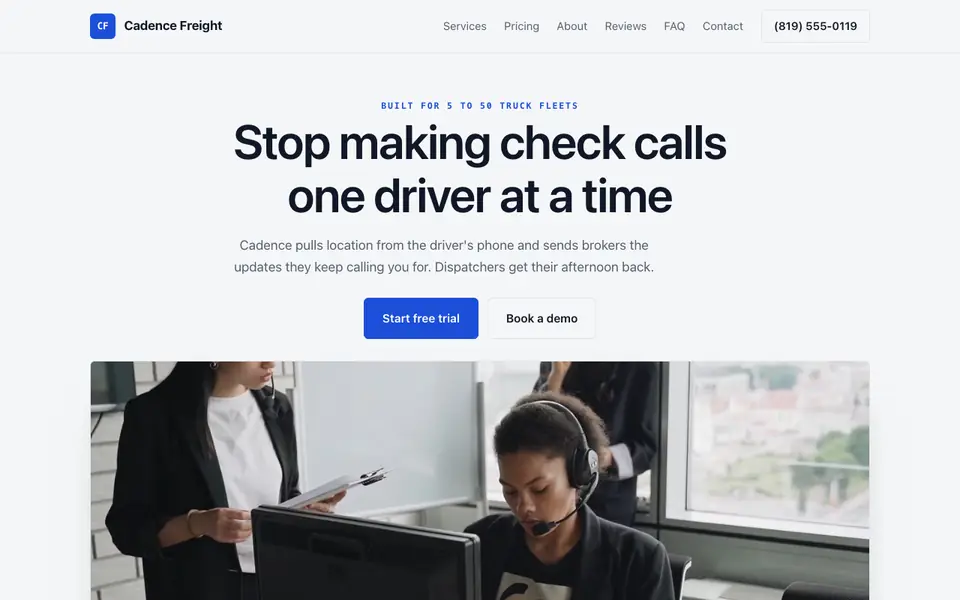
Build a startup website that explains what you do in one line, shows the product, and captures signups, then change it by chat as fast as your pitch changes.
Pages every startup website needs
- Landing Page: One clear headline that says what the product does and for whom, a product visual, and a single call to action. For an early startup this page is most of the website.
- Features / How It Works: Three to five concrete capabilities, ideally with screenshots, answer "what does it actually do" better than abstract benefit statements.
- Pricing: Even a simple "free during beta" or starting price reduces friction. Visitors who cannot find pricing often assume it is expensive and leave.
- Waitlist / Signup / Book a Demo: The whole point of the site. Pick one primary action and make every page lead to it.
- About / Team: Early users and investors want to know who is building it. A short founder story and real photos add credibility a logo alone cannot.
- Blog / Changelog: Shipping notes and short posts show momentum and give search engines something to index beyond one page.
Try this prompt
A website for an early-stage startup in Austin called Shiftly that helps restaurant managers build staff schedules in minutes, with a landing page, a how-it-works section with three steps, a simple pricing table with a free beta tier, a waitlist form, and a short founders section.
Cadence Freight
This is Cadence Freight, a startup business we described to the AI in a sentence. See the Cadence Freight example site.
Start from this design
Three designs that suit a startup website.
- Black & Violet SaaS Hero
- Triptych Mountain Waitlist Page
- Galaxy Investor Deck Title Slide
Attract users and investors with a professional site that showcases your product and vision.
A startup website designed around your actual services and prices, not a stock layout. Describe the business and the AI writes and builds every page.
Features designed for your industry
- Product Showcase: Display your product features and screenshots.
- Traction: Highlight metrics, press, and customer logos.
- Waitlist: Capture early adopter signups.
Perfect for:
- SaaS startups
- Tech startups
- Fintech
- E-commerce startups
- Mobile apps
Clarity beats cleverness
The most common startup site mistake is a headline that sounds impressive but does not say what the product is. Test it: if a stranger cannot tell you what you sell after five seconds, rewrite it. The AI can generate several headline options for you to compare.
Your site will change weekly, plan for it
Positioning, pricing, and features shift fast early on. Editing by chat ("change the headline to focus on restaurant managers, and add a testimonial section") is where an AI builder earns its keep compared with waiting on a designer.
Show the product, even if it is rough
A real screenshot or short demo video of the actual product builds more trust than polished illustrations. If the product is not built yet, say so honestly and lead with the waitlist.
we.inc builds the marketing site, not your product
we.inc is for your public website: landing page, features, pricing, blog, and forms. It does not host your app's user accounts, billing, or product backend. Use Stripe for payments and link out to your app for signups that need real accounts.
What it costs
Most startups need only a domain (about $10 to $20 a year) plus whatever tools they already use for email and payments, such as Stripe. Starter at $20 a month covers building and iterating a landing page with the AI; startups adding many feature pages, docs, or a regular blog may fit better on Pro.
Building your site is free, no card needed. Paid plans from $20 a month. Compare plans
Frequently asked questions
How much does a startup website cost on we.inc?
You can build your site free, with no card needed to start. Paid plans start at $20 a month for 250 credits, plus roughly $10 to $20 a year for your own domain.
Can I collect waitlist signups?
Yes. The AI can build a waitlist or contact form and send submissions to your email. If you already use an email tool like Mailchimp or ConvertKit, you can embed its signup form instead.
Can I take payments on my startup website?
Yes. Pricing buttons can open Stripe Checkout on your own Stripe account, or point to your own app's signup flow.
Can I change the site as my pitch changes?
Yes. On a paid plan you describe changes in plain English and the AI updates the pages, and you can also edit text directly. That makes frequent repositioning quick.
Can I use my own domain name?
Yes, on a paid plan: Starter and above include connecting your own domain, with SSL and hosting included. Building a site on We.Inc is free, with no card needed to start.
Related industries and website guides
- SaaS website landing page builder
- membership website builder
- ai & ml startups website builder
- cybersecurity companies website builder
- software development agencies website builder
- mobile app companies website builder
- startups website examples
- Best website builders for startups
Related website builders: Tech & Startups
- saas website builder
- membership website builder
- ai & ml startups website builder
- cybersecurity companies website builder
- software development agencies website builder
- mobile app companies website builder
Before you start
- startups website examples
- Best website builders for startups
- how to make a website
- free website builder
- AI website builder
Product
Who It's For
- For Agencies
- For Freelancers
- For Hosting Providers
- For SaaS Platforms
- For Startups
- For Financial Services
- For Healthcare
Features
Resources
- Blog
- Help Center
- Free Business Tools
- Free UI Components
- Website Templates
- Template Collections
- Website Examples
- Guides
- Comparisons
- Alternatives
- Best Lists
- Reviews
- Pricing Guides
- Use Cases
- Glossary & Guides
- Integrations
- Developers
- Benchmark
- Windows App