
Ship the landing page before the product is done
A SaaS website needs to explain the problem you solve in one line, show how the product works, list pricing, and capture signups or demo requests. With we.inc you describe your product and the AI writes and builds the landing page, feature pages, and pricing page in minutes, or you can publish a free template with no AI. AI building starts on Starter at $20 a month, and signups connect to your own app or waitlist tool.
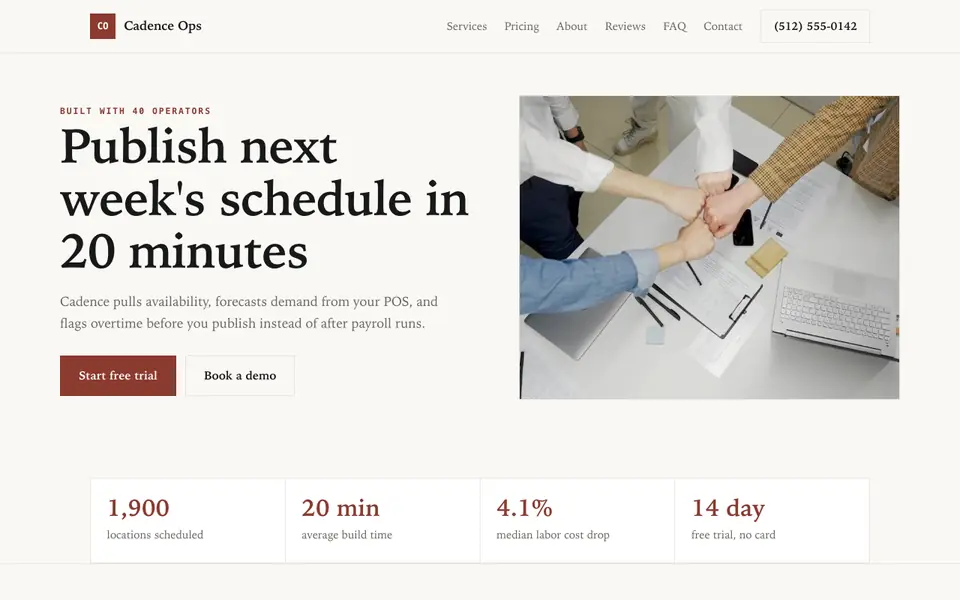
Ship your SaaS website before the product is done. Describe what you're building and the AI writes the landing page, features, pricing, and waitlist in minutes.
Pages every saas website needs
- Home / Landing: The problem, who it's for, and a single call to action (join waitlist, start trial, book demo). Visitors decide in seconds whether to keep reading.
- Features: What the product does, shown with screenshots or short visuals. Tie each feature to a benefit the customer cares about.
- Pricing: Plans, what's included, and a clear starting price. Even early on, a pricing page answers the question every buyer has.
- Waitlist / Demo Request: A short form or a link to your signup. This is how you validate demand before and after launch.
- About: Who is building it and why. Early customers bet on the team as much as the product.
- Changelog / Blog: Shows the product is alive and improving, and gives you content for search and launch posts.
Try this prompt
A website for a B2B SaaS startup in Boston called Shiftly that helps restaurant managers build weekly staff schedules in minutes. Include a landing page with a waitlist form, a features page with three core features, a pricing page with three tiers, an about page for our two founders, and a changelog. Modern, clean, blue and white.
A real saas site, not a template
This is Cadence Ops, a saas business we described to the AI in a sentence. See the Cadence Ops example site.
Start from this design
Three designs that suit a saas website.
- Dark DevOps Release Platform
- Black & Violet SaaS Hero
- Dark SaaS Pricing Table Section
About saas website design on we.inc
Waitlists, demos, and first customers all start with a page that explains the problem you solve. Launch it today, wire up signups, and validate while your competitors are still configuring their CMS.
Skip the saas web design brief and the six week wait. Tell the AI about the business in a sentence and it builds the whole site, ready to edit.
Features designed for your industry
- Pricing Table Pages: Tiered plans with feature comparisons laid out the way SaaS buyers expect to evaluate them.
- Product Screenshot Showcases: Feature sections built around your UI so visitors see the product before requesting access.
- Waitlist and Demo Capture: Signup and demo request forms that start collecting your pipeline from the day you launch.
Who this saas website design suits
- Pre-launch waitlist pages
- MVP marketing sites
- Product-led growth pages
- Niche vertical SaaS
What makes a saas website work
One page, one call to action
Early-stage SaaS sites convert best when every page points to the same next step, whether that is joining a waitlist, starting a trial, or booking a demo. Pick one and repeat it.
Say the problem in your customer's words
Use the language your customers use when they describe the pain. 'Stop rebuilding the schedule every Sunday night' lands harder than 'AI-powered workforce optimization'.
Launch the site before the product
A landing page with a waitlist lets you test positioning and collect early users while you build. The AI can rewrite the headline and features quickly as you learn what resonates.
We.inc builds the marketing site, not your app's billing or login
There is no built-in user accounts, subscription billing, or product dashboard on the marketing site. Link your signup and login buttons to your app, and use a tool like Stripe for subscriptions and a waitlist or email tool for early signups.
What it costs
For a marketing site, the main ongoing costs are your domain (about $10 to $20 a year) and any waitlist or email tool you link. A free template gets a landing page live the same day; once you want the AI rewriting copy and adding feature and changelog pages as you ship, Starter at $20 a month suits most early-stage teams, and a larger multi-page site may fit Pro.
Free for 3 template sites, without AI; AI building from $20 a month. Compare plans
Frequently asked questions
How much does a SaaS website cost?
You can publish a free we.inc template on a we.inc address with no AI, up to three sites. AI building starts on Starter at $20 a month for 250 credits. A domain is about $10 to $20 a year.
Can I collect waitlist signups?
Yes. The AI builds a signup form, and you can connect it to your email or waitlist tool, or link to your own app's signup.
Does we.inc handle subscriptions and user logins?
Not for your product. The marketing site links to your app for login and to a billing tool like Stripe for subscriptions.
Can I use my own domain name?
Yes, on a paid plan (from Starter at $20/mo). You can connect a custom domain, and SSL is included. Free sites publish on a we.inc address.
How fast can I get a landing page live?
A template can be published right away, and the AI can build a custom landing page from a description in minutes.
Related industries and website guides
- startup website builder
- membership website builder
- ai & ml startups website builder
- cybersecurity companies website builder
- software development agencies website builder
- mobile app companies website builder
- saas startups website examples
- how to make a website
Related website builders: Tech & Startups
- startup website builder
- membership website builder
- ai & ml startups website builder
- cybersecurity companies website builder
- software development agencies website builder
- mobile app companies website builder
Before you start
Product
Who It's For
- For Agencies
- For Freelancers
- For Hosting Providers
- For SaaS Platforms
- For Startups
- For Financial Services
- For Healthcare
Features
Resources
- Blog
- Help Center
- Free Business Tools
- Free UI Components
- Website Templates
- Template Collections
- Website Examples
- Guides
- Comparisons
- Alternatives
- Best Lists
- Reviews
- Pricing Guides
- Use Cases
- Glossary & Guides
- Integrations
- Developers
- Benchmark
- Windows App