BlogOn-Page SEO Checklist: On-Site & On Page Optimization
Guides
On-Page SEO Checklist: On-Site & On Page Optimization
A 25-point on-page SEO checklist for 2026 with the exact numbers: title length, meta description length, Core Web Vitals thresholds, image weight, internal links and schema. Copy it, run it on every page.
Umair Ali Sadaqat|Last updated September 28, 2026|12 min read
We.Inc is our own product. How we research and update this page
On-Page SEO Checklist: On-Site & On Page Optimization
A 25-point on-page SEO checklist for 2026 with the exact numbers: title length, meta description length, Core Web Vitals thresholds, image weight, internal links and schema. Copy it, run it on every page.
On-page SEO (also called on-site SEO or on page optimization) is everything you control on the page itself: title tag, meta description, URL, headings, copy, images, internal links, schema and speed. This on page SEO checklist gives 25 numbered checks with the exact limits Google uses in 2026; the first eight matter most.
TL;DR: the 8 checks that move rankings
The page matches what the top 5 results are (a list, a tool, a guide or a product page).
The title tag is unique, about 50 to 60 characters, main keyword near the front.
The first 100 words answer the search directly.
One H1, and H2s that read like the questions people ask.
At least 3 internal links point to the page from related pages, with descriptive anchor text.
Largest Contentful Paint under 2.5 s, INP under 200 ms, CLS under 0.1 on mobile.
Every image has alt text and weighs under about 150 KB.
The page has a visible last-updated date and schema that matches it.
Business-intent to page mapping
Before any check, decide which page should answer which search. Most small-business sites lose rankings because one page tries to rank for everything, or three pages quietly compete for the same thing.
What the customer types
Intent
The page that should answer
Must show
"[service] in [town]"
Hire someone nearby
That service's own page
Service, area, price range or how pricing works, call button
"[your business name]"
Find you
Home page
Name, phone, address or area, hours
"how much does [service] cost"
Research
A pricing or FAQ section
Honest ranges and what changes the price
"[problem] fix"
Urgent help
Service page with an emergency line
Response hours, phone, what happens next
Titles, headings and indexability
Checks 3 to 8 and 22 to 23 above cover these in detail. The short version: one unique title per page with the main phrase near the start, one H1 that matches it, H2s that read like the questions customers ask, a self-referencing canonical and no stray noindex. Confirm indexability with URL Inspection in Google Search Console rather than assuming.
Useful service details and original evidence
Google's guidance on creating helpful, people-first content asks whether a page gives original information and first-hand expertise. For a service business, that is usually simple and specific:
What exactly is included, and what is not.
Where you work, listed by town or area.
How pricing works, with a range if you publish one.
Your own photos of real jobs, with a caption saying what and where.
Licences, insurance or certifications you actually hold.
Do not borrow reviews, figures or awards from anywhere. If you do not have evidence yet, leave that section out.
Internal links, mobile usability and structured-data limits
Internal links: every service page should be linked from the home page and from at least two related pages, with anchor text naming the service.
Mobile: open the page on your own phone. Tap the phone number, fill the form, and check nothing needs sideways scrolling.
Structured data limits: mark up only what a visitor can see. Google's structured data general guidelines warn that markup describing hidden or misleading content can lead to a manual action, and eligibility never guarantees a rich result.
Printable checklist plus a grader walkthrough
Labelled demonstration. The filled worksheet below uses a fictional service page, "Water heater repair" on the Northside Plumbing example site, to show how to fill it in. The pass or fail marks are illustrations of the method, not results from a real audit.
Check
Target
Demonstration entry
Pass?
Intent
Service page, like the top results
Service page
Pass
Title
Unique, about 50 to 60 characters
"Water Heater Repair in [Town], Northside Plumbing"
Pass
H1
One, matches title
"Water heater repair in [Town]"
Pass
Answer early
Price range and response time in first 100 words
Missing response time
Fail, add it
Evidence
Own photos, licence line
Stock photo still in place
Fail, replace
Internal links in
3 or more
Home page only
Fail, add 2
Mobile
Tap-to-call works
Works
Pass
Schema
Matches visible content
LocalBusiness on home only
Pass
Blank printable copy:
`` ON-PAGE CHECK Page URL: ________________________ Target search: _______________ [ ] Intent: same page type as the top results Notes: ____________________ [ ] Title unique, ~50-60 chars, phrase near start [ ] One H1 that matches the title [ ] Answer (price range / area / next step) in first 100 words [ ] Own photos and real evidence only; nothing borrowed [ ] 3+ internal links in, descriptive anchors [ ] Works on a phone: tap-to-call, form, no sideways scroll [ ] Canonical self-referencing, not noindexed (URL Inspection) [ ] Schema only for visible content [ ] Last-updated date honest Checked by: ________ Date: ________ Re-check on: ________ ``
Grader walkthrough. Paste the page address into the free website grader. It checks basics such as the title, description and headings; copy anything it flags into the Notes column above, fix it, then run the grader again. The grader does not judge intent, evidence or usefulness, so the first five rows of the worksheet still need a person.
On page SEO checklist: the 25 on page optimization checks
Search intent match. Target: Same page type as the top 5 results. Verify: Google the keyword in a private window.
One primary keyword per page. Target: No other page on your site targets it. Verify: site:yourdomain.com "keyword".
Title tag. Target: 50 to 60 characters, under 580 px, keyword first. Verify: Meta tag generator preview.
Meta description. Target: 140 to 155 characters, states the benefit. Verify: Same tool.
URL slug. Target: Short, lowercase, hyphens, no dates. Verify: Read it aloud.
H1. Target: Exactly one, close to the title. Verify: View source, search for h1.
H2 and H3 structure. Target: Logical outline, no skipped levels. Verify: Browser outline extension.
Direct answer. Target: Question answered in the first 100 words. Verify: Read the opening.
Depth. Target: Covers the subtopics the top results cover. Verify: Compare H2s of the top 3.
Original value. Target: A number, example or opinion the others lack. Verify: Ask "what would I screenshot?".
Keyword placement. Target: In title, H1, first paragraph, one H2, URL. Verify: Ctrl+F.
Related terms. Target: Natural synonyms and entities. Verify: People Also Ask box.
Internal links in. Target: 3 or more from related pages. Verify: Search Console, Links report.
Internal links out. Target: 2 to 5 to deeper pages, descriptive anchors. Verify: No "click here".
External links. Target: 1 to 3 to primary sources. Verify: Check they are not 404.
Image alt text. Target: Describes the image, keyword only if true. Verify: Accessibility checker.
Image weight. Target: WebP or AVIF, under about 150 KB, width and height set. Verify: PageSpeed Insights.
LCP. Target: 2.5 s or faster at the 75th percentile. Verify: PageSpeed Insights, field data.
INP. Target: 200 ms or faster. Verify: Same.
CLS. Target: 0.1 or lower. Verify: Same.
Mobile layout. Target: No horizontal scroll, tap targets 48 px. Verify: Your phone.
Canonical tag. Target: Self-referencing on the preferred URL. Verify: View source.
Indexable. Target: No noindex, not blocked in robots.txt. Verify: URL Inspection in Search Console.
Schema. Target: Article, Product, FAQPage or LocalBusiness to match the page. Verify: Rich Results Test.
Freshness. Target: Visible date, updated when facts change. Verify: Read the byline.
Checks 1 to 2: intent and keyword
Intent beats everything. If the top five results for "on page seo checklist" are all numbered lists, a 3,000-word essay will not outrank them however well it is optimized. Search the keyword, note the page type, the format (list, table, tool, video) and the angle (beginner, 2026, template) and match all three.
One page, one primary keyword. Two pages chasing the same query split the signals and Google tends to rank neither. If you find a duplicate, merge the weaker page into the stronger one and redirect it.
Checks 3 to 8: the head of the page
Title tag. Google shows about 580 pixels, which is 50 to 60 characters for most titles. Put the keyword first, then the reason to click: a number, a year or a result. "On-Page SEO Checklist (2026): 25 Checks With Exact Limits" works; "Home | Company Name" does not.
Meta description. Around 140 to 155 characters. Google rewrites it on a large share of queries, but a good one still lifts click-through when it is used. Say who the page is for and what they get.
URL. /on-page-seo-checklist is better than /blog/2026/09/the-ultimate-guide-to-on-page-seo-for-beginners. Leave dates out so you can refresh the page without breaking the link.
Headings. One H1. H2s that could stand alone as answers ("How long should a title tag be?") because that is how Google and AI answers lift passages.
Direct answer. Give the answer in the first two or three sentences, then earn the rest of the scroll. This is the single cheapest change on most pages.
Checks 9 to 15: content and links
Open the top three results and list their H2s. Anything all three cover, you must cover. Then add one thing none of them have: a real example, your own numbers, a template or a tool. That is what earns links and citations.
Internal links are the most under-used lever on small sites. A page with no internal links pointing at it looks unimportant to Google no matter how good it is. Link to it from your highest-traffic pages with anchor text that describes it.
Checks 16 to 21: images and speed
Google's Core Web Vitals thresholds for a "good" page, measured at the 75th percentile of real visits:
Metric
Good
Needs improvement
Poor
Largest Contentful Paint (LCP)
2.5 s or less
2.5 to 4.0 s
Over 4.0 s
Interaction to Next Paint (INP)
200 ms or less
200 to 500 ms
Over 500 ms
Cumulative Layout Shift (CLS)
0.1 or less
0.1 to 0.25
Over 0.25
The usual fixes: serve images as WebP or AVIF, set width and height so nothing jumps, lazy-load anything below the fold but never the hero image, and cut third-party scripts you do not need. For sizing images for social shares at the same time, see the social media image sizes guide.
Checks 22 to 25: technical and freshness
A self-referencing canonical tells Google which URL to rank when the same page is reachable with tracking parameters. Check the page is indexable with the URL Inspection tool in Search Console, not by assuming.
Add schema that matches what is visible on the page: Article for posts, FAQPage when the page shows questions and answers, Product for products, LocalBusiness for a local service. Schema that describes content the visitor cannot see can earn a manual action.
Finally, show a last-updated date and keep it honest. Pages with prices, statistics or "best of" lists lose rankings when they go stale.
On-page SEO checklist template (copy this)
`` PAGE: ______________________ KEYWORD: ______________________ [ ] Intent matches top 5 (type: list / guide / tool / product) [ ] Title 50-60 chars, keyword first [ ] Meta description 140-155 chars [ ] Short URL, no date [ ] One H1, H2s as questions [ ] Answer in first 100 words [ ] Covers every H2 the top 3 share + 1 unique thing [ ] 3+ internal links in, 2-5 out, descriptive anchors [ ] Alt text on every image, images < 150 KB [ ] LCP < 2.5 s, INP < 200 ms, CLS < 0.1 (mobile) [ ] Self-canonical, indexable [ ] Schema matches visible content [ ] Last-updated date visible ``
How to run an on-page SEO audit (step by step)
An on-site SEO checklist is only useful if you run it the same way every time. This is the process we use, and it works for one page or fifty.
Pick the pages that matter. Open Google Search Console, go to Performance, and sort pages by impressions. Start with pages that get impressions but rank between positions 8 and 20: they are close enough that on-page fixes can move them.
Write down the target query for each page. Use the query Search Console already shows the page ranking for, not the one you wish it ranked for.
Check intent against the live results. Search the query in a private window and note what the top five results are (list, guide, tool, product page). If your page is a different type, fix that before anything else.
Run the checklist top to bottom. Copy the template above into a spreadsheet, one row per page, and mark each check pass or fail. View the page source to confirm the title, meta description, canonical and headings are in the HTML.
Test speed on mobile. Run the URL through PageSpeed Insights and record LCP, INP and CLS from the field data if it is available.
Fix in order of impact. Intent and content gaps first, then title and meta description, then internal links, then images and speed.
Request indexing and log the date. Use URL Inspection in Search Console after each change, and note what you changed and when.
Re-check after four weeks. Compare clicks, impressions and average position for the same query. Keep what worked, and move on to the next page.
Tip: audit your most important templates (home, service, product, blog post) once each. A fix to a template fixes every page that uses it.
What is on-page SEO?
On-page SEO is the work you do on a single page so search engines understand it and rank it: matching search intent, writing the title tag and meta description, structuring headings, answering the question early, adding internal links, describing images, marking up schema and keeping the page fast on mobile.
Is on-page SEO the same as on-site SEO?
In practice, yes. Some people use "on-site" to include site-wide items like sitemaps, robots.txt and site structure, while "on-page" means the individual page. This checklist covers both: checks 22 to 25 are the site-wide ones, and the rest apply to every single page you publish.
How often should I run an on-page SEO checklist?
Run it on every new page before it goes live, then on your most important pages every few months, or whenever traffic to one drops in Search Console. Re-check pages with prices, dates or statistics at least once a year, because stale facts lose rankings over time.
What is the difference between on-page and off-page SEO?
On-page SEO is what you control on your own site: content, titles, headings, links, images, schema and speed. Off-page SEO is mostly links and mentions from other websites. Fix on-page first, because links pointing at a weak page do less. For research tools, see how an SEO tool compares to an all-in-one website platform.
Building a new page? Start with the checklist already done
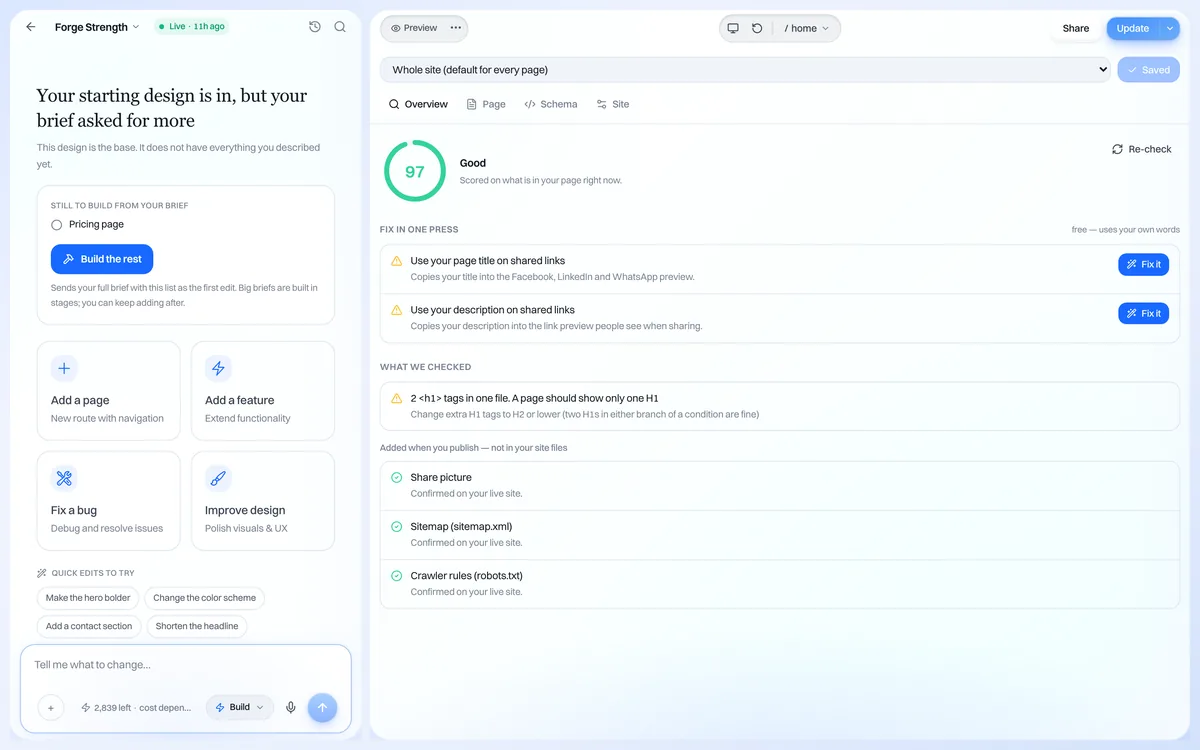
Some of this list is set once, at build time. On We.Inc, each page gets its own title and meta description in the SEO panel, and sites publish with a sitemap and HTML that search engines can read. You still own checks 1, 8 and 10, the parts no tool can do for you.
Start building your business website.Create your account and pick one of the business website templates. The free plan publishes up to 3 template sites on a we.inc address (no AI credits, no custom domain). AI building and your own domain start on Starter at $20 a month; see pricing. Planning a budget too? Try the website cost calculator.
For a small business deciding where to build, our comparison of the best free website builders for small business scores each one on the SEO controls it gives you on the free plan.
Frequently asked questions
Which page should target which search?
Map each thing a customer might search to one page: the service plus town to that service page, your business name to the home page, and questions to a guide or FAQ. If two pages chase the same search, merge them or change one page's focus.
Can structured data get me rich results?
It makes a page eligible, it does not guarantee anything. Google's structured data guidelines say the markup must describe content visible on the page, and Google decides whether to show a rich result. Several FAQ and how-to rich results are now shown only for limited kinds of sites, so check Google's current documentation before relying on them.
What does on-page SEO include?
Everything on the page you control: the title tag, meta description, URL, headings, the body copy and how well it answers the search, images and their alt text, internal links, structured data (schema), canonical tag, page speed and mobile layout. Off-page SEO is what happens elsewhere, mainly backlinks and brand mentions.
What are the most important on-page SEO checks?
In order of impact: match the search intent, write a unique title under about 60 characters with the main keyword near the start, answer the question in the first 100 words, use one H1 and logical H2s, link to the page from related pages on your site, and keep Largest Contentful Paint under 2.5 seconds on mobile.
What is the 80/20 rule in SEO?
Roughly 20% of the work produces 80% of the result. For on-page SEO that 20% is intent match, the title tag, a direct answer near the top and internal links. Fix those on your ten highest-impression pages in Google Search Console before touching anything else.
How long should a title tag and meta description be in 2026?
Google truncates by pixel width, not characters. Keep titles to about 50 to 60 characters (under 580 pixels) and meta descriptions to about 140 to 155 characters. Google rewrites many descriptions anyway, so write one that summarises the page honestly.
How often should I re-run an on-page SEO checklist?
Once when a page is published, again whenever it drops in Search Console, and at least once a year for pages that carry dates, prices or statistics. Update the visible last-updated date only when you actually change the content.
Does on-page SEO help with AI Overviews and other AI search answers?
Yes. AI answers quote passages that state a fact plainly in one or two sentences, sit under a clear heading and are backed by a number or source. A direct answer at the top, question-style H2s and FAQ sections make a page easier to cite.
How we research, test and update this page: our editorial policy. We.Inc is our own product.
We.Inc is an AI-powered website builder you can resell under your own brand. Launch a branded client dashboard, bill on Stripe Connect, and deliver AI-generated websites in minutes. White-label plans start at $99 a month for 25 client sites, with a 7-day free trial and no per-site fees.
Product
AI Website Builder: Describe a site in plain English; it's live in minutes
 Umair Ali Sadaqat|Last updated September 28, 2026|12 min read