
Stop leaking leads. Get a better website.
The best website builder for plumbers is one that puts a tap-to-call number on every screen for burst pipes, names the towns you cover and takes non-urgent jobs through a quote form. we.inc's AI builds that site from a few lines about what you fix and where, and paid plans start at $20 a month.
Build a plumber website that lists your services, names the towns you cover, and puts your phone number where a homeowner with a leak can tap it in one second.
Pages every plumber website needs
- Services: Separate sections for drain cleaning, water heaters, leak repair, repiping, and sewer work match what people actually type into Google, which is the job, not "plumber" in general.
- Emergency / 24-Hour Service: If you take after-hours calls, a page and a sticky tap-to-call button that say so plainly win the burst-pipe customer, who calls the first plumber who looks available right now.
- Service Area: List the cities, neighborhoods, or ZIP codes you cover. Plumbing is local, and this filters out calls from outside your radius before you drive there.
- Request a Quote: A short form (problem, address, photo if possible, best time to call) catches the homeowner who is shopping at night and does not want to phone yet.
- Licensing & Reviews: Your license number, insurance, and real reviews answer the two questions every homeowner has before letting a stranger into the house: are you legit, and do you show up.
- About: A photo of you or your crew and your truck makes a small shop feel trustworthy, and it is often the tiebreaker between two plumbers with similar reviews.
Try this prompt
A website for a family-owned plumbing company in Phoenix called Desert Flow Plumbing, offering drain cleaning, water heater repair and installation, and 24-hour emergency service across Phoenix, Tempe, and Mesa, with a tap-to-call button, a quote request form, and our Arizona license number in the footer.
What should a plumber's site tell someone with a leak right now?
Your phone number, whether you are available now and what they can do while they wait. A short box on the home page explaining how to find and close the main water valve is useful and shows you know what you are doing. Make the number tap-to-call on phones and keep emergency hours accurate.
How do I explain call-out fees and pricing?
Say how you charge: by the hour, by the job or with a call-out fee, and what the first visit includes. Customers hate surprises more than they hate prices, so explaining when you quote, before any work starts, removes the main reason people hesitate to call.
Which website builder should a plumber use?
A plumbing website earns its keep by making the phone ring from Google, so judge each option on three things: whether the call button is always one tap away on a phone, whether you can have a page per service and per town, and who controls the site if you stop paying someone. The common routes are a trade marketing agency, a lead-generation network, a general builder, or a site you build yourself.
| Option | Good for | Watch out for |
|---|---|---|
| Home-service marketing agencies | Done-for-you sites plus ads and review management for a shop that has the budget and no time. | Monthly contracts, and some agencies keep ownership of the domain or the site when you leave; ask before you sign. |
| Lead networks such as Angi or Thumbtack | Jobs arrive without building anything, which helps a new business fill its calendar. | You pay per lead or per job and compete with other plumbers on the same request; it does not build your own name. |
| Wix, Squarespace or GoDaddy | Cheap and quick if you are happy writing the service and area pages yourself. | Templates rarely include a sticky call bar or emergency page, so you add and test those by hand. |
| we.inc | Name your services, towns and emergency hours in a sentence or two, and you get separate service and area pages, a tap-to-call header and a quote form ready to edit. | It does not dispatch jobs, take payments on site visits or manage technicians; keep your field-service app for that. |
Your licence number, the towns you cover and whether you answer at night are what separate you from the lead networks, so make them visible on every page, not just the about page.
Still weighing Jobber, Housecall Pro and plain builders for a plumbing business? Read our comparison of website builders for plumbers.
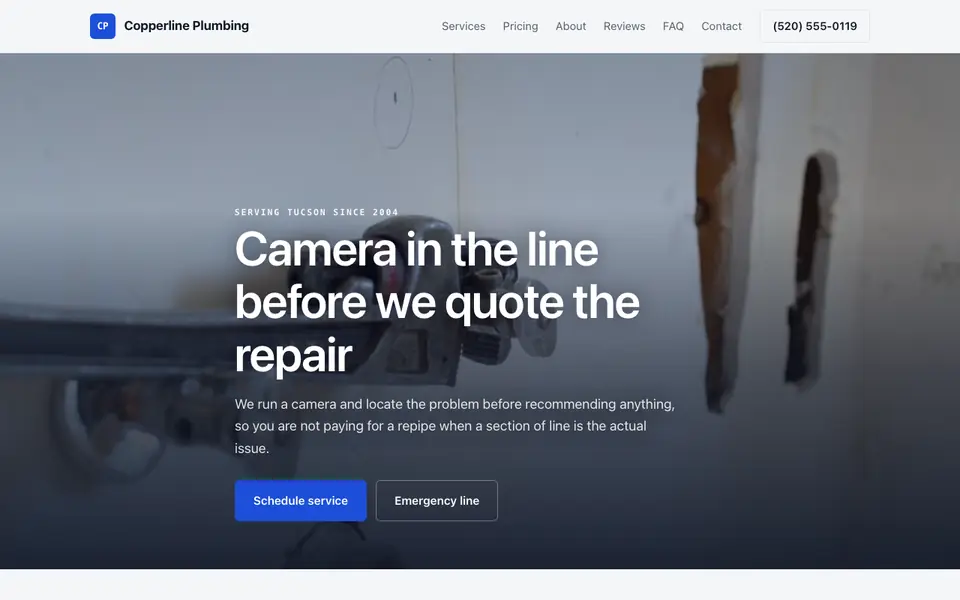
Copperline Plumbing
This is Copperline Plumbing, a plumber business we described to the AI in a sentence. See the Copperline Plumbing example site.
Start from this design
Three designs that suit a plumber website.
- Plumbing, HVAC & Electrical Company
- EV Charger and Panel Electrician
- All-in-One Property Maintenance
Attract more service calls with a professional site that builds trust and makes booking easy.
Most plumber sites are a template with the name swapped in. Describe what you do and the AI designs and writes a plumber website around that business instead.
Features designed for your industry
- Services: Display your plumbing services from repairs to installations.
- Service Areas: Show the areas you serve with local SEO.
- Emergency Service: Make it easy for customers to call for emergencies.
Perfect for:
- Residential plumbers
- Commercial plumbers
- Emergency plumbers
- Drain specialists
- Water heater installers
The phone number is the conversion
Most plumbing leads are urgent and arrive on a phone. Put a tap-to-call number in the header on every page, not just the contact page, and repeat it next to your emergency service copy. A beautiful site that hides the number loses the job to the next listing.
One page per service beats one long list
"Water heater repair in Tempe" and "drain cleaning in Mesa" are different searches. A short, genuinely specific section or page for each main service gives Google and the customer a clear match, instead of one generic paragraph that tries to cover everything.
Show your license where people can see it
Many states license plumbers and some expect the license number on advertising. Check your state's rules and put the number in the footer or on your About page next to your insurance, so a cautious homeowner can verify you before calling.
we.inc does not dispatch jobs or take payments
The AI builds your pages, quote forms, and tap-to-call buttons, but there is no built-in scheduling, dispatch, or invoicing. Most plumbers keep that in a field service tool like Jobber or Housecall Pro and link or embed its booking page on the site.
What it costs
A domain runs about $10 to $20 a year, and most plumbers already pay for a field service tool (Jobber, Housecall Pro, ServiceTitan) for scheduling and invoicing, which we.inc does not replace. For a single-truck or small-crew shop, Starter at $20 a month is usually enough to have the AI write and keep editing the site; companies covering many towns with a page per area may fit better on Pro.
Building your site is free, no card needed. Paid plans from $20 a month. Compare plans
Frequently asked questions
How much does a plumber website cost on we.inc?
Building a site on We.Inc is free, with no card needed to start. Paid plans start at $20 a month for 250 credits, plus roughly $10 to $20 a year for your own domain.
Can customers book a plumber through the website?
The AI can build a quote or service request form that emails you the problem, address, and best time to call. There is no built-in dispatch calendar or payment system, so if you want true online booking, link or embed the booking page from Jobber, Housecall Pro, or a similar tool.
What pages does a plumbing website need?
At minimum: services broken out by job, a service area page, a quote request form, and a clear phone number on every page. Add an emergency service page if you take after-hours calls, and your license number and reviews for trust.
Can I use my own domain name?
Yes, on a paid plan: Starter and above include connecting your own domain, with SSL and hosting included. Building a site on We.Inc is free, with no card needed to start.
Will a plumber website help me show up on Google Maps?
The map results are driven mostly by your Google Business Profile, its reviews, and how consistently your name, address, and phone appear online. A website with the same details and clear service and area pages supports that. We.inc handles the site; the profile and reviews are on you.
How to find clients for plumbing?
Most plumbing clients search when something breaks, so be easy to find locally: complete your Google Business Profile, collect reviews after every job, and have a website with your number, services, service area and emergency hours. Word of mouth and local contractors still matter. Building a site on We.Inc is free, with no card needed to start.
Plumber website designs, compared on the service call
A plumbing site has to get a call from someone with a problem and show the price before the truck arrives. Below, five sample sites and a template, each read for drain cleaning, a camera inspection and a water heater replacement.
How these were picked
Plumbing, HVAC, drainage, septic and water treatment samples from our library plus the Summit Trades template. Copperline Plumbing is the demonstration; its prices, crew and reviews are made up. Checked 27 September 2026. Every design here is from the We.Inc library and is labelled as a sample or template. None is a customer site, and no entry claims results.
1. Copperline Plumbing
Sample site built by our AI (made-up business). Open it
Task: A homeowner with a slow drain or a dead water heater.
Design choice: Flat rates on the page: drain cleaning $149, camera inspection $225, water heater from $1,650. "Schedule service" and an emergency line up top.
Limitation: Scheduling is a phone call. Link your booking tool or add a request form with a photo upload.
2. Northstar Heating and Air
Sample site built by our AI (made-up business). Open it
Task: A plumbing and heating shop with emergencies.
Design choice: "Call for service" first, a separate emergency after-hours call, and "How fast can you get here?" in the FAQ.
Limitation: Heating and cooling only.
3. Stonebrook Drainage
Sample site built by our AI (made-up business). Open it
Task: A wet yard or basement.
Design choice: "Get an assessment" with French drains, sump pumps and crawl space drainage.
Limitation: Outdoor drainage; no fixtures or water heaters.
4. Halloran Septic & Pumping
Sample site built by our AI (made-up business). Open it
Task: A rural customer due for pumping.
Design choice: "Schedule pumping" and an FAQ on warning signs of a failing drainfield.
Limitation: Septic only.
5. Clearline Water Systems
Sample site built by our AI (made-up business). Open it
Task: A homeowner with hard water.
Design choice: "Free water test" first, with sizing and install time in the FAQ.
Limitation: Water treatment only.
6. Plumbing, HVAC & Electrical Company
Business template from the We.Inc library (demo site: Summit Trades). Open it
Task: A shop that does plumbing, HVAC and electrical.
Design choice: Summit Trades: "Your home's systems, in expert hands", with Services, Service Area and Reviews.
Limitation: Placeholder reviews; replace with real ones or remove.
Task comparison
| Design | Drain cleaning | Camera inspection and locate | Water heater replacement |
|---|---|---|---|
| Copperline Plumbing | $149 | $225, video sent to you | From $1,650 |
| Northstar Heating and Air | No | No | No |
| Stonebrook Drainage | Yard and basement | Assessment | No |
| Halloran Septic & Pumping | No | Lid locating | No |
| Clearline Water Systems | No | Water test | No |
| Plumbing, HVAC & Electrical Company | You add it | You add it | You add it |
Walkthrough: a homeowner with a recurring clog on the Copperline sample
- They land on "Camera in the line before we quote the repair" with "Schedule service" and "Emergency line".
- "Repairs, replacements and repipes" shows drain cleaning at $149 and a camera inspection at $225.
- "Plumbing questions" explains when cabling is not enough and whether estimates are free.
- "Get a plumber out" closes the page. Edit prompt: "Add a service request form with address, problem, photo upload and preferred time, and a service area list."
Copyable build brief
A website for [company], plumbers in [area]. Services with flat rates or from-prices: drains, camera inspection, water heaters, leaks, repipes. Emergency hours and after-hours fee. Service area by town. Licence and warranty details. A service request form with photo upload. A click-to-call button on every phone screen.
What We.Inc does and does not do here
| Dispatch and job scheduling | Not built in. Link your field service software's booking page. |
| Service area pages | Yes. Ask the AI for one page per town you cover, then check each one reads as useful. |
| Publishing for free | New We.Inc accounts can build a site free, with no card needed to start. No AI credits and no custom domain. |
| Having the AI write and change the site | Paid plans: Starter $20/mo, Pro $49/mo, Max $99/mo. You describe the business, then edit by clicking or by asking in chat. |
| Your own domain | Paid plans only. |
| Taking payments | Through your own Stripe account, so the money goes to you. We.Inc does not hold funds. |
| Forms | The AI builds contact and request forms. A synced booking calendar is not built in: link the scheduling tool you already use. |
What to adapt
- Flat prices before the truck rolls.
- Emergency fee stated.
- Service area by town.
What not to copy
- The sample prices, crew size and reviews.
- Hiding the diagnostic fee.
Start from a suitable design
Start building this plumbing website. Or check costs with the website cost calculator, test a current site with the website grader, and see pricing.
Browse the templates: Plumbing website templates
In our 2026 measurement of 52 plumbers websites, 12% had no search description, 21% had no structured data and 23% had no tap-to-call link. See the full study.
Related industries and website guides
- freelance website builder
- small business website design
- coaching website builder
- realtor website builder
- print shop websites
- private investigators website builder
- plumbers website examples
- Best website builders for plumbers
Related website builders: Professional Services
- freelance website builder
- small business website design
- coaching website builder
- realtor website builder
- print shop websites
- private investigators website builder
Before you start
- plumbers website examples
- Best website builders for plumbers
- how to make a website
- free website builder
- AI website builder
Related guides
Free tools for local businesses
- Google review link generator
- WhatsApp link generator
- email signature generator
- schema markup generator
- image compressor
Product
Who It's For
- For Agencies
- For Freelancers
- For Hosting Providers
- For SaaS Platforms
- For Startups
- For Financial Services
- For Healthcare
Features
Resources
- Blog
- Help Center
- Free Business Tools
- Free UI Components
- Website Templates
- Template Collections
- Website Examples
- Guides
- Comparisons
- Alternatives
- Best Lists
- Reviews
- Pricing Guides
- Use Cases
- Glossary & Guides
- Integrations
- Developers
- Benchmark
- Windows App