
Power up your online presence.
The best website builder for electricians is one that shows your services, license and service area and gets visitors to call or request a quote; we.inc's AI writes that site, with a licensing and insurance section and a quote form, from a short description. A free template covers a basic site on a we.inc address; AI building starts on Starter at $20 a month.
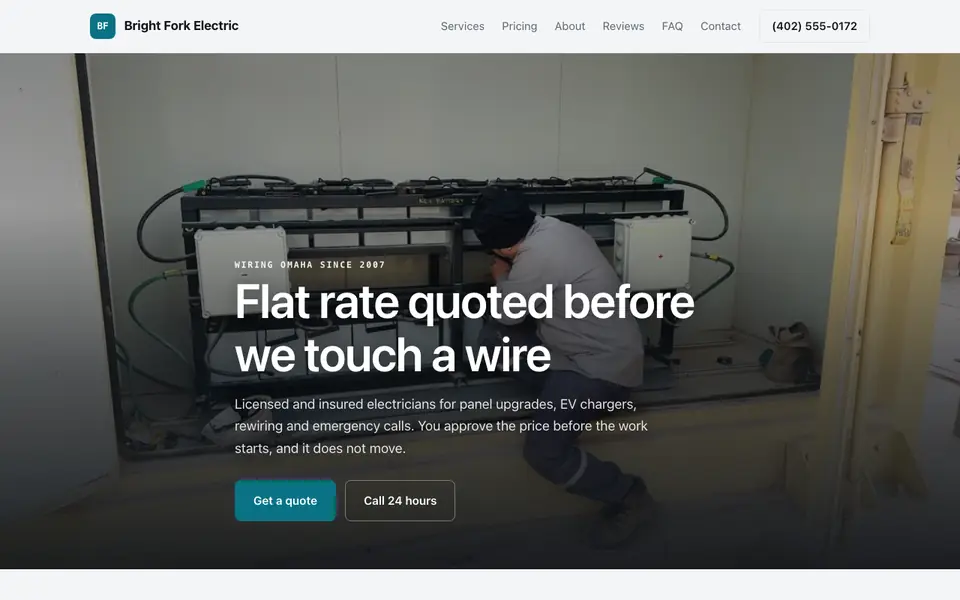
An electrician website that lists your services, shows your license, and puts a call button in reach of anyone with a sparking outlet. The AI builds it from a short description.
Pages every electrician website needs
- Home: Your service area, phone number, and whether you handle emergencies need to be visible immediately, since many electrician searches happen after something has stopped working.
- Services: Separate residential and commercial work, and call out specialty services (panel upgrades, EV charger installation, generator hookups) that customers specifically search for.
- Licensing & Insurance: Electrical work is safety-critical and heavily regulated. Displaying your license number and insurance coverage is often expected, and in some states legally required in advertising.
- Service Area: Most electricians work within a defined driving radius, and listing specific towns helps both customer self-qualification and local search visibility.
- Reviews: Letting a stranger work on your home's electrical system is a trust-heavy decision, so real reviews carry more weight here than in many other home service niches.
- Contact / Request Quote: A short form describing the issue or project lets you triage before calling back, which is more efficient than a phone-only setup for non-emergency requests.
Try this prompt
A website for an electrical contractor in Tampa called Bright Line Electric offering panel upgrades, EV charger installation, and emergency repairs, with a licensing and insurance page, a service area page, and a quote request form. Professional, safety-focused tone.
What are an electrician's website options?
An electrician's site should prove you are licensed and local, list the work you do, and make calling or requesting a quote immediate. Electricians usually choose between their field-service software's site tools, lead platforms, a general builder, or a site generated from a description of the business.
| Option | Good for | Watch out for |
|---|---|---|
| Field-service software such as Jobber or Housecall Pro | Online booking and quote requests that flow into your jobs and invoices. | Their website features are simple and work best alongside a fuller site. |
| Lead platforms such as Angi or Thumbtack | A stream of homeowners already looking for an electrician. | You pay for leads that are often sent to several contractors at once. |
| Wix or GoDaddy | Cheap, quick and under your control. | Service and service-area pages are left for you to write. |
| we.inc | Describe your services, licence and areas to get pages for panel upgrades, EV chargers, rewiring and each town you cover, plus a quote form. | It does not schedule or dispatch jobs; send booked work to your field-service tool. |
Showing your licence number and the towns you serve on every page builds trust with homeowners comparing electricians.
A real electrician site, not a template
This is Bright Fork Electric, an electrician business we described to the AI in a sentence. See the Bright Fork Electric example site.
Start from this design
Three designs that suit an electrician website.
- EV Charger and Panel Electrician
- Plumbing, HVAC & Electrical Company
- All-in-One Property Maintenance
About electrician website design on we.inc
Get more service calls with a professional site showcasing your electrical services and credentials.
Most electrician sites are a template with the name swapped in. Describe what you do and the AI designs and writes an electrician website around that business instead.
Features designed for your industry
- Services: Display your residential and commercial electrical services.
- Licenses: Showcase your certifications and insurance.
- Quote Requests: Let customers request free estimates.
Who this electrician website design suits
- Residential electricians
- Commercial electricians
- Emergency electricians
- Solar installers
- EV charger installers
What makes an electrician website work
Licensing display is often a legal requirement, not just good practice
Many states require a licensed electrical contractor to display their license number in advertising, which typically includes a website. Requirements vary by state, so checking your state's licensing board is worth doing before you publish.
Emergency and planned work need different framing
A homeowner with sparking outlets right now wants a phone number and a call button above everything else; someone planning a panel upgrade or EV charger install wants to see relevant experience and maybe financing information. Structuring services to address both reduces bounce from either group.
EV charger installation is a fast-growing specific search term
As EV adoption grows, homeowners increasingly search specifically for 'EV charger installer' rather than generic 'electrician,' and a dedicated page for this service, distinct from general electrical work, captures that search intent directly.
Photos of panel work and permits build trust
Electrical work is largely invisible once finished (it's behind a wall or in a panel box), so before-and-after photos of panel upgrades or a completed permit inspection give visitors concrete proof of quality work they otherwise can't evaluate themselves.
What it costs
Beyond your domain (about $10 to $20 a year), an electrician's real costs are licensing, insurance, and tools; we.inc doesn't include scheduling or invoicing, so the AI links out to whatever tool you already use. A free template covers a basic contact page; Starter at $20 a month is worth it once you want the AI keeping service and licensing pages current as your business grows.
Free for 3 template sites, without AI; AI building from $20 a month. Compare plans
Frequently asked questions
How much does an electrician website cost?
A free we.inc template site (up to three sites, no AI) covers a basic services and contact page. AI-built and AI-edited sites start on Starter at $20 a month for 250 credits.
Do I need to show my license number on my website?
Many states require licensed contractors to display their license number in advertising, which usually includes a website. Check your state's electrical licensing board, since the requirement and exact wording vary.
Can customers book a service call directly on the site?
The AI builds a quote request or contact form, but we.inc doesn't include native scheduling. Many electricians link the form to a scheduling tool they already use for dispatch.
Can I use my own domain name?
Yes, on any paid plan from Starter at $20 a month, with SSL included. Free sites publish on a we.inc address.
Will a website actually bring in more electrical jobs?
It helps most alongside a Google Business Profile with real reviews and a matching service area, since trust and licensing information matter more here than in most home service niches. A site with clear licensing info and specific service pages (like EV charger installation) converts better than a generic one.
How do I design an effective website for an electrician?
Put a click-to-call number and a quote request form on every page, list your services one by one, name the towns you cover, and show your license and insurance near the top. Add real photos of your work and reviews. We.Inc's AI builds those pages from a short description, from $20 a month, or start free from a template.
How to get more clients as an electrician?
Make it easy for local customers to find and trust you: keep your Google Business Profile complete and matching your website, ask every happy customer for a review, and give each service and town its own page. A website with a clear phone number and quote form turns that search traffic into calls. We.Inc builds one from $20 a month.
Electrician website designs, compared on the quote request
An electrician's site has to get the call, show a price before work starts and prove the licence. Below, five sample sites and two templates, each read for a service call, a 200 amp panel upgrade and an EV charger install.
How these were picked
Electrical, solar, HVAC, plumbing and handyman samples from our library plus the Voltline Electric and Summit Trades templates. Bright Fork Electric is the demonstration; its prices, crew and reviews are made up. Checked 27 September 2026. Every design here is from the We.Inc library and is labelled as a sample or template. None is a customer site, and no entry claims results.
1. Bright Fork Electric
Sample site built by our AI (made-up business). Open it
Task: A homeowner adding an EV charger who may need a bigger panel.
Design choice: "Flat rate quoted before we touch a wire" with prices: service call $89 (waived if you go ahead), panel upgrade from $2,400, EV charger from $850. "Get a quote" and "Call 24 hours".
Limitation: No quote form. Add one with panel size and a photo of the panel.
2. Sunridge Solar Works
Sample site built by our AI (made-up business). Open it
Task: A homeowner pricing solar, batteries and a panel upgrade together.
Design choice: "Get a design" and "See sample quote", with panel upgrades and EV chargers as services.
Limitation: Solar first; general repairs are missing.
3. Northstar Heating and Air
Sample site built by our AI (made-up business). Open it
Task: An emergency call at night.
Design choice: A separate emergency after-hours call priced on the page and "How fast can you get here?" in the FAQ.
Limitation: Heating and cooling, not electrical.
4. Copperline Plumbing
Sample site built by our AI (made-up business). Open it
Task: A trade that diagnoses before quoting.
Design choice: Paid camera diagnosis credited to the repair, stated in the FAQ.
Limitation: Plumbing, not electrical.
5. Bolt & Bracket Handyman
Sample site built by our AI (made-up business). Open it
Task: Small jobs like fixtures and TV mounting.
Design choice: "Book a visit" with $95 an hour and a two hour minimum.
Limitation: Not licensed electrical work; use it for the small-jobs page idea only.
6. EV Charger and Panel Electrician
Business template from the We.Inc library (demo site: Voltline Electric). Open it
Task: An electrician who leads with panels and EV chargers.
Design choice: Voltline Electric: "Panels, EV chargers and rewires, wired right", with a Panel & EV section and Service Area.
Limitation: Placeholder reviews and prices; add yours.
7. Plumbing, HVAC & Electrical Company
Business template from the We.Inc library (demo site: Summit Trades). Open it
Task: A shop that also does plumbing and HVAC.
Design choice: Summit Trades covers plumbing, HVAC and electrical with Services, Service Area and Reviews.
Limitation: Less electrical detail than Voltline.
Task comparison
| Design | Service call and diagnostic | Panel upgrade to 200 amp | EV charger installation |
|---|---|---|---|
| Bright Fork Electric | $89, waived on approval | From $2,400, permit included | From $850 |
| Sunridge Solar Works | System repair | Main panel upgrade | EV charger install |
| Northstar Heating and Air | Diagnostic call | No | No |
| Copperline Plumbing | Diagnostic, credited | No | No |
| Bolt & Bracket Handyman | Hourly | No | No |
| EV Charger and Panel Electrician | You add it | Panel section | EV section |
| Plumbing, HVAC & Electrical Company | You add it | You add it | You add it |
Walkthrough: a new EV owner on the Bright Fork sample
- They land on "Flat rate quoted before we touch a wire" with "Get a quote" and "Call 24 hours".
- "Residential and light commercial electrical" shows the EV charger from $850 and the 200 amp panel from $2,400.
- "Questions homeowners ask" answers whether they need a 200 amp panel, why breakers trip, permits and emergency costs.
- "Book an electrician" closes the page. Edit prompt: "Add a quote form with job type, current panel size, a photo upload and address."
Copyable build brief
A website for [company], licensed electricians in [area]. Services with flat rates or from-prices: service calls, panel upgrades, EV chargers, rewiring, generators. Licence number, insurance and warranty. Permits: who pulls them. Emergency hours and fee. A quote form with photo upload. Service area by town.
What We.Inc does and does not do here
| Dispatch and invoicing | Not built in. Link your field service software. |
| Licence details | You supply them. The AI will not invent licence numbers; add yours before publishing. |
| Publishing for free | Free plan: up to 3 template sites on a we.inc address. No AI credits and no custom domain. |
| Having the AI write and change the site | Paid plans: Starter $20/mo, Pro $49/mo, Max $99/mo. You describe the business, then edit by clicking or by asking in chat. |
| Your own domain | Paid plans only. |
| Taking payments | Through your own Stripe account, so the money goes to you. We.Inc does not hold funds. |
| Forms | The AI builds contact and request forms. A synced booking calendar is not built in: link the scheduling tool you already use. |
What to adapt
- Price before work starts.
- Say who pulls permits.
- Answer the panel-size question.
What not to copy
- The sample prices, crew and reviews.
- Emergency claims you cannot staff.
Questions
Do I need a 200 amp panel?
Your site should explain when an upgrade is needed (EV chargers, heat pumps, electric ranges) and that you check with a load calculation. The sample's answer is a model; write your own.
Why do my breakers keep tripping?
Give the plain causes (overload, a failing breaker, damaged wiring) and when to call. Visitors searching this are close to booking.
Start from a suitable design
Start building this electrician website. Or check costs with the website cost calculator, test a current site with the website grader, and see pricing.
Browse the templates: Electrician website templates
In our 2026 measurement of 49 electricians websites, 35% had no search description, 31% had no structured data and 37% had no tap-to-call link. See the full study.
Related industries and website guides
- freelance website builder
- small business website design
- coaching website builder
- realtor website builder
- engineering firms website builder
- financial advisors website builder
- electricians website examples
- Best website builders for electricians
Related website builders: Professional Services
- freelance website builder
- small business website design
- coaching website builder
- realtor website builder
- engineering firms website builder
- financial advisors website builder
Before you start
- electricians website examples
- Best website builders for electricians
- how to make a website
- free website builder
- AI website builder
Product
Who It's For
- For Agencies
- For Freelancers
- For Hosting Providers
- For SaaS Platforms
- For Startups
- For Financial Services
- For Healthcare
Features
Resources
- Blog
- Help Center
- Free Business Tools
- Free UI Components
- Website Templates
- Template Collections
- Website Examples
- Guides
- Comparisons
- Alternatives
- Best Lists
- Reviews
- Pricing Guides
- Use Cases
- Glossary & Guides
- Integrations
- Developers
- Benchmark
- Windows App