
Build trust before the first meeting.
A financial advisor website should make clear who you serve, what services you offer, how you are compensated, and how to start a conversation. We.inc's AI writes and builds those pages from your description. Paid plans start at $20 a month on Starter; have your compliance department or counsel review the copy against SEC, FINRA, or state advertising rules before it goes live.
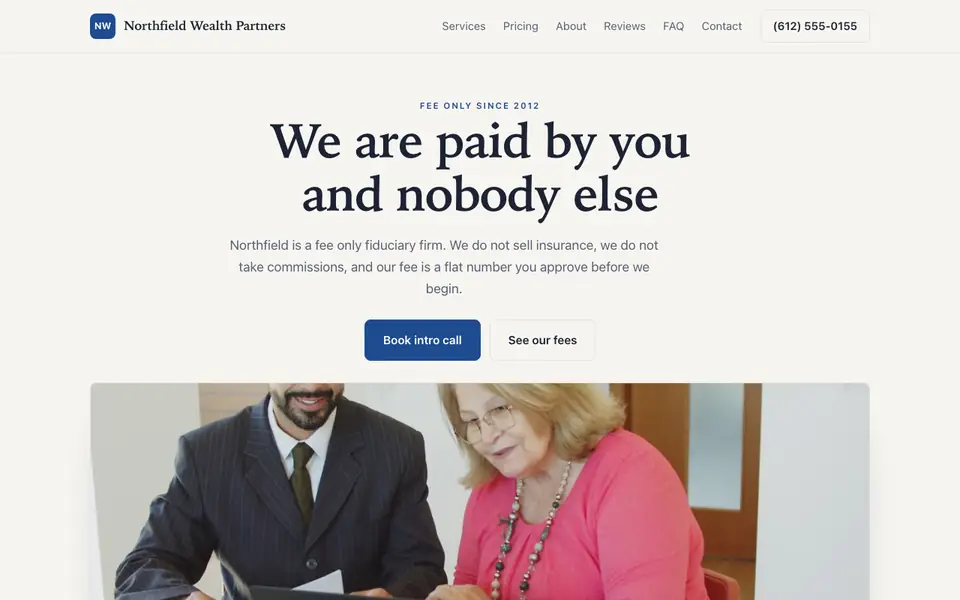
A financial advisor website that explains who you serve, how you work, and how you are paid. Describe your practice and the AI builds it for you.
Pages every financial advisor website needs
- Home: Your niche (retirees, physicians, business owners) and what you help them do, with a consultation button. Prospects look for someone who understands their situation.
- Services: Financial planning, investment management, retirement income, tax-aware strategies, as you actually offer them. Each should explain scope in plain terms.
- Who We Serve: A clear description of your ideal clients and any account minimums. It filters enquiries and builds confidence with the right people.
- Our Process: The steps from first meeting to ongoing reviews. It makes an intimidating decision feel manageable.
- Fees & Disclosures: How you are paid (fee-only, fee-based, commission) and links to your Form ADV or other required disclosures. Transparency is both expected and often required.
- Contact / Schedule: A short form and a link to your scheduler. Keep financial details out of the form.
Try this prompt
A website for a fee-only financial planning firm in Charlotte, North Carolina called Harbor Oak Planning. We work with physicians and dentists in their 30s and 40s. Include services, who we serve, our planning process, a fees page explaining our flat annual fee, a disclosures page, and a consultation form. Calm, trustworthy, navy and sage.
Can an advisor website show client testimonials?
Registered investment advisers can, under the SEC marketing rule, as long as each one carries the required disclosures, such as whether the person is a client and whether they were paid. Broker-dealer representatives follow FINRA rules instead. Ask your compliance officer before publishing any, and keep a record of who approved each one and when.
How specific should I be about who I serve?
Specific enough that the right visitor recognises themselves in the first screen. "Retirement planning for teachers in Ohio" or "advice for physicians in their first ten years" gives search engines and people a clear signal. You can still take other clients; the site just leads with the group you serve best and explains why.
Advisor website vendors, general builders or your own site: what fits an advisory firm?
For most independent advisors the choice comes down to who handles compliance review and archiving. Advisor-specific vendors build that in, general builders leave it to you, and a self-managed site works when your compliance team already reviews web pages.
| Option | Good for | Watch out for |
|---|---|---|
| Advisor website vendors such as Twenty Over Ten, FMG or Advisor Websites | Templates written for the industry, pre-reviewed content libraries and archiving that many broker-dealers already approve. | Sites can look alike across firms, and switching later means rebuilding on a new vendor. |
| Your broker-dealer or custodian's site program | Some offer an approved site option that clears compliance quickly. | You get limited control over design and wording, and the site may not move with you if you change firms. |
| Squarespace or Wix | Full design control and a clean look for a fee-only practice with a defined niche. | No built-in archiving or review workflow, so you need a separate tool or process to keep records of every change. |
| we.inc | Describe your niche, services and fee model and the AI drafts the pages, including a fees and disclosures page you can link to your Form ADV. | It has no compliance archiving and no client login, so every page still goes through your own review before it is published. |
Whichever route you take, ask your compliance contact which archiving method they accept before you pick the platform, not after.
Northfield Wealth Partners
This is Northfield Wealth Partners, a financial advisor business we described to the AI in a sentence. See the Northfield Wealth Partners example site.
Start from this design
Three designs that suit a financial advisor website.
- Restrained M&A Advisory Firm
- Wealth Management Video Hero
- Text-Led Management Consulting
Attract high-net-worth clients with a professional site showcasing your expertise and fiduciary commitment.
Skip the financial advisor web design brief and the six week wait. Tell the AI about the business in a sentence and it builds the whole site, ready to edit.
Features designed for your industry
- Services: Display your wealth management and planning services.
- Resources: Share market insights and financial planning guides.
- Consultations: Let prospects schedule complimentary consultations.
Perfect for:
- Wealth managers
- Financial planners
- Investment advisors
- Retirement planners
- Fee-only advisors
Advertising rules apply to your site
SEC marketing rules, FINRA communications rules, or state securities rules may govern your website, depending on how you are registered. Avoid performance claims, guarantees, and testimonials unless your compliance team approves them, and keep records of what was published.
Explain compensation in plain English
Prospects increasingly ask how you are paid. A clear fees page, written without jargon, builds trust and pre-qualifies leads.
A niche beats 'we help everyone'
Pages written for a specific group (teachers, tech employees, small business owners) are more persuasive and give you a real chance in search.
We.inc does not store client data or schedule meetings
The contact form emails you and is not meant for account or financial details. There is no client portal; link your custodian or planning software portal, and use Calendly for booking introductory calls.
What it costs
Beyond a domain (about $10 to $20 a year), you may need a scheduling tool and any archiving your compliance process requires. Building a site on We.Inc is free, with no card needed.
Building your site is free, no card needed. Paid plans from $20 a month. Compare plans
Frequently asked questions
Will the AI write compliant copy?
It writes clear, plain copy and avoids performance promises, but it can't guarantee compliance. Your chief compliance officer or counsel should review every page against SEC, FINRA, or state rules before publishing.
Can I link my Form ADV and disclosures?
Yes. Ask the AI to add a disclosures page or footer links to your ADV, CRS, and privacy policy.
What does it cost?
Building a site on We.Inc is free: no card and no trial are needed to start. Paid plans start at $20 a month. Domains cost about $10 to $20 a year.
Can clients log in to see their accounts?
No, we.inc has no client portal. Link the portal your custodian or planning software provides.
Can I use my firm's domain?
Yes, custom domains are included with paid plans, with SSL.
Related industries and website guides
- freelance website builder
- small business website design
- coaching website builder
- realtor website builder
- funeral home website builder
- graphic design website builder
- financial advisors website examples
- Best website builders for financial advisors
Related website builders: Professional Services
- freelance website builder
- small business website design
- coaching website builder
- realtor website builder
- funeral home website builder
- graphic design website builder
Before you start
- financial advisors website examples
- Best website builders for financial advisors
- how to make a website
- free website builder
- AI website builder
Related guides
Product
Who It's For
- For Agencies
- For Freelancers
- For Hosting Providers
- For SaaS Platforms
- For Startups
- For Financial Services
- For Healthcare
Features
Resources
- Blog
- Help Center
- Free Business Tools
- Free UI Components
- Website Templates
- Template Collections
- Website Examples
- Guides
- Comparisons
- Alternatives
- Best Lists
- Reviews
- Pricing Guides
- Use Cases
- Glossary & Guides
- Integrations
- Developers
- Benchmark
- Windows App