Purple Split Onboarding Screen
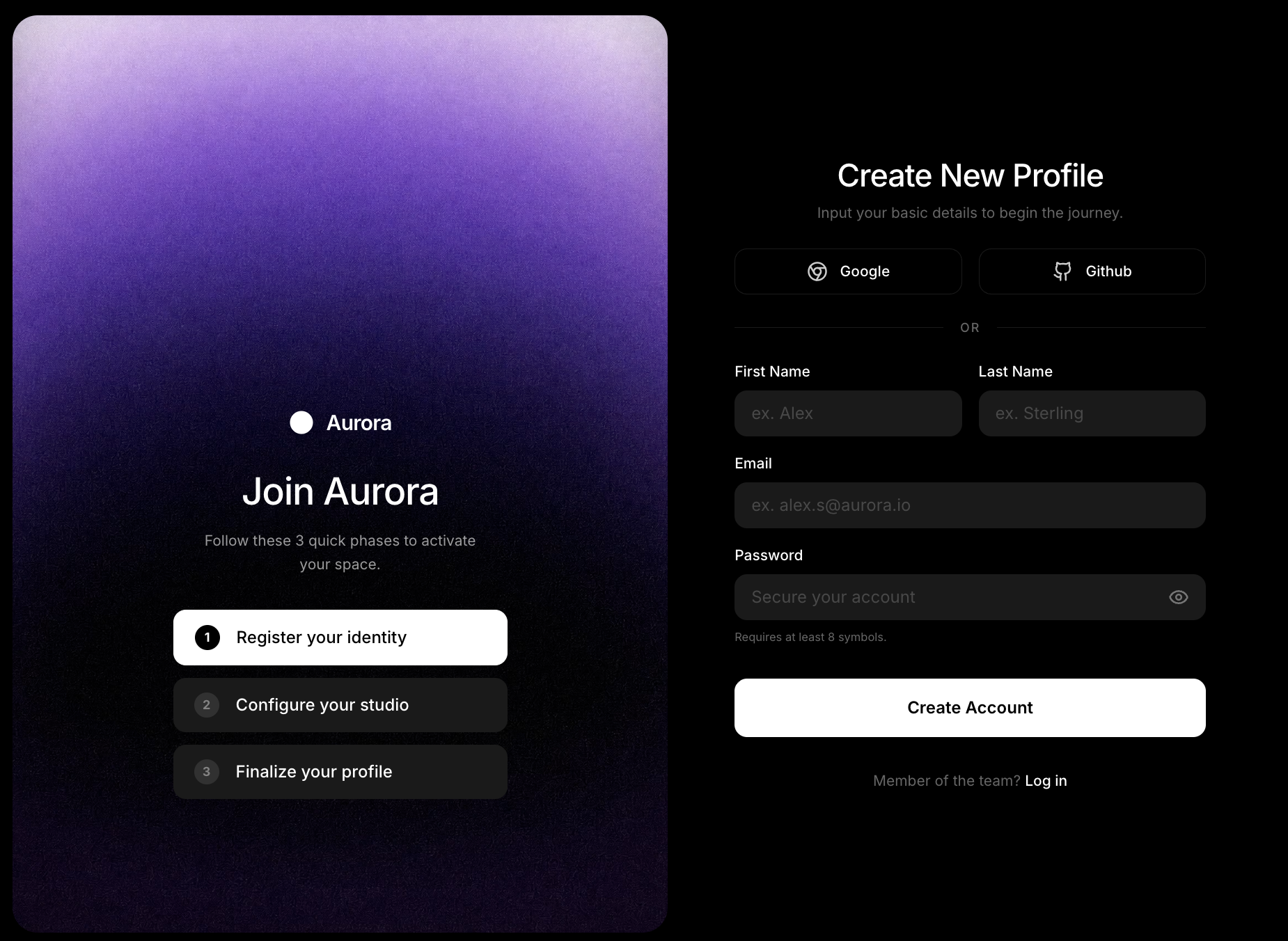
This is a sign-up screen, not a full website. It is split into two halves on black. On the left, a tall rounded panel fades from lilac to deep purple and holds the "Aurora" logo, the heading "Join Aurora", the line "Follow these 3 quick phases to activate your space", and three numbered steps: Register your identity, Configure your studio and Finalize your profile, with the first highlighted in white. On the right, "Create New Profile" sits above Google and Github buttons, an "or" divider, fields for first name, last name, email and password with a show-password eye icon, a white "Create Account" button and a "Log in" link. It would suit the onboarding step of a web app. The app name and labels are placeholders you replace with your own.
Purple Split Onboarding Screen is a professionally designed saas website template. Perfect for saas companies and tech startups.
The Purple Split Onboarding Screen template is a professionally designed, fully responsive website template built for saas companies and tech startups.
This saas template comes with hero section, feature grid, pricing table, and more: everything you need to launch a professional online presence.
Whether you are starting from scratch or refreshing an existing website, Purple Split Onboarding Screen gives you a head start with a design that looks polished and converts visitors into customers.
About this design
Purple Split Onboarding Screen is a sign-up and onboarding UI template rather than a full marketing page. It presents a two-panel dark interface side by side against a near-black background. The left panel is a deep purple gradient card with the product name "Aurora" in white and a large headline "Join Aurora", below which three numbered onboarding steps are listed in white outlined buttons: Register your identity, Configure your studio, Finalize your profile. The stepped progress model immediately reduces sign-up anxiety by showing the scope of the process.
The right panel shows a "Create New Profile" form with a clean dark-mode input layout: Google and GitHub SSO buttons at the top, then fields for First Name, Last Name, Email and Password, followed by a white "Create Account" primary button and a "Member of the team? Log in" link at the foot. Typography is clean, label-above-input, with a minimum password length note visible. The overall palette of deep purple, charcoal and white is sophisticated without being cold. The template suits SaaS products, creative platforms, and professional tools that need a polished, low-friction registration experience.
What is on the page
- Onboarding steps panel
- Registration form panel
- SSO options
- Account creation form
What is included
- Hero section
- Feature grid
- Pricing table
- Dashboard preview
- Testimonials
- FAQ section
Perfect for
- SaaS companies
- Tech startups
- Software products
- B2B platforms
Why choose Purple Split Onboarding Screen?
- Works on phones, tablets and desktops. The layout is responsive, so it adapts to any screen. Check the phone view in the editor before you publish.
- Click anything to edit it. Change any text, colour or image by clicking it. No code needed.
- Let the AI rebuild it around your business. Describe the changes you want in plain English and the AI makes them. AI plans start at $20/mo; the free plan lets you use templates without AI.
- Publish in one click. Building a site on We.Inc is free, with no card needed to start.
What's in this design
- An opening hero with the headline " logo, the heading "
- A "Create Account" call-to-action button
The preview shows the opening screen of this design. Further sections are yours to add.
How to use this template
- Look through the Purple Split Onboarding Screen preview first so you know what you are starting from.
- On We.Inc you can build your site free, with no card and no trial needed to start.
- Change any text, colour or image by clicking it, then add your product and pricing.
- Want it rebuilt around you? Describe the changes to the AI (plans from $20/mo), then publish on a we.inc address, or on your own domain with a paid plan.
Purple Split Onboarding Screen template FAQ
Is the Purple Split Onboarding Screen template free?
Yes, you can start from Purple Split Onboarding Screen for free, with no card needed. Paid plans start at $20 a month and include a custom domain.
Can I use Purple Split Onboarding Screen for a saas business?
Yes. Purple Split Onboarding Screen is filed under saas and suits saas companies and tech startups, but the design is not locked to one trade: replace the demo words and photos with your own, or on a paid plan ask the AI to rebuild the sections around your business.
Can I change the colours and fonts of Purple Split Onboarding Screen?
Yes. Click any text, colour or image to edit it, or describe the look you want to the AI on a paid plan. The layout is responsive, so it adapts to phones and desktops, and you can export the code to GitHub.
Explore similar designs.
More from the saas website templates collection. Browse more professionally designed templates in the saas category.
- Fluid 3D AI Startup Hero
- Light Serif Automation SaaS
- Glass Mosaic HR Software Hero
- Clean White AI Assistant SaaS
- Action-Photo Data Security SaaS
- AI Pitch Deck Title Slide
Building sites for clients? Sell them under your own brand · How to resell websites under your own brand
More in Templates
- Carbon and Lime Sports Chiropractor
- Painterly AI Workforce SaaS
- Wood-Fired Mediterranean Restaurant
- Wholesale Bakery Supplier
- Farm Shop and Veg Box Scheme
- Green Plant-Based Restaurant
- Vault-Door Navy Security Services
- Letter-Board Neighbourhood Garage
Product
Who It's For
- For Agencies
- For Freelancers
- For Hosting Providers
- For SaaS Platforms
- For Startups
- For Financial Services
- For Healthcare
Features
Resources
- Blog
- Help Center
- Free Business Tools
- Free UI Components
- Website Templates
- Template Collections
- Website Examples
- Guides
- Comparisons
- Alternatives
- Best Lists
- Reviews
- Pricing Guides
- Use Cases
- Glossary & Guides
- Integrations
- Developers
- Benchmark
- Windows App