Wildflower Dark Analytics SaaS
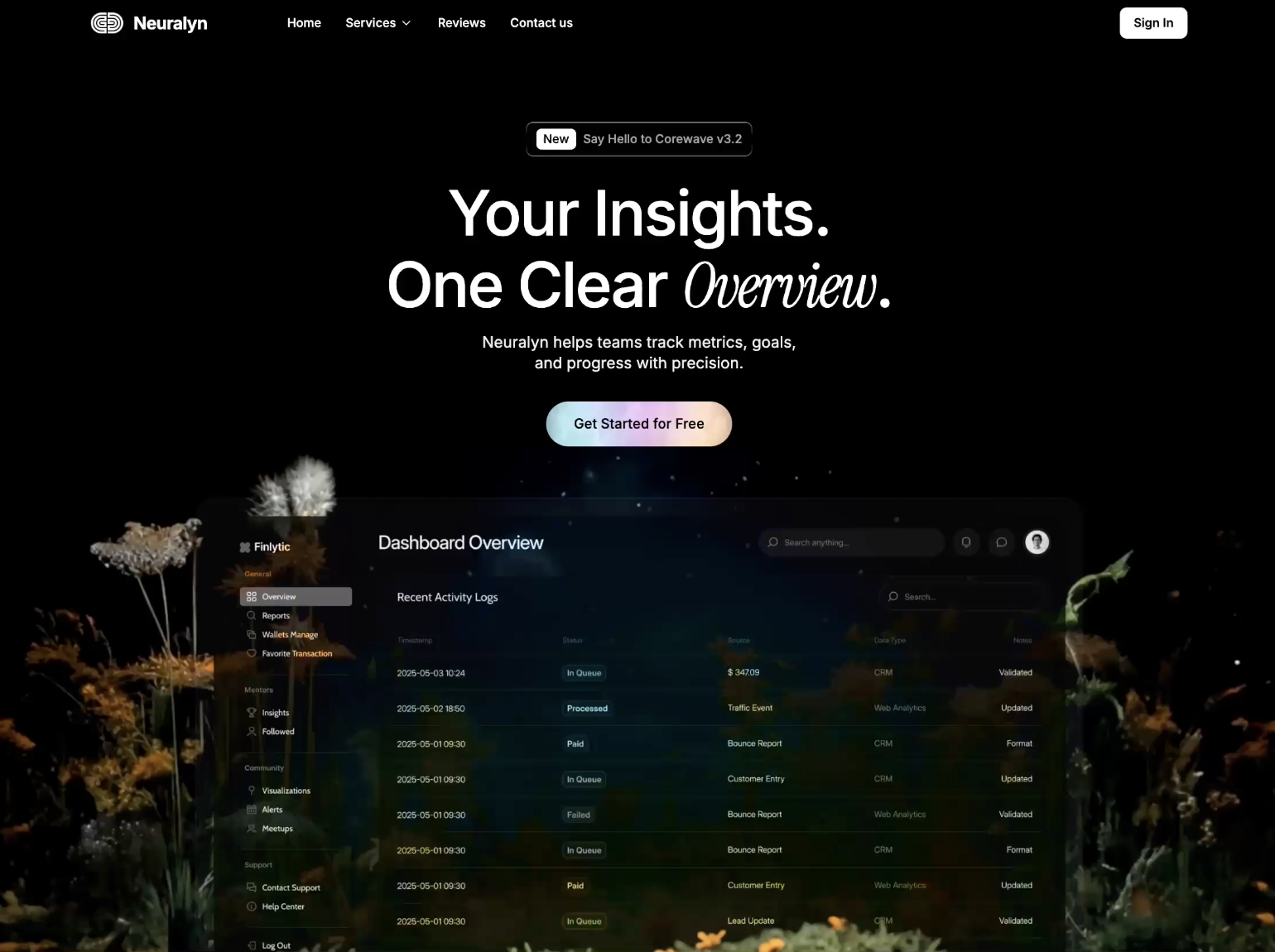
This design sets a black page against a dashboard preview framed by glowing wildflowers. At the top, a small outlined badge reads "New Say Hello to Corewave v3.2", above the headline "Your Insights. One Clear Overview.", where the last word turns into an italic script. A short line explains that Neuralyn "helps teams track metrics, goals, and progress with precision," followed by a pill button with a pastel gradient reading "Get Started for Free". The lower half shows a translucent app screen titled "Dashboard Overview", with a sidebar menu and a "Recent Activity Logs" table listing dates and statuses like In Queue, Processed and Paid. The navigation shows Home, Services, Reviews and Contact us, with a white "Sign In" button. It would suit an analytics, finance or reporting software product. The name, data and copy are placeholders you replace with your own.
Wildflower Dark Analytics SaaS is a professionally designed saas website template. Perfect for saas companies and tech startups.
The Wildflower Dark Analytics SaaS template is a professionally designed, fully responsive website template built for saas companies and tech startups.
This saas template comes with hero section, feature grid, pricing table, and more: everything you need to launch a professional online presence.
Whether you are starting from scratch or refreshing an existing website, Wildflower Dark Analytics SaaS gives you a head start with a design that looks polished and converts visitors into customers.
About this design
Wildflower Dark Analytics SaaS is built on a full-bleed black background overlaid with a close-up photograph of glowing wildflowers — amber, gold and white blooms lit from beneath against a dark field. This botanical imagery is an unexpected and memorable choice for an analytics product. Centred above it, a small outlined badge pill announces a product update, followed by the headline "Your Insights. One Clear Overview." where the final word shifts into flowing italic script, creating a distinct typographic accent. A single rounded pill button — "Get Started for Free" — serves as the primary call to action.
Below the hero, a translucent app window labelled "Dashboard Overview" rises from the bottom of the screen, showing a sidebar, summary metrics and an activity log with date-stamped statuses. Navigation (Home, Services, Reviews, Contact us) is minimal, with a white "Sign In" button pinned to the right. The contrast between the moody organic imagery and the clean product interface creates a distinctive identity. The template suits analytics platforms, reporting tools and business intelligence products aimed at teams that want elegance alongside data precision.
What is on the page
- Hero with wildflower backdrop and headline
- Dashboard preview
- Services
- Reviews
- Pricing
- Contact
What is included
- Hero section
- Feature grid
- Pricing table
- Dashboard preview
- Testimonials
- FAQ section
Perfect for
- SaaS companies
- Tech startups
- Software products
- B2B platforms
Why choose Wildflower Dark Analytics SaaS?
- Works on phones, tablets and desktops. The layout is responsive, so it adapts to any screen. Check the phone view in the editor before you publish.
- Click anything to edit it. Change any text, colour or image by clicking it. No code needed.
- Let the AI rebuild it around your business. Describe the changes you want in plain English and the AI makes them. AI plans start at $20/mo; the free plan lets you use templates without AI.
- Publish in one click. Building a site on We.Inc is free, with no card needed to start.
What's in this design
- An opening hero with the headline "Your Insights. One Clear Overview"
- A "Sign In" call-to-action button
The preview shows the opening screen of this design. Further sections are yours to add.
How to use this template
- Look through the Wildflower Dark Analytics SaaS preview first so you know what you are starting from.
- On We.Inc you can build your site free, with no card and no trial needed to start.
- Change any text, colour or image by clicking it, then add your product and pricing.
- Want it rebuilt around you? Describe the changes to the AI (plans from $20/mo), then publish on a we.inc address, or on your own domain with a paid plan.
Wildflower Dark Analytics SaaS template FAQ
Is the Wildflower Dark Analytics SaaS template free?
Yes, you can start from Wildflower Dark Analytics SaaS for free, with no card needed. Paid plans start at $20 a month and include a custom domain.
Can I use Wildflower Dark Analytics SaaS for a saas business?
Yes. Wildflower Dark Analytics SaaS is filed under saas and suits saas companies and tech startups, but the design is not locked to one trade: replace the demo words and photos with your own, or on a paid plan ask the AI to rebuild the sections around your business.
Can I change the colours and fonts of Wildflower Dark Analytics SaaS?
Yes. Click any text, colour or image to edit it, or describe the look you want to the AI on a paid plan. The layout is responsive, so it adapts to phones and desktops, and you can export the code to GitHub.
Explore similar designs.
More from the saas website templates collection. Browse more professionally designed templates in the saas category.
- Fluid 3D AI Startup Hero
- Light Serif Automation SaaS
- Glass Mosaic HR Software Hero
- Clean White AI Assistant SaaS
- Action-Photo Data Security SaaS
- AI Pitch Deck Title Slide
Building sites for clients? Sell them under your own brand · How to resell websites under your own brand
More in Templates
- Monochrome Analytics Dashboard SaaS
- Orange Sports Car Dealer Hero
- Electric Blue Poster Hero
- Glass Card Pricing Section
- Light-Ray Framed Tech Hero
- Dark Panel Engineering SaaS Hero
- Dark Productivity Dashboard UI
- Light Serif Automation SaaS
Product
Who It's For
- For Agencies
- For Freelancers
- For Hosting Providers
- For SaaS Platforms
- For Startups
- For Financial Services
- For Healthcare
Features
Resources
- Blog
- Help Center
- Free Business Tools
- Free UI Components
- Website Templates
- Template Collections
- Website Examples
- Guides
- Comparisons
- Alternatives
- Best Lists
- Reviews
- Pricing Guides
- Use Cases
- Glossary & Guides
- Integrations
- Developers
- Benchmark
- Windows App