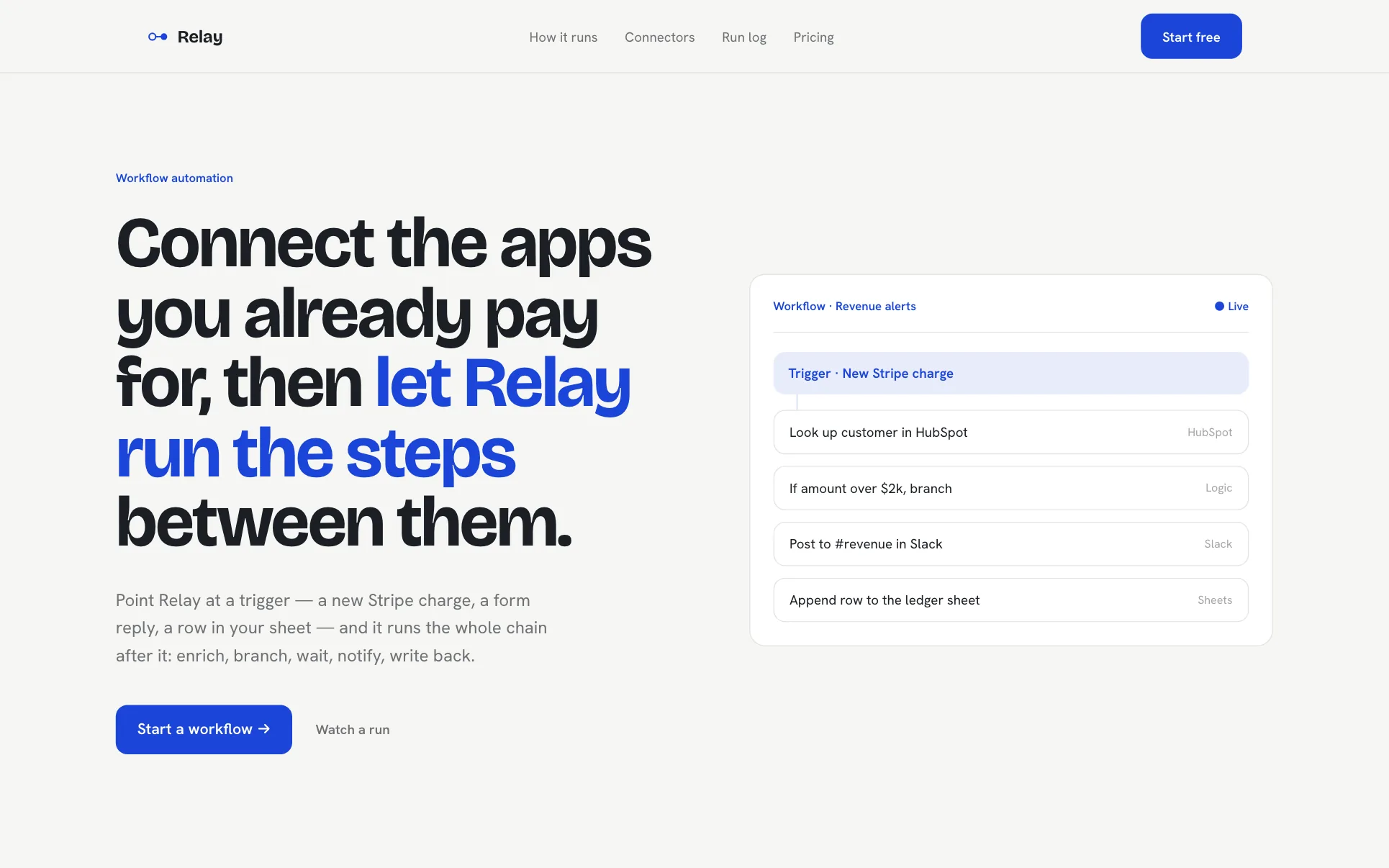
Light Workflow Automation SaaS
Light Workflow Automation SaaS is a saas website template in a white and blue palette. The demo site's title line reads "Workflow Automation". The demo opens with the line "Connect the apps you already pay for, then let Relay run the steps between them.". Its menu runs how it runs, connectors, run log and pricing, so you can see the page structure before you start. Your own business name, words and photos replace the demo content; the layout and styling carry over.
Light Workflow Automation SaaS is a professionally designed saas website template. Perfect for saas companies and tech startups.
The Light Workflow Automation SaaS template is a professionally designed, fully responsive website template built for saas companies and tech startups.
This saas template comes with how it runs, connectors, run log, and more: everything you need to launch a professional online presence.
Whether you are starting from scratch or refreshing an existing website, Light Workflow Automation SaaS gives you a head start with a design that looks polished and converts visitors into customers.
About this design
Light Workflow Automation SaaS is a clean, conversion-focused landing page for a workflow automation platform. The layout is light-background and structured, with navigation (How it runs, Connectors, Run log, Pricing) and a green "Start free" pill pinned to the top right. The hero is text-led: a bold headline — "Connect the apps you already pay for, then let Relay run the steps between them" — followed by a plain-language paragraph describing the trigger-and-chain mechanic. A live workflow diagram below shows a Stripe charge triggering a HubSpot lookup, a conditional branch, a Slack post and a Sheets write-back, making the product behaviour immediately concrete.
A four-metric stats bar — 640 connectors, 18 min median time to first workflow, 3.1M steps per day, 99.95% run success rate — anchors credibility before the feature breakdown. The "What a Relay does" section explains triggers, branching and write-back in plain terms, each with a one-line descriptor. A closing CTA uses friendly copy: "Your first workflow is running before this coffee goes cold." The template suits no-code automation platforms, integration middleware tools and SaaS products targeting operations and revenue teams.
What is on the page
- Hero with headline and value description
- Live workflow diagram
- Performance stats bar
- Triggers feature card
- Branching feature card
- Write-back feature card
- Connectors catalogue
- Pricing
- CTA
What is included
- How it runs
- Connectors
- Run log
- Pricing
Perfect for
- SaaS companies
- Tech startups
- Software products
- B2B platforms
Why choose Light Workflow Automation SaaS?
- Works on phones, tablets and desktops. The layout is responsive, so it adapts to any screen. Check the phone view in the editor before you publish.
- Click anything to edit it. Change any text, colour or image by clicking it. No code needed.
- Let the AI rebuild it around your business. Describe the changes you want in plain English and the AI makes them. AI plans start at $20/mo; the free plan lets you use templates without AI.
- Publish in one click. Go live free on a we.inc address, or connect your own domain on a paid plan.
What's in this design
- An opening hero with the headline "Connect the apps you already pay for, then let Relay run the steps..."
- A top menu linking to How it runs, Connectors, Run log and Pricing
- A section headed "The steps you keep doing by hand, running on their own"
- A section headed "Your first workflow is running before this coffee goes cold"
- A footer
Read from the live preview of this design.
How to use this template
- Open the live preview of Light Workflow Automation SaaS to see the design before you commit.
- Start from it free: the free plan gives you up to 3 template sites on a we.inc address, no card and no AI.
- Click any text, colour or image to change it, and swap in your product and pricing.
- Want it rebuilt around you? Describe the changes to the AI (plans from $20/mo), then publish on a we.inc address, or on your own domain with a paid plan.
Light Workflow Automation SaaS template FAQ
Is the Light Workflow Automation SaaS template free?
Yes, you can start from Light Workflow Automation SaaS on the free plan, which gives you up to 3 template sites published on a we.inc address, with no card. The free plan does not include the AI or a custom domain; AI plans start at $20 a month.
Can I use Light Workflow Automation SaaS for a saas business?
Yes. Light Workflow Automation SaaS is filed under saas and suits saas companies and tech startups, but the design is not locked to one trade: replace the demo words and photos with your own, or on a paid plan ask the AI to rebuild the sections around your business.
Can I change the colours and fonts of Light Workflow Automation SaaS?
Yes. Click any text, colour or image to edit it, or describe the look you want to the AI on a paid plan. The layout is responsive, so it adapts to phones and desktops, and you can export the code to GitHub.
Explore similar designs.
More from the saas website templates collection. Browse more professionally designed templates in the saas category.
- Fluid 3D AI Startup Hero
- Light Serif Automation SaaS
- Glass Mosaic HR Software Hero
- Clean White AI Assistant SaaS
- Action-Photo Data Security SaaS
- AI Pitch Deck Title Slide
Building sites for clients? Sell them under your own brand · How to resell websites under your own brand
More in Templates
- Instant-Quote Solar Installer
- Welcoming All-Ages Dance Studio
- Hazard-Stripe Storm Repair Roofer
- Measure-First Plumbing and Heating
- Cinematic Custom Home Builder
- Frosted Glass DeFi Hero
- Rotating-Location Food Truck
- Sage & Blush Garden Wedding
Product
Who It's For
- For Agencies
- For Freelancers
- For Hosting Providers
- For SaaS Platforms
- For Startups
- For Financial Services
- For Healthcare
Features
Resources
- Blog
- Help Center
- Free Business Tools
- Free UI Components
- Website Templates
- Template Collections
- Website Examples
- Guides
- Comparisons
- Alternatives
- Best Lists
- Reviews
- Pricing Guides
- Use Cases
- Glossary & Guides
- Integrations
- Developers
- Benchmark
- Windows App