
Build a website that gets results.
The best website builder for a gym shows the training floor, explains membership options and prices, posts the class schedule and gives a first-time visitor one clear way to try it. we.inc's AI builds those pages from a description of your gym and links your gym software for memberships, starting at $20 a month.
Your gym website is where a curious local decides whether to walk in. Describe your gym and the AI builds membership, class, and trainer pages with a clear free-trial signup.
Pages every gym website needs
- Home: Real photos of your floor, your type of gym (strength, CrossFit-style, 24-hour, boutique), location, and a free-trial or day-pass button. People decide on vibe fast.
- Memberships: Tiers, what each includes, and whether there is a contract or signup fee. Hidden pricing is one of the biggest complaints people have about gyms.
- Classes & Schedule: Class descriptions with difficulty and a current timetable or an embedded schedule from your booking software.
- Coaches & Trainers: Photos, certifications, and specialties. Personal training is a major revenue line, and members want to know who is coaching them.
- Facilities: Equipment, locker rooms, recovery, childcare, parking, and hours. These are practical deal-breakers for many people.
- Free Trial / Contact: A short form for a trial pass or tour, plus address and map. Keep it to name, email, phone, and a preferred time.
Try this prompt
A website for an independent strength gym in Columbus, Ohio called Ironside Strength Co., with three membership tiers, a class schedule for barbell and conditioning classes, bios for our five coaches, a facilities page showing platforms and a turf area, and a free 3-day trial form. Bold, dark, with orange accents.
Turning "gym near me" searches into trial visits
People choosing a gym compare distance, opening hours and the price they will actually pay. Most leave a site that hides membership costs behind a contact form.
Show membership prices or a clear starting price
A price-from figure with what it includes, and whether there is a joining fee or a minimum term, answers the question every visitor has. If prices vary by location, list them per location.
Publish the class timetable as text
A timetable shown only as an image cannot be read by search engines or screen readers. Text classes with times and coaches can be found when someone searches for a class type in your area.
Offer a free pass or first class online
A short form for a guest pass turns a curious visitor into someone standing at your front desk. Keep it to name, email and preferred day.
Keep holiday hours current in Business Profile
Gyms get many searches on public holidays and early mornings. Set special hours in your Google profile ahead of each holiday so nobody arrives to a locked door.
Which website builder should a gym or fitness studio use?
Decide where class booking and membership billing will live, then pick the website around it. Most gyms land on one of three setups: the site that comes bundled with their gym management software, a general builder with a booking add-on, or their own site with a Book button pointing at the scheduler they already pay for.
| Option | Good for | Watch out for |
|---|---|---|
| Web tools from your gym software (Mindbody, Glofox and similar) | Timetable, memberships and sign-up waivers stay in one system with no copying between tools. | These are booking widgets or simple pages rather than a full marketing site, and design choices are narrow. |
| Wix with Wix Bookings | Personal trainers and small studios get sessions, class bookings and paid plans inside the site itself. | Moving to dedicated gym software later means rebuilding the booking side and asking members to sign up again. |
| Squarespace with Acuity Scheduling | A polished boutique look with a capable appointment and class scheduler beside it. | The scheduler is billed separately and members manage bookings in a second place. |
| we.inc | Describe your classes, coaches and intro offer, and you get a timetable page, coach profiles and a free-trial form to which you attach your existing booking link. | It does not run memberships, recurring billing or check-in, so those stay in your gym software. |
Whichever route you take, put the intro offer and the next class on the first screen: a newcomer deciding whether to try you wants to know when and how much, before the story of the gym.
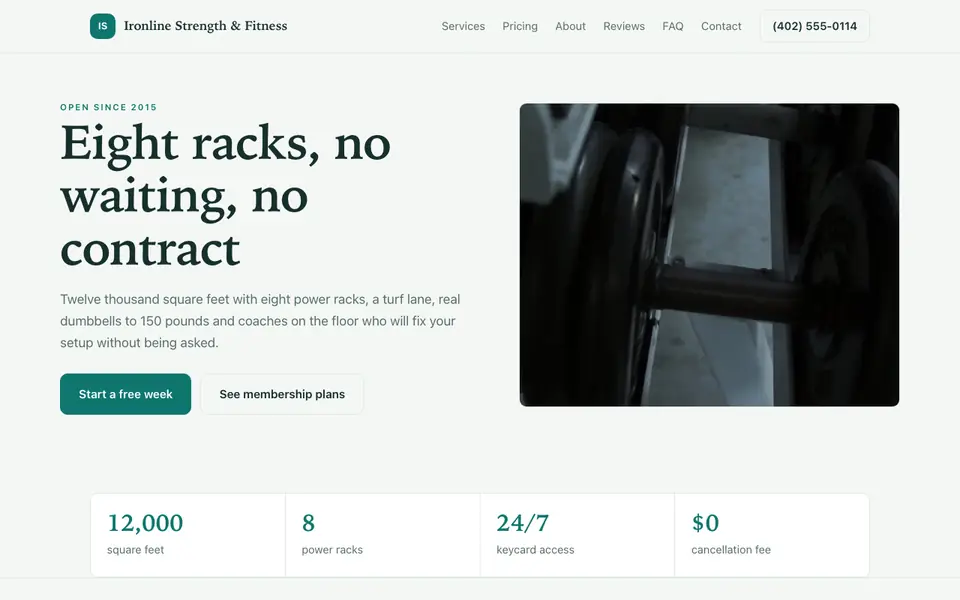
Ironline Strength & Fitness
This is Ironline Strength & Fitness, a gym business we described to the AI in a sentence. See the Ironline Strength & Fitness example site.
Start from this design
Three designs that suit a gym website.
- Black & Yellow High-Intensity Gym
- Black & Orange Barbell Gym
- Coached Strength Training Gym
Attract new members with a powerful site showcasing your facilities, classes, and membership options.
Most gym sites are a template with the name swapped in. Describe what you do and the AI designs and writes a gym website around that business instead.
Features designed for your industry
- Facilities Showcase: Display your equipment, spaces, and amenities with photos.
- Class Schedule: Show your fitness classes with easy-to-read schedules.
- Membership Plans: Display pricing and let visitors sign up online.
Perfect for:
- Fitness centers
- Health clubs
- 24-hour gyms
- Boutique gyms
- Community gyms
Link your gym software for signups and booking
We.inc does not process memberships, recurring billing, or class reservations. Link or embed Mindbody, Glofox, Wodify, or whatever you use so members sign up and book there.
Show the real gym, not stock athletes
Photos of your actual members, equipment, and space convert better than stock images and set honest expectations. Swap placeholder images before you publish.
Say plainly how cancellation works
A line explaining contract length and how to cancel builds trust quickly, because cancellation horror stories are common. Some states also regulate health club contracts, so keep your terms consistent with local rules.
One landing page per offer
If you run a 6-week challenge or a new-member promo, ask the AI for a dedicated page with its own form. It keeps the homepage clean and gives ads a focused destination.
What it costs
Most of a gym's software spend is the management platform; the website side is modest. New We.Inc accounts can build a site free, with no card needed to start. A domain costs about $10 to $20 a year.
Building your site is free, no card needed. Paid plans from $20 a month. Compare plans
Frequently asked questions
Is we.inc a full gym website builder with member signup?
It builds the site and forms, not member accounts. Recurring billing, check-ins, and class booking stay in software such as Mindbody or Glofox, which you link from the site.
Should I show membership prices on my gym website?
Usually yes. Visitors comparing gyms often leave sites that hide prices. If pricing varies, show a 'starting at' figure and explain what changes it.
Can I embed my class schedule?
If your booking software offers an embeddable schedule widget, the AI can place it on your classes page. Otherwise it can build a static timetable you update from chat.
How long does it take to build?
The AI builds a first version in minutes from your description. Plan a bit more time to add your own photos and check the details before publishing.
Do I need a paid plan to use my own domain?
Yes. Free sites run on a we.inc address; connecting a domain you own needs a paid plan starting at $20 a month.
Browse the templates: Gym and fitness website templates
Related industries and website guides
- therapist website builder
- dentist website builder
- nutritionist website builder
- health coach websites
- home health care website builder
- life coaches website builder
- gyms website examples
- how to make a website
Related website builders: Health & Wellness
- therapist website builder
- dentist website builder
- nutritionist website builder
- health coach websites
- home health care website builder
- life coaches website builder
Before you start
Related guides
Product
Who It's For
- For Agencies
- For Freelancers
- For Hosting Providers
- For SaaS Platforms
- For Startups
- For Financial Services
- For Healthcare
Features
Resources
- Blog
- Help Center
- Free Business Tools
- Free UI Components
- Website Templates
- Template Collections
- Website Examples
- Guides
- Comparisons
- Alternatives
- Best Lists
- Reviews
- Pricing Guides
- Use Cases
- Glossary & Guides
- Integrations
- Developers
- Benchmark
- Windows App