
Senior living web design for the family doing the research
Senior living web design is written for two readers: the older adult and the adult child who often does the research. The site should explain each care level, show floor plans and a pricing range, show daily life honestly, and make booking a tour easy. Building a site on We.Inc is free, with no card needed to start.
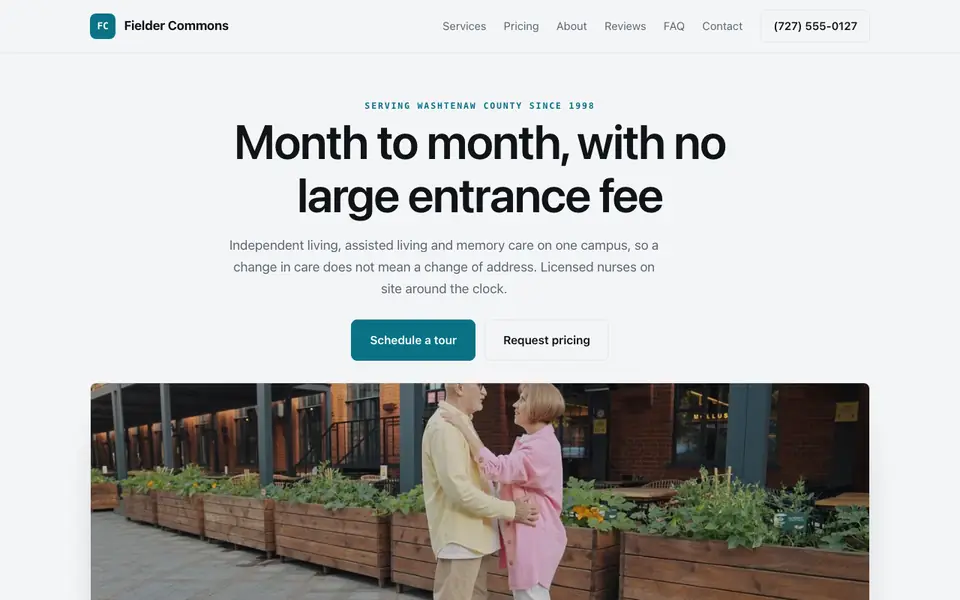
Describe your community and the AI builds a senior living website with care levels, floor plans, pricing ranges and a tour request form. Edit it by chat, visually, or in code.
Pages every senior living website needs
- Home: Community name, location, care levels offered and a 'schedule a tour' button.
- Care Levels: Independent, assisted living and memory care, each with services included and who it suits. Families search these terms separately.
- Floor Plans and Pricing: Apartment types with square footage and a monthly starting range, plus what the fee covers.
- Life Here: Dining menus, the activity calendar, outings and amenities, with your own photos.
- Our Team: Executive director, director of nursing and care staff. Families want to know who is in charge of care.
- Schedule a Tour: A form asking who the tour is for, the care level needed, the timeline and a preferred day.
Try this prompt
A website for an assisted living and memory care community in Asheville called Laurel Ridge, with pages for each care level, floor plans with starting monthly prices, a dining and activities page, our care team, and a tour request form.
How do we describe our levels of care without confusing families?
Explain each level by the help a resident gets day to day. Independent living, assisted living and memory care mean little to a family on their first search, so describe what each looks like: meals, help with bathing, medication management, secured areas. Say how a move between levels works if someone's needs change. Families usually stay with a community that answers that question clearly.
What photos should a senior living site use?
Real photos of your rooms, dining room and residents, with permission. Families compare communities by what daily life looks like, so show an actual apartment with furniture, the activity calendar on a wall and staff at work. Avoid stock images of smiling models, which families spot quickly. Include photos of the outdoor spaces and the entrance, since those are what visitors see first on a tour.
How do senior living communities usually build their websites?
Senior living sites are read by adult children as much as by future residents, so they must explain care levels, show the community and make booking a tour easy. Communities typically choose between a senior living marketing agency, referral directories plus a simple site, or a site they manage themselves.
| Option | Good for | Watch out for |
|---|---|---|
| Senior living marketing agencies | Sector-specific copy, lead tracking and often a CRM tie-in for move-in pipelines. | Retainers and slower changes when floor plans, availability or care levels shift. |
| Referral directories such as A Place for Mom | Families searching for care find you there, and advisors walk them through options. | Leads come through a paid referral model, and families may compare you with every nearby community. |
| Squarespace or Wix | Easy photo-led pages for amenities, dining and floor plans. | Tour scheduling and care-level explanations are left for you to build and write. |
| we.inc | Describe your care levels, amenities and location to get pages for each level of care, floor plans, a photo tour and a tour request form. | It does not connect to senior living CRMs, so tour requests arrive as form messages for your team to follow up. |
Families often decide which communities to visit from the photos and the care-level page, so those two deserve the most attention.
How the Fielder Commons example lays out levels of care
Fielder Commons is a senior living campus our AI made up from one sentence, not an operating community. It is a useful look at how a community site helps adult children compare options for a parent, often in a hurry.
Independent, assisted and memory care side by side
The care levels sit in one row, each with what is included, so a family can see where their parent fits today and where they could move later. Showing that a change in care does not mean a change of address answers one of the first worries families raise.
Monthly rates stated rather than hidden
Many communities make families call for any number at all. The example publishes starting monthly rates and says what they include, such as dining and housekeeping, which filters out poor fits and builds trust with the rest.
Tour booking and a nurse assessment
Families nearly always want to visit before deciding, so the tour button sits at the top. A free care assessment by a licensed nurse gives a second, lower pressure way in for people not ready to tour.
State licensing belongs on the page
Assisted living and memory care are licensed by the state, and the rules differ from one state to the next. Naming the licence and linking to the state inspection lookup lets families check the record themselves.
Fielder Commons
This is Fielder Commons, a senior living business we described to the AI in a sentence. See the Fielder Commons example site.
Start from this design
Three designs that suit a senior living website.
- Ice Blue Home Care Agency
- Terracotta Senior Home Care
- Forest Green Home Care Provider
Most senior living sites are a template with the name swapped in. Describe what you do and the AI designs and writes a senior living website around that business instead.
Features designed for your industry
- Care levels explained: Independent living, assisted living and memory care, each with what is included.
- Tour requests: A form that asks who the tour is for, the care level and a preferred day.
- Daily life: Dining, activities and staff, shown with your own photos and calendar.
Perfect for:
- An assisted living community with a memory care wing
- An independent living community with apartments and cottages
- A small residential care home with a handful of residents
- A continuing care community with several levels on one campus
Write for the adult child
The first visitor is often a son or daughter researching at night after a hard phone call. Plain answers on care levels, costs and what happens after the tour do more than soft-focus photos.
Give a pricing range
Families compare several communities and move on from the ones that hide costs. A starting monthly range per apartment type, and what it includes, keeps you in the comparison.
Show daily life with your own photos
Use real photos of your dining room, rooms and activities. Only feature residents who have agreed, and never publish health details.
Licensing and inspections
State the license your community holds and link to your state's inspection or licensing lookup. Families check, and making it easy signals you have nothing to hide.
What it costs
Building your site is free, with no card needed to start. Having the AI build and edit your care, floor plan and life pages starts at $20/month on Starter.
Building your site is free, no card needed. Paid plans from $20 a month. Compare plans
Frequently asked questions
What should a senior living website include?
Care levels, floor plans with a starting price, dining and activities, the care team, licensing information and a tour request form. Those answer the questions families ask on the first call.
Is this different from a home health care website?
Yes. Home health care agencies send caregivers to a client's home, so their site is about services and service area. A senior living community sells a place to live, so its site is about care levels, apartments, daily life and tours.
Does it work for assisted living web design?
Yes. The same structure fits an assisted living facility, an independent living community or a memory care home. Tell the AI which levels you offer and it builds a page for each.
Can families book a tour online?
They send a tour request through a form that emails your sales or move-in team. For live calendar booking, link the scheduling tool you already use.
What does a senior living website cost on we.inc?
on We.Inc you can build your site free, with no card and no trial needed to start. AI building and editing starts on Starter at $20 a month, and a custom domain needs a paid plan plus about $10 to $20 a year for the name.
Related industries and website guides
- therapist website builder
- dentist website builder
- nutritionist website builder
- spas website builder
- veterinarians website builder
- acupuncture websites
- how to make a website
- free website builder
Related website builders: Health & Wellness
- therapist website builder
- dentist website builder
- nutritionist website builder
- spas website builder
- veterinarians website builder
- acupuncture websites
Before you start
Product
Who It's For
- For Agencies
- For Freelancers
- For Hosting Providers
- For SaaS Platforms
- For Startups
- For Financial Services
- For Healthcare
Features
Resources
- Blog
- Help Center
- Free Business Tools
- Free UI Components
- Website Templates
- Template Collections
- Website Examples
- Guides
- Comparisons
- Alternatives
- Best Lists
- Reviews
- Pricing Guides
- Use Cases
- Glossary & Guides
- Integrations
- Developers
- Benchmark
- Windows App