Best Real Estate Agent Website Builders (2026)
What is the best website builder for real estate agents?
Short answer: It depends on who builds the site and how you show listings. We.Inc suits agents who want the site written for them from a description, with AI building from $20/mo; Wix (from $17/mo) and Squarespace (from $12/mo) suit agents who build it themselves, WordPress.com suits brokerages that want a listing plugin, and real-estate-only platforms suit agents who want listing search built in.
Key facts
- Showing MLS listings usually needs an IDX feed through the agent's MLS membership and an IDX provider, often a separate fee.
- A real estate site needs an about page, service areas, buyer and seller enquiry forms and a page that works on a phone.
- We.Inc's free plan publishes up to 3 template sites on a we.inc address, with no AI and no custom domain.
- Prices were checked on each vendor's pricing page in September 2026.
Summary checked against this page on September 25, 2026.
Disclosure: We.Inc makes one of the products in this list.
Quick answer: An agent or small brokerage website has to do four jobs: show who you are and where you work, capture buyer and seller enquiries, show listings (usually through your MLS or IDX provider), and look right on a phone. Pick We.Inc if you want the site written for you from a description (AI building from $20/mo; the free plan is templates only). Pick Wix (from $17/mo) or Squarespace (from $12/mo) to build it yourself, and WordPress.com if you want the widest choice of listing plugins. Real-estate-only platforms such as Placester or AgentFire build listing search in, so check their current pricing if live listings are your priority.
Last updated September 2026.
- We.Inc: Agents who want a finished site from a short description. Free: 3 template sites on a we.inc address. AI building from $20/mo (Starter), Pro $50/mo, Max $99/mo
- Wix: Agents who want to build the site themselves with apps. Light $17, Core $29, Business $39, Business Elite $159 per month
- Squarespace: Luxury and boutique agents who sell on photography. Basic $12, Core $17, Advanced $25 per month billed annually ($19, $27, $36 month to month) (prices checked September 2026)
- WordPress.com: Brokerages that want a listing plugin or publish a lot. Personal $4, Premium $8, Business $25, Commerce $45 per month (monthly billing $9 to $70)
- Webflow: Brokerages with a designer who sets the site up. Basic $15, Premium $25 per month ($39 billed monthly), plus paid seats for extra editors
Real estate website builders compared for agents, brokers and property managers: selection method, five annotated example designs, a task checklist, a copyable build brief and prices checked September 2026.
Best Real Estate Website Builders: our ranked picks
1. We.Inc
An AI website builder: you describe your agency, area and specialities in a sentence and it writes a complete, editable site with an about page, service areas, enquiry forms and contact details, then publishes it to your own domain. Good if you want a finished site without learning an editor.
Best for: Agents who want a finished site from a short description
Pricing: Free: 3 template sites on a we.inc address. AI building from $20/mo (Starter), Pro $50/mo, Max $99/mo
Pros: AI writes the pages for you, including area and service pages; Edit by clicking on the page or by asking in chat; Custom domain from the $20/mo Starter plan; Real estate example designs to start from
Cons: The free plan is templates only, with no AI and no custom domain; No built-in MLS or IDX listing feed; link or embed the one your provider gives you
2. Wix
A popular do-it-yourself builder with real estate templates and an app market. A good all-round choice if you are happy to build and write the site yourself.
Best for: Agents who want to build the site themselves with apps
Pricing: Light $17, Core $29, Business $39, Business Elite $159 per month
Pros: Large template and app library; Drag-and-drop editor; Free plan to try it
Cons: You build and write every page yourself; Listing apps can add monthly costs; Switching templates once live is hard
3. Squarespace
Design-led templates that suit photo-heavy property and luxury agent sites. Fewer apps than Wix, but less to go wrong.
Best for: Luxury and boutique agents who sell on photography
Pricing: Basic $12, Core $17, Advanced $25 per month billed annually ($19, $27, $36 month to month) (prices checked September 2026)
Pros: Strong templates for photo-led sites; Most features included in the plan; Hosting handled for you
Cons: No free plan; Fewer real estate apps; Listing feeds need an outside provider
4. WordPress.com
The most flexible option if you want a listing plugin, a blog about your market or several agent pages. Takes more setup than the others.
Best for: Brokerages that want a listing plugin or publish a lot
Pricing: Personal $4, Premium $8, Business $25, Commerce $45 per month (monthly billing $9 to $70)
Pros: Very flexible; Wide choice of plugins, including listing plugins; Free plan to start
Cons: Plugins need a higher plan; Steeper learning curve; More upkeep
5. Webflow
A design tool with a content system, good for a brokerage with a team page, area guides and a blog that a designer sets up once.
Best for: Brokerages with a designer who sets the site up
Pricing: Basic $15, Premium $25 per month ($39 billed monthly), plus paid seats for extra editors
Pros: Full design control; Content collections for agents and area guides; Clean, fast pages
Cons: Steep learning curve; Extra editor seats cost more; Listing feeds need an outside embed
Methodology
Selection method and audience: this page is for individual agents, small brokerages and property managers, not large franchises. We compared mainstream builders on the jobs such a site has to do: a clear about page and service area, buyer and seller enquiry forms that reach you, a way to show listings through the MLS or IDX provider you already use, a page that works on a phone, and a cost that stays reasonable after intro offers end. Prices come from each vendor's pricing page, checked in September 2026, in US dollars per month on annual billing unless noted. Real-estate-only platforms (such as Placester, AgentFire or Luxury Presence) are mentioned but not ranked, because we have no dated check of their prices. We have not run paid hands-on tests of every builder, so we publish no scores; the checklist below lets you run the same tasks yourself. Every example design on this page was made with We.Inc and is labelled as an example; none is a customer or a real agency. We.Inc makes one of the products on this list.
Task comparison: what to check on each builder
Run these five tasks on your top two builders using a free plan or trial, and mark each one done on the plan you intend to buy, done only on a higher plan, or not possible.
1. Listings: can you add your IDX provider's search or listing embed, or a listing plugin, and does it work on a phone? 2. Enquiries: build a "What is my home worth?" form and a buyer enquiry form, send a test entry from each and check it reaches you. 3. Area pages: add one page per neighbourhood you cover, each with its own title. 4. Your domain: connect it and confirm it loads with a padlock. 5. Updates: change a sold listing or an open-house date and time how long it takes.
Listings are the task that separates builders most. Showing MLS listings normally needs an IDX feed through your MLS membership and an IDX provider, which is usually a separate fee from the website builder. Ask your provider what it supports before you pick a builder.
Example 1: a neighbourhood agent
Customer task: a buyer new to the area wants to know whether this agent knows the neighbourhood and how to get in touch. Design choice: the hero names the city and area straight away, with one clear "Book a call" button and the agent's photo. Limitation: an example design has no live listings; a real site would add the IDX search or embed from the agent's provider.

Example 2: a luxury agent
Customer task: a seller of a high-end home judges whether the agent will present the property well. Design choice: large photography, restrained type and few words, so the pictures do the selling. Limitation: big images slow pages on phones, so compress them and check load speed with our website grader.
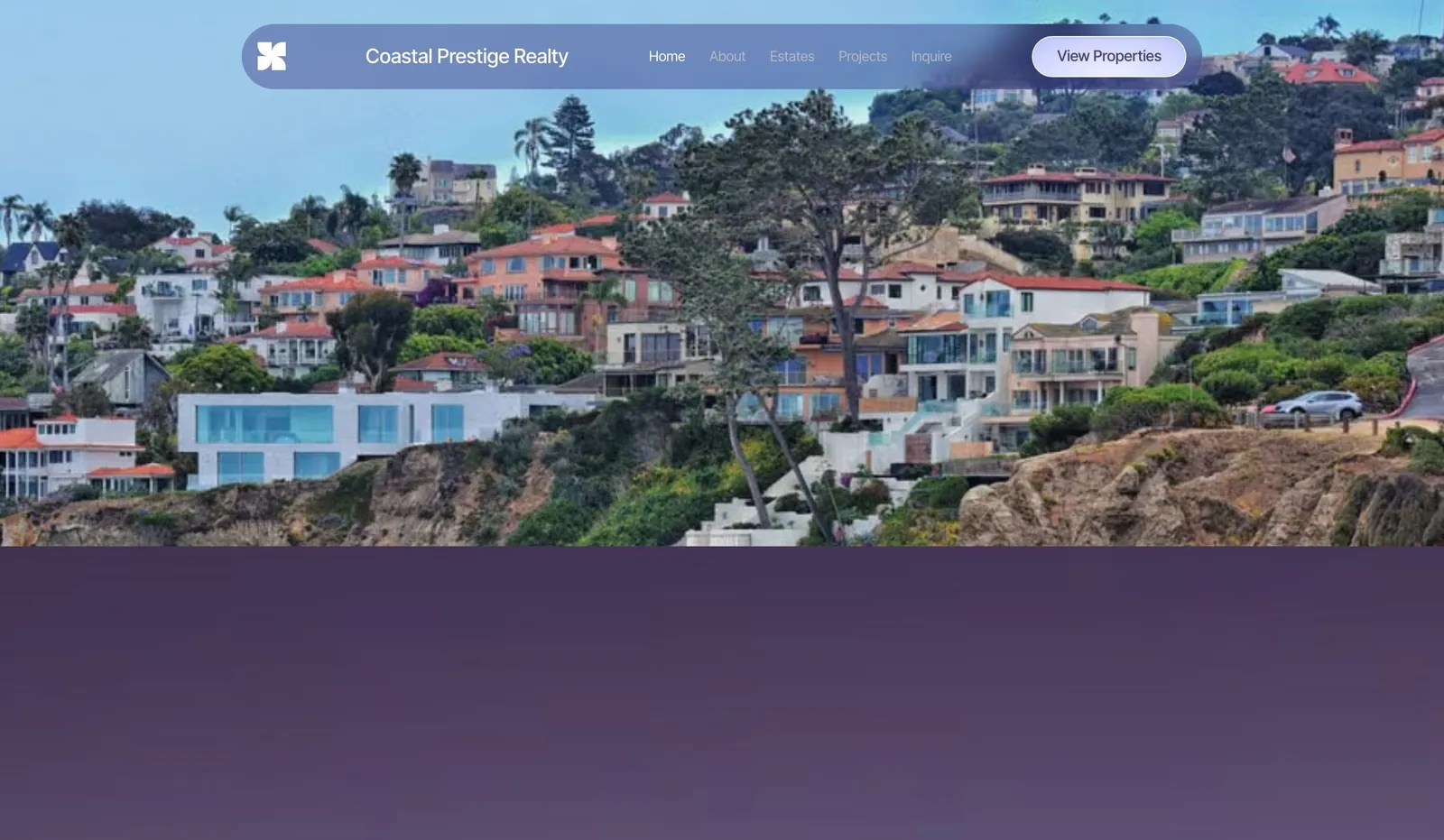
Example 3: a residential brokerage
Customer task: a visitor wants to find the right agent in a team. Design choice: a team section and separate buyer and seller paths from the homepage. Limitation: each agent page needs its own photo, bio and contact details, which someone has to keep current as the team changes.

Example 4: a commercial broker
Customer task: a business owner looking for office or retail space wants to see the property types covered and speak to someone. Design choice: property types as clear sections, and an enquiry form that asks for size and area. Limitation: commercial listings often come from different databases than residential MLS, so check how you will publish them.

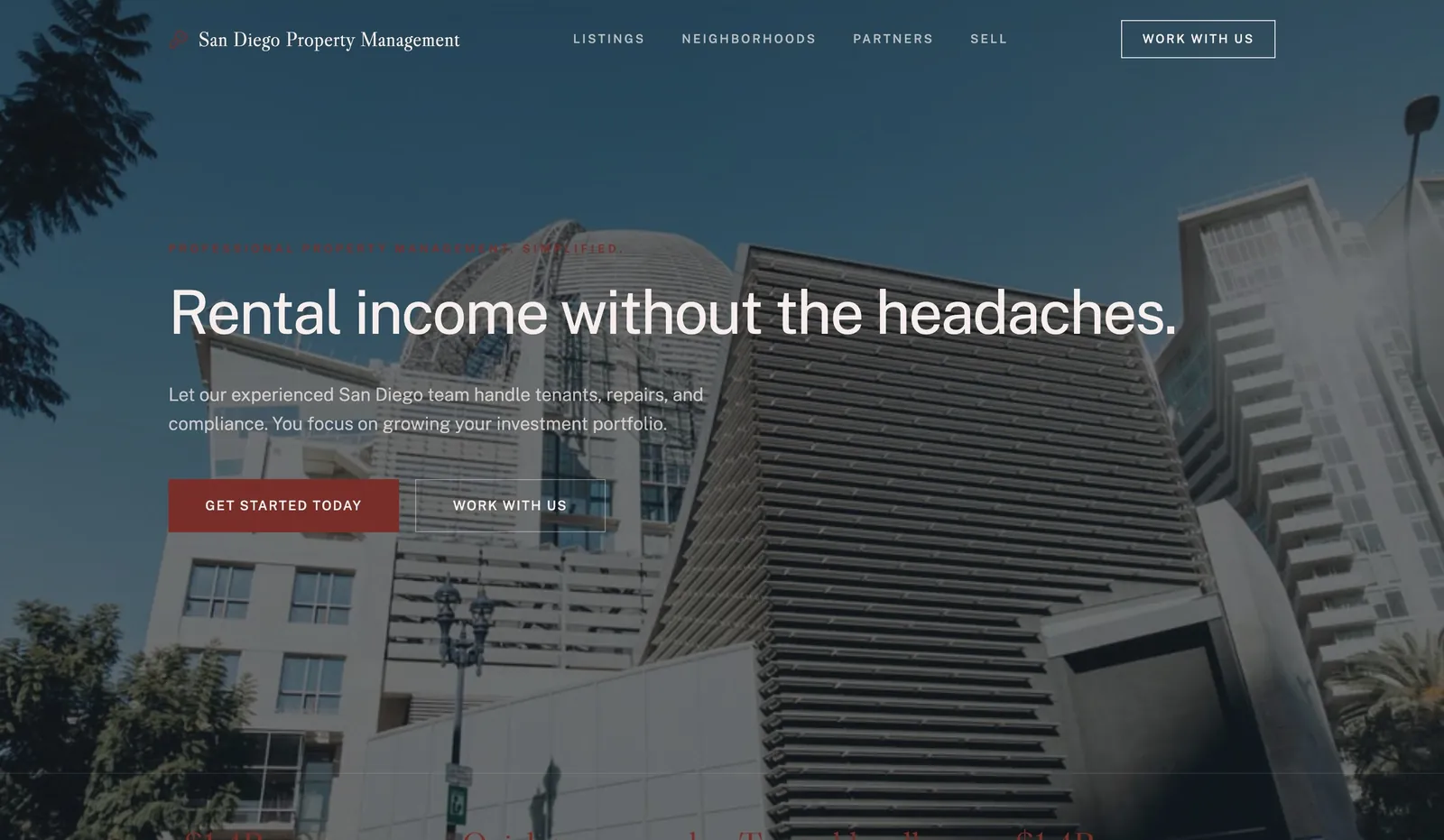
Example 5: a property manager
Customer task: an owner wants to know what management costs and covers; a tenant wants to report a repair or pay rent. Design choice: separate owner and tenant entry points at the top of the page. Limitation: rent payment and repair requests usually live in property management software, so the site links to that portal rather than replacing it.
Copyable build brief
Paste this into any builder's AI tool, or hand it to whoever builds your site, and fill in the brackets: "A website for [your name or brokerage], a real estate [agent / brokerage / property manager] in [city], covering [neighbourhoods]. Pages: home, about, buy, sell, one page per neighbourhood, contact. Include a home valuation request form and a buyer enquiry form, a tap-to-call number, my licence details in the footer, and a space for my IDX listing search. Tone: [friendly / premium / straightforward]."
We have not published results for this brief on each builder. Run it yourself and compare what each gives you against the five tasks above.
What to adapt, and what not to copy
Adapt: the structure (separate buyer, seller and area pages), clear enquiry forms, and the photo-led layout if your market is premium. Replace every example name, photo and piece of text with your own: example designs use made-up businesses.
Do not copy: another agent's listing photos or descriptions, which belong to them or to the MLS, or any claim about sales, rankings or reviews you cannot back up. Check your licensing body's advertising rules for what your site must show, such as your brokerage name and licence number.
Start from a suitable template
Browse the real estate example designs on we.inc/website-builder/real-estate-agents and we.inc/website-builder/real-estate-brokers, or the business templates on we.inc/website-templates/business. The free plan publishes up to 3 template sites on a we.inc address; AI building and your own domain start on Starter at $20 a month. Our website cost calculator adds up builder, domain and IDX fees for a full yearly figure.
Conclusion
Start with the five tasks: the right builder is the one that shows your listings through the provider you already use, gets enquiries to you reliably, works on a phone and that you will keep up to date. Pick We.Inc if you want the site written for you, Wix or Squarespace if you want to build it yourself, WordPress.com for listing plugins, and a real-estate-only platform if built-in listing search matters most.
Frequently asked questions
What is the best website builder for real estate agents?
It depends on who builds the site and how you show listings. We.Inc suits agents who want the site written for them (AI building from $20/mo). Wix and Squarespace suit agents who build it themselves, WordPress.com suits brokerages that want a listing plugin, and real-estate-only platforms suit agents who want listing search built in.
Can I show MLS listings on my website?
Usually through an IDX feed, which needs your MLS membership and an IDX provider. The provider gives you a search page, an embed or a plugin to add to the site. Check what your provider supports before you choose a builder.
How much does a real estate website cost with a builder?
In plan fees, the entry plans compared here were $12 to $20 a month on annual billing in September 2026 (Squarespace Basic $12, Wix Light $17, We.Inc Starter $20). Add your domain and any IDX provider fee. Our website cost calculator adds it up.
Do real estate agents need their own website?
Listing portals show your listings, but your own site is where you control your profile, your area pages and your enquiry forms, and the leads come to you.
Are the example designs on this page real agencies?
No. They are example designs made with We.Inc for made-up businesses, shown to illustrate design choices.
More in Best Of
- Best Free Restaurant Website Builders (2026)
- 10 Best Website Builders for Small Business (2026)
- 8 Best Website Builders for Startups (2026)
- 8 Best Website Builders for Wedding Planners (2026)
- Best White Label Website Builders for Agencies (2026)
- Best White Label Website Builders, Compared (2026)
- The cheapest website builders in 2026 (with renewal prices)
- 10 Best AI App Builders (2026)
Build it yourself
How we research, test and update this page: our editorial policy. We.Inc is our own product.
We.Inc is an AI-powered website builder you can resell under your own brand. Launch a branded client dashboard, bill on Stripe Connect, and deliver AI-generated websites in minutes. White-label plans start at $99 a month for 25 client sites, with a 7-day free trial and no per-site fees.
Product
- AI Website Builder: Describe a site in plain English; it's live in minutes
- White Label Platform: Your brand, your domain, your margin
- Enterprise: SSO, custom SLAs, and dedicated support
- Developer API: Embed site generation into your SaaS
Who It's For
- For Agencies: Resell under your brand
- For Freelancers: Your own branded builder
- For Hosting Providers: Add a builder to your stack
- For SaaS Platforms: Embed site creation via API
- For Startups
- For Financial Services
- For Healthcare
Features
- Drag & Drop Editor
- Built-in SEO Tools
- Custom Branding
- Client Dashboard
- Reseller Billing (Stripe Connect)
Resources
- Blog
- Help Center
- Free Business Tools
- Website Templates
- Glossary & Guides
- Integrations
- Developers
- Benchmark
- Windows App