The website builder made for boat rental companies.
What pages does a boat rental website need?
Short answer: A boat rental website needs a fleet page with capacity and rates, rules and boater education information, a weather and cancellation policy, and a reserve page with a request form. We.Inc builds this from a description of your marina and boats, with optional deposits through your own Stripe account.
Key facts
- We.Inc's Starter plan for AI-built boat rental sites starts at $20 a month with 250 credits.
- The free plan allows up to 3 template sites on a we.inc address with no AI or custom domain.
- We.Inc does not sync a live availability calendar, so rental requests are confirmed by email reply or through a linked reservation tool.
- Monthly US searches for 'boat rental website' are 260 per month, per DataForSEO, September 2026.
- Liability waivers are not built into the site; owners are advised to link to a dedicated waiver service instead.
Summary checked against this page on September 25, 2026.
A boat rental website needs your fleet with capacity and horsepower, half-day and full-day rates, what is included (fuel, life jackets, a captain or not) and a clear route to reserve. We.Inc builds it from a description of your marina and boats, with a rental request form that emails you and optional deposits through your own Stripe account. For live slot availability, link your dedicated reservation tool.
Create a stunning boat rental website that attracts clients, showcases your work, and grows your business, no coding required.
Pages every boat rental website needs
- Fleet: One card per boat type: pontoon, deck boat, fishing skiff, kayak or jet ski, with passenger limit, engine size and photos.
- Rates and durations: Half-day, full-day and multi-day pricing, plus fuel policy and security deposit, so nobody is surprised at the dock.
- Rules and boater education: Explain age minimums, the boater safety card your state may require, alcohol policy and no-wake zones.
- Weather and cancellation: Renters want to know what happens when a storm rolls in; spell out rain checks and refund terms.
- Where to go: A short guide to coves, sandbars, fuel docks and waterfront restaurants turns a rental page into a trip plan.
- Reserve: A request form for date, boat, party size and pickup time, with an optional deposit through Stripe.
Try this prompt
A website for Sandbar Boat Rentals on Lake Travis near Austin, Texas. We rent 22-foot pontoons for up to 12 people, two tritoons and stand-up paddleboards, by the half day or full day, with an optional licensed captain. Include a fleet page with capacities, a what-to-bring checklist, a map of our marina dock, cancellation and weather policy, and a reservation request form that takes a deposit through Stripe.
A real boat rental site, not a template
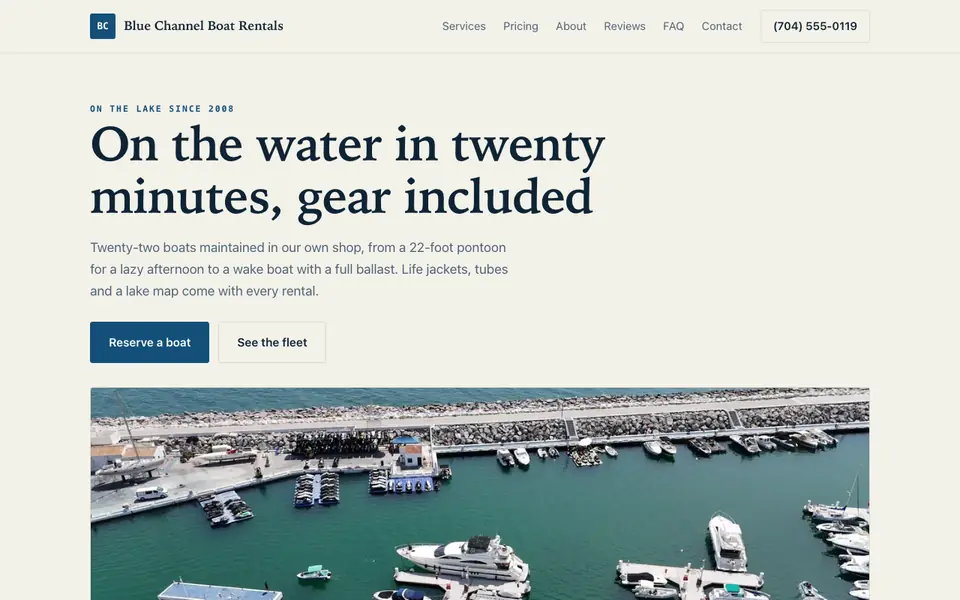
This is Blue Channel Boat Rentals, a boat rental business we described to the AI in a sentence. Every service, price and line of copy on it was written for that business. See the Blue Channel Boat Rentals example site.
Start from this design
Three designs that suit a boat rental website. Each one is free to start from.
- Nomad Rentals
- Wander
- Hotel Cove
About boat rental website design on we.inc
A boat rental website designed around your actual services and prices, not a stock layout. Describe the business and the AI writes and builds every page.
Features designed for your industry
- Fleet Gallery: Tailored features designed specifically for boat rental companies to help you stand out online.
- Pricing: Built-in tools that make managing your boat rental business easier and more efficient.
- Online Booking: Grow your boat rental business with marketing tools that drive results.
Who this boat rental website design suits
- Boat charters
- Kayak rentals
- Jet ski rentals
What makes a boat rental website work
Capacity and licensing up front
State rules on who can operate a rental vessel vary, and many require a boater education card for younger operators. Listing the rules and each boat's legal passenger capacity on the site cuts the number of arguments on the dock.
Deposits hold the weekend
Summer Saturdays sell out. Taking a deposit through your own Stripe account when someone requests a date filters out no-shows, and your refund policy page tells them what happens if the weather turns.
Link real availability, don't fake it
We.Inc does not sync a live availability calendar. If you run a booking system that tracks which pontoon is out, link to it from the Reserve button; otherwise the request form emails you and you confirm by reply.
Waivers belong in a dedicated tool
Liability waivers usually need signature capture and records you can retrieve later. Link to your waiver service from the confirmation page instead of building it into a web form.
What it costs
The free plan lets you publish up to three template sites on a we.inc address, without AI or your own domain. Once you want the AI to lay out your fleet and rewrite rates each season, Starter is $20 a month, and connecting a domain you own (roughly $10 to $20 a year) comes with the paid plans.
The free plan lets you build up to 3 sites from templates and publish them free on a we.inc address. It has no AI. Building and editing with AI starts on Starter at $20 a month with 250 credits.
Frequently asked questions
Can customers pay online for a rental?
Yes. Deposits or full payment can be taken through your own Stripe account, and the money goes straight to you.
Will the site show which boats are free on a given day?
No. There is no availability-syncing calendar. Use the request form and confirm by email, or link to the reservation system you already use.
Can I update prices for peak season?
Ask the AI in chat to change the rates table, or edit it yourself in the visual editor. Changes publish in a click.
Can I add a captained charter option?
Yes. Add it as its own card on the fleet or rates page with its own price and a note about crew and gratuity.
Can I collect signed waivers?
The builder does not do e-signatures. Link to a dedicated waiver service from your booking confirmation.
More in Website Builder
- The website builder made for bookstores.
- Bring your boutique experience online.
- A bridal shop website that brings brides in with a shortlist
- Build the perfect website for your cafe.
- The website builder made for campgrounds & rv parks.
- The website builder made for candle makers.
- A car dealership website shoppers trust before they visit the lot
- Shine sells itself. Your photos just have to load
Related website builders: Lodging & Travel
- hotel website design
- campgrounds & rv parks website builder
- escape rooms website builder
- golf courses website builder
- tour guides website builder
- tour operators website builder
Before you start
Related guides
We.Inc is an AI-powered website builder you can resell under your own brand. Launch a branded client dashboard, bill on Stripe Connect, and deliver AI-generated websites in minutes. White-label plans start at $99 a month for 25 client sites, with a 7-day free trial and no per-site fees.
Product
- AI Website Builder: Describe a site in plain English; it's live in minutes
- White Label Platform: Your brand, your domain, your margin
- Enterprise: SSO, custom SLAs, and dedicated support
- Developer API: Embed site generation into your SaaS
Who It's For
- For Agencies: Resell under your brand
- For Freelancers: Your own branded builder
- For Hosting Providers: Add a builder to your stack
- For SaaS Platforms: Embed site creation via API
- For Startups
- For Financial Services
- For Healthcare
Features
- Drag & Drop Editor
- Built-in SEO Tools
- Custom Branding
- Client Dashboard
- Reseller Billing (Stripe Connect)
Resources
- Blog
- Help Center
- Free Business Tools
- Website Templates
- Glossary & Guides
- Integrations
- Developers
- Benchmark
- Windows App