
The website builder made for golf courses.
A good golf course website gives golfers a hole-by-hole feel for the course, current green fees, a one-click path to tee times, and information on events, lessons, and the clubhouse. With we.inc you describe your course and the AI writes and builds those pages. Paid plans start at $20 a month on Starter, and tee-time booking stays in your existing tee sheet software.
A golf course website should show off the layout, post current rates, and send golfers straight to tee times. Describe your course and the AI builds the pages for you.
Pages every golf course website needs
- Home: Big course photography, a clear 'Book a Tee Time' button, and today's essentials such as hours and course conditions. Golfers mostly want to book, so do not bury that button.
- The Course: Hole-by-hole descriptions with par, yardage by tee, and a photo or flyover for each. This is what separates a course site from a directory listing.
- Rates & Memberships: Green fees by day and time, twilight and junior rates, cart fees, and membership tiers. Publish them plainly; golfers comparing courses will skip one that hides prices.
- Events & Outings: Tournament and outing packages with an inquiry form. Group outings are often a course's most valuable bookings and deserve their own page.
- Lessons & Practice: Your teaching pros, clinics, range hours, and junior programs. Many golfers search for lessons separately from tee times.
- Clubhouse & Dining: Grill or restaurant hours, menu, pro shop, and private event space. It gives non-golfers and event planners a reason to call.
Try this prompt
A website for a public 18-hole golf course in Boise, Idaho called Cedar Ridge Golf Club, with a hole-by-hole course tour, green fees and twilight rates, a tee time button linking to our booking system, tournament and outing packages with an inquiry form, lessons with our two PGA pros, and grill hours. Classic, green and cream.
Tee sheet website or your own site: options for a golf course
For a public course the most important button is book a tee time, and that usually comes from the tee sheet system. The marketing site around it, with rates, course tour, events and membership, can come from the tee sheet vendor, a golf marketing agency, or a site you manage.
| Option | Good for | Watch out for |
|---|---|---|
| Tee sheet systems such as foreUP or GolfNow | Online tee time booking, and some offer a course website with booking built in. | Course sites from tee sheet vendors tend to look alike, and some booking models involve sharing tee times. |
| Golf marketing agencies | Photography, outings packages and membership campaigns handled for you. | Retainers and slow updates when events or rates change. |
| Squarespace or Wix | Image-rich hole-by-hole tours and event pages under your control. | Booking still has to embed or link from your tee sheet. |
| we.inc | Describe your course, layout, outings and membership to get a course tour, events and outings pages and an inquiry form, with your tee time link front and centre. | It is not a tee sheet; keep booking in your existing system and link to it. |
Outing and event inquiry pages often bring in more revenue than daily tee times, so give them their own page.
Inside the Cedar Hollow Golf Club example
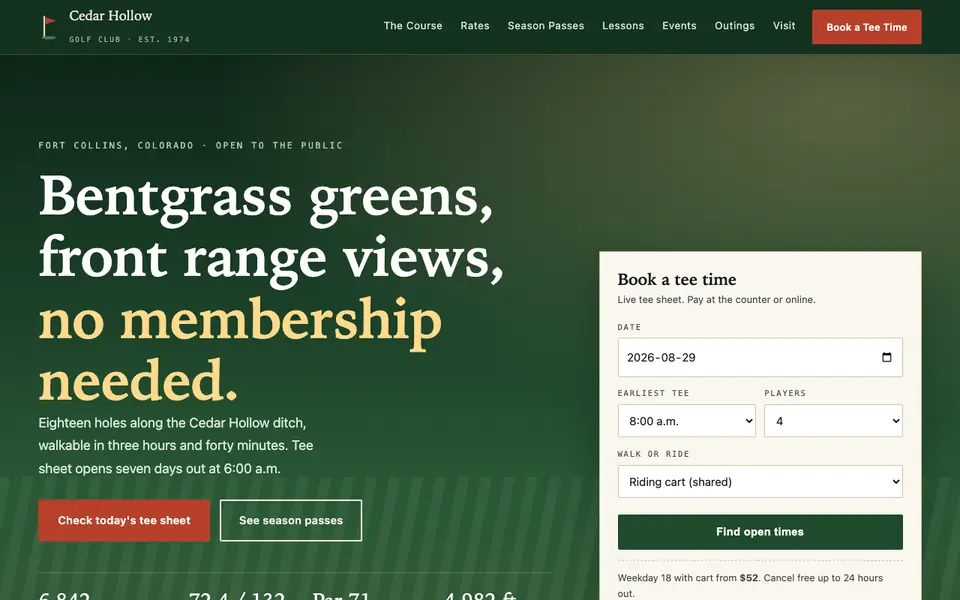
Cedar Hollow Golf Club is an invented public course in Colorado that our AI built from a sentence. Golfers visit a course site mostly on the morning they want to play, so the example puts today's information first and the history further down.
A tee sheet on the homepage
Date, earliest time, number of players and walk or ride sit in one small form, with the shop phone as a fallback. Golfers compare open times across courses in minutes, so a booking step buried two pages deep loses the round.
Course conditions updated daily
Cart path only holes, green speed, aeration dates, range hours and frost delays are listed together. This is the information regulars call the pro shop for, and posting it saves your staff the calls.
Rating and slope for the scorecard crowd
Yardage from the back tees, course rating, slope and elevation appear as plain figures. Players posting scores for a handicap look for these numbers, and travelling golfers use elevation to guess how far the ball will fly.
Separate pages for passes, lessons and outings
Season passes, instruction and group outings each get their own menu item. A tournament organiser and a beginner booking a lesson are different buyers and should not have to read each other's details.
Cedar Hollow Golf Club
This is Cedar Hollow Golf Club, a golf course business we described to the AI in a sentence. See the Cedar Hollow Golf Club example site.
Start from this design
Three designs that suit a golf course website.
- Luxury Yacht Club Landing Page
- Blue Back-Office Operations Firm
- Big-Headline Operations Consulting
Skip the golf course web design brief and the six week wait. Tell the AI about the business in a sentence and it builds the whole site, ready to edit.
Perfect for:
- Public golf courses
- Private clubs
- Golf resorts
Keep tee times in your tee sheet system
We.inc does not run a tee sheet, POS, or live tee-time availability. Link the online booking page from the tee sheet software you already use (for example foreUP, Club Caddie, or Lightspeed Golf) so golfers book and pay there.
Write the course tour like a caddie would
For each hole, note the shot that matters: a forced carry, a hidden bunker, a green that falls away. That detail is what golfers read and share, and it gives search engines unique text about your course.
Give outings their own lead form
Ask for event date, group size, format (scramble, shotgun), and food needs. A dedicated outing form captures better leads than a general contact page.
Post conditions and seasonal changes
Frost delays, aeration dates, and cart-path-only days are what locals check before driving over. A short 'course conditions' note on the homepage is easy to update from chat on a paid plan.
What it costs
Beyond your tee sheet software, the only extra costs are a domain (around $10 to $20 a year). Building a site on We.Inc is free: no card and no trial are needed to start; a custom domain needs a paid plan, from $20 a month on Starter.
Building your site is free, no card needed. Paid plans from $20 a month. Compare plans
Frequently asked questions
Can golfers book tee times on a we.inc site?
Not directly. We.inc builds your pages and forms but has no tee sheet. Add a button that links to your existing online booking page and golfers finish there.
What makes golf course web design different from other sites?
Photography and course detail carry the site. A hole-by-hole tour, clear rates, and a fast path to tee times matter more than long marketing copy.
Can I sell memberships or gift cards online?
Yes. The AI can build membership and gift card pages with checkout through your own Stripe account. If your pro shop POS already sells gift cards, you can link that instead so balances stay in one system.
Will the site work for our restaurant and events too?
Yes. The AI can add dining hours, a menu page, and private event and outing pages with their own inquiry forms, all within the same site.
Is there a free option?
Building a site on We.Inc is free for every account, with no card needed. A custom domain needs a paid plan (free to build, paid plans from $20 a month).
Related industries and website guides
- online course website design
- hotel website design
- tour guides website builder
- tour operators website builder
- travel agencies website builder
- bed and breakfasts website builder
- how to make a website
- free website builder
Related website builders: Lodging & Travel
- online course website design
- hotel website design
- tour guides website builder
- tour operators website builder
- travel agencies website builder
- bed and breakfasts website builder
Before you start
Product
Who It's For
- For Agencies
- For Freelancers
- For Hosting Providers
- For SaaS Platforms
- For Startups
- For Financial Services
- For Healthcare
Features
Resources
- Blog
- Help Center
- Free Business Tools
- Free UI Components
- Website Templates
- Template Collections
- Website Examples
- Guides
- Comparisons
- Alternatives
- Best Lists
- Reviews
- Pricing Guides
- Use Cases
- Glossary & Guides
- Integrations
- Developers
- Benchmark
- Windows App