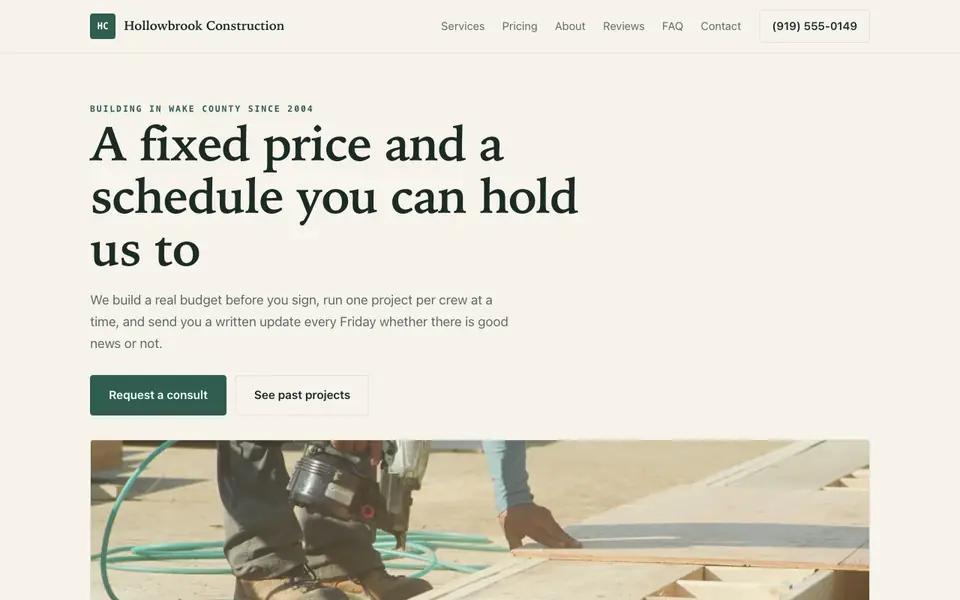
Get general contractor website design that shows finished projects, your license and insurance, and a quote form that pre-qualifies the job before you drive out.
Tell us what you do and our AI writes and builds your general contractor site around it.
Build My General Contractor Site - Free
15,000+businesses trust us
4.7
from 1,200+ reviews
No credit card required
Free plan: 3 template sites · AI building from $20/mo · Cancel anytime
hollowbrookconstruction.com
Look like the contractor who finishes on time
For general contractor website design, describe your work to we.inc's AI (remodels, additions, new builds, commercial tenant improvements), your service area, and your license details, and it drafts a site built around a project portfolio and a quote form; AI building starts on Starter at $20 a month. If you just need a clean site live quickly with no AI writing, a free template publishes on a we.inc address at no cost.
Hollowbrook Construction: an example site for general contractors, made with We.Inc.
Get general contractor website design that shows finished projects, your license and insurance, and a quote form that pre-qualifies the job before you drive out.
Pages every general contractor website needs
Projects / Portfolio: Homeowners and property managers hire a GC on proof. Before-and-after photos grouped by project type (kitchens, additions, commercial) with a short note on scope and timeline do more selling than any headline.
Services: Spell out what you take on and what you do not (residential remodels, additions, new construction, commercial). It sets expectations and filters out jobs that are too small or outside your trade.
Request a Bid / Quote: A form that asks project type, rough budget range, timeline, and address pre-qualifies leads so you are not driving to estimates for jobs that were never going to happen.
Licensing & Insurance: Your contractor license number, the states or counties you work in, and proof of liability and workers' comp coverage are the first things a cautious client checks.
Process: A simple walk-through (consultation, estimate, contract, permits, build, walkthrough) calms the biggest fear in hiring a GC, which is not knowing what happens after the deposit.
About & Reviews: Years in business, your crew, and real client reviews help you stand out from the contractor down the street with similar photos.
Try this prompt
A website for a residential general contractor in Denver called Front Range Builders, doing kitchen and bath remodels, home additions, and basement finishes, with a project gallery, a bid request form that asks for budget range and timeline, and our Colorado license and insurance details.
Three designs that suit a general contractor website.
Bold On-Site Construction Company
Plumbing, HVAC & Electrical Company
Storm-Ready Roofing Contractor
About general contractor website design on we.inc
Homeowners are terrified of hiring the wrong GC. A polished site with licensed-and-insured badges, project timelines, and real client photos closes the trust gap before the first call.
Skip the general contractor web design brief and the six week wait. Tell the AI about the business in a sentence and it builds the whole site, ready to edit.
Features designed for your industry
License & Insurance Badges: Display credentials up front so homeowners stop asking and start booking.
Project Portfolio: Organize finished work by project type, from kitchen gut jobs to full builds.
Detailed Quote Forms: Collect scope, budget, and timeline up front so you only drive to serious bids.
Who this general contractor website design suits
Home remodeling
New construction
Commercial build-outs
Design-build firms
What makes a general contractor website work
Photos are the whole pitch
A GC site lives or dies on its portfolio. Use your own job photos, not stock images, and caption each with the scope ("450 sq ft addition, 14 weeks"). A few well-documented projects beat a gallery of fifty unlabeled shots.
Budget ranges save you wasted estimates
Adding a budget range dropdown to the bid form is the single easiest way to screen leads. Someone with $8,000 for a full kitchen remodel self-selects out, and the ones who stay are closer to ready.
Licensing rules vary by state
Contractor licensing and advertising rules differ by state and sometimes by city. Check what your state requires on marketing materials, and put your license number and coverage on a visible page so clients can verify you.
we.inc does not run project management
The AI builds your portfolio, service pages, and bid forms, but it does not handle estimates, contracts, change orders, or client portals. Keep those in a tool like Buildertrend, JobTread, or your accounting software, and link to them from the site if clients need access.
What it costs
Beyond a domain (about $10 to $20 a year), most contractors already use separate software for estimating and project management, which we.inc does not replace. Starter at $20 a month is usually enough to have the AI build and keep updating a portfolio-driven site; contractors with many project pages or several service areas may fit better on Pro.
Free for 3 template sites, without AI; AI building from $20 a month. Compare plans
Frequently asked questions
How much does general contractor website design cost on we.inc?
You can publish a template site for free (no AI, up to three sites, on a we.inc address). If you want the AI to write your pages and keep editing them by chat, Starter is $20 a month for 250 credits, plus about $10 to $20 a year for your own domain.
Can I add new projects to my portfolio myself?
Yes. On a paid plan you can tell the AI something like "add the Maple Street kitchen remodel with these photos" and it updates the gallery. You can also edit text and swap images directly in the editor.
Can clients request bids through the site?
Yes. The AI can build a bid request form with project type, budget range, timeline, and address, and send submissions to your email. Estimates and contracts still happen in your own tools.
Do I need to show my contractor license number?
Many states expect it on advertising, and clients look for it either way. Check your state's rules and add the number and your insurance details to the footer or an About page.
Can I use my own domain name?
Yes, on a paid plan: Starter and above include connecting your own domain, with SSL and hosting included. The free plan publishes on a we.inc address.