
Build trust before you build their project.
The best website builder for contractors is one that leads with photos of your finished work, lists your services and areas, shows your license and insurance, and makes requesting a quote a one-click job; we.inc's AI builds those pages from a description in minutes. You can also publish a free template with no AI, and AI building starts on Starter at $20 a month.
Good contractor website design shows your finished projects and makes getting a quote easy. Describe your business and the AI builds the site around your best work.
Pages every contractor website needs
- Home: Your trade, your service area, and your best project photos above the fold, with a 'get a quote' button. Homeowners are comparing several contractors and judge quickly.
- Services: A section or page per service (remodels, additions, roofing, decks). Homeowners search for the job they need, not just 'contractor'.
- Project Gallery: Before-and-after photos with a line about the job. Past work is the strongest proof a contractor can show.
- About: Your story, your crew, years in business, and your license and insurance details. It answers 'can I trust these people in my home'.
- Service Areas: The towns and neighborhoods you work in. It sets expectations and helps you show up in local searches.
- Request a Quote: A form asking for the type of project, address, rough timeline, and photos by email. Clear questions get you better leads.
Try this prompt
A website for a residential remodeling contractor in Charlotte, North Carolina called Carolina Craft Builders, doing kitchen and bathroom remodels and home additions. Include a services page, a before-and-after project gallery, an about page with our license and insurance info, a service areas list, and a request-a-quote form. Solid, trustworthy, clean.
What is the best website setup for a contractor?
For most contractors the winning setup is a site that shows finished projects and makes it easy to request a quote, connected to whatever you already use for estimates and scheduling. The main choices are field-service software, a general builder, a contractor marketing agency, or a site built from a description.
| Option | Good for | Watch out for |
|---|---|---|
| Field-service software such as Jobber or Housecall Pro | Quotes, scheduling and invoicing in one place; some of these tools also offer booking pages you can link from a site. | They are operations tools first, so a full project portfolio usually needs a proper site as well. |
| Contractor marketing agencies | Hands-off, and often include local ads and lead tracking. | Long contracts and leads that are sometimes shared with other contractors in the area. |
| Wix, Squarespace or GoDaddy | Inexpensive and fine if you will write the service and area pages yourself. | Project galleries, license details and quote forms are all on you to build. |
| we.inc | Describe your trade, service area and license, and get project galleries, service pages and a quote form that emails you. | It does not schedule crews or send invoices; keep using your field-service tool for that and link to its booking page. |
Lead-sharing directories such as Angi or Thumbtack can fill a slow month, but a site of your own is where repeat and referred customers come back to you directly.
A real contractor site, not a template
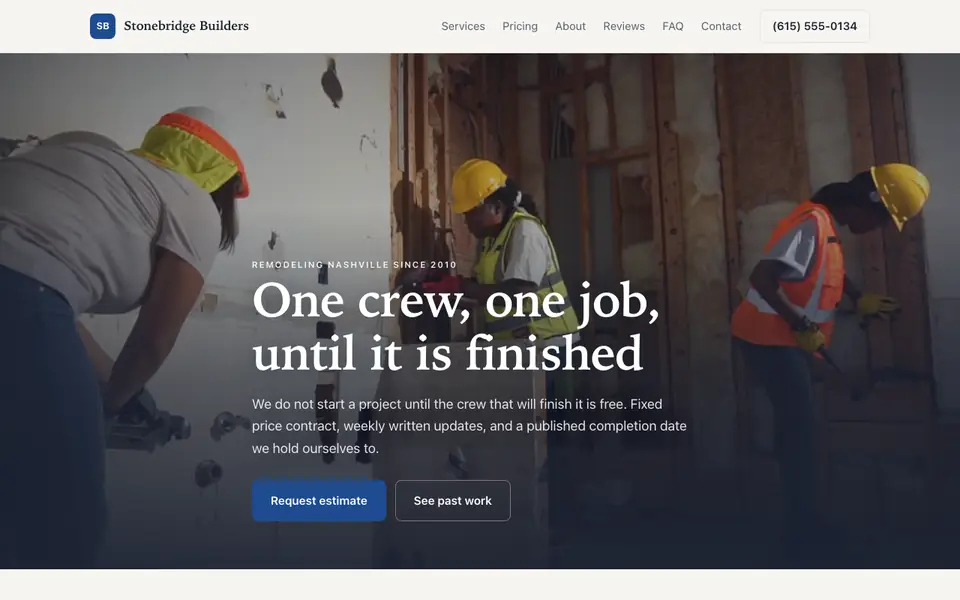
This is Stonebridge Builders, a contractor business we described to the AI in a sentence. See the Stonebridge Builders example site.
Start from this design
Three designs that suit a contractor website.
- Bold On-Site Construction Company
- Plumbing, HVAC & Electrical Company
- Storm-Ready Roofing Contractor
About contractor website design on we.inc
Win more bids with a professional site showcasing your completed projects and craftsmanship.
A contractor website designed around your actual services and prices, not a stock layout. Describe the business and the AI writes and builds every page.
Features designed for your industry
- Project Gallery: Showcase your completed construction projects.
- Credentials: Display your licenses, insurance, and certifications.
- Free Estimates: Let homeowners request project estimates.
Who this contractor website design suits
- General contractors
- Remodeling contractors
- Home builders
- Renovation specialists
- Commercial contractors
What makes a contractor website work
Show your license and insurance clearly
Many homeowners check whether a contractor is licensed and insured before calling. Put your license number (where your state requires one) and a line about insurance on the about page or footer, and keep it current.
Real project photos beat stock photos
Homeowners can tell stock photos apart from real jobs. Upload photos of your own work, even phone photos, and the AI can write short captions describing each project.
Service area pages help local search
Listing the towns you serve, with a sentence or two about work you have done there, helps you appear when people search for 'kitchen remodel near me' in those areas.
We.inc does not include estimating, scheduling, or invoicing
The AI builds your quote request form and pages, but there is no built-in estimating, job scheduling, or invoicing. Link or embed a dedicated tool such as Jobber or Housecall Pro for those.
What it costs
Beyond your domain (about $10 to $20 a year), your main extra cost is any field service tool you link for estimates and scheduling. A free template gets a basic site live; once you want the AI writing service pages and adding projects to your gallery as you finish them, Starter at $20 a month covers most contractors.
Free for 3 template sites, without AI; AI building from $20 a month. Compare plans
Frequently asked questions
How much does contractor website design cost?
You can publish a free we.inc template on a we.inc address with no AI, up to three sites. AI-written and AI-edited sites start on Starter at $20 a month for 250 credits. A domain is about $10 to $20 a year.
Can customers request quotes through the site?
Yes. The AI builds a quote request form. For estimating, scheduling, and invoicing, link a tool such as Jobber or Housecall Pro.
Can I add project photos myself?
Yes. Upload your own photos and the AI can place them in your gallery and write captions.
Can I use my own domain name?
Yes, on a paid plan (from Starter at $20/mo). You can connect a custom domain, and SSL is included. Free sites publish on a we.inc address.
What pages does a contractor website need?
A homepage, services, a project gallery, an about page with license and insurance info, service areas, and a quote request form.
What is the best website for contractors?
One that says what you build and where in the first screen, shows real project photos, gives honest price ranges and makes the estimate request easy. The sample contractor designs on this page each lead with how the estimate works.
Do I need a web designer, or is a contractor website builder enough?
A builder is enough for most small contractors. Fill in a template for free, or on a paid plan describe your business and the AI writes the pages. You can change any text or photo yourself afterwards.
Contractor web design: five sample sites, compared on the estimate request
A website for contractors has one job before any other: turn a homeowner with a project into a site visit or a written estimate. Below, five sample contractor sites from our library, each read for how it handles a kitchen remodel, an addition and a repair a homeowner wants priced.
How these were picked
Remodeling, general contracting, additions, basement and roofing samples from our library. Stonebridge Builders is the demonstration; its prices, crew and reviews are made up, like every sample here. Checked 27 September 2026. Every design here is from the We.Inc library and is labelled as a sample or template. None is a customer site, and no entry claims results.
1. Stonebridge Builders
Sample site built by our AI (made-up business). Open it
Task: A homeowner planning a remodel who has been let down by a contractor before.
Design choice: "One crew, one job, until it is finished" with "Request estimate" and "See past work". From-prices for each project type and a paid design and estimate package credited if you build.
Limitation: The estimate is a phone call or email. Add a request form with project type, address and photo upload.
2. Hollowbrook Construction
Sample site built by our AI (made-up business). Open it
Task: A family comparing bids for a large remodel or custom home.
Design choice: "A fixed price and a schedule you can hold us to", budget ranges by project type and a paid consultation credited to the contract.
Limitation: No project gallery on the first screens; add real photos of finished jobs.
3. Rowan Ridge Additions
Sample site built by our AI (made-up business). Open it
Task: A family that needs more space and does not want to move.
Design choice: "More house, without moving to get it", a feasibility study first, then ranges for rooms, suites, second stories, garage conversions and ADUs.
Limitation: Additions only; a general remodeler would add kitchen and bath pages.
4. Underline Basement Company
Sample site built by our AI (made-up business). Open it
Task: A homeowner turning a bare basement into living space.
Design choice: "We fix the water before we frame", with a fixed-price estimate and an allowance schedule instead of an hourly guess.
Limitation: Basements only.
5. Sturbridge Roofing
Sample site built by our AI (made-up business). Open it
Task: A homeowner with a leak who fears being sold a new roof.
Design choice: "Free inspection" first, photos of every problem area, and a leak repair from-price next to full replacement prices.
Limitation: Roofing only; the storm and insurance story needs your own local detail.
Task comparison
| Design | Kitchen or bath remodel | Addition or major project | Repair priced before work |
|---|---|---|---|
| Stonebridge Builders | From $38,000 kitchen, from $19,500 bath | From $185/sq ft | No |
| Hollowbrook Construction | From $58,000 kitchen | From $185,000 addition | No |
| Rowan Ridge Additions | No | From $135,000, after a feasibility study | No |
| Underline Basement Company | No | Basement finish | Water problems first |
| Sturbridge Roofing | No | Replacement from $12,400 | Leak repair from $475 |
Walkthrough: a homeowner pricing a kitchen remodel on the Stonebridge sample
- They land on "One crew, one job, until it is finished" with "Request estimate" and "See past work".
- "Remodels, additions and whole home work" shows a kitchen remodel from $38,000 and a typical six to nine weeks.
- The FAQ answers how long the kitchen is out of use, what an allowance is and who pulls permits.
- "Let us look at your project" asks for photos and a rough scope. Edit prompt: "Add an estimate request form with project type, address, budget range, timeline and photo upload."
Copyable build brief
A website for [company], a [remodeling / general / roofing] contractor in [area]. Project types with from-prices or honest ranges. How estimates work and whether they are free. Licence and insurance details. Real project photos with a short caption each. Towns served. An estimate request form with photo upload. A click-to-call button on every phone screen.
What We.Inc does and does not do here
| Estimating, scheduling and invoicing | Not built in. Link the field service or estimating tool you already use. |
| Project gallery | Yes. Upload your own photos and ask the AI to write a caption for each job. |
| Publishing for free | Free plan: up to 3 template sites on a we.inc address. No AI credits and no custom domain. |
| Having the AI write and change the site | Paid plans: Starter $20/mo, Pro $49/mo, Max $99/mo. You describe the business, then edit by clicking or by asking in chat. |
| Your own domain | Paid plans only. |
| Taking payments | Through your own Stripe account, so the money goes to you. We.Inc does not hold funds. |
| Forms | The AI builds contact and request forms. A synced booking calendar is not built in: link the scheduling tool you already use. |
What to adapt
- From-prices or ranges per project type.
- How the estimate works, in plain words.
- Licence and insurance where people can find them.
What not to copy
- The sample prices, years in business and reviews.
- Stock photos passed off as your jobs.
Questions
What makes good contractor web design?
A clear first screen that says what you build and where, a button to request an estimate, real project photos, and honest price ranges. The samples above each lead with how the estimate works, because that is what a homeowner is deciding on.
Should a contractor website show prices?
Most of the samples show from-prices or ranges per project type and say they are confirmed after a site visit. It filters out projects far outside your range. Use your own numbers, not the sample ones.
Start from a suitable design
Start building this contractor website. Or check costs with the website cost calculator, test a current site with the website grader, and see pricing.
Browse the templates: Construction and contractor website templates
Related industries and website guides
- hvac website design
- general contractor website design
- freelance website builder
- small business website design
- electricians website builder
- engineering firms website builder
- Contractor website example
- contractor website builder
Related website builders: Professional Services
- hvac website design
- general contractor website design
- freelance website builder
- small business website design
- electricians website builder
- engineering firms website builder
Before you start
- contractors website examples
- Best website builders for contractors
- how to make a website
- free website builder
- AI website builder
Related guides
Product
Who It's For
- For Agencies
- For Freelancers
- For Hosting Providers
- For SaaS Platforms
- For Startups
- For Financial Services
- For Healthcare
Features
Resources
- Blog
- Help Center
- Free Business Tools
- Free UI Components
- Website Templates
- Template Collections
- Website Examples
- Guides
- Comparisons
- Alternatives
- Best Lists
- Reviews
- Pricing Guides
- Use Cases
- Glossary & Guides
- Integrations
- Developers
- Benchmark
- Windows App