
The website builder made for roofing companies.
How do I build a website for a roofing company?
Short answer: We.Inc's AI builds a roofing website by describing your services, materials, and service area, starting at $20 a month on the Starter plan. It creates pages for services, a project gallery, service area, licensing and insurance, and a free estimate request form.
Key facts
- AI-built roofing websites on We.Inc start at $20 a month on the Starter plan.
- The example site built with We.Inc for this trade is called Ridgeline Roofing & Exteriors.
- Three starter designs suited to a roofing website are Ironpeak Roofing, Summit Trades, and Ferro Industrial.
- The search term 'roofing website design' gets 260 monthly US Google searches, 'roofing website' gets 170, and 'roofing website template' and 'roofing website builder' each get 90, as of September 2026 via DataForSEO.
Summary checked against this page on September 25, 2026.
A roofing company needs a site that separates storm damage, repairs and full replacements, shows photos of roofs you actually finished, and collects estimate requests with the address and roof type. we.inc is a strong pick because its AI builds all of that from a description of your crew and area; roofing sites run on paid plans from $20 a month.
A roofing website builder for roofing companies: describe your services and service area and the AI builds storm damage and replacement pages, a project gallery of your own roofs, your license and insurance details, and a free estimate form.
Pages every roofing website needs
- Services: Repair, full replacement, storm and hail damage, inspections and gutters, each on its own page, because homeowners search for the specific job.
- Storm damage and insurance claims: What to do after a storm and how you work with adjusters. Urgent storm traffic needs its own page, not a bullet point.
- Materials: Asphalt, metal, tile or flat roofing, whichever you install, with what each is suited to.
- Project gallery: Before-and-after photos of your own finished roofs, tagged by material and town.
- Service area: The towns or counties you cover, which filters leads and helps local search.
- Free estimate request: Address, roof age, material, the issue and an optional photo field, so you can triage by urgency before calling.
- License, insurance and certifications: License number, insurance and any manufacturer certifications you hold, visible where wary homeowners look.
Try this prompt
A website for a residential and storm-damage roofing company in Tulsa called Ironclad Roofing, offering repair, full replacement in asphalt and metal, and free storm inspections. Include a storm damage and insurance claim page, a before-and-after project gallery, a service area page listing the towns we cover, our license number and insurance in the header, and a free estimate form that asks roof age, material and the problem with an optional photo upload.
Should a roofing site mention insurance claims?
Yes, carefully. Explain how you inspect and document storm damage and how you work with the homeowner's adjuster, but leave the decision on the claim to the insurer. Some states limit what contractors may say or do on a claim, and offers to waive a deductible are illegal in several of them, so check your state rules before you write the page.
Which roof types should get their own page?
Each roof you install often enough to show finished examples. Asphalt shingle, metal, tile and flat or low-slope commercial roofs are searched separately and attract different customers. A page per type with your own photos, the brands you install and typical lifespan answers more questions than one long services list.
Getting a roofing company found before and after storms
Roofing demand spikes after hail and wind, and so do searches for local roofers. The companies that get the calls are the ones whose map listing, reviews and website all show a real local address and recent jobs.
Post jobs in your Business Profile as you finish them
A photo of a finished roof with the neighbourhood and material named keeps your profile active and shows homeowners that you work near them. A few posts a month is plenty.
Write a storm page before the season, not during it
Explain how you inspect for hail and wind damage, what photos to take and how long repairs usually wait in peak season. A page that is already indexed when a storm hits is the one people find.
Use an address you actually work from
Google suspends listings that use virtual offices or addresses where no one works. If your crew is mobile, set the profile as a service-area business and hide the street address instead.
Which route makes sense for a roofing company website?
A roofing site has to win trust fast, especially after a storm when homeowners are wary of out-of-town crews. Roofers usually weigh a roofing marketing agency, manufacturer and lead-platform listings, a general builder, or a site they generate and control.
| Option | Good for | Watch out for |
|---|---|---|
| Roofing marketing agencies | Specialists in storm-season ads and local search who handle the whole site. | Monthly retainers add up, and check who owns the site and the leads when the contract ends. |
| Manufacturer contractor listings such as GAF or Owens Corning | Certified installers appear in the manufacturer's contractor finder, which homeowners trust. | You need the certification to be listed, and the listing links out rather than replacing your own site. |
| Angi or HomeAdvisor | A steady flow of homeowners asking for quotes now. | You pay for leads that are often sent to several roofers at once. |
| General builders | Low cost for a crew that already has good project photos and time to write. | Storm, insurance-claim and material pages are what rank and convert, and they take effort to write well. |
| we.inc | Describe the roofs you install and repair and the towns you cover to get service, storm damage, gallery and estimate request pages. | It does not measure roofs from satellite images or produce estimates; inspection requests arrive as form messages. |
If you hold a manufacturer certification, say so on your own site too and link to your listing, so a homeowner can confirm it.
Comparing builders on how easy the project gallery is to keep current? See the best website builders for roofers.
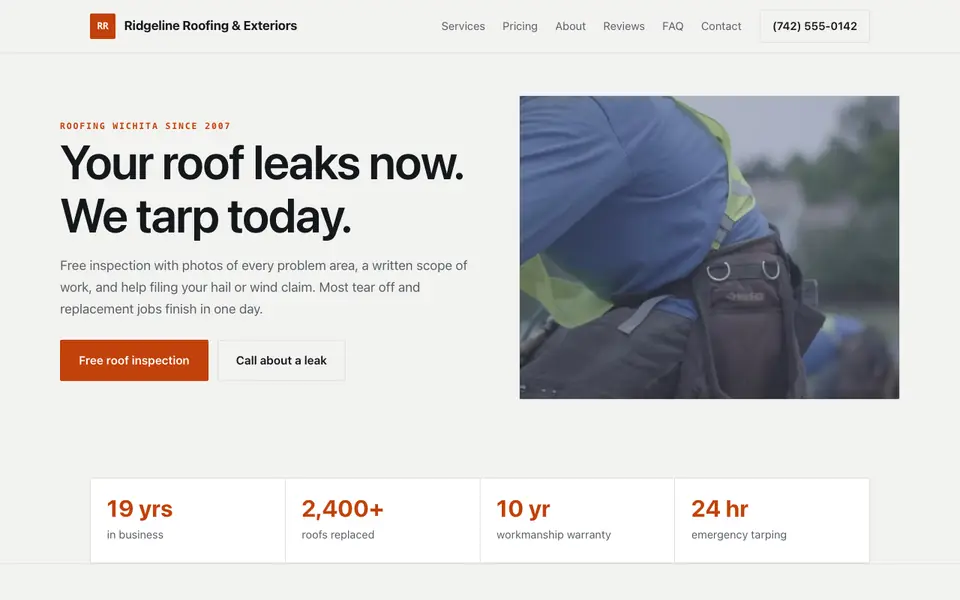
What a homeowner with a leak sees on the Ridgeline Roofing example
Ridgeline Roofing & Exteriors is a fictional Wichita roofer our AI wrote from a one-sentence brief. The page is built for two moments: an active leak, and a hail claim after a storm.
Emergency tarping in the headline
The first line promises a tarp the same day, with a separate button to call about a leak. Someone with water coming through the ceiling is not reading a services grid.
An inspection report the adjuster can use
The free inspection includes photos and a written report to hand to the insurance company. Storm-damage customers search for help with claims; say clearly that you document damage and do not negotiate on their behalf where state rules forbid it.
Materials named, not just roof types
Shingle, metal and flat roofing entries mention the underlayment, gauge or membrane used. Homeowners comparing quotes line these details up side by side.
Prices framed as starting points
A note says every figure is confirmed after getting on the roof. Licensing and permit rules for roofers vary by state and city, so list your licence number and say you pull permits where they are required.
Ridgeline Roofing & Exteriors
This is Ridgeline Roofing & Exteriors, a roofing business we described to the AI in a sentence. See the Ridgeline Roofing & Exteriors example site.
Start from this design
Three designs that suit a roofing website.
- Storm-Ready Roofing Contractor
- Plumbing, HVAC & Electrical Company
- Industrial Steel Fabricator
Most roofing sites are a template with the name swapped in. Describe what you do and the AI designs and writes a roofing website around that business instead.
Perfect for:
- Roof repair
- Roof replacement
- Storm damage
What to check in a roofing website builder
Look for a tap-to-call button that stays on screen on phones, separate pages per service and per town, a form you can shape (roof age, material, photos), and the ability to publish new job photos from your phone. Test each builder on those before you compare prices.
Storm pages convert urgent traffic
Homeowners searching after a hailstorm want to know what to do first and whether you deal with their insurer. A dedicated page that answers those questions serves that traffic far better than a general services list.
Proof of work must be yours
Real before-and-after photos of your own jobs do more than any written claim. Upload a few after every job and ask the AI to add them to the gallery.
License and insurance deter storm-chaser worries
After storms, homeowners check for a license number, insurance and manufacturer certifications before calling. Put them near the top, not only in the footer. Requirements vary by state, so check yours.
Inspections are requested, not auto-booked
There is no live calendar in we.inc. Requests arrive by email, or link the scheduling tool or CRM you already use from the estimate page.
What it costs
on We.Inc you can build your site free, with no card and no trial needed to start. Paid plans start at $20 a month on Starter, then Pro at $49 and Max at $99; credits are spent when the AI generates or edits. Budget about $10 to $20 a year for a domain. Estimate requests route to your email or existing CRM, so most roofers need no extra software for the site. Companies with many town pages that change often may prefer Pro.
Building your site is free, no card needed. Paid plans from $20 a month. Compare plans
Frequently asked questions
What is the best website builder for a roofing company?
One that makes calling you easy on a phone, gives each service and town its own page, and lets you add job photos quickly. We.inc's AI builds that from a description of your company (free to build, paid plans from $20 a month), or start from a free roofing template.
How much does a roofing website cost?
Building a site on We.Inc is free for every account, with no card needed. Paid plans start at $20 a month, plus roughly $10 to $20 a year for a custom domain.
Can homeowners send photos of the damage?
Yes. Ask the AI for an estimate form with a photo field, or invite customers to reply to your confirmation email with pictures.
Can it schedule inspections automatically?
No. There is no live calendar. Requests arrive by email and you confirm the time, or link your own scheduling tool.
Do I need to show my roofing license?
Many states require it in advertising, and homeowners look for it after storms. Show license number, insurance and certifications clearly.
How does the site help with local search?
A page per town or county you serve, a Google Business Profile that matches your site, and real project photos are what help roofers show up locally. The built-in tools let you <a href="/features/seo-tools">manage titles, redirects and your sitemap</a> without a separate plugin.
Browse the templates: Roofing website templates
Related industries and website guides
- construction website builder
- pet sitting website builder
- hvac website design
- general contractor website design
- septic services website builder
- tree service companies website builder
- roofing companies website examples
- how to make a website
Related website builders: Home Services
- construction website builder
- pet sitting website builder
- hvac website design
- general contractor website design
- septic services website builder
- tree service companies website builder
Before you start
Related guides
Product
Who It's For
- For Agencies
- For Freelancers
- For Hosting Providers
- For SaaS Platforms
- For Startups
- For Financial Services
- For Healthcare
Features
Resources
- Blog
- Help Center
- Free Business Tools
- Free UI Components
- Website Templates
- Template Collections
- Website Examples
- Guides
- Comparisons
- Alternatives
- Best Lists
- Reviews
- Pricing Guides
- Use Cases
- Glossary & Guides
- Integrations
- Developers
- Benchmark
- Windows App