
A pet sitting website that makes owners comfortable handing you the keys
A pet sitting website should make an owner trust you with their pet and their house: who you are, what you offer and charge, where you work, and how to set up a meet-and-greet. On we.inc you can publish a free template, or describe your business to the AI (from $20/month) and it builds those pages for you.
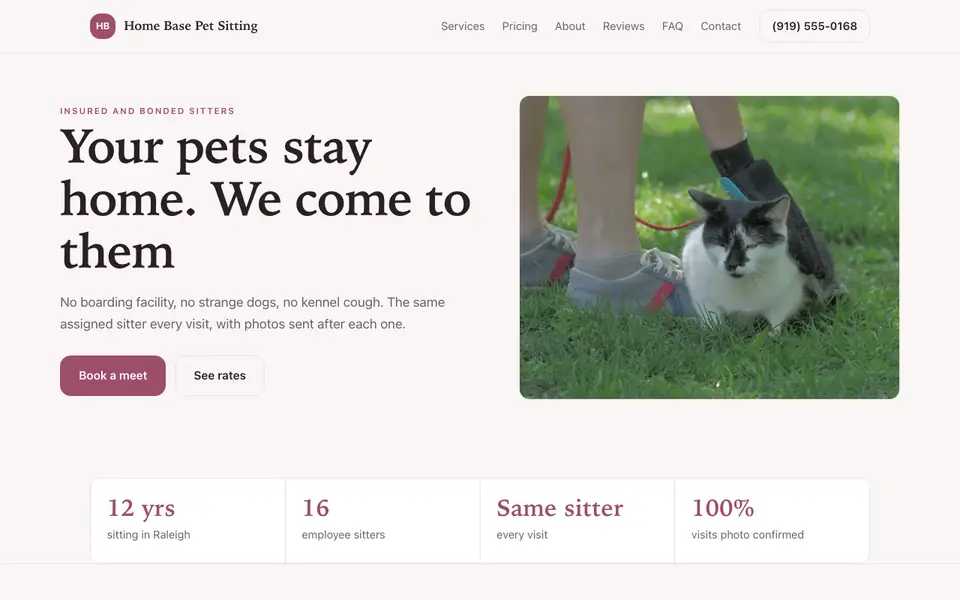
Describe your services and the AI builds a pet sitting website with rates, your service area, and a meet-and-greet request form. Edit by chat, visually, or in code.
Pages every pet sitter website needs
- Home: Your photo, the services you offer, your area and a clear button to request a meet-and-greet.
- Services and Rates: Drop-ins, overnights, walks and add-ons with prices, so owners can budget before they reach out.
- About: Your experience with animals, training and why you do this, since trust is the whole sale.
- Service Area: A list or map of neighborhoods you cover prevents inquiries you cannot take.
- Policies: Booking, cancellation, key handling and emergency vet policies answered up front.
- Contact / Meet-and-Greet: A form that asks about pets, dates and home access so the first call is productive.
Try this prompt
A website for a pet sitting and dog walking business in Portland, Oregon called Rose City Paws, with drop-in visits, overnight stays and 30-minute walks, a rates page, a map of the neighborhoods we serve, our insurance and pet first aid certification, and a meet-and-greet request form.
A real pet sitter site, not a template
This is Home Base Pet Sitting, a pet sitter business we described to the AI in a sentence. See the Home Base Pet Sitting example site.
Start from this design
Three designs that suit a pet sitter website.
- Neighborhood Veterinary Clinic
- Soft Neutral Pet Supply Store
About pet sitter website design on we.inc
A pet sitter website designed around your actual services and prices, not a stock layout. Describe the business and the AI writes and builds every page.
Features designed for your industry
- Services and rates: Drop-in visits, overnights and dog walks laid out with clear prices.
- Service area: Show the neighborhoods or zip codes you cover so inquiries come from the right places.
- Trust details: Insurance, bonding, pet first aid training and your care routine, where owners look first.
Who this pet sitter website design suits
- A solo pet sitter moving clients off a marketplace app
- A dog walking and pet sitting business adding staff
- A cat sitter who wants a simple site with rates and a contact form
- A sitter serving a few specific neighborhoods
What makes a pet sitter website work
Trust is the product
Owners are giving you a key and a family member. A real photo of you, your experience, and whether you are insured and bonded matter more than design details.
Publish your rates
Listing prices for visits, overnights and extra pets filters out mismatched inquiries and saves back-and-forth messages.
Holiday demand planning
Holidays book up early. A short notice on the home page about holiday booking windows and minimums helps you fill the calendar without last-minute scrambles.
Scheduling and payments need a separate tool
We.inc builds the website and inquiry form, but has no built-in booking calendar. Link or embed a pet care tool like Time To Pet or a scheduler like Calendly; payments can go through your own Stripe account or your usual app.
What it costs
Beyond a custom domain (about $10 to $20 a year), a pet sitting site needs nothing else to launch. Starter at $20/month is plenty for most sitters who want the AI to build and update their site.
Free for 3 template sites, without AI; AI building from $20 a month. Compare plans
Frequently asked questions
How much does a pet sitting website cost?
You can publish up to 3 template sites free on a we.inc address, without AI. AI building and editing starts on Starter at $20/month for 250 credits, plus about $10 to $20 a year for a custom domain.
Can clients book and pay on my site?
Not natively. The AI can add a meet-and-greet request form, and you can link or embed a scheduling tool like Time To Pet or Calendly and take payment through the app you already use.
What should I put on a pet sitting website?
Your photo and experience, services with rates, the area you cover, policies for keys, cancellations and emergencies, and a contact form. Insurance and pet first aid details help owners decide.
Do I need my own website if I use a marketplace app?
Not strictly, but your own site gives repeat and referred clients a place to find you directly, with your rates and policies, instead of searching a marketplace.
Can I update my rates or holiday schedule myself?
Yes. Tell the AI what changed in chat, or edit the text directly in the visual editor.
Related industries and website guides
- construction website builder
- hvac website design
- general contractor website design
- dog breeder website builder
- pressure washing websites
- remodeling contractor websites
- pet sitters website examples
- how to make a website
Related website builders: Home Services
- construction website builder
- hvac website design
- general contractor website design
- dog breeder website builder
- pressure washing websites
- remodeling contractor websites
Before you start
Product
Who It's For
- For Agencies
- For Freelancers
- For Hosting Providers
- For SaaS Platforms
- For Startups
- For Financial Services
- For Healthcare
Features
Resources
- Blog
- Help Center
- Free Business Tools
- Free UI Components
- Website Templates
- Template Collections
- Website Examples
- Guides
- Comparisons
- Alternatives
- Best Lists
- Reviews
- Pricing Guides
- Use Cases
- Glossary & Guides
- Integrations
- Developers
- Benchmark
- Windows App