
A pressure washing website where the before-and-afters do the selling
A pressure washing website should lead with before-and-after photos, explain each service and surface, show your service area and make getting a quote quick. On we.inc you can launch a free template or let the AI build it from $20/month. Scheduling and invoicing stay in a field service tool you link.
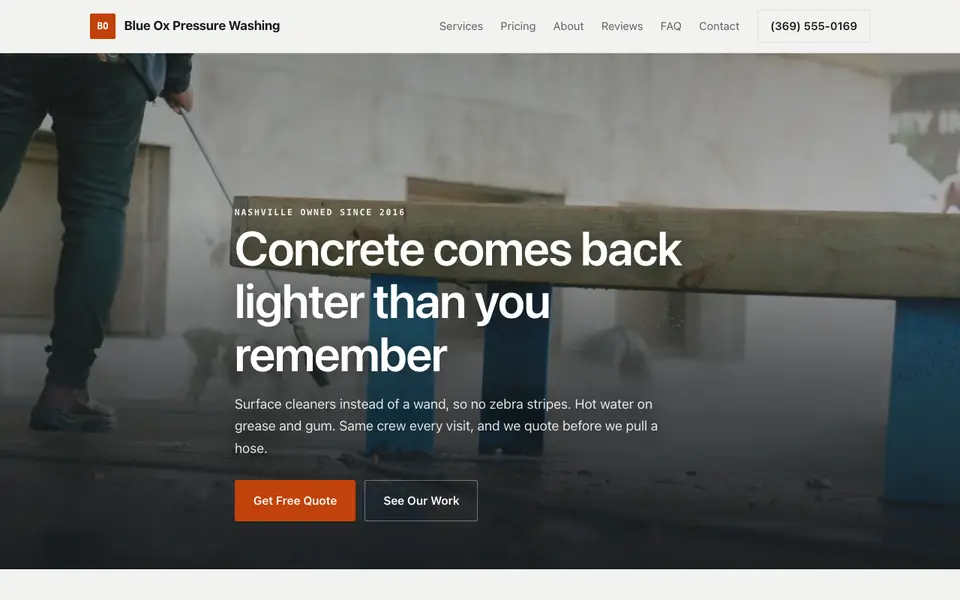
Describe your business and the AI builds a pressure washing website with a transformation gallery, service pages and a quote form. Edit it by chat, visually, or in code.
Pages every pressure washing website needs
- Home: A striking before-and-after, your area and a quote button.
- Services: House wash, concrete, decks, roofs and commercial each deserve a page for search.
- Gallery: Transformation photos are the strongest proof you have.
- Soft Wash vs Pressure Wash: Explains why you use low pressure on siding and roofs, which builds trust.
- Service Area: Towns covered so leads stay near your routes.
- Get a Quote: Surfaces, approximate size and a place to describe the job.
Try this prompt
A website for a pressure washing company in Tampa called Clearwave Exterior Cleaning offering house soft washing, driveway and paver cleaning, and roof cleaning, with a before-and-after gallery, a page explaining soft washing, a list of towns we serve, and a quote form asking which surfaces need cleaning.
A real pressure washing site, not a template
This is Blue Ox Pressure Washing, a pressure washing business we described to the AI in a sentence. See the Blue Ox Pressure Washing example site.
Start from this design
Three designs that suit a pressure washing website.
- Clean White Express Car Wash
- Plumbing, HVAC & Electrical Company
- Dark Premium Auto Detailing
About pressure washing website design on we.inc
Most pressure washing sites are a template with the name swapped in. Describe what you do and the AI designs and writes a pressure washing website around that business instead.
Features designed for your industry
- Before-and-after gallery: Side-by-side shots of driveways, siding and decks that sell the job on sight.
- Service pages: House soft washing, concrete, decks, roofs and storefronts, each explained.
- Quote requests: A form that collects surfaces, square footage and photos from the customer.
Who this pressure washing website design suits
- A one-truck operator moving past social media posts
- A soft washing company explaining why it doesn't blast siding
- A business adding commercial storefront and fleet washing
- A seasonal operator bundling house and driveway washes
What makes a pressure washing website work
Shoot every job twice
Take the before and after from the same spot and angle. Consistent pairs in the gallery convince far better than one-off glamour shots.
Explain your method
Homeowners worry about damaged siding, etched concrete and dead plants. A short page on soft washing, surface-safe pressures and how you protect landscaping answers that.
Check runoff and licensing rules
Some cities regulate wastewater runoff from commercial washing, and business licensing varies. Check your local requirements, and mention your insurance if you carry it.
Booking and invoicing live elsewhere
We.inc builds the website and quote form, but it has no calendar that syncs your crew's availability. Link Jobber, Housecall Pro or ResponsiBid for online estimates, booking and invoices.
What it costs
A template site is free on a we.inc address. AI building and edits are $20/month on Starter, and a custom domain costs about $10 to $20 a year. Most pressure washing sites need nothing more.
Free for 3 template sites, without AI; AI building from $20 a month. Compare plans
Frequently asked questions
Can customers book a wash online?
They can request a quote or booking through a form that emails you. For instant online booking and deposits, link a tool like Jobber, Housecall Pro or ResponsiBid.
What makes a pressure washing website work?
Real before-and-after photos, clear service pages, your service area, reviews and a quote form. The gallery usually does the heaviest lifting.
Where does pricing start?
Free for up to three template sites on a we.inc address, without AI. AI building starts with Starter at $20/month (250 credits), and a custom domain requires a paid plan.
Can I add new before-and-after photos myself?
Yes. Upload them and tell the AI to add them to the gallery, or drop them in with the visual editor.
Should I have separate residential and commercial pages?
Yes, if you do both. Property managers and business owners search differently from homeowners and want to see storefront or fleet work.
Related industries and website guides
- construction website builder
- pet sitting website builder
- hvac website design
- general contractor website design
- remodeling contractor websites
- roofing companies website builder
- pressure washing companies website examples
- how to make a website
Related website builders: Home Services
- construction website builder
- pet sitting website builder
- hvac website design
- general contractor website design
- remodeling contractor websites
- roofing companies website builder
Before you start
- pressure washing companies website examples
- how to make a website
- free website builder
- AI website builder
Product
Who It's For
- For Agencies
- For Freelancers
- For Hosting Providers
- For SaaS Platforms
- For Startups
- For Financial Services
- For Healthcare
Features
Resources
- Blog
- Help Center
- Free Business Tools
- Free UI Components
- Website Templates
- Template Collections
- Website Examples
- Guides
- Comparisons
- Alternatives
- Best Lists
- Reviews
- Pricing Guides
- Use Cases
- Glossary & Guides
- Integrations
- Developers
- Benchmark
- Windows App