
Show clients what you can build.
A freelance or studio web developer's site is itself the audition: case studies that show the problem, the stack, and the result, a clear list of services, a sense of how you work and price, and a project inquiry form. On we.inc you can describe your practice and have the AI build a fast, polished site, then keep your time for client code. Project inquiries email you; contracts, invoices, and client access stay in your own tools.
Win projects with a portfolio site that demonstrates your coding skills and completed projects.
Pages every web developer website needs
- Home: What you build, for whom, and one standout project, with a 'Start a project' button. Prospects want to know in seconds whether you fit their stack and budget.
- Work / Case Studies: Three to six projects with the brief, your role, technologies, and outcome you can honestly describe. Screenshots alone don't show how you think.
- Services: Custom builds, front-end, headless CMS, e-commerce, performance audits, accessibility fixes, maintenance retainers. Scope clarity keeps inquiries relevant.
- Process: Discovery, estimate, milestones, review rounds, launch, and handover. Clients who have been burned before look for this.
- About & Stack: Your background, the languages and frameworks you work in, time zone, and availability. Agencies subcontracting to you check this first.
- Project Inquiry: A form for project type, budget range, timeline, and existing site URL. Budget and timeline fields screen out mismatched leads before a call.
Try this prompt
Make a portfolio website for Tomasz Nowak, a freelance full-stack web developer in Denver, Colorado, who builds headless e-commerce sites and web apps for small brands. Include four case studies with the problem, stack, and result, a services page covering custom builds, performance audits, and monthly maintenance, a process page, an about page listing my stack, and a project inquiry form with budget range and timeline.
How should a web developer present portfolio projects?
For each project, show the problem, the stack, your role and a link to the live site if the client allows it. Hiring managers and clients want to know what you personally built. Screenshots go stale, so check links regularly. Three well-explained projects show more than a grid of logos.
What should the site say about maintenance after launch?
Explain whether you offer ongoing support, what it covers, such as updates, backups, small changes and security fixes, and how clients request work. Many clients do not realise a site needs care after launch. Clear terms avoid disputes later. Say how quickly you usually respond.
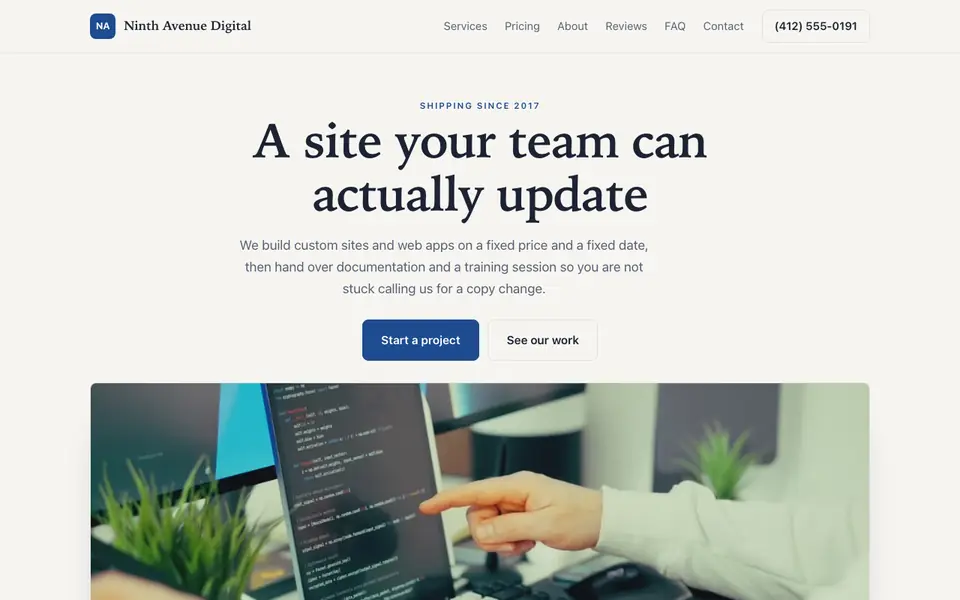
Ninth Avenue Digital
This is Ninth Avenue Digital, a web developer business we described to the AI in a sentence. See the Ninth Avenue Digital example site.
Start from this design
Three designs that suit a web developer website.
- Dark Blue Coding Platform Hero
- Caslon Editorial Print Studio
- Dark Blue IT Services Company
A web developer website designed around your actual services and prices, not a stock layout. Describe the business and the AI writes and builds every page.
Features designed for your industry
- Project Portfolio: Showcase your websites and applications.
- Tech Stack: Display your programming languages and tools.
- Open Source: Link to your GitHub and code contributions.
Perfect for:
- Freelance developers
- Full-stack developers
- Frontend developers
- WordPress developers
- App developers
Case studies over logo walls
Tell the AI each project's brief, constraints, and what you shipped, and it writes structured case studies. Only cite results you can back up; it will not invent performance numbers or client names.
Screen leads with the form
Budget range, deadline, and project type fields go straight to your inbox. It cuts down on discovery calls that were never going to become projects.
Show you respect the craft
Ask for fast-loading, accessible pages, and check the result with your own tools. Prospects who are technical will look at your site closely.
Where client work lives
we.inc builds your marketing site, not a client portal. Keep contracts, invoices, repos, and staging links in your usual tools, and take payments through your own Stripe account if you like.
What it costs
New We.Inc accounts can build a site free, with no card needed to start. Paid plans start at $20 a month with Starter, and connecting your own domain, which most developers will want, needs a paid plan and about $10-20 a year for the name.
Building your site is free, no card needed. Paid plans from $20 a month. Compare plans
Frequently asked questions
Why would a developer use a website builder?
Your billable hours are better spent on client work. The AI gets a polished portfolio live quickly and you can update it by describing changes in chat.
Can I export or view the code?
Sites are built as React and Tailwind projects. Check your plan's features for what code access is available.
Can clients log in to see their project?
No. There is no client portal. Share progress through your project management tool or staging links.
Can I embed GitHub or live demos?
Yes. Link repositories and live demos from each case study page.
Can I take deposits for projects?
You can sell a deposit or package through your own Stripe account, or invoice from Stripe after scoping.
Related industries and website guides
- freelance website builder
- small business website design
- coaching website builder
- realtor website builder
- accountants website builder
- architect website builder
- web developers website examples
- how to make a website
Related website builders: Professional Services
- freelance website builder
- small business website design
- coaching website builder
- realtor website builder
- accountants website builder
- architect website builder
Before you start
Product
Who It's For
- For Agencies
- For Freelancers
- For Hosting Providers
- For SaaS Platforms
- For Startups
- For Financial Services
- For Healthcare
Features
Resources
- Blog
- Help Center
- Free Business Tools
- Free UI Components
- Website Templates
- Template Collections
- Website Examples
- Guides
- Comparisons
- Alternatives
- Best Lists
- Reviews
- Pricing Guides
- Use Cases
- Glossary & Guides
- Integrations
- Developers
- Benchmark
- Windows App