Your members need websites. You could be the one who gives them one.
Walk around any coworking floor and count the businesses whose website is a placeholder, a social profile or a page they are embarrassed to share. Operators already sell desks, meeting rooms, mail handling and community. A website under the space's own brand fits that list, and it gives a member one more reason to stay. This page covers how to decide whether to offer it, how to package it, and the operational side of running it.
TL;DR
- Members are early-stage businesses, and a credible website is one of their first needs. It is a perk that is used, unlike many on the list.
- In We.Inc the platform carries your space's name, logo, colours and sign-in page; each member is a client account with its own site.
- Package it three ways: included in a membership tier, a paid add-on billed on your own Stripe account, or part of an incubator programme.
- Location sites for each of your spaces can sit in the same account. Book a demo to plan the offer.
Why a website perk works in a shared workspace
Coworking retention is built on small, practical reasons to stay. Members leave when the space stops being useful compared with a kitchen table. Perks that matter are the ones a member uses weekly or that would be a hassle to replace. A website qualifies on both counts: once a freelancer's or startup's site lives on your platform, under your brand, moving desks also means moving their site.
That also cuts the other way. If you offer websites, you take on support questions, and the quality of those sites reflects on your space. Decide up front how much help you will give.
Three ways to package it
| Model | How it works | Suits | Watch out for |
|---|---|---|---|
| Included perk | Members on a chosen tier get one site | Spaces competing on community and value | Cost per member: set a site limit of one |
| Paid add-on | Members pay you monthly for a site, billed on your Stripe account | Spaces with many freelancers and small agencies | Support load: write down what is included |
| Programme | Incubator or accelerator cohorts get a site as part of the programme | Spaces running startup programmes | What happens after the cohort ends |
You can mix them. A common pattern is "one site included on dedicated-desk tiers, paid for hot-desk members".
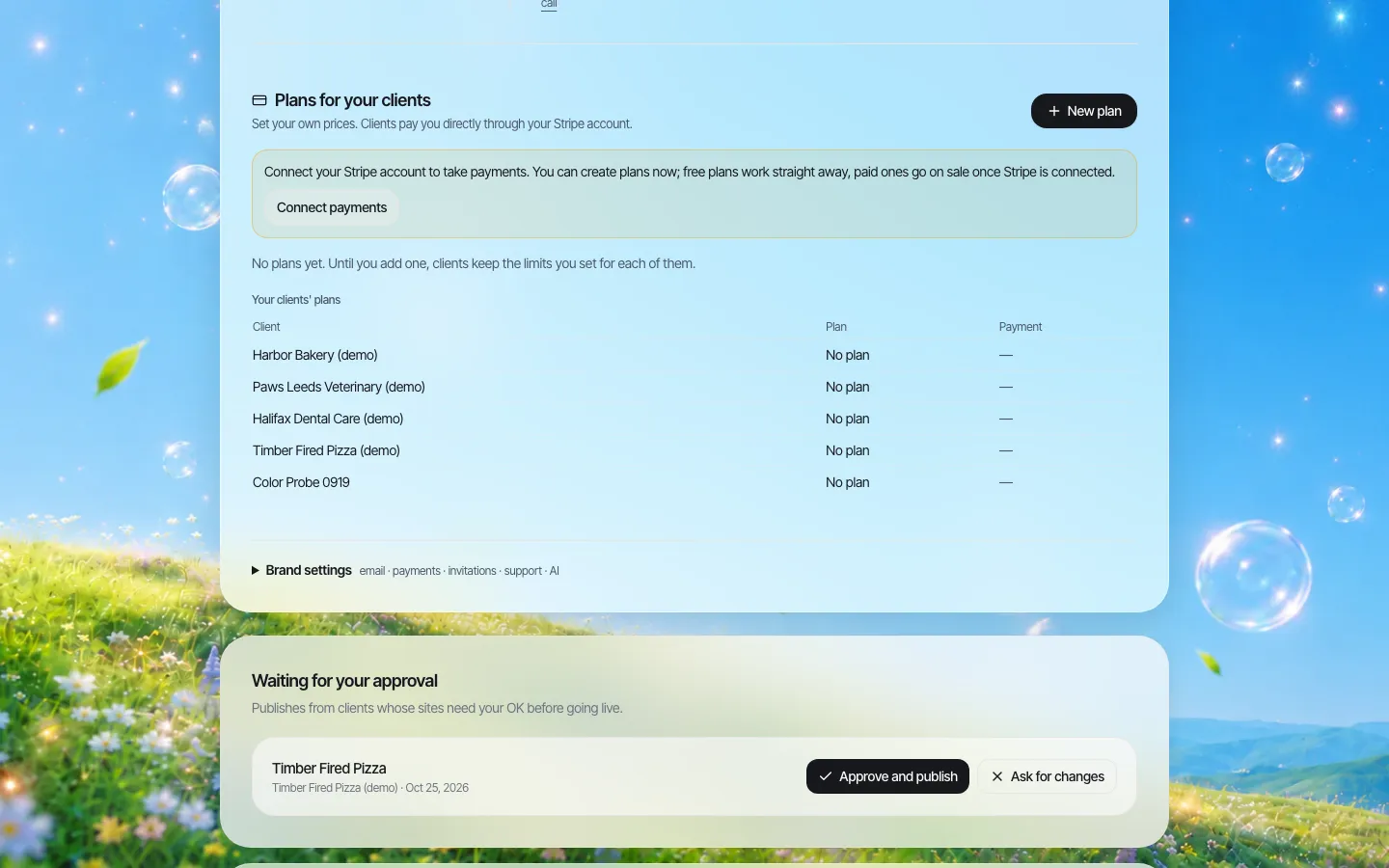
*Plans you create for members. Payments go to your own connected Stripe account, and the plan sets each member's site limit and features.*
Plans you create belong to you: you choose the names, what each includes and what members pay. When a member pays on your connected Stripe account, their plan's limits apply to their account automatically, and if the subscription lapses the account goes back to its base limits. That keeps "included" and "paid" members separate without manual work.
What a member sees
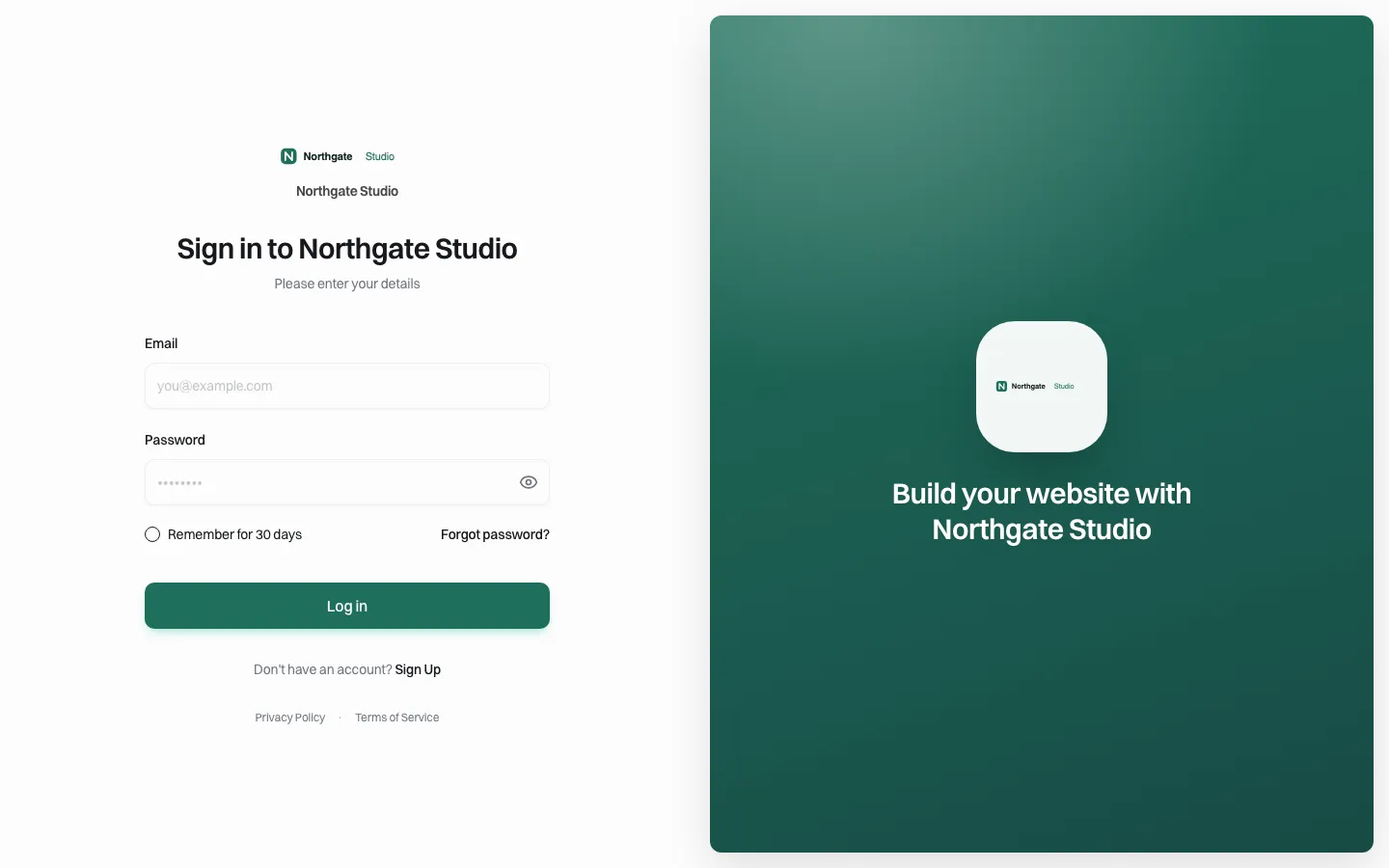
*The sign-in page carries the space's brand. Members never see the platform underneath.*
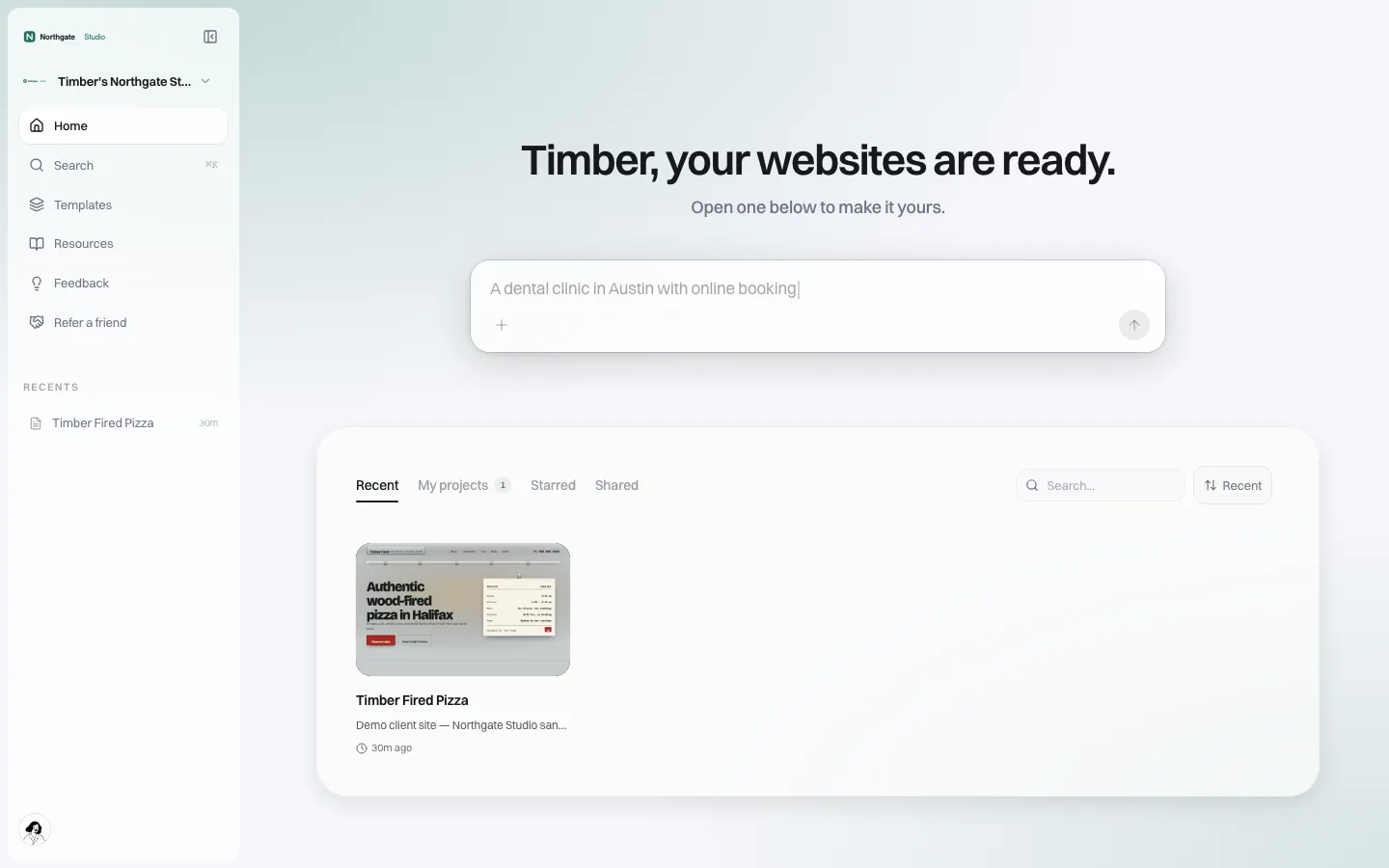
*A member's home screen on your address. From here they describe their business, pick a template and edit their site.*
A member signs up on your branded page, describes their business, and gets a site they can edit visually. They can connect their own domain if you allow it. Help pages and emails carry your support address, not ours. The point for an operator is that the perk feels like part of the membership, not a referral to a third-party tool.
Location sites for your own spaces
If you run several locations, each probably deserves its own page or site: different neighbourhood, different meeting rooms, different community manager. Those can live in the same account as your members' sites, as accounts of their own with their own limits. Keep location sites under the central team's control (approval on, domain changes off) while member sites run with more freedom.
Write each location site from the floor up: the actual meeting rooms and how many people they seat, the nearest coffee, the bike storage, the events that happen there. Location pages that only swap the street name are both weak marketing and the kind of near-duplicate pages Google's spam policies warn about.
Running it without becoming a web agency
The operational risk is that your community team turns into unpaid web support. Set limits early:
- Write a one-page "what's included". Templates, the editor, help pages, connecting a domain. Not: writing copy, designing logos, fixing a site a member broke at midnight.
- Point help to your branded help page. It carries your support email, so questions land in one inbox.
- Decide which features members get. Blog and forms are useful to most; an online store matters to makers and product startups. Turn on what your members need and leave the rest off as a brand default.
- Watch who never publishes. A webhook can tell your CRM when a member has not published seven days after joining, which is the moment a nudge from a community manager helps most.
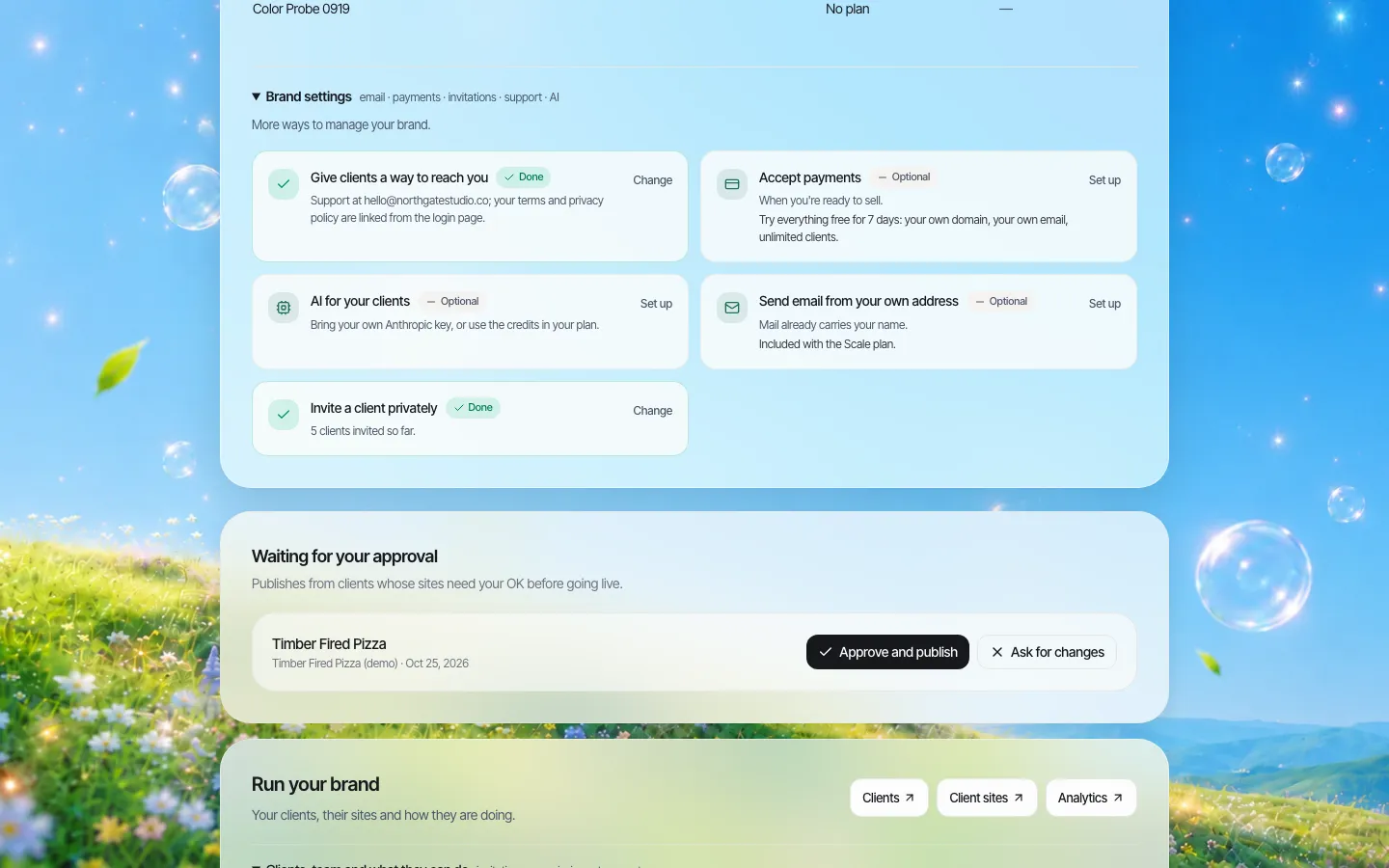
*Brand settings: your support contact, payments, whether members can use AI, sending email from your own address, and invite-only sign-up.*
Private invites matter for coworking: you probably want only members to get sites, not anyone who finds the sign-up page. Invite-only sign-up keeps the perk inside the membership.
When a member leaves
Members move on, often because they grew. Write the leaving rule before the first site goes live:
- If they keep paying for the site, they keep it, even after giving up the desk. Some operators find this becomes a small revenue line of its own.
- If they stop, their site's code can be downloaded or synced to GitHub so they can host it elsewhere.
- Their domain is theirs, provided they registered it.
Questions to settle before launch
Run through these with your community and finance leads before the first invitation goes out. Each one has caused trouble for operators who skipped it.
| Question | Why it matters | A sensible default |
|---|---|---|
| Who answers "my site is broken" at 9pm? | Members expect the same responsiveness as the front desk | Help page plus email, answered next business day |
| Does a site count as a membership benefit for tax or contract purposes? | Bundled perks can complicate invoices | Show it as a separate line, even when the price is zero |
| Can members use the space's address on their site? | Virtual-office members often want to | Only on membership tiers that include a business address |
| Can members sell products on their site? | Stores bring payment and refund questions | Store switched off by default, on by request |
| What if a member publishes something you would not want associated with your brand? | The platform carries your name | Approval before publishing for the first site, then off |
The last row is worth taking seriously. The sign-in page and emails say your space's name, so a member's site is loosely associated with you. Approval on a member's first publish is a light-touch way to catch problems early without reviewing every later change.
Where We.Inc fits, and where it does not
Good fit: operators with a few hundred members or more, several locations, or an incubator programme, who want a perk under their own brand and are comfortable owning first-line support.
Not a fit: if you want a member directory or a booking system for desks and rooms, those belong in your space-management software. We.Inc builds websites; it does not replace your booking or access-control tools.
Read how billing works on reseller billing, then book a demo and we will sketch the offer for your membership tiers.
Sources
Last checked 2026-10-25.
- Google Search Central, Spam policies for Google web search: doorway abuse, scaled content abuse, site reputation abuse, thin affiliation.
Book a demo. Pricing is tailored to your volume and setup, and you get your exact price on the call. 0% transaction fee.
Frequently asked questions
Can only our members sign up?
Yes. Switch on private invites so new accounts only come from invitations you send.
Can members pay us for a website?
Yes. You create plans and connect your own Stripe account; members pay you, and their plan sets their site limit and features.
Will members see the We.Inc name?
The sign-in page, member dashboard, help pages and system emails carry your space's brand and your support contact.
What happens to a member's site when they leave the space?
That is your policy to set. They can keep paying for the site, or download its code or sync it to GitHub and take it elsewhere.
Keep reading
- White label website builder: the We.Inc platform
- White-label reseller billing
- White-label client dashboard
- White-label custom branding
- Manage many client websites from one account
More in White Label
- Custom Branding | White Label
- Client domains: the part of white-label that breaks when nobody owns it
- Every acquired practice comes with a website nobody at head office can log into
- Your sellers will make a website either way. Make it one you can see.
- Most domains you sell never become a website. That gap is the product.
- Drupal multisite alternative: keep Drupal for the flagship, rethink the long tail
- Duda white label pricing in 2026, and the AI alternative
- Websites for the projects, partners and small businesses an EDO serves
We.Inc is an AI-powered website builder you can resell under your own brand. Launch a branded client dashboard, bill on Stripe Connect, and deliver AI-generated websites in minutes. White-label pricing is tailored to your volume and setup: book a 30-minute demo for a quote.
Product
- AI Website Builder: Describe a site in plain English; it's live in minutes
- White Label Platform: Your brand, your domain, your margin
- Enterprise: SSO, custom SLAs, and dedicated support
- Developer API: Embed site generation into your SaaS
Who It's For
- For Agencies: Resell under your brand
- For Freelancers: Your own branded builder
- For Hosting Providers: Add a builder to your stack
- For SaaS Platforms: Embed site creation via API
- For Startups
- For Financial Services
- For Healthcare
Features
- Drag & Drop Editor
- Built-in SEO Tools
- Custom Branding
- Client Dashboard
- Reseller Billing (Stripe Connect)
Resources
- Blog
- Help Center
- Free Business Tools
- Free UI Components
- Website Templates
- Template Collections
- Website Examples
- Guides
- Comparisons
- Alternatives
- Best Lists
- Reviews
- Pricing Guides
- Use Cases
- Glossary & Guides
- Integrations
- Developers
- Benchmark
- Windows App