Running fifty websites is a different job from running one
One website is a project. Fifty websites is an operation: people join and leave, sites are launched and forgotten, someone asks who changed the opening hours, and nobody can say how many sites the organisation actually has. This page walks through how We.Inc handles that operation from a single branded account, screen by screen, and where you will still need your own process.
TL;DR
- The hard part of many sites is not building them; it is knowing what exists, who owns each one and what each owner is allowed to do.
- In We.Inc every site owner is a "client" account under your brand. You see them all in one list with status, tags, notes and a site limit.
- Per-client switches decide who can publish, connect a domain, see the code, or run a blog, store, forms and SEO settings. Approval before publishing is one more switch.
- There is no shared-content syndication or multi-stage workflow engine. Book a demo to walk your own site list through it.
The questions that tell you a network has outgrown its setup
Before looking at any software, try answering these about your current sites. If more than two take longer than a minute, the problem is operational, not technical.
- How many live sites do we have, and where is the list?
- For each one, who is the named owner today (not who built it)?
- Which sites can change without anyone central seeing it first?
- If a staff member leaves tomorrow, which sites lose their only editor?
- Which sites are on their own domain, and who renews it?
- When a page went wrong last month, how long did it take to find out who changed it?
Organisations that run many sites tend to land in one of three shapes. The agency runs sites for paying clients. The network (franchisor, association, university, city) runs sites for its own departments, chapters or locations. The platform gives sites to its own customers as part of another product. The screens below are the same for all three; what changes is who you call a "client".
1. One register of every site and every owner
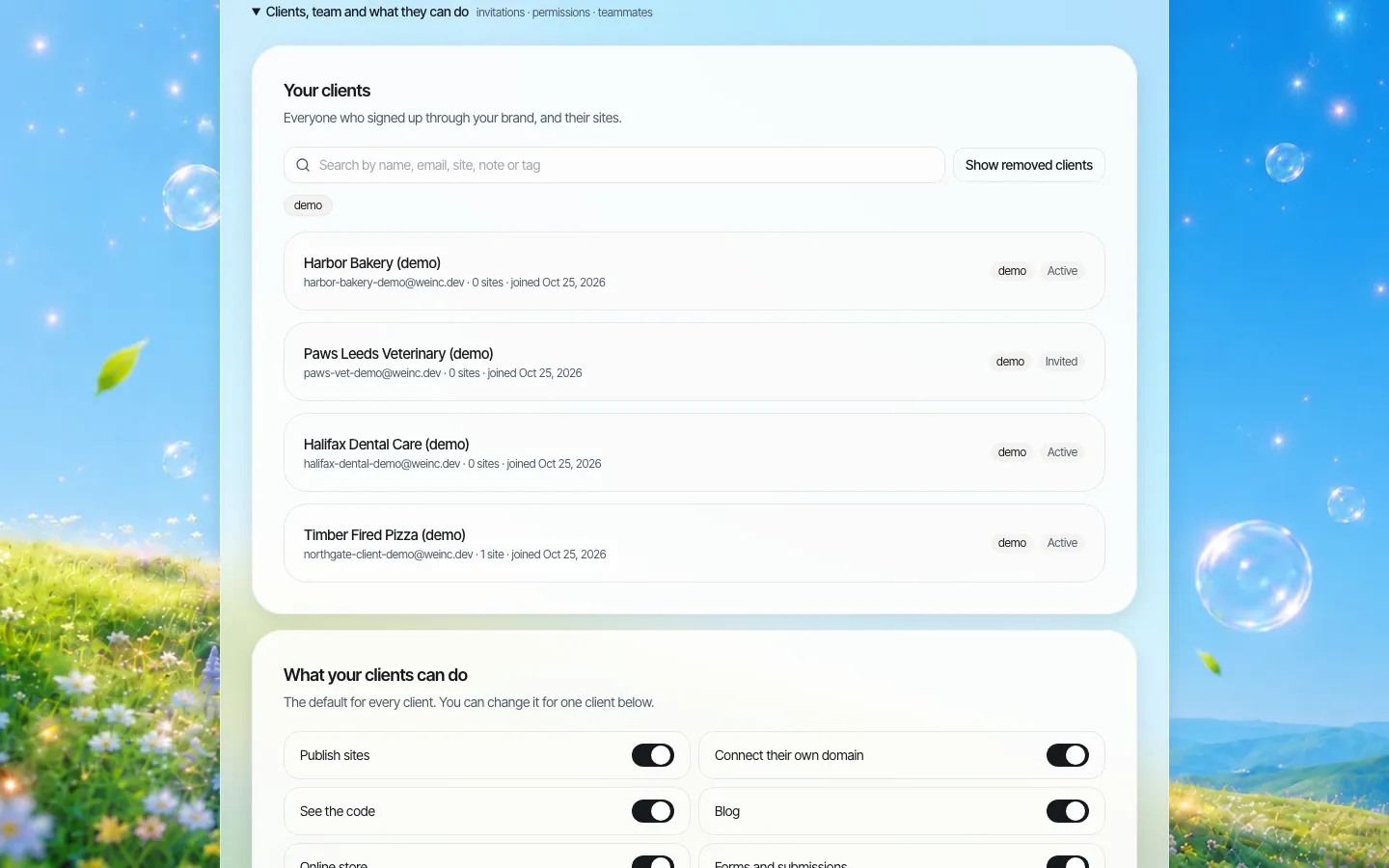
*The client register on a demo brand. Every site owner appears once, with a status (Active or Invited), tags, and a search that covers names, emails, sites, notes and tags.*
The first job of multi-site management is a register that cannot drift from reality. In We.Inc the register is not a spreadsheet someone maintains; it is the list of accounts that exist under your brand. A department, location or customer appears there when it is invited, and its sites appear under it as they are created.
Things worth using from day one:
- Tags. Tag by whatever you report on: region, department, contract type, "pilot", "needs review". The search box filters by tag.
- Notes. Record the owner of record and the renewal or review date in the client's notes. Notes are searchable, so "review: March" finds every site due in March.
- Removed clients stay findable. "Show removed clients" brings back accounts you have taken off, which matters when someone asks what happened to a site last year.
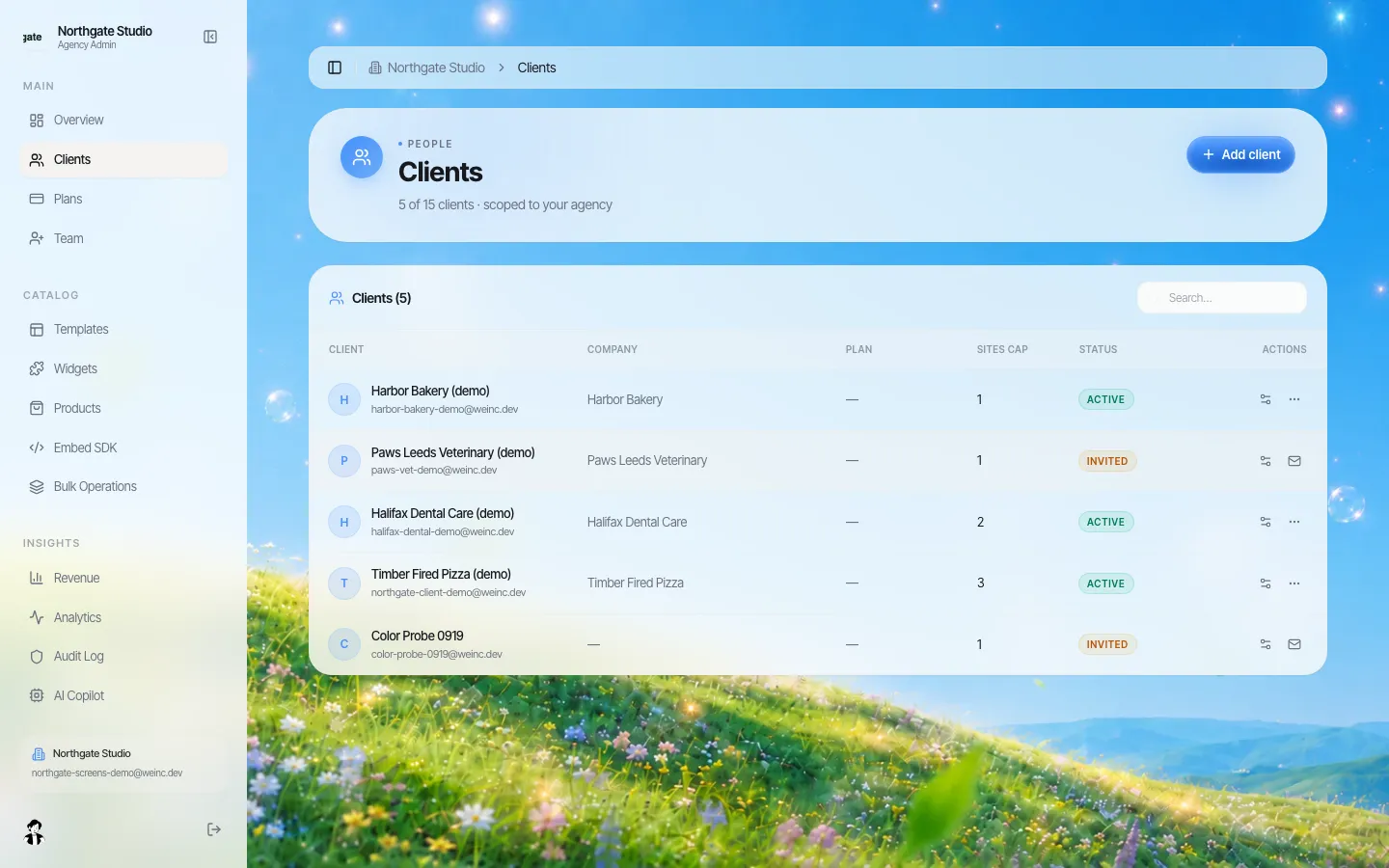
*The same clients in the agency console's table view: company, plan, how many sites each may have, and status at a glance.*
2. Limits that match how much each owner should run
The commonest way a network gets out of hand is one enthusiastic owner creating six sites for one purpose. Each client in We.Inc has a site limit: a number, or "no limit". A student society might get one site, a department three, a regional office ten. If you sell sites, the limit can come from a plan you assign to the client, so moving a client between plans moves their limit with it.
Set limits low and raise them on request. A request to raise a limit is a useful moment to ask what the new site is for and who will own it.
3. Decide what each owner can do, once, then make exceptions
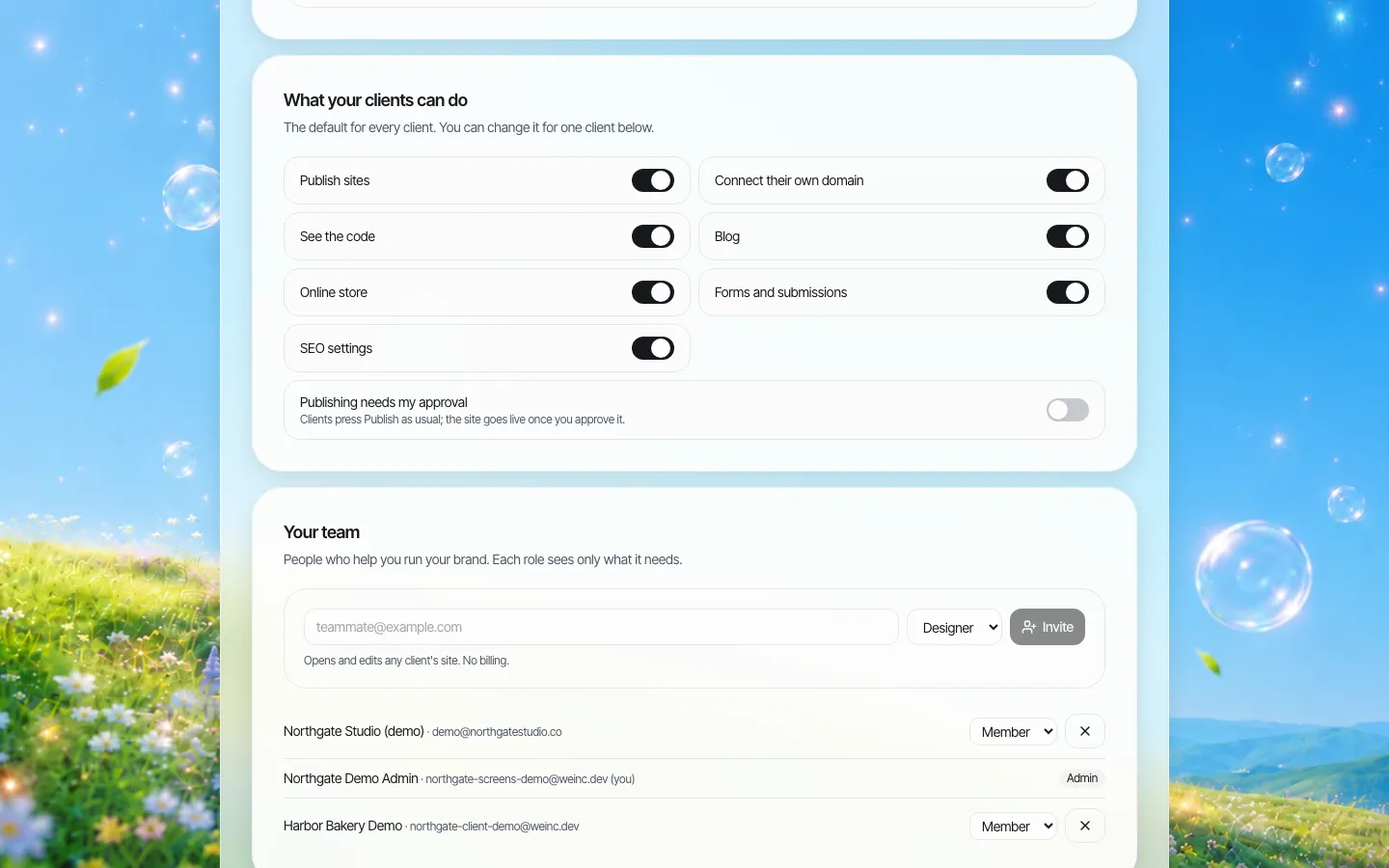
*Brand-wide defaults. These apply to every client unless you change them for one client.*
Rather than configuring each site, you set a default for the whole brand and then override it for the clients that need something different. The seven switches are publishing, connecting their own domain, seeing the code, blog, online store, forms and submissions, and SEO settings. A separate switch makes publishing wait for your approval. We cover the switches in depth on the client permissions page; for multi-site work the point is that a new site inherits sensible rules the moment it exists, so you are not relying on someone remembering to lock it down.
4. A team that matches the size of the network
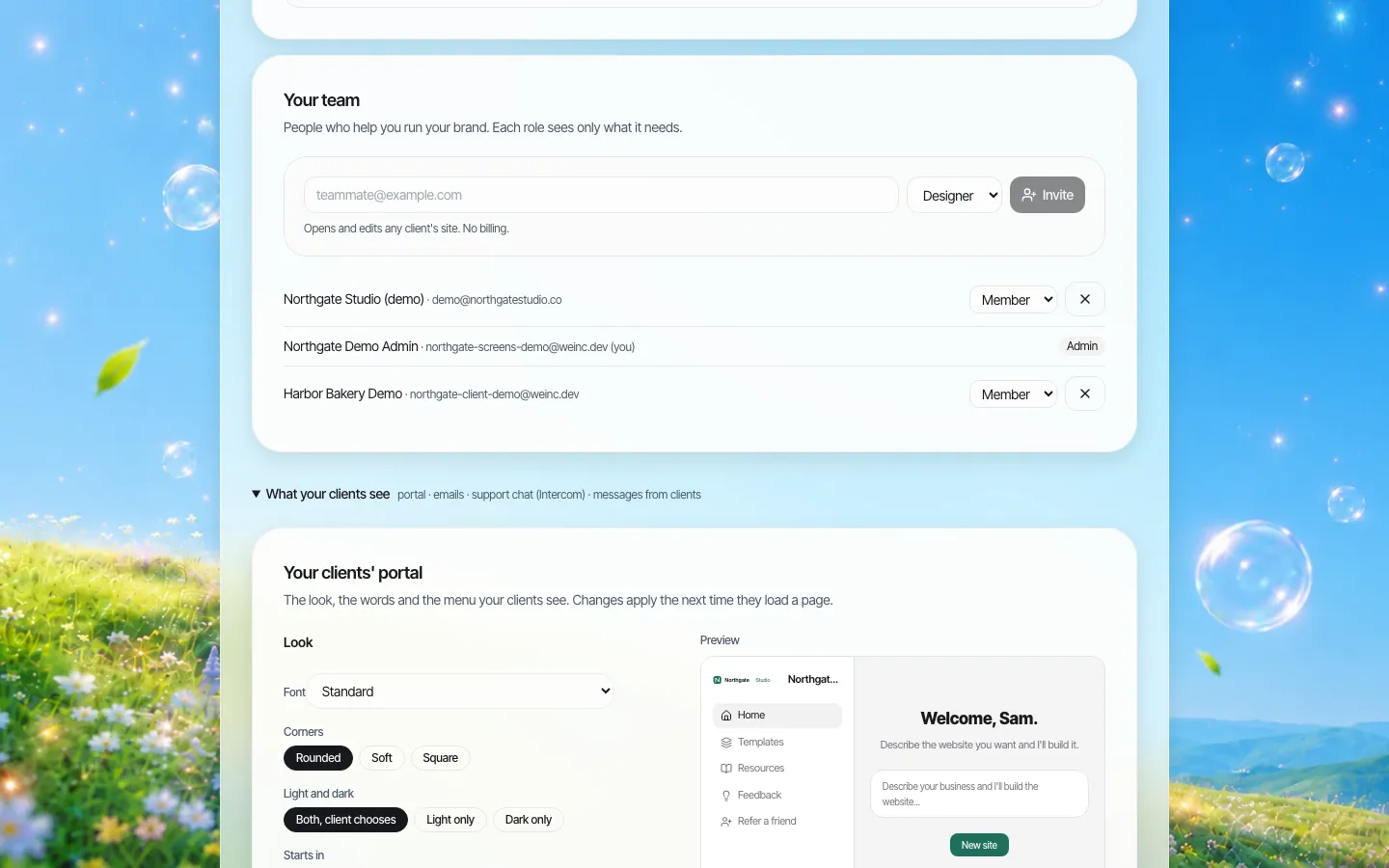
*Your own team, separate from the site owners. Each person gets a role when invited.*
The people who run the network are a different group from the people who own sites. Your team members are owners, admins or members of the brand account. The invite form also offers fixed presets for common jobs: a designer opens and edits any client's site without seeing billing, support sees clients and their sites and writes notes but does not edit, and billing handles plans and payments only. These are fixed roles, not a custom role builder. If you need a role that does something none of these do, tell us in the demo rather than assuming it exists.
5. Approval for the sites that need it
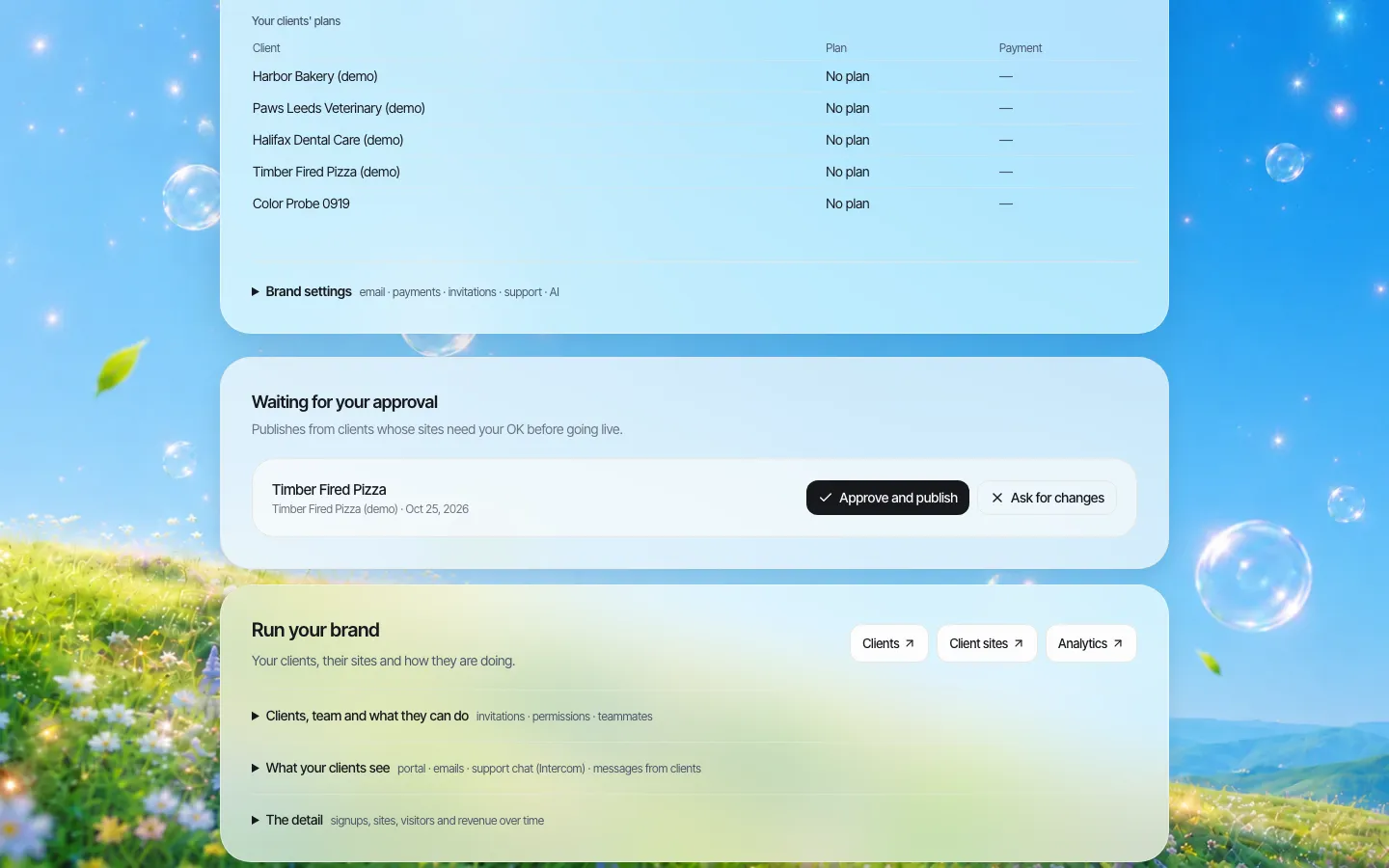
*The approval queue. When a client with approval switched on presses Publish, the request lands here.*
Most networks need approval for some sites and not others: new owners, student or volunteer editors, anything in a regulated area. Approval in We.Inc is a single step. The client presses Publish as usual; the site goes live once the brand owner approves it, or the owner asks for changes. It is not a multi-stage chain with legal and communications sign-off in sequence; if your policy needs that, the extra stages happen outside the platform before the owner approves. The full detail is on our publishing approvals page.
6. A record of who changed what
Account-level changes (inviting or removing a client, changing a client's limits or switches, changing brand settings, team changes, approvals) are written to an audit log that owners and admins can filter by action. It answers "who gave this client their own domain?", not "who edited this paragraph?", and the difference is explained on that page.
A launch sequence for an existing network
If you already have sites scattered across other tools, do not move them all at once. This order has worked for networks of 20 to a few hundred sites:
| Week | Step | Done when |
|---|---|---|
| 1 | Build the register: every current site, its owner of record, its domain, its renewal date | The list exists and someone senior has signed it off |
| 1 | Write the brand defaults: which switches are on for everyone, and whether approval is on by default | Defaults are set in the account |
| 2 | Invite your own team with the narrowest role that does the job | Nobody on the team is an admin who does not need to be |
| 2-3 | Pilot: five owners with different needs (one trusted, one new, one with a custom domain, one short-lived, one regulated) | Each has published at least one change |
| 4 | Fix the defaults based on the pilot | Fewer than one in five clients needs an override |
| 5+ | Move the rest in batches of 10 to 20, retiring sites nobody claims | Every site in the register has an owner and a review date |
Retiring is part of the job. A network that only ever adds sites ends up with dozens nobody reads. Our governance policy template has wording for retiring and archiving sites.
Avoid building a network of near-identical pages
If your sites are location or branch sites, there is a search risk as well as an operational one. Google's spam policies describe doorway abuse, which includes "having multiple domain names or pages targeted at specific regions or cities that funnel users to one page", and scaled content abuse, where many pages are generated mainly to manipulate rankings. A network of sites that differ only by town name invites both. Give each site content only that owner can write (their team, their hours, their local work) and let the owner write it, which is one more reason to give site owners real editing rights instead of doing everything centrally.
Where We.Inc fits, and where it does not
Good fit: a central team running tens to hundreds of small and medium sites for departments, locations, chapters or paying clients, where each site has a different owner and the central job is setting rules, approving, and knowing what exists.
Not built for:
- Shared content syndication. There is no "publish this news item to 40 sites at once" content hub. A bulk operations screen exists in the agency console for pushing changes across several client sites; ask to see what it covers today before you plan around it.
- Multi-stage workflows. Approval is one step, by the brand owner.
- Deep integrations on one flagship site. If one site needs to sit on top of a student system, a booking engine or an ERP, an enterprise CMS may suit that site better; We.Inc can run the long tail around it.
We do not publish security certifications, uptime figures or hosting-region guarantees. Every site's code can be downloaded or synced to GitHub, so leaving is possible; our vendor exit plan guide covers what to put in the contract.
Book a demo with your register (or the messy list you have instead) and we will walk five of your sites through the screens above.
Sources
Last checked 2026-10-25.
- Google Search Central, Spam policies for Google web search: doorway abuse and scaled content abuse.
Book a demo. Pricing is tailored to your volume and setup, and you get your exact price on the call. 0% transaction fee.
Frequently asked questions
How many websites can one We.Inc account manage?
Each brand account holds many client accounts, and each client has its own site limit, a number or no limit. The practical ceiling for your network is a question for the demo, where we look at your volume.
Can I push one change to many sites at once?
There is no shared-content hub that syndicates one item to many sites. The agency console has a bulk operations screen for pushing changes across several client sites; ask to see what it covers today before relying on it.
Can different sites have different rules?
Yes. You set brand-wide defaults for seven switches and for approval before publishing, then override any of them for one client.
Who on my team can see and edit client sites?
Owners and admins manage everything. The invite form also offers fixed presets: designer (edits any client site, no billing), support (sees clients and sites, writes notes, no edits) and billing (plans and payments only). There is no custom role builder.
Keep reading
- White label website builder: the We.Inc platform
- Client permissions: what each site owner can do
- Brand governance across many websites
- Audit log for a white-label website platform
- Website governance policy template
- Website vendor exit plan: contract clauses
More in White Label
- Affiliate websites when every affiliate has its own board
- Your instructors want a website. Make sure it is yours, not a competitor’s
- Should a payments company give its merchants a website?
- Candidate websites for every customer on your campaign platform
- White-label website builder pricing
- You already made their logo, cards and sign. The website is the next thing they ask about.
- A website for every building, run by the company that manages them
- Agents want their own site. The brokerage needs it to stay on-brand. Both can be true.
We.Inc is an AI-powered website builder you can resell under your own brand. Launch a branded client dashboard, bill on Stripe Connect, and deliver AI-generated websites in minutes. White-label pricing is tailored to your volume and setup: book a 30-minute demo for a quote.
Product
- AI Website Builder: Describe a site in plain English; it's live in minutes
- White Label Platform: Your brand, your domain, your margin
- Enterprise: SSO, custom SLAs, and dedicated support
- Developer API: Embed site generation into your SaaS
Who It's For
- For Agencies: Resell under your brand
- For Freelancers: Your own branded builder
- For Hosting Providers: Add a builder to your stack
- For SaaS Platforms: Embed site creation via API
- For Startups
- For Financial Services
- For Healthcare
Features
- Drag & Drop Editor
- Built-in SEO Tools
- Custom Branding
- Client Dashboard
- Reseller Billing (Stripe Connect)
Resources
- Blog
- Help Center
- Free Business Tools
- Free UI Components
- Website Templates
- Template Collections
- Website Examples
- Guides
- Comparisons
- Alternatives
- Best Lists
- Reviews
- Pricing Guides
- Use Cases
- Glossary & Guides
- Integrations
- Developers
- Benchmark
- Windows App