Keep every site on-brand without approving every comma
Brand governance usually fails in one of two ways. Either the brand team approves everything and becomes the reason nothing gets published, or it approves nothing and discovers a year later that the Leeds office uses a different logo. The workable middle is to lock the few things that define the brand, delegate the rest, and only review the moments where mistakes are expensive. This page shows how to make those calls and which of them We.Inc enforces for you.
TL;DR
- Lock what defines recognition (logo, colours, type, the sign-in experience); delegate what only the local owner knows; review only high-risk moments.
- In We.Inc the brand look (logos, colours, fonts, button styles, portal layout) is set once by the brand account; site owners work inside it.
- Per-owner switches and approval before publishing let you trust experienced owners and check new ones, without a separate policy per site.
- Software enforces the frame. A short written standard and a named reviewer still do the rest. Book a demo to set your own brand up.
Brand governance is three decisions per element
For every element of a site, you are choosing one of three treatments:
- Lock: only the brand team can change it, and the software stops anyone else.
- Delegate: the site owner changes it freely, inside written guidance.
- Review: the owner changes it, and someone checks before it goes live.
Most brand problems come from treating everything the same way. Lock too much and owners route around you with a separate site. Review too much and the queue becomes the problem. Here is a starting table; copy it into your brand standard and change the right-hand column to suit your organisation.
| Element | Treatment | Reason |
|---|---|---|
| Logo, favicon, brand name | Lock | Recognition depends on it being identical everywhere |
| Colour palette and fonts | Lock | Small drift (a slightly different blue) is the most common and most visible failure |
| Button and corner styles | Lock | Cheap to standardise, makes every site feel like one family |
| Sign-in page and owner dashboard look | Lock | It is where owners meet your brand every day |
| Page layout and sections | Delegate inside templates | Owners need different pages; the look stays consistent |
| Opening hours, contacts, team, local news | Delegate | Only the owner knows; central review slows it down for no gain |
| Photos | Delegate with written rules | Give a short do and don't list (no stock with competitor logos, real staff only) |
| Claims, prices, regulated wording | Review | A legal or compliance mistake on one site is a mistake for the whole brand |
| A brand-new site's first publish | Review | The cheapest moment to fix a structural problem |
| Custom domains | Decide per owner | A domain is a long-lived public commitment; see below |
| Tracking scripts and third-party embeds | Lock or review | One bad script slows or breaks pages; it can also change what data you collect |
What the brand account locks for you
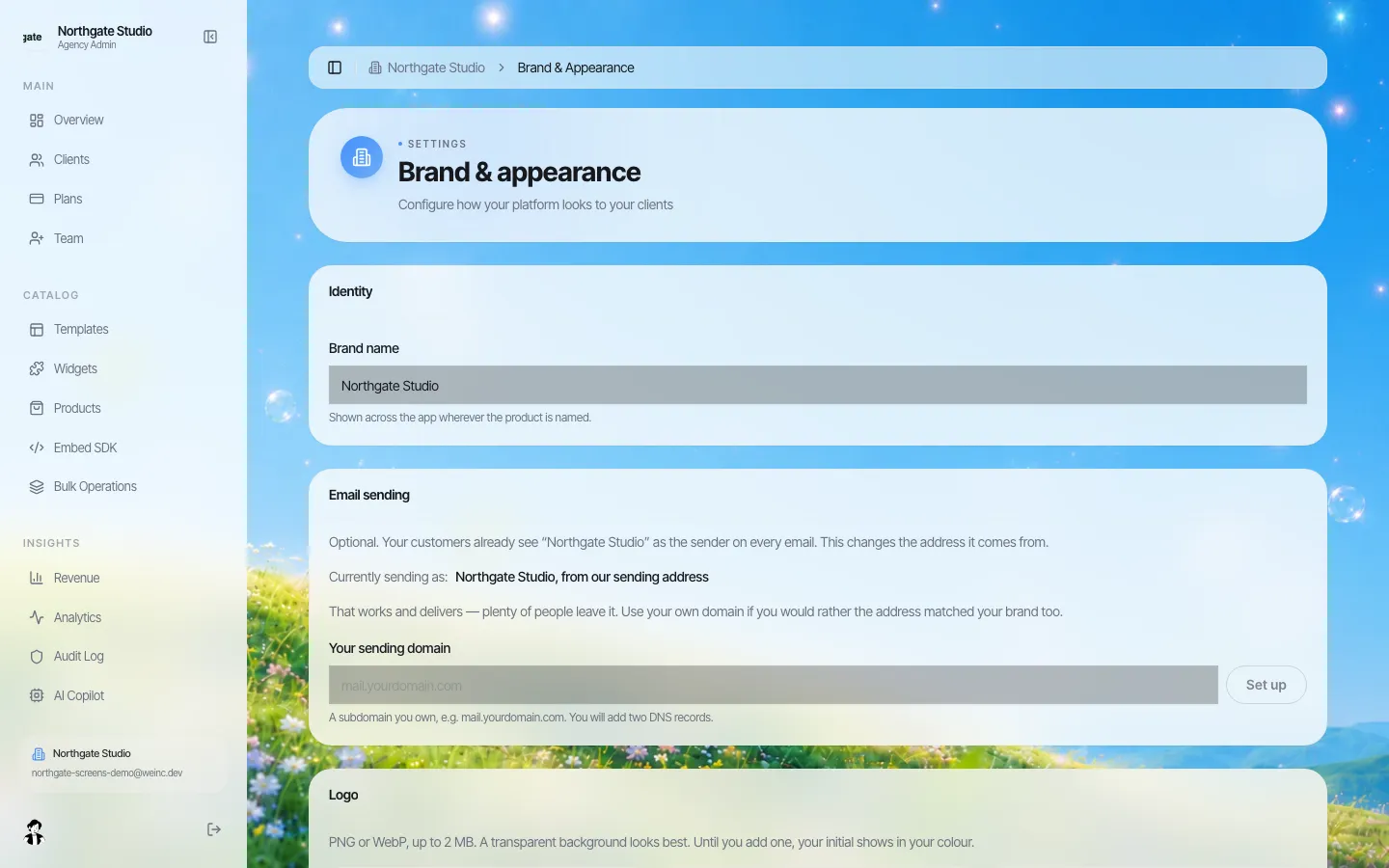
*Brand name, light and dark logos and favicon are set once on the brand account.*
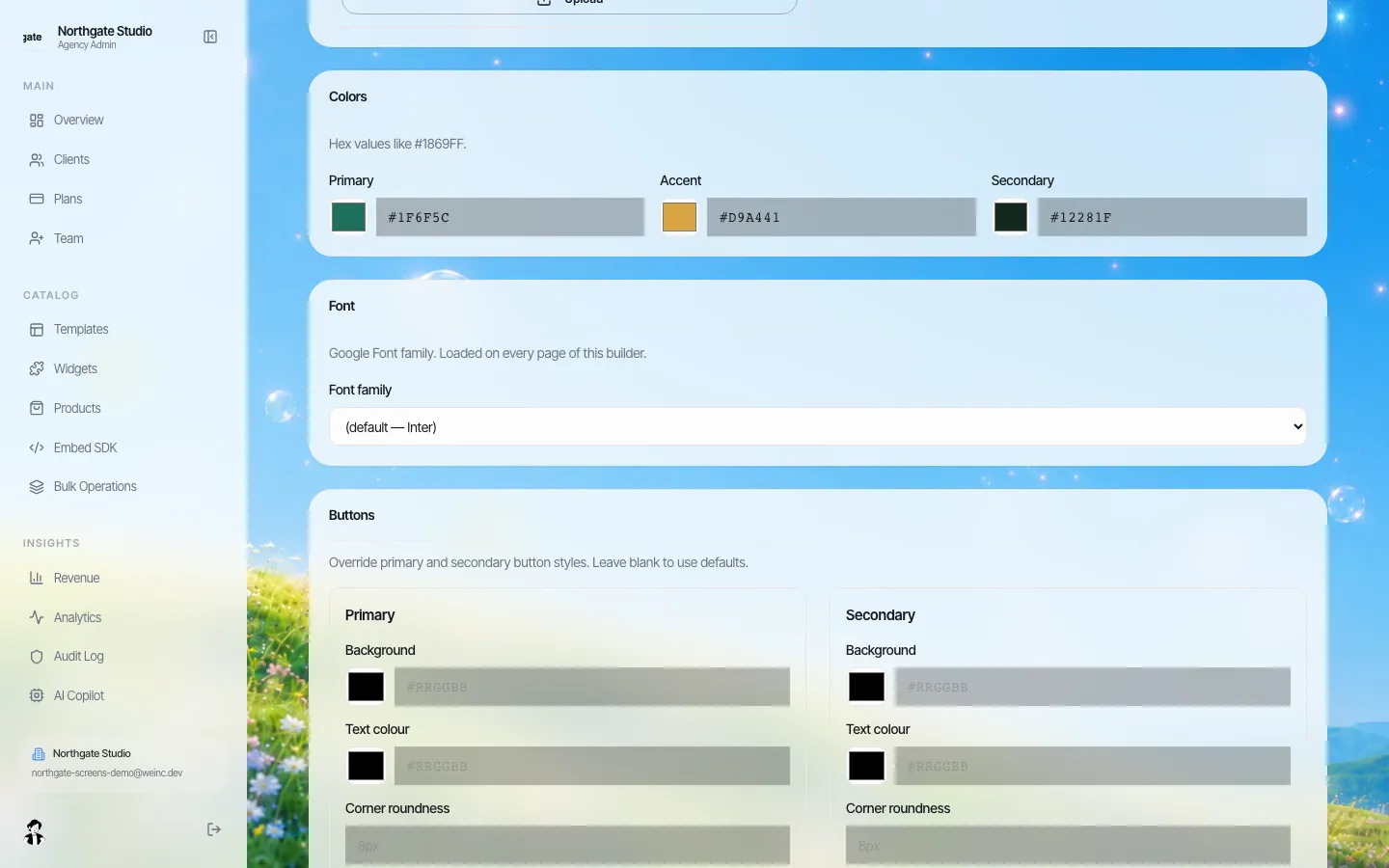
*Brand colours, the font family and button styles, set once for every site owner. Standardising buttons is one of the cheapest ways to make many sites look related.*
In We.Inc, the brand's identity lives on the brand account: name, light and dark logos, favicon, background images, colours, font and button styles, plus the email sending identity. Site owners sign in to a portal that already carries all of it. The look of the owner's own dashboard is set centrally too.
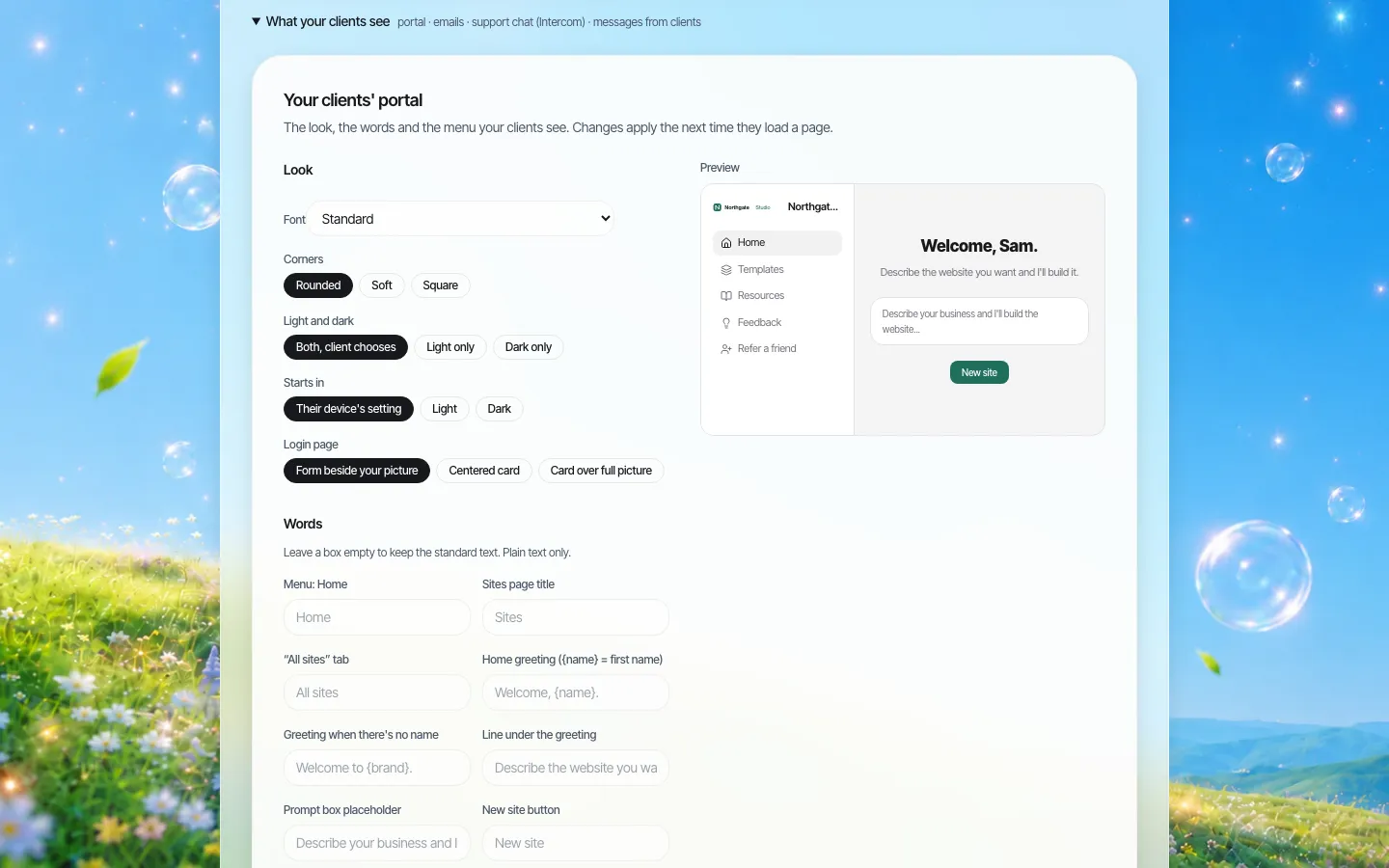
*The portal designer. Corners, light or dark mode, the sign-in layout and which menu items owners see, with a live preview.*
This matters more than it looks. When the tools an owner works in carry the brand, owners stop thinking of "the website" as something separate from the organisation, and they stop bringing in outside tools that look nothing like it. The custom branding page covers the rebranding of the editor itself in more detail; this page is about the rules around it.
Delegation is a permission, not a hope
"Delegate the opening hours" only works if owners can actually edit their sites, and "lock the tracking scripts" only works if they cannot. We.Inc lets you set, for all owners at once, whether they may publish, connect their own domain, see the code, run a blog, a store or forms, and change SEO settings, then change any of those for one owner. A franchise location might get a blog but no code access; a regional office with its own developer might get code access and its own domain.
Code access deserves a deliberate decision. An owner who can see and change the code can do almost anything, including undoing the brand look on their own site. That is right for a trusted partner with a developer and wrong for a volunteer editor.
Review only where it pays
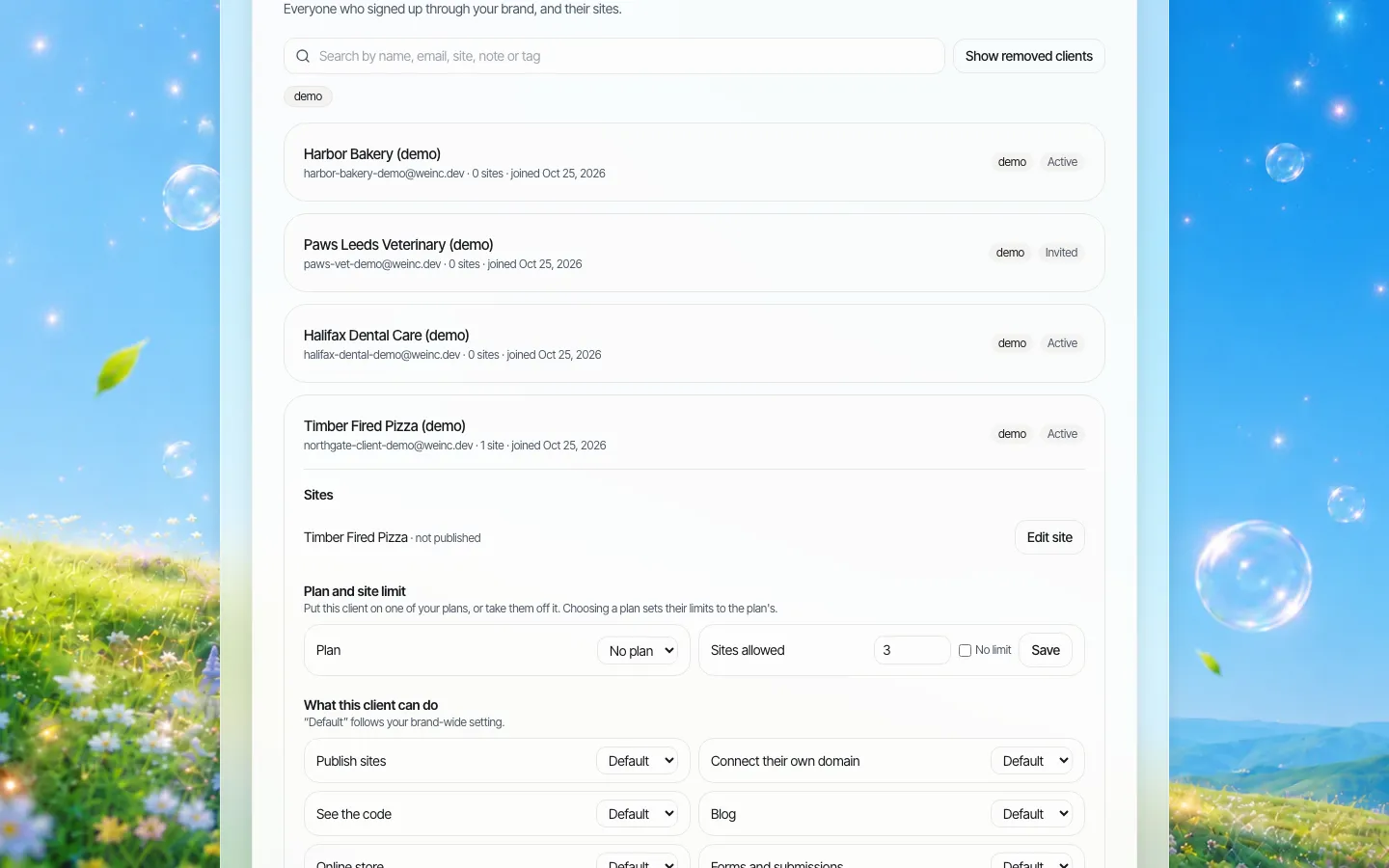
*One owner's settings. "Default" follows the brand-wide rule; changing it applies to this owner only.*
Approval before publishing can be on for every owner by default or for chosen owners only. A pattern that keeps the queue short:
- New owners start with approval on. Their first few publishes are where structural problems show up.
- After a fixed number of clean publishes, or a set period, switch it off. Write the threshold into your standard so owners know how to earn it.
- Regulated owners keep it on. Anything with health, financial or legal claims stays reviewed.
- Turn it back on after a problem, with a note in the owner's record saying why and when it will be reviewed.
It is a single approval by the brand owner, not a chain. If your process needs compliance and brand sign-off in sequence, do the first check outside the platform and use the approval as the final gate.
The domain question
A custom domain feels like a branding detail. It is really an ownership question: whose name is it registered in, who renews it, and what happens to it when an owner leaves the network? Decide this before switching on "connect their own domain" for anyone. A common rule is that domains carrying the brand name are registered by the brand and pointed at the owner's site, so they stay with the brand if the owner leaves.
A one-page brand standard for site owners
Owners will not read a 60-page brand book. Give them one page:
- What you cannot change (and why): logo, colours, fonts, buttons, scripts.
- What you own: your hours, contacts, team, news, photos, inside these rules.
- What we check before it goes live: new sites, claims, prices, anything regulated.
- How to ask for an exception: one named contact, a promised reply time.
- What happens if it goes wrong: we contact you, approval goes back on for a while.
Pair it with the fuller website governance policy template, which covers ownership, review cycles and retiring content.
What software cannot govern
No platform reads a sentence and knows it breaks your tone of voice, or knows that a photo shows a competitor's van. Software enforces the frame: the look, the switches, the gate. Inside the frame, governance is people: a written standard, a named reviewer, and the habit of looking at a sample of sites every month. We.Inc's audit log helps with the last part by showing who changed which owner's settings and when.
What we do not claim: accessibility of what owners publish is not guaranteed by the brand look. Templates can be built to help, and your team still has to test the content owners add.
See your brand in it
Book a demo. Bring your logo, colours and the three owners who give you the most trouble; we will set up the brand and their settings on the call.
Book a demo. Pricing is tailored to your volume and setup, and you get your exact price on the call. 0% transaction fee.
Frequently asked questions
Can site owners change the logo or brand colours?
The brand look (logos, favicon, colours, font, button styles and the owner portal look) is set on the brand account. Owners work inside it. An owner you give code access to can change their own site's code, so reserve code access for trusted owners.
Do I have to approve every change?
No. Approval before publishing can be on for all owners or only some, and switched per owner. Many brands keep it on for new and regulated owners and off for experienced ones.
Is the approval a multi-step workflow?
No. It is a single approval by the brand owner before a site goes live. Extra checks, such as legal review, happen outside the platform first.
How is this different from custom branding?
Custom branding is putting your name and look on the platform. Brand governance is the rules about who may change what across many sites, and when someone checks.
Keep reading
- White label website builder: the We.Inc platform
- White-label custom branding
- Client permissions: what each site owner can do
- Manage many client websites from one account
- Website governance policy template
- White-label client dashboard
More in White Label
- Every email your clients get, in your name
- The page your clients see most should not say someone else's name
- Brizy white label pricing, and the AI alternative
- The same fix on forty websites, without opening forty editors
- Your clients need a website halfway through your programme. Give them one under your name.
- The moment someone forms a company, they need a website. You are already there
- A member website programme your chamber can actually run
- The cheapest white-label website builder, by cost per site
We.Inc is an AI-powered website builder you can resell under your own brand. Launch a branded client dashboard, bill on Stripe Connect, and deliver AI-generated websites in minutes. White-label pricing is tailored to your volume and setup: book a 30-minute demo for a quote.
Product
- AI Website Builder: Describe a site in plain English; it's live in minutes
- White Label Platform: Your brand, your domain, your margin
- Enterprise: SSO, custom SLAs, and dedicated support
- Developer API: Embed site generation into your SaaS
Who It's For
- For Agencies: Resell under your brand
- For Freelancers: Your own branded builder
- For Hosting Providers: Add a builder to your stack
- For SaaS Platforms: Embed site creation via API
- For Startups
- For Financial Services
- For Healthcare
Features
- Drag & Drop Editor
- Built-in SEO Tools
- Custom Branding
- Client Dashboard
- Reseller Billing (Stripe Connect)
Resources
- Blog
- Help Center
- Free Business Tools
- Free UI Components
- Website Templates
- Template Collections
- Website Examples
- Guides
- Comparisons
- Alternatives
- Best Lists
- Reviews
- Pricing Guides
- Use Cases
- Glossary & Guides
- Integrations
- Developers
- Benchmark
- Windows App