Decide what every site owner can do, in seven switches
The person who owns a site is rarely the person who should be able to do everything with it. A bakery owner should edit the menu, not the code. A volunteer chapter editor should publish news, not connect a new domain. This page walks through the permission switches in We.Inc, how the defaults and exceptions combine, and five profiles you can copy.
TL;DR
- Seven switches per site owner: publish sites, connect their own domain, see the code, blog, online store, forms and submissions, SEO settings. Plus: publishing needs my approval.
- Set them once for everyone, let a client plan set them for a group, and override them for one owner. The most specific setting wins.
- When something is switched off, the owner sees a plain message in your brand's voice, never the platform's name.
- These are switches, not a custom permission builder. Book a demo to map your owners onto them.
The switches
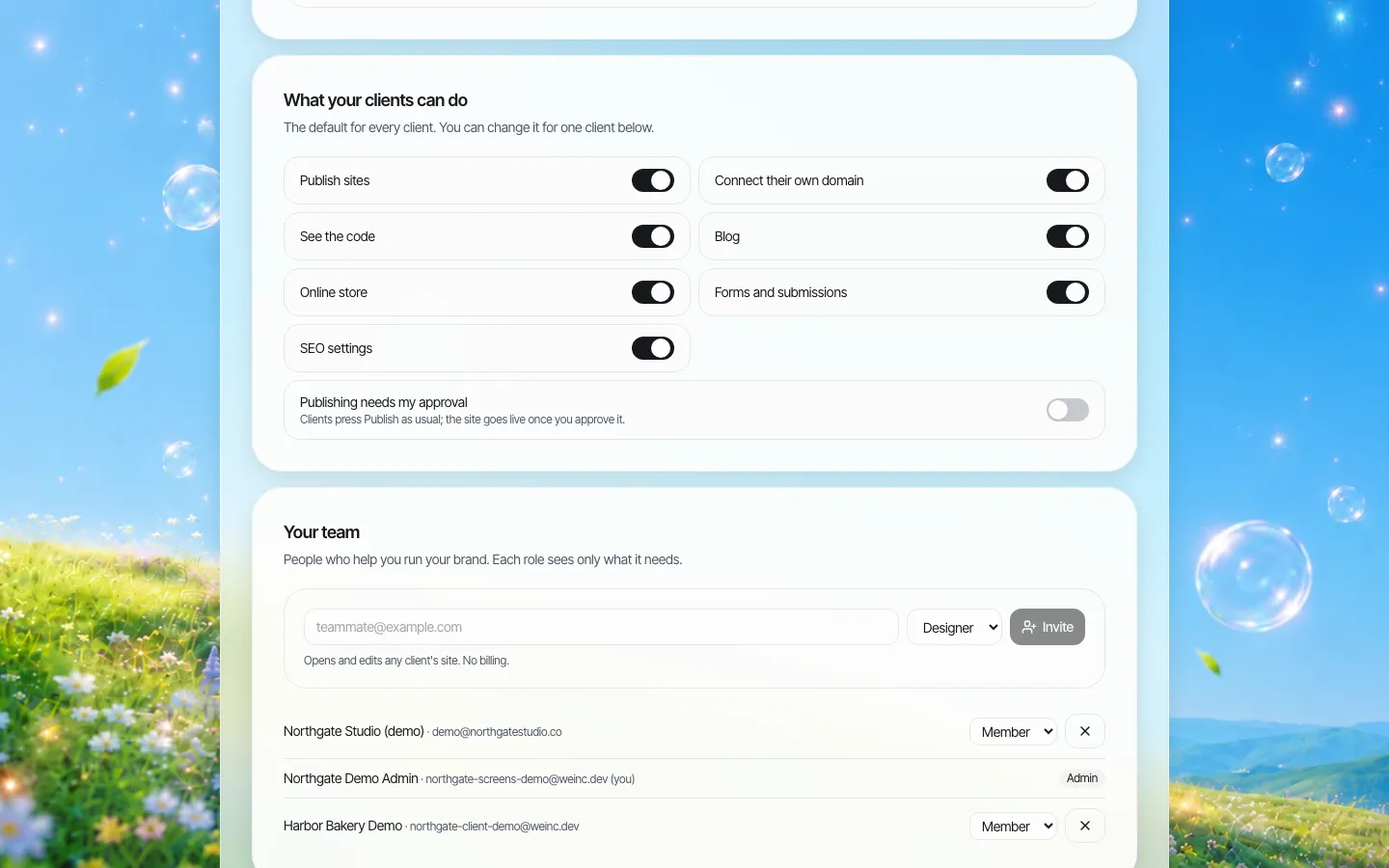
*The brand-wide defaults. Every new site owner starts with these.*
| Switch | When on, the owner can | Typical reason to switch it off |
|---|---|---|
| Publish sites | Put their site live and update it | They should build and preview while you decide when it goes live, for example during onboarding |
| Connect their own domain | Point a domain they own at their site | Domains carry your brand or need central renewal |
| See the code | Open and change the site's code | The owner has no developer; code changes can undo the brand look |
| Blog | Run a blog on their site | You run news centrally, or the owner has no one to write |
| Online store | Sell products from their site | Selling is outside the agreement, or needs separate approval |
| Forms and submissions | Collect form submissions | Forms collect personal data you have not agreed how to handle |
| SEO settings | Change the search settings for their site | You manage search centrally across the network |
| Publishing needs my approval | (When on) publishes wait for the brand owner | Off for trusted owners; on for new, volunteer or regulated ones |
Approval only applies when publishing is allowed at all: an owner who cannot publish has nothing to approve.
How defaults, plans and overrides combine
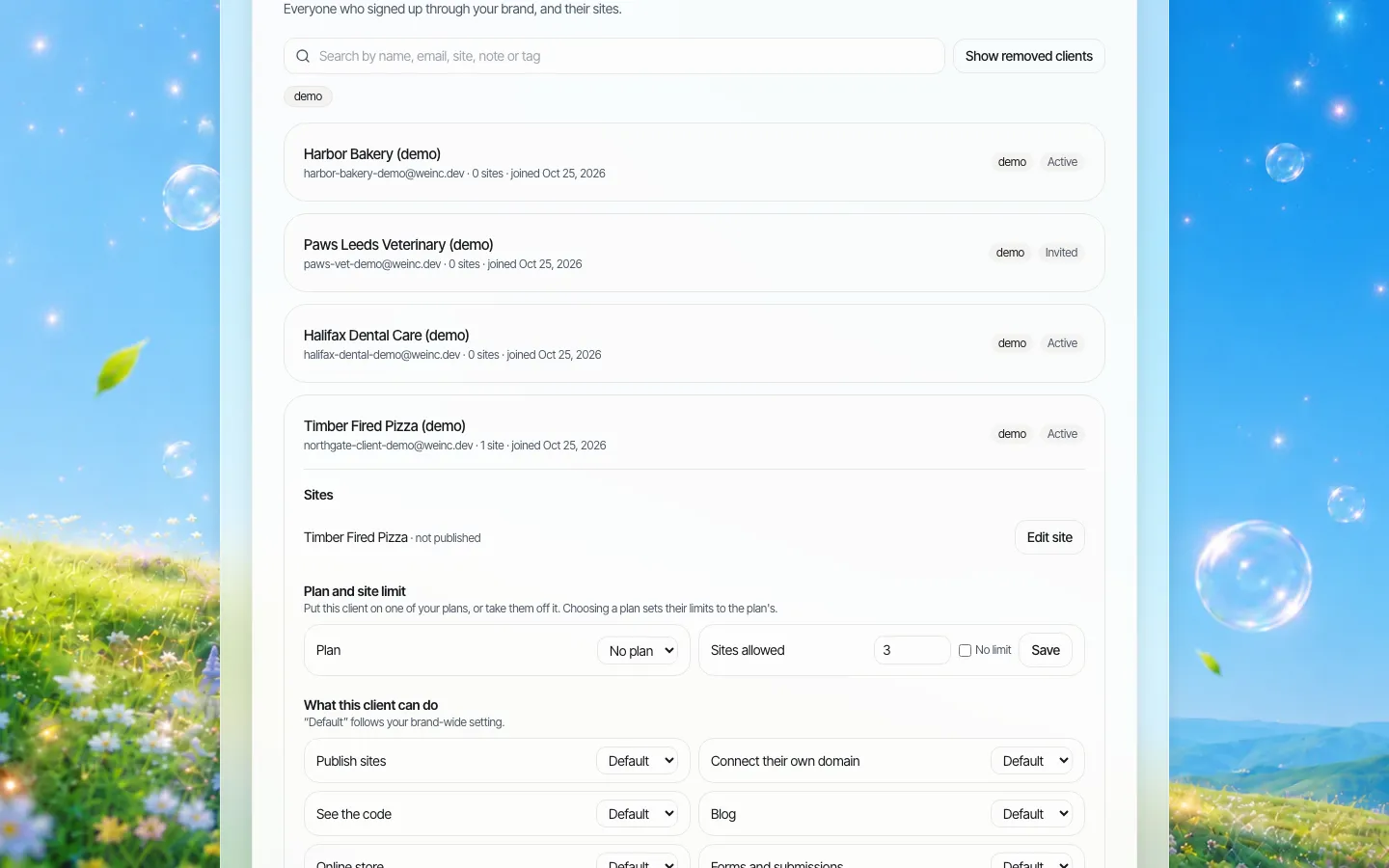
*One owner's page. Each switch reads "Default" until you choose otherwise for this owner.*
There are three places a permission can be set, and the most specific one wins:
- A setting on this one owner, if you have chosen one.
- Otherwise, the plan the owner is on, if you sell or assign plans and the plan includes or excludes that feature.
- Otherwise, the brand-wide default.
- If none of them says anything, the feature is allowed.
Approval before publishing works the same way with two levels: a setting on the owner, otherwise the brand default.
In practice this means you rarely touch individual owners. Set the brand default to your normal case, use plans for groups (for example "basic" without a store and "complete" with one), and keep one-off overrides for genuine exceptions. Setting an owner back to "Default" removes their exception, so they follow the brand rule again.
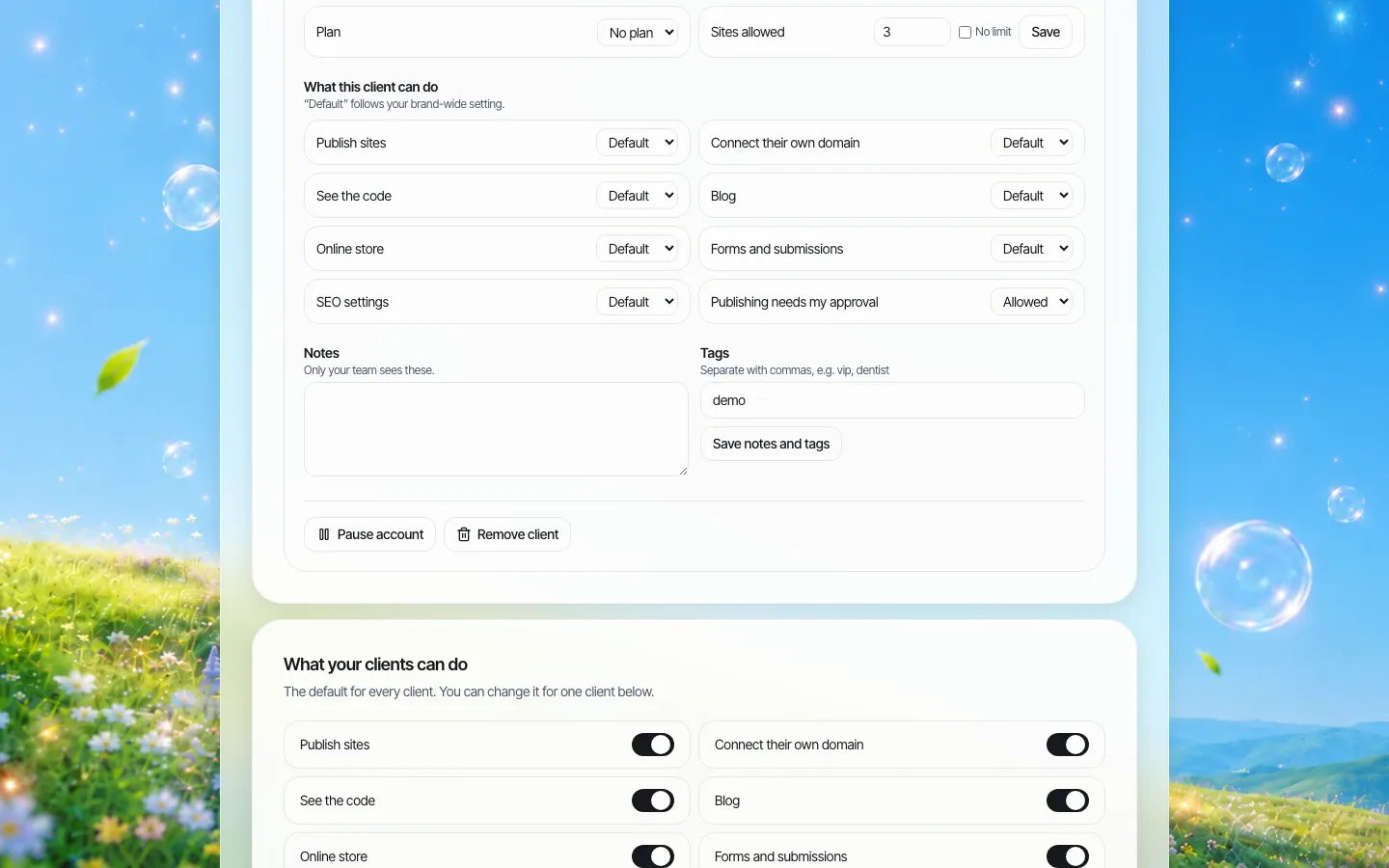
*Lower on the same page: the remaining switches, the approval setting, notes and tags, and pausing or removing the owner.*
A small wording caveat we are fixing: on an owner's page, the approval drop-down can read "Allowed" for an owner who is set to need approval. The behaviour follows the setting; the label is confusing.
What a blocked owner sees
When an owner tries something that is switched off, they see a plain sentence such as "Connecting your own domain isn't included in your account." The message never names the underlying platform, so it reads as your brand's rule. Tell owners in your onboarding how to ask for a feature, so the message leads to a conversation rather than a support ticket that just says "broken".
Five profiles to copy
These cover most networks. Name them in your own documents and apply them as plans or brand defaults.
| Profile | Publish | Own domain | Code | Blog | Store | Forms | SEO | Approval |
|---|---|---|---|---|---|---|---|---|
| New owner (first month) | On | Off | Off | On | Off | On | Off | On |
| Trusted owner | On | On | Off | On | Per contract | On | On | Off |
| Owner with a developer | On | On | On | On | Per contract | On | On | Off |
| Volunteer or student editor | On | Off | Off | On | Off | Off | Off | On |
| Regulated (health, finance, legal claims) | On | Off | Off | On | Off | Review first | Off | On, always |
Two notes on the table. Forms are switched off for volunteers here because forms collect personal data, and someone needs to have decided where submissions go and who reads them; switch them on once that is decided. And "Owner with a developer" is the only profile with code access, because code access can override almost anything else on the owner's site.
Your team is a different set of permissions
Site owners and your own staff are separate. Your staff are members of the brand account with roles: owner, admin or member, with fixed presets for designer (edits any client site, no billing), support (sees clients and sites, writes notes, no edits) and billing (plans and payments only).
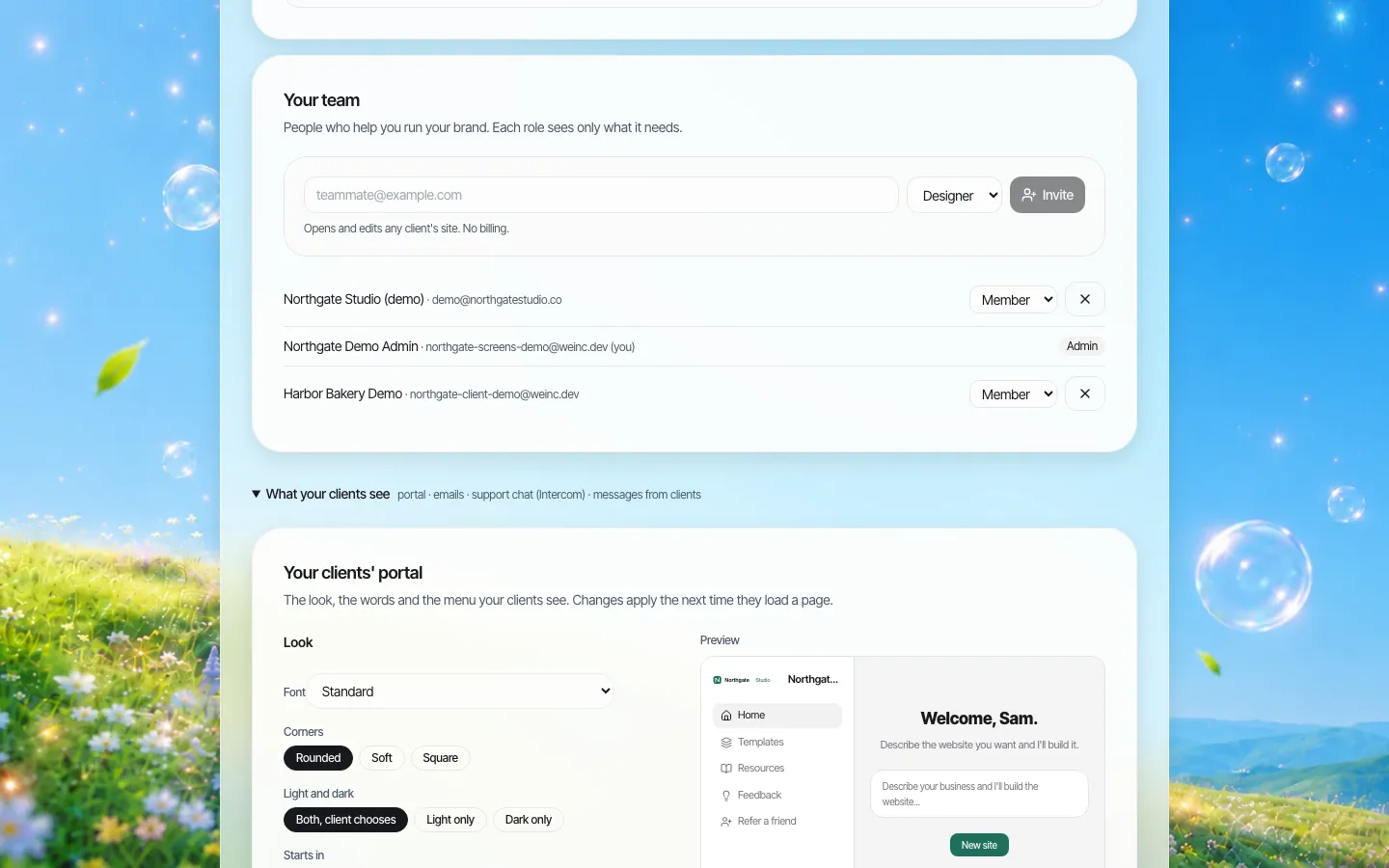
*Your own team. Pick the narrowest role that does the job.*
Managing permissions over time
Permissions decay. Owners get features "just for this launch" that nobody switches back. Three habits prevent it:
- Record why. When you override a switch for one owner, write the reason and a review date in their notes. Notes are searchable.
- Review overrides quarterly. Search for owners with exceptions and confirm each is still needed.
- Check the log. Every change to an owner's settings is recorded in the audit log, with the fields that changed, so you can see who granted what.
What this is not
- Not a custom permission builder. You get the seven switches and the approval setting. If you need a permission that is not on the list (for example "can edit pages but not the footer"), it does not exist today; raise it in the demo.
- Not page-level permissions inside a site. Permissions apply to the owner's account and sites as a whole.
- Not multi-stage approval. Approval is a single step by the brand owner. See publishing approvals.
For how this fits into a wider rulebook (owners of record, review cycles, retiring sites), see the website governance policy template.
Book a demo with a list of your owner types, and we will set up the profiles above with you on the call.
Book a demo. Pricing is tailored to your volume and setup, and you get your exact price on the call. 0% transaction fee.
Frequently asked questions
What can I control for each client in We.Inc?
Seven switches: publish sites, connect their own domain, see the code, blog, online store, forms and submissions, and SEO settings, plus whether publishing needs your approval.
If I change the brand default, does it affect existing clients?
Yes, for every client who has no setting of their own and whose plan does not set that feature. A setting on one client, or on their plan, takes priority over the brand default.
What does a client see when a feature is switched off?
A plain message, for example that connecting their own domain is not included in their account. It never names the underlying platform.
Can I create my own permission types?
No. There are seven fixed switches and the approval setting. Ask in the demo if you need something that is not on the list.
Keep reading
- White label website builder: the We.Inc platform
- Manage many client websites from one account
- Brand governance across many websites
- Audit log for a white-label website platform
- Website governance policy template
- White-label client dashboard
More in White Label
- Your logo on someone else's product is not a portal. Your words and your menu are
- Your best work, as a starting point for every new client
- Stop being your clients' content-entry service
- You should be able to leave. Here is exactly what leaves with you
- More sites than staff: a website platform for community colleges
- Websites for members who own the business, not franchisees who follow it
- Your members need websites. You could be the one who gives them one.
- Custom Branding | White Label
We.Inc is an AI-powered website builder you can resell under your own brand. Launch a branded client dashboard, bill on Stripe Connect, and deliver AI-generated websites in minutes. White-label pricing is tailored to your volume and setup: book a 30-minute demo for a quote.
Product
- AI Website Builder: Describe a site in plain English; it's live in minutes
- White Label Platform: Your brand, your domain, your margin
- Enterprise: SSO, custom SLAs, and dedicated support
- Developer API: Embed site generation into your SaaS
Who It's For
- For Agencies: Resell under your brand
- For Freelancers: Your own branded builder
- For Hosting Providers: Add a builder to your stack
- For SaaS Platforms: Embed site creation via API
- For Startups
- For Financial Services
- For Healthcare
Features
- Drag & Drop Editor
- Built-in SEO Tools
- Custom Branding
- Client Dashboard
- Reseller Billing (Stripe Connect)
Resources
- Blog
- Help Center
- Free Business Tools
- Free UI Components
- Website Templates
- Template Collections
- Website Examples
- Guides
- Comparisons
- Alternatives
- Best Lists
- Reviews
- Pricing Guides
- Use Cases
- Glossary & Guides
- Integrations
- Developers
- Benchmark
- Windows App