Who changed it, and when: the audit log, line by line
Sooner or later someone asks a question nobody can answer from memory. Who gave this client their own domain? Who removed that team member? Who approved the site that went live with the wrong prices? An audit log is the record that answers those questions. This page shows exactly what ours records, what it does not, and how to use it without overclaiming what it proves.
TL;DR
- The We.Inc audit log records actions on the brand account: clients invited, changed or removed, permission defaults, brand settings, team changes, plans, domains and publish approvals.
- Each entry has a date, the user, the action, the resource it touched and a details field listing what changed.
- Only owners and admins can open it. It can be filtered by action and is paged 50 entries at a time.
- It is not a page-by-page edit history of each site, and we make no retention or tamper-proof claims. Book a demo to see it on your own account.
What the screen shows
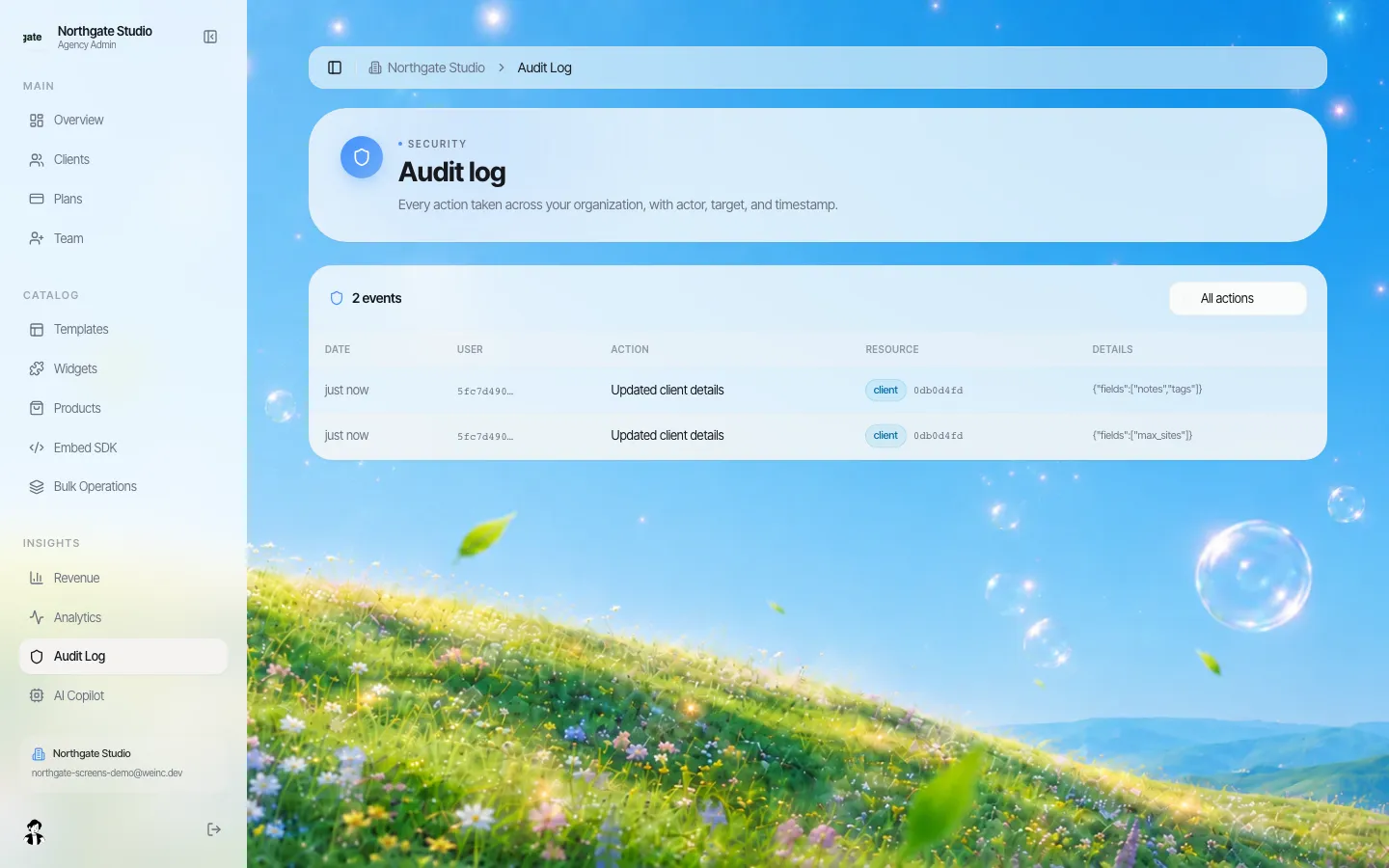
*Two real entries from editing a demo client: one changed the notes and tags, the other changed the site limit. Each row shows date, user, action, resource and details.*
Each entry in the audit log has five parts:
| Column | What it holds | Example from the screenshot |
|---|---|---|
| Date | When the action happened | "just now" |
| User | Who did it | Currently shown as the person's account ID, not their name |
| Action | What was done, in words | "Updated client details" |
| Resource | What kind of thing it touched, and which one | client, with its ID |
| Details | The specifics, where the action has them | Which fields changed: notes and tags; or the site limit |
Owners and admins can filter the log by action (the "All actions" menu) and page through it. Other team roles and site owners cannot open it.
One honest caveat on the screenshot: the user column shows an account ID rather than a name today. You can match the ID to a person from your team list, but it is a step you should know about before you rely on the log in a hurry.
What is recorded
These are the account-level actions written to the log, grouped by the question each answers:
| Question you get asked | Actions recorded |
|---|---|
| Who added or removed this client? | Client invited; client removed |
| Who changed what this client can do? | Client details updated, including site limit, plan, notes, tags and per-client switches |
| Who changed the rules for everyone? | Client defaults updated (the brand-wide switches and the approval default) |
| Who changed the brand? | Branding updated |
| Who changed our team? | Team member invited; role changed; member added or removed |
| Who approved this site going live? | Publish request approved or rejected |
| Who changed what clients pay? | Plan created, updated or deleted; payments connection started |
| Who removed a domain? | Domain removed |
| Who opened a client's site from the console? | Client site opened |
What is not recorded, and where that information lives
Being clear about this matters more than the list above, because an audit log is only useful if people know its edges.
- Edits inside a site. The log does not record that someone changed a heading on a client's home page. It is about the account and the rules around sites, not the content of each page. For content history, the site's code can be synced to GitHub, where every change you sync is a commit with a date.
- What site owners do in their own accounts. A client creating a page, uploading a photo or editing text is not an organisation action.
- Sign-ins and failed sign-ins. The log is not a security monitoring feed.
- Retention and tamper-proofing. We do not state a retention period or claim the log is immutable. If your records policy requires a set retention period, export what you need on a schedule (see below) and ask us in the demo what is available today.
Using it in practice
When something goes wrong
Start from the resource, not the date. If a client suddenly has a custom domain, filter by client changes and read down the entries for that client's ID. The details field tells you which fields changed in each entry, so you can tell a notes edit from a permission change without guessing.
Monthly review (15 minutes)
Pick a fixed day. An owner or admin reads the last month's entries and asks four questions:
- Did anyone join the team, change role or leave, and does that match HR or the contract list?
- Did any client get a permission that the brand standard says needs sign-off (code access, own domain)?
- Did the brand-wide defaults change? Was it agreed?
- Were any publish requests rejected, and has the owner fixed and resubmitted?
Write the date of the review and anything followed up in your own records. A log that is never read proves very little.
When people leave
When a team member leaves, remove them on the day and check the log for their recent actions. This is the moment people most often discover a permission change nobody discussed.
Public bodies and records requests
Many public bodies must keep records of administrative decisions and may receive public records requests. The audit log can help you reconstruct who changed site settings and when, but it is not a records-management system and we make no claim that it satisfies any particular retention schedule or law. Treat it as a source you copy from into your own records system, under your own retention rules. Our government agencies page covers the wider public-sector fit.
Questions to ask any vendor about audit logs
Use these whether or not you choose us. Our answers are in the right-hand column.
| Question | Why it matters | We.Inc today |
|---|---|---|
| Which actions are logged? Ask for the list. | "Everything" is rarely true | The account-level actions in the table above |
| Are content edits inside sites logged? | Settings logs and content history are different things | No; use GitHub sync for content history |
| Who can read the log? | Too wide and it leaks; too narrow and nobody reads it | Owners and admins |
| Does an entry show what changed, or just that something changed? | You need the field, not only the event | A details field lists changed fields where the action has them |
| How long are entries kept? Can they be edited or deleted? | Retention and integrity are the point of a log | No stated retention or immutability claim; ask in the demo |
| Can the log be exported? | You may need it in your own records system | Ask in the demo for the current export options |
| Is the user shown by name? | Speed during an incident | Account ID today |
For a wider list of vendor questions, see our procurement checklist.
How this fits with permissions and approval
The audit log is the third piece of a set. Client permissions decide what each site owner may do. Publishing approvals put a check before a site goes live. The audit log records who changed either of those and who approved what. Each is weaker alone: permissions without a log invite quiet exceptions, and a log without permissions just records the mess.
NIST's guide to log management (SP 800-92, 2006) is still the standard reference if you are writing an internal logging policy; it is written for security logs across an organisation, which is broader than a website platform's account log, but its advice on deciding what to log and who reviews it applies.
Book a demo and we will change a client's settings on the call and show you the entries it creates.
Sources
Last checked 2026-10-25.
- National Institute of Standards and Technology, SP 800-92: Guide to Computer Security Log Management, September 2006.
- We.Inc product behaviour described on this page was checked in the current release on 2026-10-25.
Book a demo. Pricing is tailored to your volume and setup, and you get your exact price on the call. 0% transaction fee.
Frequently asked questions
Does the audit log record edits to website content?
No. It records actions on the brand account, such as client, permission, brand, team, plan, domain and approval changes. For a history of content changes, sync a site's code to GitHub.
Who can see the audit log?
Owners and admins of the brand account. Other team roles and site owners cannot open it.
How long are audit log entries kept?
We do not state a retention period or claim the log is tamper-proof. If you need a fixed retention period, copy entries into your own records system on a schedule and ask us in the demo what is available.
Does the audit log show names?
Today the user column shows the account ID, which you can match to a person in your team list.
Keep reading
- White label website builder: the We.Inc platform
- Client permissions: what each site owner can do
- Manage many client websites from one account
- White-label websites for government agencies
- Website platform procurement checklist
- Website vendor exit plan: contract clauses
More in White Label
- One brand, hundreds of dealers, and a website for each
- Give business customers and members a website, under your institution's name
- Keep every site on-brand without approving every comma
- Every email your clients get, in your name
- The page your clients see most should not say someone else's name
- Brizy white label pricing, and the AI alternative
- The same fix on forty websites, without opening forty editors
- Your clients need a website halfway through your programme. Give them one under your name.
We.Inc is an AI-powered website builder you can resell under your own brand. Launch a branded client dashboard, bill on Stripe Connect, and deliver AI-generated websites in minutes. White-label pricing is tailored to your volume and setup: book a 30-minute demo for a quote.
Product
- AI Website Builder: Describe a site in plain English; it's live in minutes
- White Label Platform: Your brand, your domain, your margin
- Enterprise: SSO, custom SLAs, and dedicated support
- Developer API: Embed site generation into your SaaS
Who It's For
- For Agencies: Resell under your brand
- For Freelancers: Your own branded builder
- For Hosting Providers: Add a builder to your stack
- For SaaS Platforms: Embed site creation via API
- For Startups
- For Financial Services
- For Healthcare
Features
- Drag & Drop Editor
- Built-in SEO Tools
- Custom Branding
- Client Dashboard
- Reseller Billing (Stripe Connect)
Resources
- Blog
- Help Center
- Free Business Tools
- Free UI Components
- Website Templates
- Template Collections
- Website Examples
- Guides
- Comparisons
- Alternatives
- Best Lists
- Reviews
- Pricing Guides
- Use Cases
- Glossary & Guides
- Integrations
- Developers
- Benchmark
- Windows App