Stop being your clients' content-entry service
Ask any agency where their hours go after launch and the answer is small edits: change the phone number, swap this photo, make the button say "Book now". Each one is two minutes of work and twenty minutes of email. A visual editor that clients will actually use is the cheapest support tool a reseller can have. This page shows the editor your clients get on We.Inc and how to decide what they may touch.
TL;DR
- Clients click an element on their site and change it from a side panel: text, colours, links, corners, borders, shadows, spacing, images.
- Edits apply for each screen size and for hover, focus and active states.
- Visual edits are free: they do not use AI credits. When a change cannot be made directly, the client is offered an explicit "Ask AI" option that says it uses credits.
- Every edit is written into the site's source code, so a site edited visually can still be exported.
What clients can change
The editor opens on the client's own site, inside your portal. They click a heading, button or image, and the panel on the left shows only the controls that apply to it.
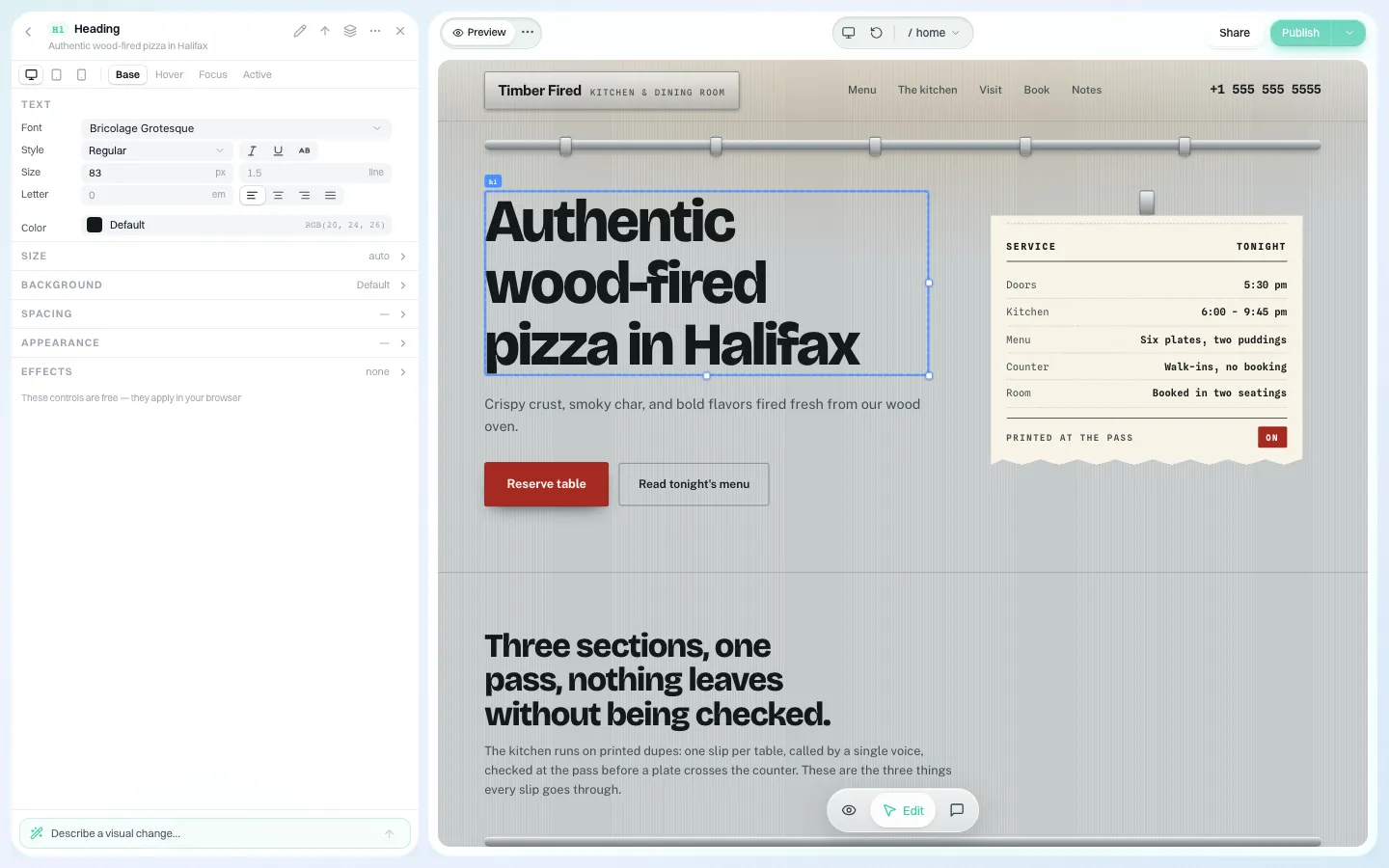
*A heading selected. Font, size and colour sit in the panel; the change shows in the preview straight away.*
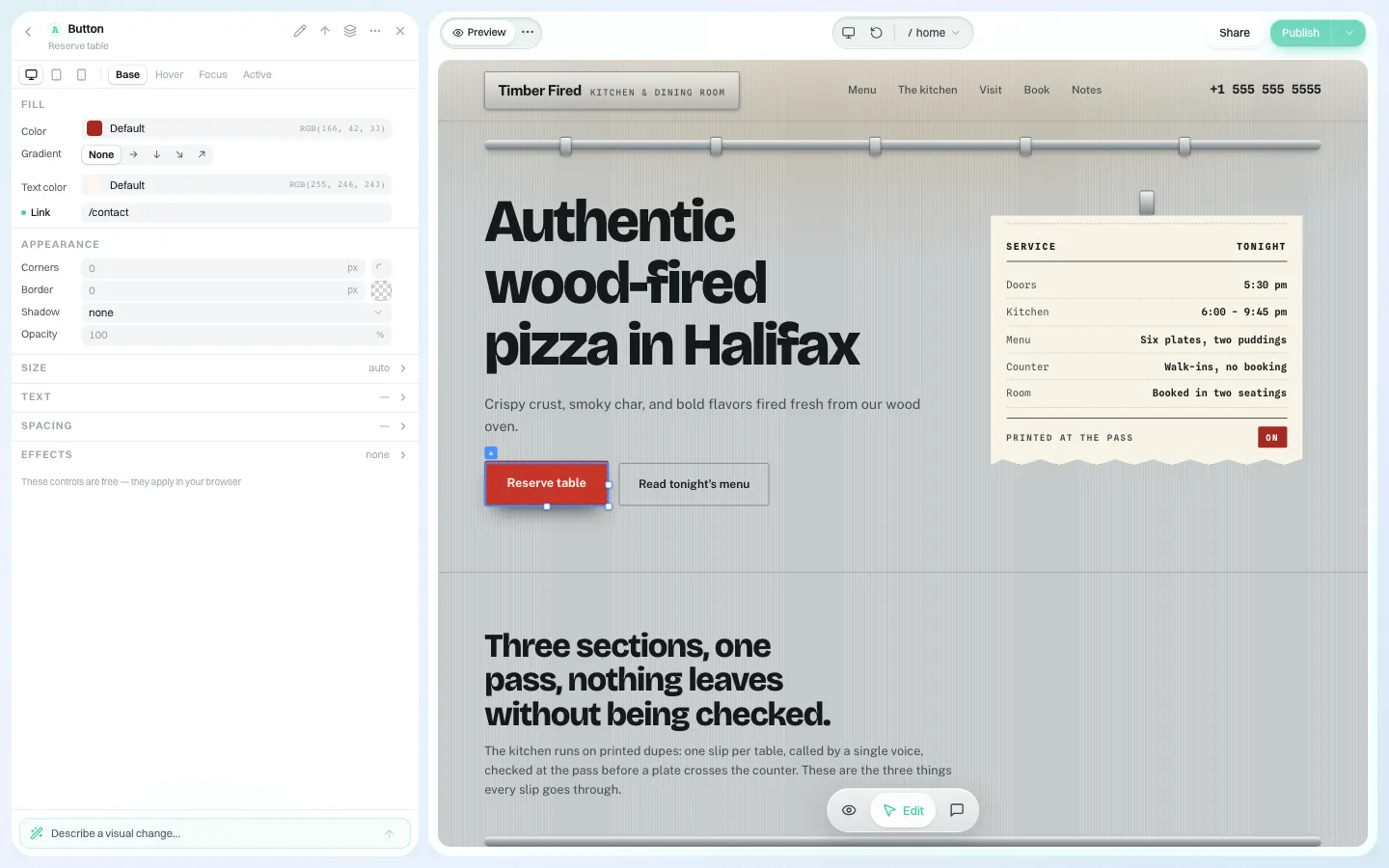
*A button selected. Its link, fill, corners and shadow, plus separate tabs for hover, focus and active states. The note at the bottom reads: "These controls are free — they apply in your browser."*
The controls, grouped the way clients think
| Client says | Where it lives | Notes |
|---|---|---|
| "Change the wording" | Click the text and type | Works on headings, paragraphs and buttons |
| "Make it our red" | Fill / text colour | Gradients have four directions |
| "This button should go to the booking page" | Link | Internal paths or full addresses |
| "Make it rounder / flatter" | Corners, border, shadow, opacity | Pixel values |
| "It looks wrong on my phone" | Screen-size toggle at the top of the panel | Desktop, tablet and phone edited separately |
| "Swap this photo" | Select the image and replace it | Only the selected image changes, even if the same stock photo appears elsewhere |
| "Add a section" | Insert section | From ready-made section designs |
| "Delete this" | Remove | Guarded so removing one element cannot take the whole page with it |
Why "free" matters for a reseller
Many AI builders charge for every edit because every edit is a prompt. That trains clients to stop editing, or to email you instead. On We.Inc, visual edits are deterministic changes to the source files: no AI call, no credits. Before a control is shown as "applies directly", the editor checks at selection time whether the edit can actually be made on that element. When it cannot, the client is offered a pre-written AI request, clearly labelled as using credits, instead of a silent failure. The AI is never fired behind their back.
At the bottom of the panel there is a "Describe a visual change" box for the requests that are easier to say than to click. That one does use AI.
Undo and saving
Each visual edit goes through the same pipeline as other edits: it is written to the site's files, saved, and can be undone. Because it is written to source (not stored as an overlay), the change is still there after a code export or a GitHub sync. See code export.
Deciding what clients may touch
A visual editor does not remove the need for rules; it makes them more important. Three settings shape what a client can do after they have edited:
- Publishing. Whether the client can put changes live at all.
- Approval before publishing. A single-step approval before a client's site goes live: they edit freely, you approve the result.
- See the code. Whether the Code panel is visible.
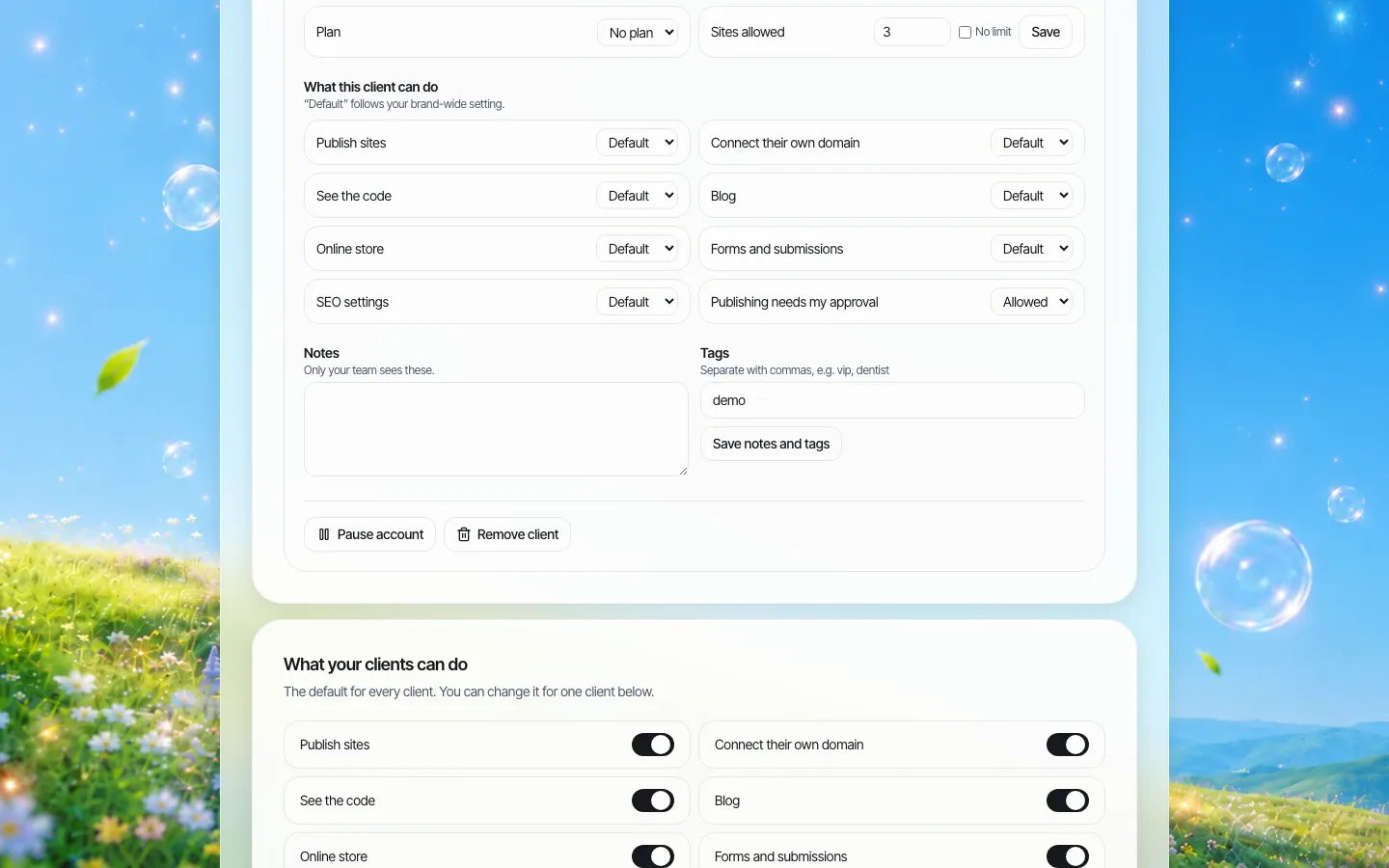
*Per-client switches in the client manager. Most agencies give editing to everyone and gate publishing for new clients.*
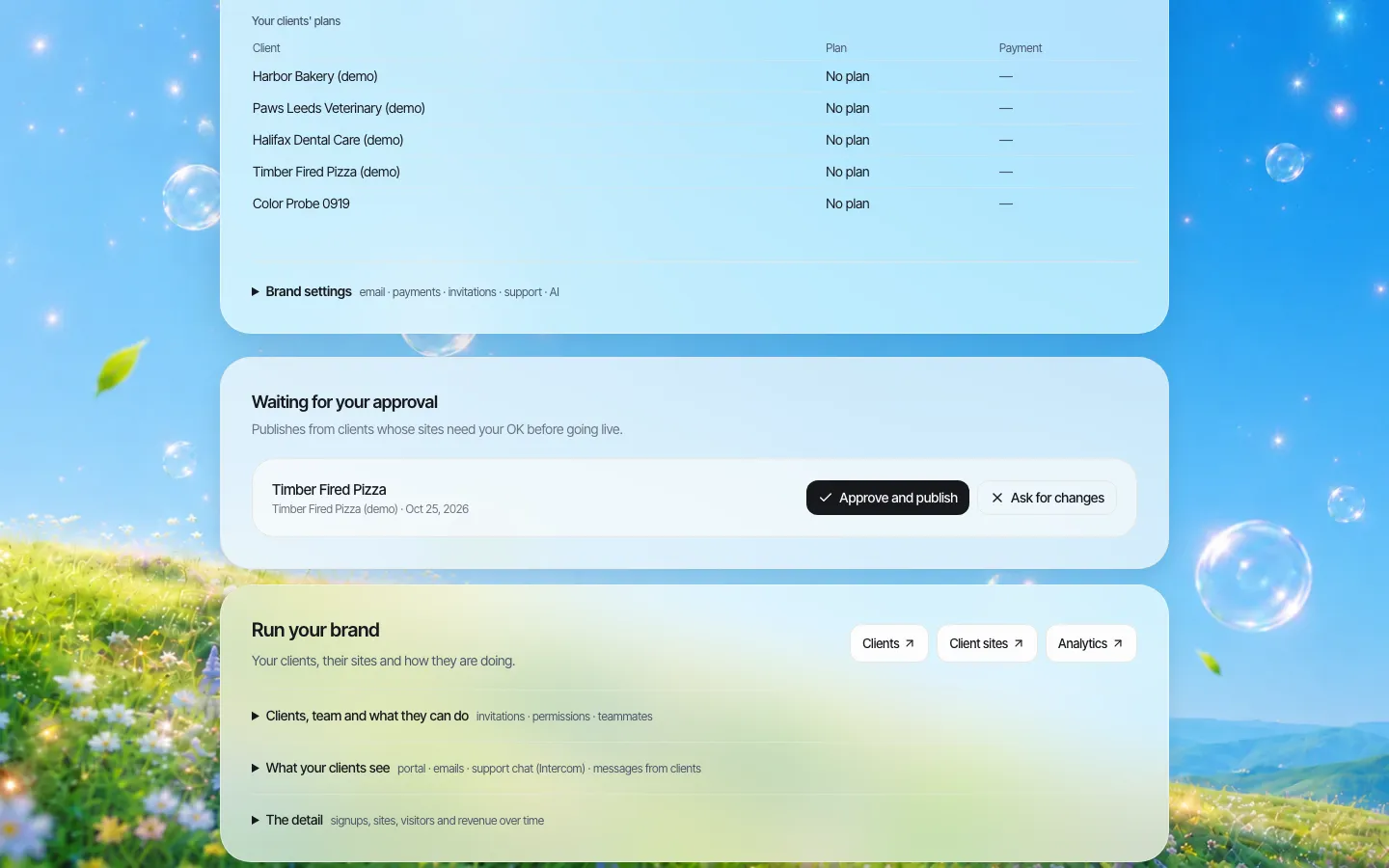
*The approval queue. The screen is real; on this demo the waiting request was staged.*
A common setup: new clients edit with approval on for their first month, then approval is switched off once they have shown they will not delete the contact page.
A short training script for clients
Paste this into your welcome email or help section (your portal's Resources area can hold it):
- Open your site and press Edit.
- Click the thing you want to change. The panel on the left shows what you can change about it.
- Use the phone icon at the top of the panel to check how it looks on a phone.
- Changes in the panel are free. The "Describe a visual change" box uses AI credits.
- Press Publish when you are happy. If your account needs approval, the web team is asked to approve first.
What changes for your support desk
Agencies that switch clients to self-editing usually see the same pattern. Tickets about small text and photo changes drop, and a smaller number of "I broke something" tickets appear in the first weeks. Undo handles most of them; approval before publishing catches the rest before the public sees them. Plan an extra check-in in each client's first month, then expect the requests that reach you to be the ones worth billing for: new pages, new features, redesigns.
Where the editor stops
- It edits the elements on the page. It is not a layout canvas where you drag boxes anywhere; structure changes go through sections or AI.
- Highly custom code written by a developer may expose fewer direct controls; the editor will say so and offer AI.
- It does not check accessibility. Colour contrast and alt text remain your team's job to test.
If your clients need a structured content back-office with hundreds of entries, a headless CMS may suit them better. If they need to change words, photos, links and colours without calling you, this is built for that.
Book a demo and we will hand you the editor on a sample client site.
Book a demo. Pricing is tailored to your volume and setup, and you get your exact price on the call. 0% transaction fee.
Frequently asked questions
Do visual edits use AI credits?
No. Changes made from the editor panel are free. Only the "Describe a visual change" box and the optional "Ask AI" fallback use credits, and both say so.
Can clients edit the mobile version separately?
Yes. The panel has desktop, tablet and phone toggles, and edits apply per screen size.
Can I approve changes before they go live?
Yes. Turn on single-step approval before a client's site goes live, as a brand default or for one client. You approve or ask for changes from a queue.
Are visual edits lost if we export the code?
No. Each edit is written into the site's source files, which is what the export contains.
Keep reading
- White label website builder: the We.Inc platform
- Client permissions: what each site owner can do
- AI site generation for your clients
- Code export and no lock-in
- White-label client dashboard
- Onboarding clients onto your platform
More in White Label
- You should be able to leave. Here is exactly what leaves with you
- More sites than staff: a website platform for community colleges
- Websites for members who own the business, not franchisees who follow it
- Your members need websites. You could be the one who gives them one.
- Custom Branding | White Label
- Client domains: the part of white-label that breaks when nobody owns it
- Every acquired practice comes with a website nobody at head office can log into
- Your sellers will make a website either way. Make it one you can see.
We.Inc is an AI-powered website builder you can resell under your own brand. Launch a branded client dashboard, bill on Stripe Connect, and deliver AI-generated websites in minutes. White-label pricing is tailored to your volume and setup: book a 30-minute demo for a quote.
Product
- AI Website Builder: Describe a site in plain English; it's live in minutes
- White Label Platform: Your brand, your domain, your margin
- Enterprise: SSO, custom SLAs, and dedicated support
- Developer API: Embed site generation into your SaaS
Who It's For
- For Agencies: Resell under your brand
- For Freelancers: Your own branded builder
- For Hosting Providers: Add a builder to your stack
- For SaaS Platforms: Embed site creation via API
- For Startups
- For Financial Services
- For Healthcare
Features
- Drag & Drop Editor
- Built-in SEO Tools
- Custom Branding
- Client Dashboard
- Reseller Billing (Stripe Connect)
Resources
- Blog
- Help Center
- Free Business Tools
- Free UI Components
- Website Templates
- Template Collections
- Website Examples
- Guides
- Comparisons
- Alternatives
- Best Lists
- Reviews
- Pricing Guides
- Use Cases
- Glossary & Guides
- Integrations
- Developers
- Benchmark
- Windows App