
Can You White-Label Webflow? What Agencies Actually Get
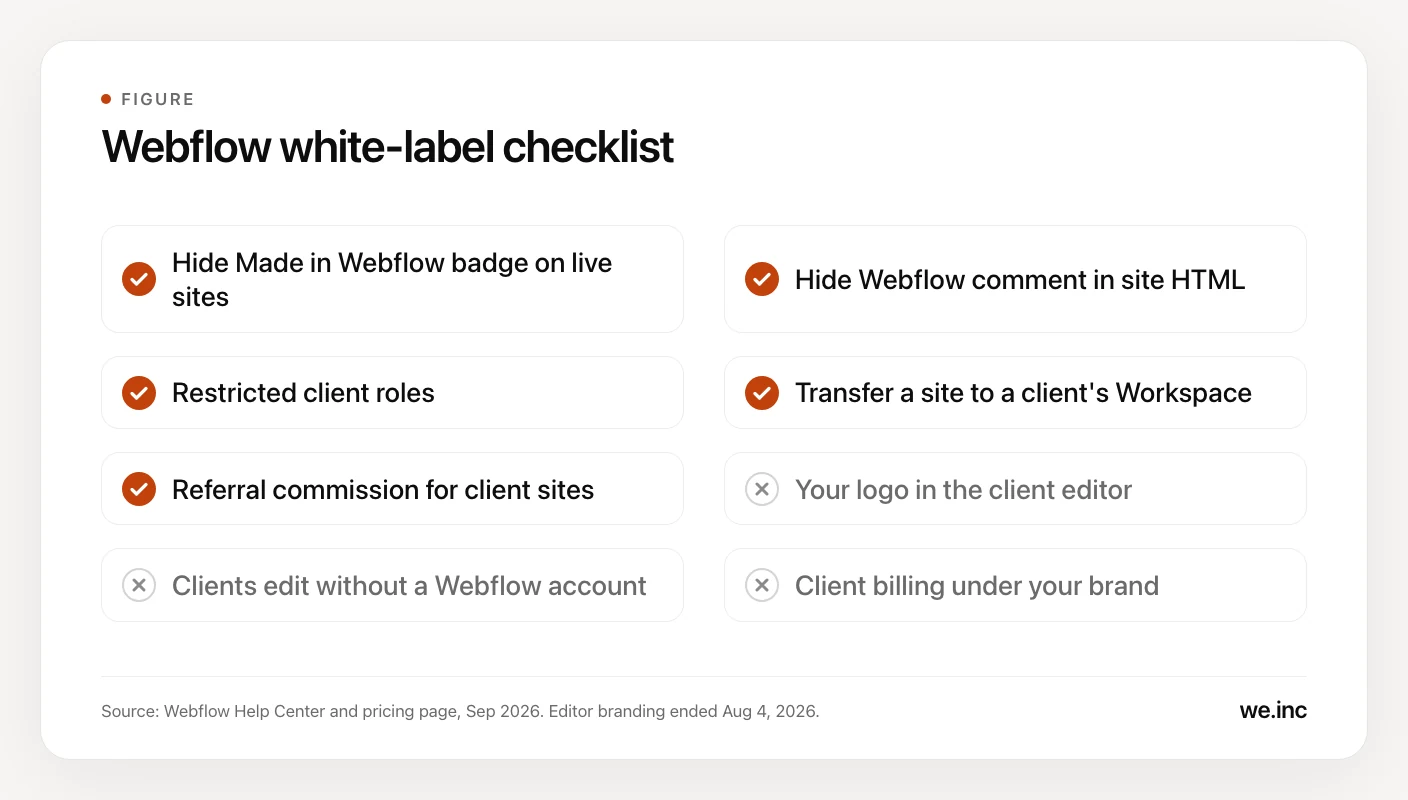
No. Webflow retired Editor branding on August 4, 2026. You can hide the badge on live sites, but clients still sign in and edit inside Webflow itself.
Start for free. No credit card required.
For agencies: White label website builder: your own branded AI builder (book a demo)
No, not as of September 2026. Webflow lets you remove the "Made in Webflow" badge from published sites, but its Editor branding (whitelabeling) feature ended with the legacy Editor on August 4, 2026. Your clients now sign in with a Webflow account, edit inside Webflow's interface, and, if you hand billing to them, pay Webflow directly.
Short answer: You can make a Webflow site look unbranded to visitors. You cannot make Webflow look like your own product to clients. Webflow's agency model is built on referrals and partner status, not reselling.
What would white-labeling Webflow actually require?
"White label" gets used loosely, so it helps to split it into layers. A platform is fully white-label when a client can use it for years without seeing the vendor's name. That takes six things:
- The published site carries no vendor badge or credit.
- The login and dashboard sit on your domain with your logo.
- The editor shows your brand, not the vendor's.
- Emails such as invites, receipts and password resets come from your brand.
- Billing goes from the client to you, at a price you set.
- The contract allows you to resell access under your own name.
Webflow covers the first layer well. It does not cover layers two to five, and its terms restrict the sixth without written consent. The sections below show exactly why, using Webflow's own pricing page, help center and terms, all checked on September 15, 2026.
Can you remove Webflow branding from client sites?
Yes. Webflow's help article on branding says the badge is on by default, and you can hide it if you have "a Growth, Agency, or Enterprise Workspace plan or a paid site plan." Sites created inside a Growth, Agency or Enterprise Workspace start with it switched off. The toggle lives in Site settings, under the General tab.
A second toggle removes the comment Webflow adds to the top of your HTML. Webflow is candid that this "will not remove all Webflow-specific terms and references" from your site's code. Visitors will not notice. A curious client viewing the page source might.
One trap for agencies who proxy sites: if you point a reverse proxy or plugin at the free webflow.io staging address, the badge cannot be removed. Webflow says you need a paid Site plan and a custom domain or subdomain first.
What do Webflow's Freelancer and Agency plans include?
Webflow splits billing in two. A Workspace plan pays for your team and collaboration tools. A Site plan pays for hosting each site on a custom domain, and every hosted site needs its own. Prices below are from Webflow's pricing page, in USD before tax, as of September 2026.
| Plan | Billed yearly | Billed monthly | What agencies get |
|---|---|---|---|
| Freelancer Workspace | $16/mo | $24/mo | 1 full seat, 10 staging sites, 1 client seat per site, client payments |
| Agency Workspace | $35/mo | $42/mo | 1 full seat, unlimited staging sites, 3 client seats per site, site-level roles, badge-free staging |
| Extra full seat | $39/mo | $45/mo | Design and admin access |
| Extra limited seat | $15/mo | $19/mo | Content editing or page building |
| Basic Site plan | $15/mo | $25/mo | Custom domain, no CMS |
| Premium Site plan | $25/mo | $39/mo | CMS with 20,000 items, 50 GB bandwidth |
Two timing notes. Premium replaced the CMS and Business Site plans for new purchases on May 13, 2026. Existing sites inside Freelancer and Agency Workspaces move to the new Site plan pricing at their first renewal on or after November 16, 2026, so an agency's current invoices may still show the older prices.
How do clients edit a Webflow site now?
Through client seats. These arrived on February 2, 2026 to replace the legacy Editor, and they are the reason the white-label question now has a firmer answer.
- Seats are per site. Agency plans include three free client seats per site and Freelancer plans include one. Webflow says "additional client seats cannot be purchased at this time."
- Roles are limited. A client can be a Marketer (build pages from components), a Content editor (edit existing content) or a Reviewer (view and comment).
- Clients need a Webflow account. The invite asks them to "sign in to or create a free Webflow account." Clients reach the editing view in the Webflow canvas, for example by adding ?update to a live page's address.
- No branding option. Webflow's migration FAQ compares the legacy Editor with the new Content editor role, and "Editor branding (whitelabeling)" is marked available only in the legacy Editor.
There is also a rule that catches in-house setups: you cannot put someone in a client seat if they share the Workspace owner's business email domain.
Does Webflow's client billing work for resellers?
Not as reseller billing. Webflow's client payments feature, on Freelancer and Agency plans, lets you "hand off site billing to your clients," so they pay for their own Site plans and add-ons "directly in Webflow." The client accepts using a Webflow account, enters a card, and then sees a Payments tab in their Webflow dashboard. The request email comes from Webflow.
That solves a real problem: agencies no longer carry client hosting costs on their own card. But the client pays Webflow's price to Webflow, and the help article describes no way to set your own price or add a margin. Other limits: one client per site, and a maximum of ten pending payment requests per Workspace. You can also transfer a paid site straight into the client's Workspace, after which you need guest access to keep working on it.
The contract is the other half. Section 4.3 of Webflow's Terms of Service says that "without Webflow's prior written consent, you do not have the right to sublicense or resell access to the Platform." If your offer is really "our website platform" and the platform is Webflow, read that clause before you price it. For how resale models differ, see our explainer on private label versus white label website builders.
Does Webflow have a reseller or partner program?
It has a partner program built on referrals. There are three routes, and you can only be in the partner program or the affiliate program, not both.
- Webflow Foundations is the free entry tier for service-provider Workspaces on Starter, Freelancer or Agency plans. It pays 10% commission on the first year of self-serve annual Site plans and add-ons, plus 10% on Enterprise plans, for clients you bring to Webflow.
- Certified Partner requires at least one team member to pass a pre-qualification exam, a Freelancer or Agency plan, and three client site examples. Partners get a directory profile, matchmaking with prospective clients, the Partner Hub and priority support.
- The affiliate program pays 50% of a new customer's first subscription for up to 12 months, but it is aimed at people with an audience, such as bloggers and educators, and explicitly excludes client referrals.
So the Webflow model is the reverse of white label. You bring clients to Webflow, Webflow bills them, and you earn service fees plus a first-year commission.
What does running 20 client sites on Webflow cost?
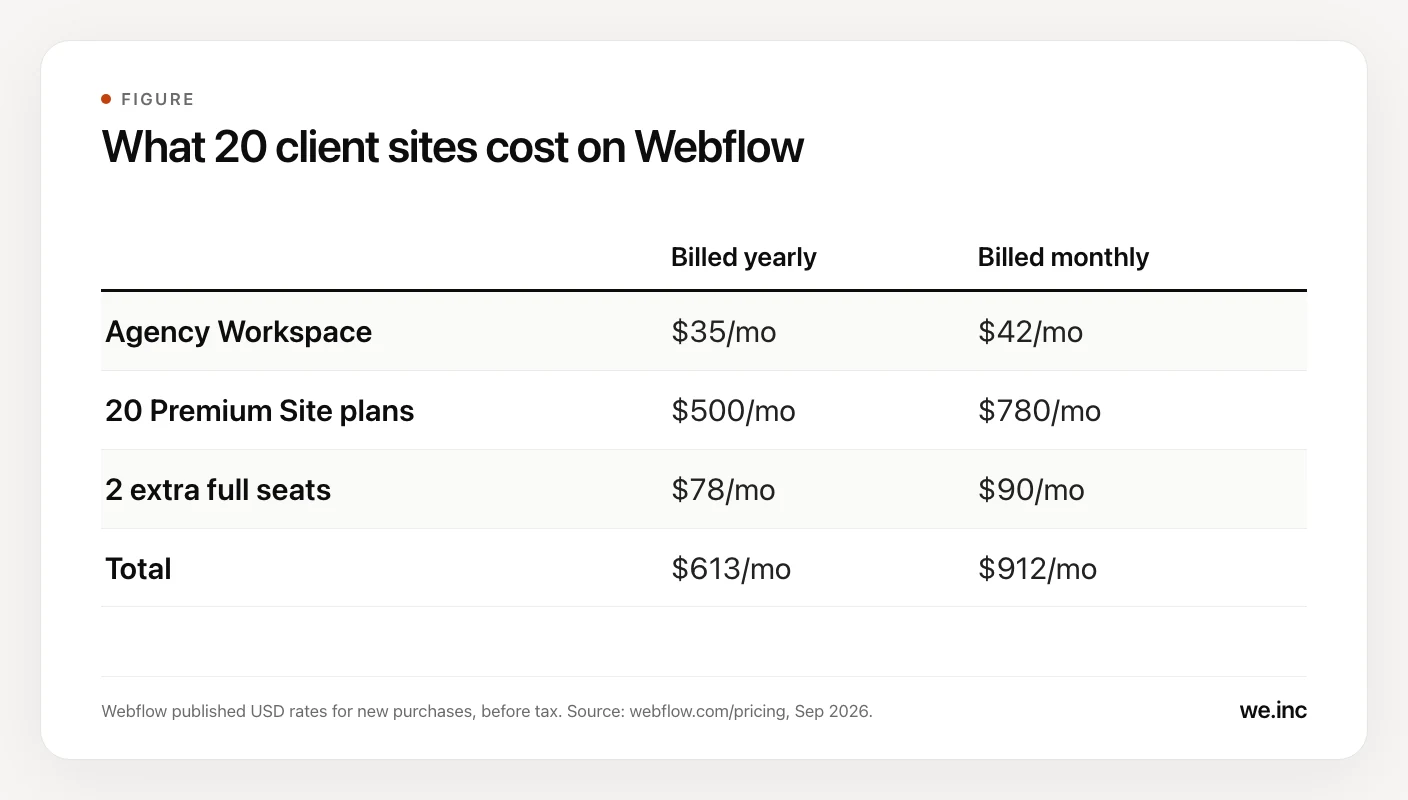
Take an agency with 20 client sites on the Premium Site plan, an Agency Workspace, and two designers on top of the owner. The agency pays for everything. Prices are Webflow's published rates for new purchases as of September 2026.
- Billed yearly: $35 Workspace + (20 × $25) Site plans + (2 × $39) seats = $35 + $500 + $78 = $613 a month, or $7,356 a year.
- Billed monthly: $42 + (20 × $39) + (2 × $45) = $42 + $780 + $90 = $912 a month.
If you use client payments instead, the 20 Site plans ($500 a month on yearly billing) move to your clients' cards and your own bill drops to $113 a month ($35 + $78). The cost is visibility: every client now receives Webflow invoices.
On the income side, Foundations commission on a Premium plan billed yearly is 10% of $300 ($25 × 12), or $30 per qualifying site, once. If all 20 sites qualified, that is $600 in year one and nothing after.
What are the workarounds, and what are the risks?
Webflow documents two techniques that agencies sometimes reach for. Neither creates a white-label product.
A reverse proxy. Webflow has a help article on serving Webflow content under your own domain or a subdirectory through NGINX, AWS CloudFront or Cloudflare. It requires a paid Site plan and a dedicated origin subdomain, you must never proxy the webflow.io address, and Webflow's support team "is unable to provide direct help" with third-party proxies. It changes the address visitors see. It does nothing for logins, the editor, emails or billing.
Your own editing tool on the Webflow Data API. Webflow's Data API includes endpoints that create CMS collection items, so a developer can build a branded form that lets clients add blog posts or listings without opening Webflow. The risks are practical: it covers CMS content rather than page design, you maintain it as the API evolves, and Section 4.3 of the terms still applies if you charge clients for access.
A third option is commercial rather than technical: keep every Site plan on your card and sell clients a monthly care plan from your own invoicing. Clients never see a Webflow invoice. But they still see Webflow the moment they log in to edit, and Webflow's site ownership article notes that sites in your Workspace belong to your Workspace, so put ownership and handover terms in your client contract.
When is Webflow still the right choice?
Often. Webflow is a strong platform, and not being white-label is only a problem if you need to resell a platform. Its real strengths:
- Design control. Designers get fine-grained visual control over layout and styling, plus Interactions with GSAP for timeline-based animation.
- A serious CMS. The Premium Site plan includes 20,000 CMS items and 40 collections.
- Team workflows. Real-time collaboration, shared libraries across sites, page building from designer-approved blocks, and site-level roles on the Agency plan.
- A growing platform. Localization, analytics and A/B testing add-ons, AI that can build a site from a prompt, and Webflow Cloud for app hosting.
- A partner ecosystem that sends leads. The Certified Partner directory and matchmaking tool connect agencies with clients looking for Webflow work.
| If you... | Better fit |
|---|---|
| Sell custom design projects and hand the site over | Webflow |
| Want clients to know and trust the platform brand | Webflow |
| Prefer referral commission to resale margin | Webflow Foundations or Certified Partner |
| Need clients to log in to a platform on your domain | White-label builder |
| Want clients to pay you a monthly price you set | White-label builder |
| Run many small sites where per-site hosting squeezes margin | White-label builder |
If you land in the bottom half of that table, our list of Webflow alternatives for agencies covers the platforms built for resale, and the white-label website builder guide explains what to check before you sign. Per-site pricing is not unique to Webflow either: our Duda white label review runs the same arithmetic at 10, 50 and 150 sites.
Where We.Inc fits
We.Inc covers the layers Webflow leaves out. Partners run the AI website builder on their own web address, with their own name, logo and colors on the login, dashboard and builder screens, and the emails their customers receive carry the partner's brand. Customers pay the partner through the partner's own Stripe account.
Customers or partners describe a business, the AI builds the site, and it can be edited visually or in code, then published to a custom domain with SSL. There is a 0% transaction fee on what your clients pay you. Pricing is tailored to your volume and setup. Book a 30-minute demo and you get your exact price on the call. Book a demo. See the details on the We.Inc white-label page.
Sources
- Webflow: Plans and pricing, checked September 2026
- Webflow Help Center: Webflow branding, checked September 2026
- Webflow Help Center: The legacy Editor, checked September 2026
- Webflow Help Center: Legacy Editor deprecation FAQ, checked September 2026
- Webflow Blog: Legacy Editor deprecation, checked September 2026
- Webflow Help Center: Choose a Workspace plan, checked September 2026
- Webflow Help Center: Manage client seats, checked September 2026
- Webflow Help Center: Client payments, checked September 2026
- Webflow Help Center: Updated pricing and simplified plans for May 2026, checked September 2026
- Webflow Help Center: Join Webflow Foundations, checked September 2026
- Webflow Help Center: Webflow Certified Partner program, checked September 2026
- Webflow Help Center: Webflow's affiliate program overview, checked September 2026
- Webflow Help Center: Set up a self-managed reverse proxy in Webflow, checked September 2026
- Webflow Help Center: Site ownership, checked September 2026
- Webflow Developers: Create collection items, checked September 2026
- Webflow: Terms of Service, checked September 2026
Frequently asked questions
Can you white label Webflow?
Not in the way agencies usually mean. As of September 2026, Webflow lets you hide the Made in Webflow badge on published sites, but its Editor branding (whitelabeling) feature ended with the legacy Editor on August 4, 2026. Clients now edit through client seats, sign in with a Webflow account, work in Webflow's interface and, if they pay for hosting, pay Webflow directly.
How do I remove the Made in Webflow badge?
Go to Site settings, then the General tab, then Webflow branding, turn the badge off, save and publish. Webflow's help center says you need a paid Site plan or a Growth, Agency or Enterprise Workspace plan. Sites created inside those Workspace plans have the badge off by default. The same setting can remove the Webflow comment at the top of your site's HTML.
Can my clients pay me instead of Webflow?
Webflow's client payments feature, on Freelancer and Agency Workspace plans, moves site billing to the client, who pays Webflow directly from a Webflow account. It does not route money through you. You can keep site plans on your own card and invoice clients separately, but Webflow's Terms of Service say you may not resell access to the platform without Webflow's written consent.
What happened to Webflow's Editor branding?
Webflow deprecated the legacy Editor and its whitelabeling on August 4, 2026. Client seats arrived on February 2, 2026, and eligible legacy Editor users were migrated to free client or limited seats from May 4, 2026. Webflow's migration FAQ lists Editor branding as a legacy Editor feature that the new Content editor role does not have.
Does Webflow have a reseller or commission program for agencies?
Webflow has a referral model, not a reseller model. Webflow Foundations, the entry tier of its Partner Program, pays 10% commission on the first year of self-serve annual site plans and add-ons, plus 10% on Enterprise plans for clients you bring. Certified Partners get a directory listing and matchmaking. The separate affiliate program pays 50% but excludes client referrals.
How many client seats does the Webflow Agency plan include?
As of September 2026, the Agency Workspace plan includes three free client seats per site, whether the site is staged or paid, and the Freelancer plan includes one. Webflow says additional client seats cannot be purchased at this time. Clients in those seats can be given the Marketer, Content editor or Reviewer role, and each must sign in with a Webflow account.
More in Blog
- Using a Chatbot for Business: An Implementation Guide
- Chiropractor Website Design: Templates, Pages & Cost
- Church Website Design: Examples, Templates and Must-Have Pages
- Claude Opus 5 Just Launched. Here Is What You Can Build With It.
- How to Build a Website for Your Cleaning Business
- Coaching Website: What to Include, Examples and How to Build One
- Coffee Shop Website Design: Pages, Costs and a Template
- Competitor SEO Analysis: A Step-by-Step Method
Website builders for the businesses in this article
Alternatives mentioned in this article
Related guides and tools
Start building
How we research, test and update this page: our editorial policy. We.Inc is our own product.
Product
Who It's For
- For Agencies
- For Freelancers
- For Hosting Providers
- For SaaS Platforms
- For Startups
- For Financial Services
- For Healthcare
Features
Resources
- Blog
- Help Center
- Free Business Tools
- Free UI Components
- Website Templates
- Template Collections
- Website Examples
- Guides
- Comparisons
- Alternatives
- Best Lists
- Reviews
- Pricing Guides
- Use Cases
- Glossary & Guides
- Integrations
- Developers
- Benchmark
- Windows App