
The website builder made for after-school programs.
How do I build a website for an after-school program?
Short answer: We.Inc's AI builds an after-school program website answering which schools you pick up from, your hours, and how to hold a spot, plus an enrollment inquiry form that emails you. Pages cover a typical afternoon schedule, transportation, tuition, and staff safety, and you can edit anything afterward by chat.
Key facts
- A recommended tuition page lists 5-day, 3-day, and drop-in options along with registration fees and sibling policies.
- The example site built with We.Inc for this trade is called Anchor Point After School.
- Three starter designs suited to an after-school program website are TinyTrails Kids, Meridian Scholars, and Launch.
- A recommended safety and staff page explains background checks, staff-to-child ratios, and sign-out rules.
Summary checked against this page on September 25, 2026.
An after-school program website has to answer three parent questions fast: which schools you pick up from, what hours you run until, and how to hold a spot. It should also show your daily rhythm, your staff screening policy and your fees for full weeks, part weeks and school-closure days. On we.inc the AI builds those pages plus an enrollment inquiry form that emails you, and you can edit anything afterwards by chat.
Pages every after-school program website needs
- Home: States the age range, the schools you serve and your closing time in the first screen, because that is how parents filter.
- A Typical Afternoon: A timeline from dismissal pickup through snack, homework time, activities and parent pickup shows the program is structured, not just supervised.
- Transportation & Pickup Schools: Parents need to know whether you walk, van or bus children from their specific school, and what happens on early-release days.
- Tuition & Schedules: Lists 5-day, 3-day and drop-in options, registration fees, sibling policies and what school holidays and snow days cost.
- Safety & Staff: Explains background checks, ratios, sign-out rules and who is authorized to collect a child, which is the page anxious parents read twice.
- Enroll / Waitlist: An inquiry form collecting grade, school and desired days lets you reply with availability instead of playing phone tag.
Try this prompt
Build a website for Bright Hours Kids Club, an after-school program in Columbus, Ohio for kindergarten through 5th grade. We pick up from four elementary schools by van, run until 6:15pm, do homework help then STEM and art rotations, and offer full-day camp on school closures. Include a tuition page with 3-day and 5-day options, a safety page about staff screening and sign-out, and a waitlist inquiry form.
What does a parent want to see first on an after-school program site?
The end time, the pickup arrangements and what a typical afternoon looks like. Working parents are checking whether your hours cover their commute, so put the daily schedule near the top. A simple run-down such as snack, homework hour, outdoor play and a club activity helps them picture their child there. Staff-to-child ratios and how you handle late pickups belong on the same page.
How should we explain what happens on school holidays and early-release days?
Give it a short section of its own with the dates you cover and whether those days cost extra or need separate sign-up. Parents scramble when a school closes unexpectedly, so say how you will tell them about snow days or sudden closures. Update the calendar each term rather than leaving last year's dates live.
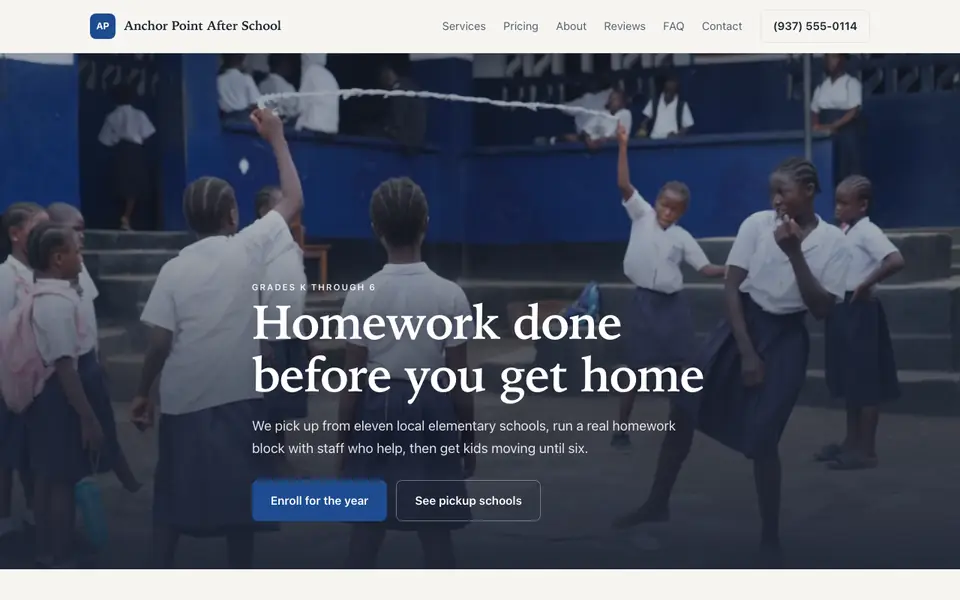
Anchor Point After School
This is Anchor Point After School, an after-school program business we described to the AI in a sentence. See the Anchor Point After School example site.
Start from this design
Three designs that suit an after-school program website.
- Small-Group Tutoring Service
- Full-Stack Coding Bootcamp
Skip the after-school program web design brief and the six week wait. Tell the AI about the business in a sentence and it builds the whole site, ready to edit.
Perfect for:
- After-school care
- Enrichment programs
- Youth programs
Closure-day and summer camp pages
Teacher in-service days, winter break and summer are where many programs fill their year. A separate page for each season with dates and drop-in pricing turns your site into the place parents check when the school calendar surprises them.
Pickup authorization, explained up front
Describe how sign-out works, what ID you ask for and how custody paperwork is handled. Keep the actual authorization forms off the website; collect those in person or through your enrollment software rather than a public web form.
Licensing and subsidy wording
Many regions license school-age care and some programs accept childcare subsidies. State your license number only as it appears on your certificate, and check your licensing agency for any rules about how programs may advertise. We.inc is a website builder, not a compliance tool.
Link your registration or billing tool
If you already take registrations and autopay in a childcare management app, the site can link straight to it. We.inc does not run a parent login or attendance system, so the site is the front door and your existing tool does the bookkeeping.
What it costs
You can put up a template-based program site on a we.inc address for free, with no card needed. Paid plans start at $20 a month on Starter, and pointing a school-year domain at it needs a paid plan plus the domain itself, usually $10-20 a year.
Building your site is free, no card needed. Paid plans from $20 a month. Compare plans
Frequently asked questions
Can parents enroll and pay deposits on the site?
The AI builds an enrollment inquiry or waitlist form that emails you. If you want deposits online, you can connect your own Stripe account for a simple payment, or link to the childcare software you already use for registration.
Should I collect allergy and medical information through the website form?
No. Keep the web form to basics like grade, school and desired days, and gather health, allergy and custody details through your secure enrollment paperwork. We.inc is not built to hold sensitive child records.
Can I show which schools we pick up from?
Yes. Ask the AI for a pickup page listing each school, the dismissal time you plan around and how early-release days are handled. You can update it each fall by typing the changes into chat.
Can I post photos of the kids?
Technically yes, but only with written parental permission. Many programs use photos of activities, projects and spaces instead of recognisable faces.
Is there a parent portal for attendance or messages?
No. We.inc builds your public website, not a logged-in parent area. Link to your attendance or messaging app from the site if you use one.
Related industries and website guides
- tutor website builder
- online course website design
- childcare centers website builder
- cooking schools website builder
- driving schools website builder
- preschools & daycares website builder
- after-school programs website examples
- how to make a website
Related website builders: Education & Training
- tutor website builder
- online course website design
- childcare centers website builder
- cooking schools website builder
- driving schools website builder
- preschools & daycares website builder
Before you start
Product
Who It's For
- For Agencies
- For Freelancers
- For Hosting Providers
- For SaaS Platforms
- For Startups
- For Financial Services
- For Healthcare
Features
Resources
- Blog
- Help Center
- Free Business Tools
- Free UI Components
- Website Templates
- Template Collections
- Website Examples
- Guides
- Comparisons
- Alternatives
- Best Lists
- Reviews
- Pricing Guides
- Use Cases
- Glossary & Guides
- Integrations
- Developers
- Benchmark
- Windows App