
The website builder made for driving schools.
What pages does a driving school website need?
Short answer: A driving school website needs a home page showing license status and courses offered, a courses and packages page, instructor and vehicle information, pickup area and road test details, policies, and an enrollment request form. We.Inc's AI builds these pages, and course requirements should come from your state or provincial licensing authority.
Key facts
- We.Inc's Starter plan for AI-built driving school sites starts at $20 a month with 250 credits.
- Building a site on We.Inc is free, with no card needed to start.
- The site does not keep a live calendar of instructor availability; enrollment requests are emailed and lessons booked separately.
- We.Inc advises against collecting learner permit numbers, dates of birth, or ID scans through the website form.
- A school's own domain typically costs $10 to $20 a year and requires a paid plan.
Summary checked against this page on September 25, 2026.
A driving school website should explain your course options, such as teen driver education, adult lessons, defensive driving and road test preparation, along with what each costs, the areas you pick students up from, and how to enroll. On we.inc the AI builds those pages and an enrollment request form that emails your office. Course and lesson requirements are set by your state or provincial licensing authority, so the site should describe them in your own verified words rather than guessing.
Pages every driving school website needs
- Home: Your license status, the courses you offer, the towns you serve, and an enroll button. Parents want to see immediately that you are a licensed school near them.
- Courses & Packages: Classroom or online theory, behind-the-wheel hours, lesson bundles, and road test packages, each with what is included. Lay out the order a new driver goes through them.
- Instructors & Vehicles: Instructor bios with their licensing, and the dual-control cars students learn in. Nervous learners and their parents want to know who is in the passenger seat.
- Pickup Area & Road Test Info: Neighborhoods and schools you pick up from, and which testing centers you use for road test prep. It answers the most common phone question before it is asked.
- Policies & FAQ: Cancellation and no-show fees, weather rules, what learners must bring to each lesson, and how completion certificates are issued. Written policies prevent disputes.
- Enrollment Request: A short form for student name, age, course of interest, preferred lesson times and parent contact. Keep it to scheduling basics; permit numbers and birth certificates belong in your office process.
Try this prompt
A website for Green Light Driving Academy, a licensed driving school in Sacramento, California. We offer teen driver education with behind-the-wheel lessons, adult beginner lessons, and road test preparation, with pickup from homes and high schools across Sacramento and Elk Grove. Include a courses and pricing page, instructor bios, our cancellation policy, road test tips, and an enrollment request form. Friendly, reassuring look in green and white.
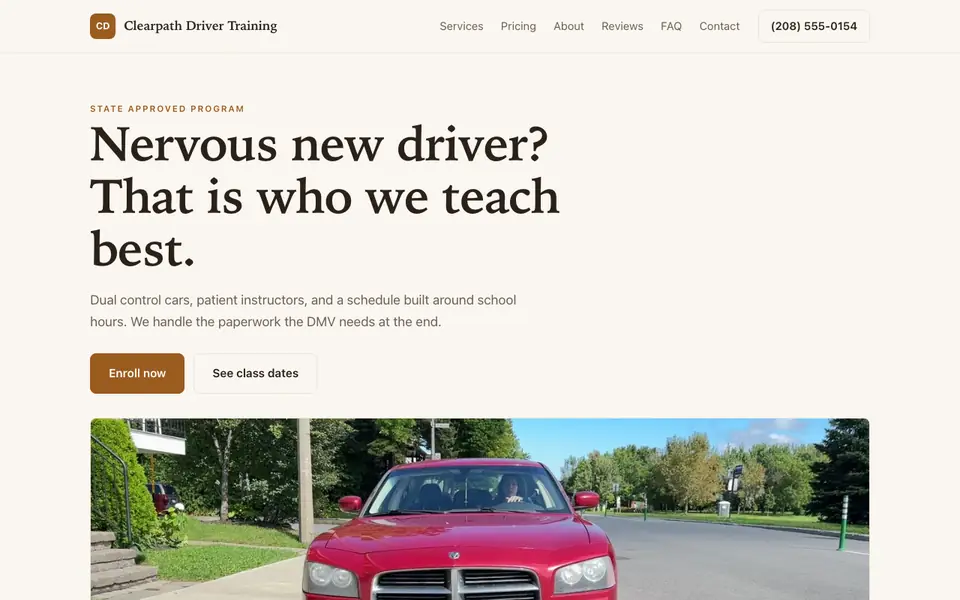
Clearpath Driver Training
This is Clearpath Driver Training, a driving school business we described to the AI in a sentence. See the Clearpath Driver Training example site.
Start from this design
Three designs that suit a driving school website.
- Light Online Course Platform
- Full-Stack Coding Bootcamp
- Small-Group Tutoring Service
Driving School website design without the agency retainer. Describe the business in plain English and the AI writes and builds the pages around it: your services, your prices, your words.
Perfect for:
- Teen driving
- Adult driving
- Defensive driving
Describe requirements from your regulator, not memory
Hour requirements, age limits and certificate rules vary by state or province and change over time. Write them from your licensing authority's current guidance and link to its official page. we.inc is not a compliance tool and will not check them for you.
Don't collect permit numbers or ID scans
Learner permit numbers, dates of birth and identity documents are sensitive. Use the website form only for contact and scheduling preferences, and collect official documents in person or through a secure system.
Link a scheduling tool for lesson slots
The site does not keep a live calendar of instructor availability. Many schools send an enrollment request first, then book lessons in the scheduling tool they already use, linked from the site.
Sell packages online if you want
Lesson bundles and course fees can be paid through your own Stripe account, which cuts down on cash handling and no-shows. State your refund policy clearly next to the payment button.
What it costs
On We.Inc you can build your site free, with no card and no trial needed to start. Paid plans start at $20 a month with Starter. A web address in your school's own name needs a paid plan, and the domain registration usually runs $10 to $20 yearly.
Building your site is free, no card needed. Paid plans from $20 a month. Compare plans
Frequently asked questions
Can students book lessons on a live calendar?
No. There is no availability-syncing calendar. The site sends enrollment and lesson requests to your email, and you can link to a separate scheduling tool if you use one.
Can parents log in to track lesson hours?
No. we.inc does not offer a student or parent portal. Track hours in your school management system and share progress the way you already do.
Can I take payment for courses online?
Yes, through your own Stripe account. You can list course packages and let families pay when they enroll.
Will the site keep us compliant with licensing rules?
No. It is a website builder, not a compliance tool. Confirm curriculum, advertising and record-keeping rules with your state or provincial licensing authority.
Can I run an online theory course through the site?
The site can describe and sell access, but it does not host timed, tracked coursework. If your regulator approves an online curriculum, link to the platform that delivers it.
Related industries and website guides
- tutor website builder
- online course website design
- preschools & daycares website builder
- after-school programs website builder
- childcare centers website builder
- cooking schools website builder
- Driving school website example
- how to make a website
Related website builders: Education & Training
- tutor website builder
- online course website design
- preschools & daycares website builder
- after-school programs website builder
- childcare centers website builder
- cooking schools website builder
Before you start
Product
Who It's For
- For Agencies
- For Freelancers
- For Hosting Providers
- For SaaS Platforms
- For Startups
- For Financial Services
- For Healthcare
Features
Resources
- Blog
- Help Center
- Free Business Tools
- Free UI Components
- Website Templates
- Template Collections
- Website Examples
- Guides
- Comparisons
- Alternatives
- Best Lists
- Reviews
- Pricing Guides
- Use Cases
- Glossary & Guides
- Integrations
- Developers
- Benchmark
- Windows App