
Fill your childcare waitlist without a single flyer
A childcare website should show the ages you serve, your programs and daily rhythm, hours, licensing and safety practices, and an easy way to request a tour. With we.inc the AI writes and builds those pages from your description, or you can publish a free template with no AI. AI building starts on Starter at $20 a month; confirm anything about licensing, ratios, or enrollment against your state's childcare rules.
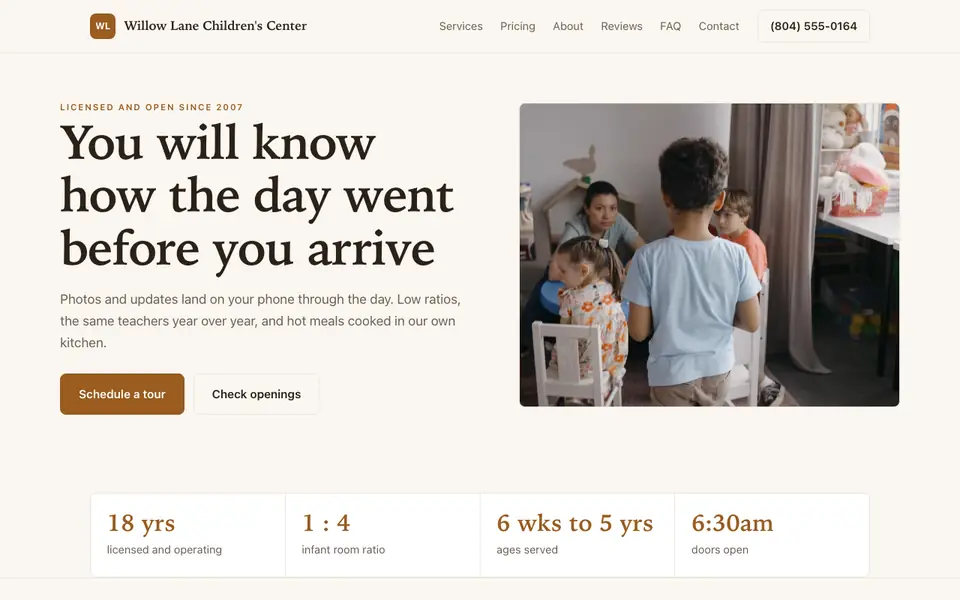
A childcare website that answers what parents ask first: ages, hours, licensing, and how to book a tour. Describe your center and the AI builds your daycare website for you.
Pages every childcare website needs
- Home: Ages served, hours, location, and a 'schedule a tour' button. Parents are comparing a shortlist and often searching on their phone.
- Programs: Infant, toddler, preschool, and pre-K or school-age care, each with a typical day. Parents want to picture their child's day.
- Safety & Licensing: Your state license, staff background checks, CPR and first aid training, and pickup procedures. This is what parents care about most.
- Our Teachers: Photos and backgrounds of your staff. Parents want to know who spends the day with their child.
- Tuition & Enrollment: How enrollment works, waitlist status, and whether you accept state subsidies. Even if you don't list rates, explain the process.
- Tour Request: Parent name, child's age, desired start date, and contact details. Keep it short; save detailed forms for enrollment.
Try this prompt
A website for a childcare center in Columbus, Ohio called Little Acorn Learning Center. We care for infants through pre-K, open 6:30am to 6pm, and follow a play-based curriculum. Include program pages by age group, a safety and licensing page, teacher bios, an enrollment page that mentions our waitlist, and a tour request form. Soft, cheerful colors, not too busy.
How should a childcare site describe its daily routine and curriculum?
Show a sample day for each age room, from drop-off to nap time to outdoor play. Name the approach you follow, such as play-based or Montessori-inspired, and explain in one or two sentences what that looks like for a toddler. Parents compare centers side by side, so concrete details stand out. Include how you share updates with families during the day.
What should parents learn about staff on the website?
Qualifications, how long lead teachers have been with you, and the checks every staff member passes before working with children. Short profiles with a photo and a sentence about each person help children and parents feel familiar before the first day. Required ratios and background checks depend on where you operate, so check your local rules and describe what you actually do.
A real childcare site, not a template
This is Willow Lane Children's Center, a childcare business we described to the AI in a sentence. See the Willow Lane Children's Center example site.
Start from this design
Three designs that suit a childcare website.
- Small-Group Tutoring Service
- Full-Stack Coding Bootcamp
About childcare website design on we.inc
Parents pick a daycare at 11pm on their phone. Show your licensing, your ratios, and your rooms, and let them request a tour on the spot.
Most childcare sites are a template with the name swapped in. Describe what you do and the AI designs and writes a childcare website around that business instead.
Features designed for your industry
- Tour Scheduling: Let parents book a visit online instead of playing phone tag during nap time.
- Licensing & Safety Badges: Display your state license, CPR certifications, and security measures where anxious parents look first.
- Room & Ratio Pages: Show each age group's room, teachers, and child-to-staff ratio so parents know exactly what they are getting.
Who this childcare website design suits
- Daycare centers
- Infant care programs
- Preschools
- After-school programs
What makes a childcare website work
State licensing rules shape what you say
Ratios, licensing numbers, and even some advertising statements are governed by your state childcare agency. Show your license accurately and check your state's rules before stating ratios or credentials on the site.
Photos of children need parent permission
Only use photos of enrolled children with written parental consent, and avoid names alongside faces. Many centers use photos of classrooms and hands-on activities instead.
Explain the waitlist honestly
If infant spots are scarce, say so and describe how the waitlist works. Parents appreciate clarity and it saves your director repeat calls.
We.inc does not handle enrollment or parent communication
The tour form emails you, but there is no built-in enrollment, tuition billing, or parent app. Link your childcare management tool, such as Brightwheel or Procare, for those.
What it costs
Besides a domain (about $10 to $20 a year), the main cost is whatever childcare management software you already use. A free template can cover a simple center page; to have the AI write program pages and keep enrollment updates current, Starter at $20 a month is enough for most single-site centers.
Free for 3 template sites, without AI; AI building from $20 a month. Compare plans
Frequently asked questions
Is a daycare website different from a childcare website?
Not really; parents use both terms. The AI builds the same essentials either way: programs by age, safety and licensing, teachers, enrollment, and a tour form.
Can parents enroll or pay tuition online?
The AI can build an enrollment interest form and even a page that takes a registration fee through your own Stripe account. For ongoing tuition billing, attendance, and parent messaging, link Brightwheel, Procare, or your existing system.
Should I post my tuition?
It's your call. Some centers list rates by age group; others explain the process and share rates at the tour. Either way, mention whether you accept state subsidies.
Can I start for free?
Yes. Up to three template sites publish free on a we.inc address, with no AI. AI building and editing is on Starter at $20 a month.
Can I use our own domain?
Yes, with any paid plan. You'll buy the domain separately for around $10 to $20 a year.
Related industries and website guides
- tutor website builder
- online course website design
- cooking schools website builder
- driving schools website builder
- preschools & daycares website builder
- after-school programs website builder
- childcare centers website examples
- how to make a website
Related website builders: Education & Training
- tutor website builder
- online course website design
- cooking schools website builder
- driving schools website builder
- preschools & daycares website builder
- after-school programs website builder
Before you start
Product
Who It's For
- For Agencies
- For Freelancers
- For Hosting Providers
- For SaaS Platforms
- For Startups
- For Financial Services
- For Healthcare
Features
Resources
- Blog
- Help Center
- Free Business Tools
- Free UI Components
- Website Templates
- Template Collections
- Website Examples
- Guides
- Comparisons
- Alternatives
- Best Lists
- Reviews
- Pricing Guides
- Use Cases
- Glossary & Guides
- Integrations
- Developers
- Benchmark
- Windows App