
The website builder made for preschools & daycares.
A preschool website should let a parent quickly see your age groups, daily schedule, teaching approach, tuition and hours, and then request a tour. On we.inc you describe your program and the AI builds those pages along with a tour request and enrollment inquiry form that emails your director. It is a public website, not a parent portal, so daily reports, billing accounts and child records stay in your childcare management system.
Pages every preschool website needs
- Home: Ages served, hours, location, your approach in a sentence, and a 'schedule a tour' button. Parents shortlisting several centers decide who to call from this screen.
- Programs & Classrooms: Toddler, two-year-old, preschool and pre-K rooms with typical ratios you maintain, a sample daily rhythm, and what children learn. State only ratios and practices you actually follow.
- Our Approach: Play-based, Montessori, Reggio-inspired, faith-based or academic readiness, explained in parent language. This is usually the tie-breaker between two nearby centers.
- Tuition & Enrollment: Full-day and half-day options, registration fee, waitlist process and whether you accept subsidies. Clear information here filters out mismatched tours.
- Health, Safety & Licensing: Your license status, security procedures at drop-off, allergy and nutrition approach, and illness policy. Link to your licensing inspection records if your state publishes them.
- Tour Request: Parent name, contact, child's age and desired start date. Keep medical, custody and immunization details out of this form and collect them at enrollment through your secure process.
Try this prompt
A website for Little Acorn Learning Center, a licensed play-based preschool in Raleigh, North Carolina for children ages 2 to 5. We offer full-day and half-day programs, an outdoor garden classroom, and a pre-K readiness class. Include programs by age, a sample daily schedule, our approach, tuition and waitlist info, health and safety policies, staff bios, and a tour request form. Warm, gentle colors with plenty of white space.
What parents check on the Willow Bend Early Learning example
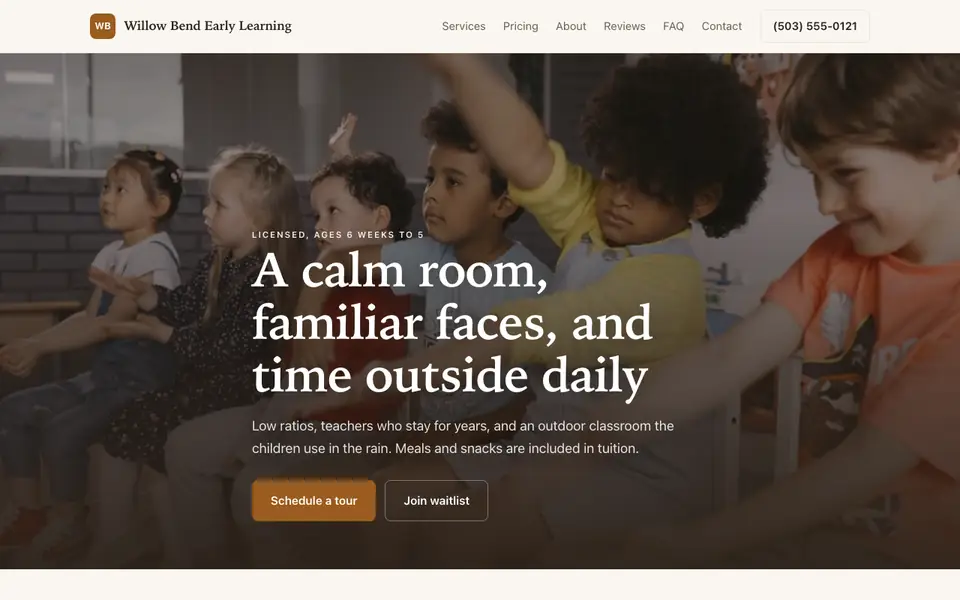
Willow Bend Early Learning is a made-up Oregon center that our AI wrote from a single sentence. Parents choosing care compare safety, cost and availability, and the example puts all three where they can find them quickly.
Licensed status and ratios up front
The site says it is licensed and shows the infant-to-teacher ratio near the top. Ratios and licensing are set by each state, so parents use them as the first filter and you should quote your own state's numbers accurately.
Tuition by age room, with what it covers
Each room from infants to pre-kindergarten has a monthly price, and the page says meals and supplies are included. Families budget a year at a time and need to know what is extra.
Tour and waitlist as separate steps
Schedule a tour and Join waitlist are both main buttons. Infant spots often have long waits, so letting parents join a list on the same visit keeps them from moving on to the next center.
Part-time spots where available
A three-day schedule is offered when a room has space. Many parents search for part-time care specifically and leave sites that only mention full days.
Willow Bend Early Learning
This is Willow Bend Early Learning, a preschool business we described to the AI in a sentence. See the Willow Bend Early Learning example site.
Start from this design
Three designs that suit a preschool website.
- Small-Group Tutoring Service
- Evening Language Classes
A preschool website designed around your actual services and prices, not a stock layout. Describe the business and the AI writes and builds every page.
Perfect for:
- Preschools
- Daycares
- Montessori schools
Licensing comes first, and in your own words
Childcare licensing rules, ratios and required disclosures vary by state and country. Describe your license and policies as your regulator requires and link to official records where possible. we.inc is not a compliance tool, so check your licensing agency's rules before publishing.
Never collect child records through the website
Immunizations, allergies, custody arrangements and medical notes are sensitive. The tour form should collect only contact details and the child's age; everything else belongs in your enrollment paperwork or childcare management software.
Link, don't replace, your parent app
Daily reports, photos, check-in and tuition accounts live in dedicated childcare software. Add a 'current families' link to it in the menu; we.inc has no parent login.
Photos need consent
Only publish pictures of children whose parents have given written permission, and avoid names alongside faces. Many centers use classroom and outdoor space photos without children instead.
What it costs
Building a site on We.Inc is free: no card and no trial are needed to start. Paid plans begin at $20 a month. A domain in your school's name needs a paid plan too, plus the registration fee, generally $10 to $20 per year. Registration fees can be collected through your own Stripe account.
Building your site is free, no card needed. Paid plans from $20 a month. Compare plans
Frequently asked questions
Can parents log in to see daily reports or pay tuition balances?
No. we.inc has no parent portal or login. Link to the childcare management app you use for reports, check-in and billing.
Can families enroll fully online?
The site can take tour and enrollment inquiries that email you, and it can collect a registration fee through your own Stripe account. Enrollment paperwork with medical and custody details should go through your secure system.
Can I show live classroom openings?
There is no live availability sync. You can ask the AI to update an 'openings' note whenever your spots change.
Does the site handle licensing requirements for me?
No. It is a website builder, not a compliance tool. Confirm what you must disclose, and how you may advertise, with your state or local childcare licensing agency.
Can I post the monthly menu and calendar?
Yes. On a paid plan you can ask the AI to update a menu or school calendar page each month, or attach a PDF.
Related industries and website guides
- tutor website builder
- online course website design
- after-school programs website builder
- childcare centers website builder
- cooking schools website builder
- driving schools website builder
- preschools & daycares website examples
- how to make a website
Related website builders: Education & Training
- tutor website builder
- online course website design
- after-school programs website builder
- childcare centers website builder
- cooking schools website builder
- driving schools website builder
Before you start
Product
Who It's For
- For Agencies
- For Freelancers
- For Hosting Providers
- For SaaS Platforms
- For Startups
- For Financial Services
- For Healthcare
Features
Resources
- Blog
- Help Center
- Free Business Tools
- Free UI Components
- Website Templates
- Template Collections
- Website Examples
- Guides
- Comparisons
- Alternatives
- Best Lists
- Reviews
- Pricing Guides
- Use Cases
- Glossary & Guides
- Integrations
- Developers
- Benchmark
- Windows App