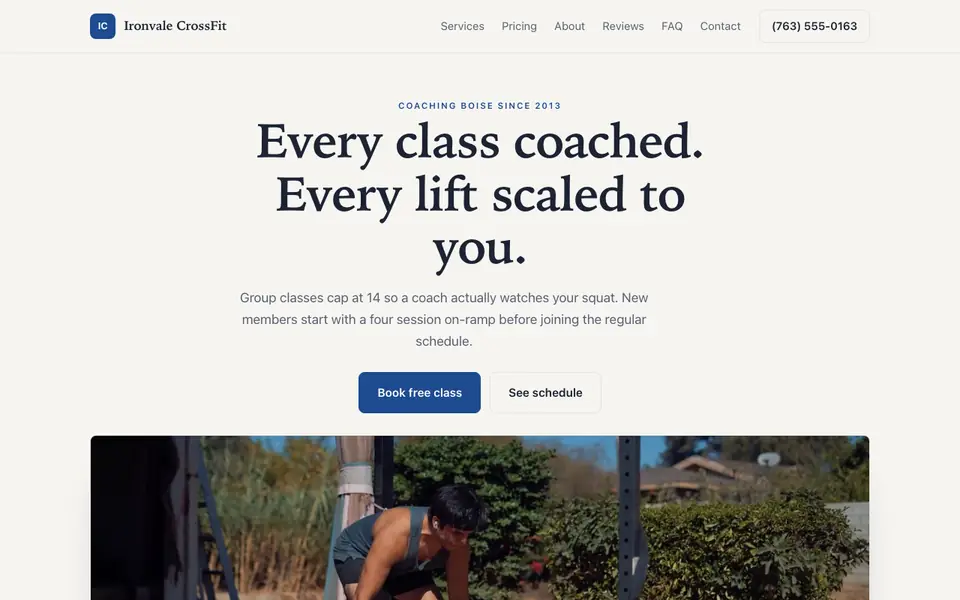
Attract athletes with a powerful site showcasing your community, coaches, and class schedule.
Tell us what you do and our AI writes and builds your crossfit gym site around it. Not a template with your name dropped in: your services, your pricing, your words.
Build My CrossFit Gym Site - Free
15,000+businesses trust us
4.7
from 1,200+ reviews
No credit card required
Free plan: 3 template sites · AI building from $20/mo · Cancel anytime
ironvalecrossfit.com
Build a website as intense as your WODs.
What pages does a CrossFit gym website need?
Short answer: A CrossFit gym website needs a home page with a free-intro booking button, an on-ramp or fundamentals explainer, a class schedule, membership options, and coach bios. We.Inc's AI builds these pages from a description, while class booking itself stays in your gym management software.
Key facts
We.Inc's Starter plan for AI-built CrossFit gym sites starts at $20 a month with 250 credits.
The free plan allows up to 3 template sites on a we.inc address with no AI.
We.Inc does not run class reservations, waivers, or member accounts; the site links to the gym's existing booking app.
Use of the name 'CrossFit' is tied to affiliate status, so non-affiliates should describe classes as functional fitness instead.
Monthly US searches for 'crossfit gym website' are 10 per month, per DataForSEO, September 2026.
Summary checked against this page on September 25, 2026.
A CrossFit gym website should explain your on-ramp or fundamentals program, show the class schedule, list membership options and make booking a free intro session easy. Newcomers are often intimidated, so coach bios and scaling explanations help. we.inc builds these pages from a description; class booking itself stays in your gym management software.
Ironvale CrossFit: an example site for crossfit gyms, made with We.Inc.
Attract athletes with a powerful site showcasing your community, coaches, and class schedule.
Pages every crossfit gym website needs
Home: A strong photo of real members, your location, and a "book a free intro" button.
Start here / On-ramp: Explains the fundamentals course new athletes complete before joining group WODs.
Schedule: Class times by day, including open gym, barbell club or mobility sessions.
Memberships: Unlimited, limited-class and drop-in options with any commitment terms stated plainly.
Coaches: Credentials the coaches actually hold (for example CrossFit Level 1 or 2) and their backgrounds.
Drop-ins: Travelling athletes look for drop-in fees, what to bring and whether to book ahead.
Try this prompt
A website for Anvil CrossFit in Boise. Gritty industrial look. Pages: free intro session request, a 3-week on-ramp program, weekly schedule with 5:30am, noon and evening classes, memberships (unlimited, 3x per week, 10-class punch card), coach bios, and drop-in info for travelling athletes with a link to our booking app.
A real crossfit gym site, not a template
This is Ironvale CrossFit, a crossfit gym business we described to the AI in a sentence. Every service, price and line of copy on it was written for that business. See the Ironvale CrossFit example site.
Start from this design
Three designs that suit a crossfit gym website. Each one is free to start from.
GRIT Barbell Club
Forge Athletics
Iron
About crossfit gym website design on we.inc
Most crossfit gym sites are a template with the name swapped in. Describe what you do and the AI designs and writes a crossfit gym website around that business instead.
Features designed for your industry
Daily WODs: Post your workouts of the day for members to preview.
Community: Showcase your athletes and their achievements.
Class Schedule: Display your class times and specialty sessions.
Who this crossfit gym website design suits
CrossFit affiliates
Functional fitness gyms
Strength boxes
Competition teams
CrossFit communities
What makes a crossfit gym website work
Scaling reassurance
Say clearly that every workout is scaled to the athlete. It is the single biggest objection from people who think they need to get fit before joining.
Booking stays in your gym software
we.inc does not run class reservations, waivers or member accounts. Link your existing booking or membership app from the schedule and membership pages.
Trademark care
Use of the CrossFit name is tied to your affiliate status. If you are not an affiliate, describe your classes as functional fitness instead; check the brand's current affiliate rules.
Community content
Event pages for in-house throwdowns or the annual Open season give members something to share. Add them by chat when dates are set.
What it costs
Having the AI build your box's site starts at $20 per month on the Starter plan, and a custom gym domain needs a paid plan too (the name usually runs $10 to $20 yearly). Without paying you can still publish up to 3 templates on a we.inc address, edited by hand.
The free plan lets you build up to 3 sites from templates and publish them free on a we.inc address. It has no AI. Building and editing with AI starts on Starter at $20 a month with 250 credits.
Frequently asked questions
Can members book classes on the site?
Not directly. The site links to your class booking app; there is no built-in reservation calendar or member login.
Can I collect free intro requests?
Yes. The AI builds a form that emails you the person's name, goals and preferred times so a coach can follow up.
Can I sell memberships online?
You can use Stripe payment links from your own account, though most gyms bill memberships through their gym software and link to it.
Can I put waivers on the site?
Liability waivers should be signed in a dedicated tool with proper records. Link to it rather than collecting signatures through a website form.
How do I post the daily WOD?
Update it by chat or edit the text directly, or link to the app where you already publish programming.
We.Inc is an AI-powered website builder you can resell under your own brand. Launch a branded client dashboard, bill on Stripe Connect, and deliver AI-generated websites in minutes. White-label plans start at $99 a month for 25 client sites, with a 7-day free trial and no per-site fees.
Product
AI Website Builder: Describe a site in plain English; it's live in minutes