
A photo booth website that shows the prints and locks the date
A photo booth business website should show sample prints from real events, explain each booth type, list packages with hours and prices, and let planners check a date in under a minute. On we.inc you build your site free (no card needed) and describe your booth business to the AI (from $20/month) and it builds the pages and enquiry form for you.
Describe your booths and the AI builds a photo booth business website with sample prints, package prices, and a date-check form. Edit it by chat, visually, or in code.
Pages every photo booth website needs
- Home: Your booth types, your area and a 'check my date' button in the first screen.
- Booths: Open-air, enclosed, mirror, 360 or GIF booth, each with photos, space needed and power requirements.
- Packages and Pricing: Hours, unlimited or set prints, attendant, backdrop and props per package, with a starting price.
- Gallery: Sample strips, backdrops and guest shots from past events. This is what planners actually buy.
- Check a Date: A form for event date, venue, start time, hours and guest count so you can quote in one reply.
- FAQ: Setup time, space and power, travel fees, deposits and how guests get their digital copies.
Try this prompt
A website for a photo booth rental business in Phoenix called Flash & Frame, with pages for our open-air, mirror and 360 booths, three packages with hours and prices, a gallery of sample prints, and a form asking event date, venue, hours and guest count.
How should a photo booth company show its packages?
Lay them out side by side: hours, booth type, prints or digital only, props, an attendant and custom templates. Planners compare quickly, so a clear table wins. Mention travel limits and setup space needed. Add sample print designs so couples and event planners can picture the result.
What venue details should clients know before booking a booth?
Floor space needed, power requirements, setup and teardown time, and whether you can work outdoors. Venue coordinators often ask these questions, so a page with them saves emails. Say if you carry insurance some venues require. Note whether the booth needs wifi for instant sharing.
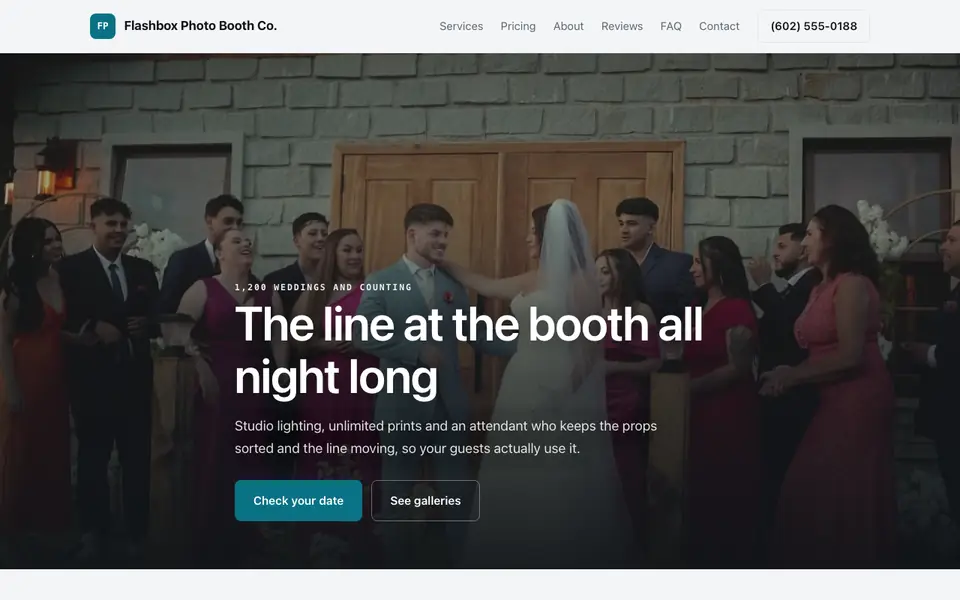
Flashbox Photo Booth Co.
This is Flashbox Photo Booth Co., a photo booth business we described to the AI in a sentence. See the Flashbox Photo Booth Co. example site.
Start from this design
Three designs that suit a photo booth website.
- Pink-Orange Gradient Party DJ
- Dark DJ and Event Production
- Full-Photo Wedding Planner
Photo Booth website design without the agency retainer. Describe the business in plain English and the AI writes and builds the pages around it: your services, your prices, your words.
Features designed for your industry
- Sample prints and GIFs: Real strips, backdrops and props from past events so planners can see what guests take home.
- Date-check form: Asks event date, venue, hours and guest count, so you can confirm availability in one reply.
- Packages by event: Wedding, corporate and party packages with hours, prints and add-ons spelled out.
Perfect for:
- A photo booth rental business covering weddings and parties
- A 360 video booth operator working corporate events
- A mirror booth company selling premium wedding packages
- A side business with one open-air booth and a props kit
Lead with the output
Planners do not book a booth, they book the prints, the backdrop and the fun. Put real sample strips and a short clip near the top, and label each one with the event type so a bride and an HR manager both see themselves.
Publish package prices
Photo booth buyers compare three or four companies in one sitting. A starting price per package, with hours, prints and attendant included, keeps you on the shortlist instead of in the 'call for a quote' pile.
Answer the venue questions
Venues and planners ask how much floor space you need, whether you need a power outlet, and how long setup takes. Put those numbers on each booth page so the venue coordinator can say yes without calling you.
Deposits and contracts use your own tools
We.inc builds the site and an enquiry form that emails you. Taking a deposit or signing a contract happens in the tool you already use, such as Stripe payment links, HoneyBook or Dubsado, linked from your booking page.
What it costs
Building your site is free for every account, with no card needed. Having the AI build and edit your booth pages and gallery starts at $20/month on Starter.
Building your site is free, no card needed. Paid plans from $20 a month. Compare plans
Frequently asked questions
What should a photo booth business website include?
Your booth types, packages with hours and starting prices, a gallery of real sample prints, a service area, and a form that asks event date, venue and hours. Those five things answer most planner questions before the first call.
Can clients check if my date is free?
They send a date-check request through a form that emails you. For live availability or instant booking, link a booking tool you already use from the Check a Date page.
Can I show 360 booth videos?
Yes. Embed clips from the video host you use, or upload short files. Keep large videos on a host and embed them so the page loads fast on phones.
What does a photo booth website cost on we.inc?
on We.Inc you can build your site free, with no card and no trial needed to start. AI building and editing starts on Starter at $20 a month, and a custom domain needs a paid plan plus about $10 to $20 a year for the name.
Is there a photo booth website template?
Yes. Building a site on We.Inc is free, with no card needed to start.
Related industries and website guides
- musician website builder
- wedding planner website builder
- portfolio website builder
- newsletter website builder
- podcast website builder
- rappers website builder
- how to make a website
- free website builder
Related website builders: Creative & Entertainment
- musician website builder
- wedding planner website builder
- portfolio website builder
- newsletter website builder
- podcast website builder
- rappers website builder
Before you start
Product
Who It's For
- For Agencies
- For Freelancers
- For Hosting Providers
- For SaaS Platforms
- For Startups
- For Financial Services
- For Healthcare
Features
Resources
- Blog
- Help Center
- Free Business Tools
- Free UI Components
- Website Templates
- Template Collections
- Website Examples
- Guides
- Comparisons
- Alternatives
- Best Lists
- Reviews
- Pricing Guides
- Use Cases
- Glossary & Guides
- Integrations
- Developers
- Benchmark
- Windows App