
Strengthen your studio's online presence.
A Pilates studio site should say whether classes are reformer, mat or both, explain the intro offer, list instructors and levels and link to the class booking app. we.inc's AI builds that from a short description of your studio, with paid plans starting at $20 a month.
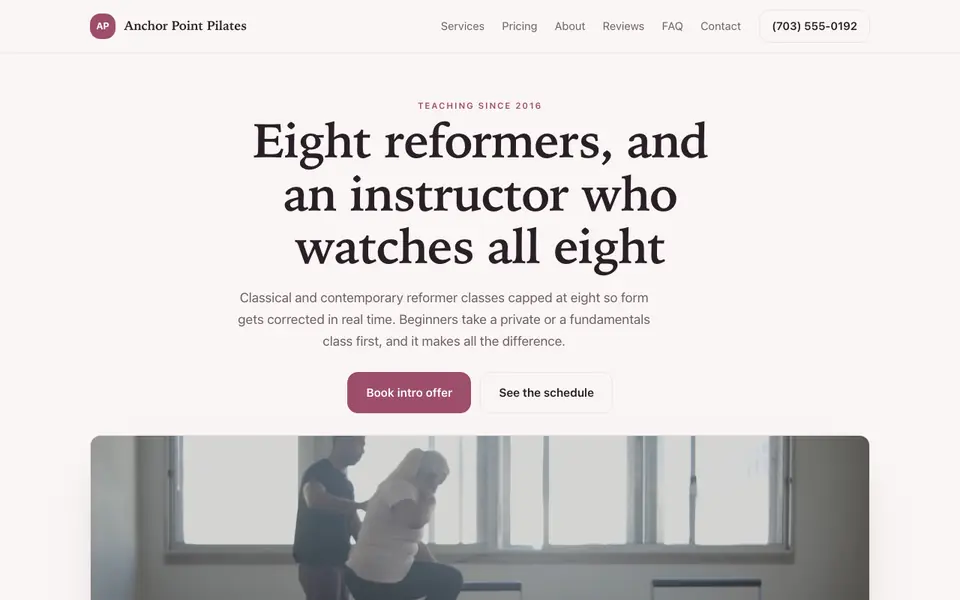
Attract students with a sleek site showcasing your reformer classes, instructors, and studio space.
Pages every pilates studio website needs
- Classes: Reformer, mat, tower and barre fusion each described with level and intensity.
- New client / intro offer: Explains the intro pack or first-class steps and what to expect on the equipment.
- Privates and duets: Clients recovering from injury or pregnant often prefer one-to-one sessions.
- Instructors: Teacher training lineage (classical or contemporary) matters to experienced students.
- Pricing: Class packs, memberships and private rates with expiry and cancellation policies.
- Studio etiquette: Grip socks, arrival time and late-cancel fees stated upfront avoid awkward conversations.
Try this prompt
A website for Linea Pilates, a reformer and mat studio in San Diego. Soft neutral palette. Pages: class descriptions (Reformer Foundations, Reformer Flow, Mat, Jumpboard), a new-client intro pack, private and duet sessions, instructor bios with training backgrounds, pricing for class packs and memberships, studio etiquette including grip socks and our 12-hour cancellation policy, and a book button linking to our scheduling app.
How can a pilates studio help beginners choose a first class?
Explain the difference between mat and reformer classes, and mark which sessions are suited to newcomers. Say what to wear, whether grip socks are required, and when to arrive. A short intro offer or beginner series gives people a clear place to start. Beginners worry about keeping up, so reassuring wording matters.
Should the site mention pilates for injury recovery or pregnancy?
Only if your instructors are trained for it, and then say what training they have. Advise clients to check with their doctor or physio first. Describe how classes are adapted rather than promising outcomes. Health advertising rules vary, so check your local rules before making any claims.
Anchor Point Pilates
This is Anchor Point Pilates, a pilates studio business we described to the AI in a sentence. See the Anchor Point Pilates example site.
Start from this design
Three designs that suit a pilates studio website.
- Reformer Pilates and Barre Studio
- Calm Grey Yoga Studio
- Monochrome Wellness App
Most pilates studio sites are a template with the name swapped in. Describe what you do and the AI designs and writes a pilates studio website around that business instead.
Features designed for your industry
- Class Types: Display your mat, reformer, and specialty classes.
- Instructors: Introduce your certified Pilates instructors.
- Book Classes: Let clients reserve spots in classes online.
Perfect for:
- Reformer studios
- Mat Pilates
- Clinical Pilates
- Barre Pilates
- Private Pilates
Explain the reformer
First-timers are often nervous about the machine. A short section on springs, straps and how the instructor sets you up lowers the barrier.
Booking links out
we.inc does not run class schedules or spot reservations. Put your scheduling app's link on every book button so availability stays accurate.
Health questions stay offline
If you ask about injuries or pregnancy, do it through your booking tool's intake or in person, not a website form. Suggest clients check with their doctor as appropriate.
Level labels that mean something
Define what "foundations" or "intermediate" require so clients self-select and classes run smoothly.
What it costs
Paid plans start at $20 a month, and your own domain requires a paid plan as well, with the name costing around $10 to $20 a year. Building a site on We.Inc is free, with no card needed to start.
Building your site is free, no card needed. Paid plans from $20 a month. Compare plans
Frequently asked questions
Can clients book reformer spots on the site?
They book through your scheduling app; the site links to it. There is no built-in class calendar or client login.
Can I sell class packs online?
You can add Stripe payment links from your own account, but if your scheduling app manages credits, sell packs there so balances stay in one place.
Can I take private session requests?
Yes. The AI builds a request form that emails you preferred times and goals, without asking for medical details.
Should I post my cancellation policy?
Yes. Stating late-cancel and no-show fees on the site supports enforcing them later.
Can I run teacher training pages?
Yes. Add a page with curriculum, dates and an application request form.
Related industries and website guides
- therapist website builder
- dentist website builder
- nutritionist website builder
- plastic surgeon websites
- senior living websites
- spas website builder
- pilates studios website examples
- how to make a website
Related website builders: Health & Wellness
- therapist website builder
- dentist website builder
- nutritionist website builder
- plastic surgeon websites
- senior living websites
- spas website builder
Before you start
Product
Who It's For
- For Agencies
- For Freelancers
- For Hosting Providers
- For SaaS Platforms
- For Startups
- For Financial Services
- For Healthcare
Features
Resources
- Blog
- Help Center
- Free Business Tools
- Free UI Components
- Website Templates
- Template Collections
- Website Examples
- Guides
- Comparisons
- Alternatives
- Best Lists
- Reviews
- Pricing Guides
- Use Cases
- Glossary & Guides
- Integrations
- Developers
- Benchmark
- Windows App