
Dentist Website Design: Examples and Must-Haves
Dentist website design that fills the chair: online booking, treatment pages, insurance and fees, new patient forms, emergency info and privacy-safe forms. What the best dentist websites share, a must-have checklist, costs and template tips.
Browse the templates: Dentist website templates
Short answer (September 2026): great dentist website design makes booking easy, answers the cost and insurance question up front, shows the real team, and gives every treatment its own clear page. The best dentist websites feel calm, load fast on a phone and put "Book an appointment" and the phone number on every screen.
Build your dental website. Start free with a template site and publish it on a we.inc address, no card. Or describe your business in one prompt and the We.Inc AI builder drafts the whole site, on paid plans from $20/mo. Start building free, see what the dentist website builder sets up, or start from this design: Brightside Dental, Brightwell Dental, Verdant Family Health.
Most people pick a dentist after comparing two or three practice websites. Here is what the good ones do, the pages and features you need, typical costs, and how to use a dental website template without looking like everyone else.
What the best dentist websites have in common
Look at practices that clearly get a lot of new patients online and the same patterns repeat:
- Booking is one tap away. A "Book online" button in the header, a sticky button on mobile, and online booking that shows real open times.
- The team is real. Photos of the actual dentists, hygienists and front desk, with short bios. Nervous patients want to see who will treat them.
- Costs are not a mystery. A clear list of insurance plans accepted, a membership plan for uninsured patients if you offer one, and "from" prices for common treatments.
- Treatment pages answer questions. What happens, how long it takes, whether it hurts, what it costs, aftercare.
- Emergency help is obvious. "Toothache? Call now" with same-day availability if you offer it.
- A calm, clean design. Plenty of white space, readable type, soft colours, no clutter.
Must-have pages and features for dental website design
| Page or feature | What to include | Why it matters |
|---|---|---|
| Home | Practice name, town, "accepting new patients", book button, phone, 3 reasons to choose you | First impression and fastest path to booking |
| Online booking | Real availability, new vs existing patient, reason for visit | Many patients prefer booking outside office hours |
| Treatment pages | One per treatment: process, time, comfort, cost range, FAQs | Ranks for each treatment and reassures |
| Meet the team | Photos, qualifications, languages spoken, short personal note | Trust for anxious patients |
| New patients | What to expect at the first visit, forms, what to bring | Removes uncertainty |
| Insurance and fees | Plans accepted, payment options, financing, membership plan | Answers the question behind many calls |
| Emergency dentistry | Same-day availability, after-hours number | Captures urgent, high-intent searches |
| Reviews | Real Google reviews, before and after photos with consent | Social proof |
| Contact and location | Map, parking, accessibility, hours, phone | Gets people to the door |
| Privacy and accessibility | Privacy notice, accessibility statement | Legal and trust basics |
Writing treatment pages patients actually read
Treatment pages do two jobs: they rank for searches like "dental implants near me", and they calm a nervous patient. A structure that works for every treatment:
- What it is, in one plain sentence without jargon.
- Who it is for, and signs you might need it.
- What happens, step by step, including how many visits and how long each takes.
- Comfort, covering numbing, sedation options if you offer them, and recovery.
- Cost, as a range, with what insurance typically covers and financing options.
- Results, with before and after photos used with written patient consent.
- FAQs, three to five real questions your front desk hears every week.
- A booking button that opens the right appointment type.
Keep paragraphs short and use headings, because many patients skim on a phone in the waiting room of their current dentist. Ask your front desk team for the questions they answer most often. Those questions are exactly what people type into Google.
Dental website design and patient privacy
Dental practices handle health information, so forms need care. In the US, protected health information is generally covered by HIPAA. That means:
- A general contact or booking request form should ask only for name, phone, email and preferred time. Do not ask patients to describe symptoms or medical history in a plain web form.
- Patient intake forms and anything with medical history should use a dedicated patient-forms or practice-management tool whose vendor will sign a business associate agreement.
- Tracking scripts on pages where patients enter information deserve review. The US Department of Health and Human Services has issued guidance on online tracking technologies for covered entities.
Outside the US, similar rules apply under local privacy law, such as GDPR in the UK and EU. This is general information, not legal advice.
Accessibility for dental websites
Many patients are older or have low vision. Use body text of at least 16px, strong colour contrast, descriptive button labels ("Book a cleaning" instead of "Click here"), alt text on images, and forms that work with a keyboard. The WCAG 2.2 AA standard is the usual target.
Dental website design examples
These are example designs made with We.Inc, not real practices. The names, towns and details are placeholders. Use them to see how the must-haves above look on a real layout.
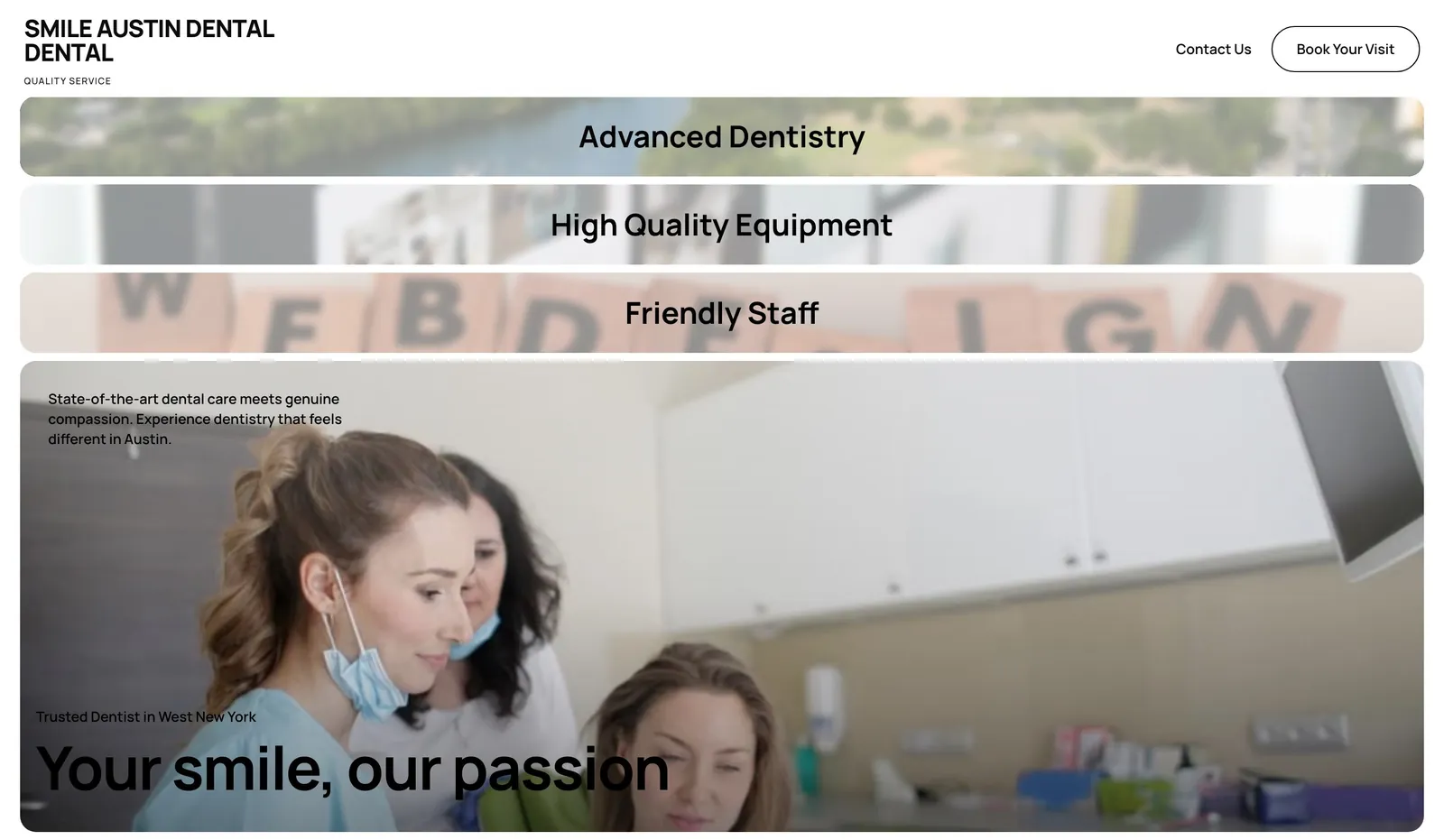
Example design: general dental practice. A booking button in the hero, treatments listed near the top and contact details in the header. Generated from the one-line prompt "a website for a dentist in Austin, Texas".
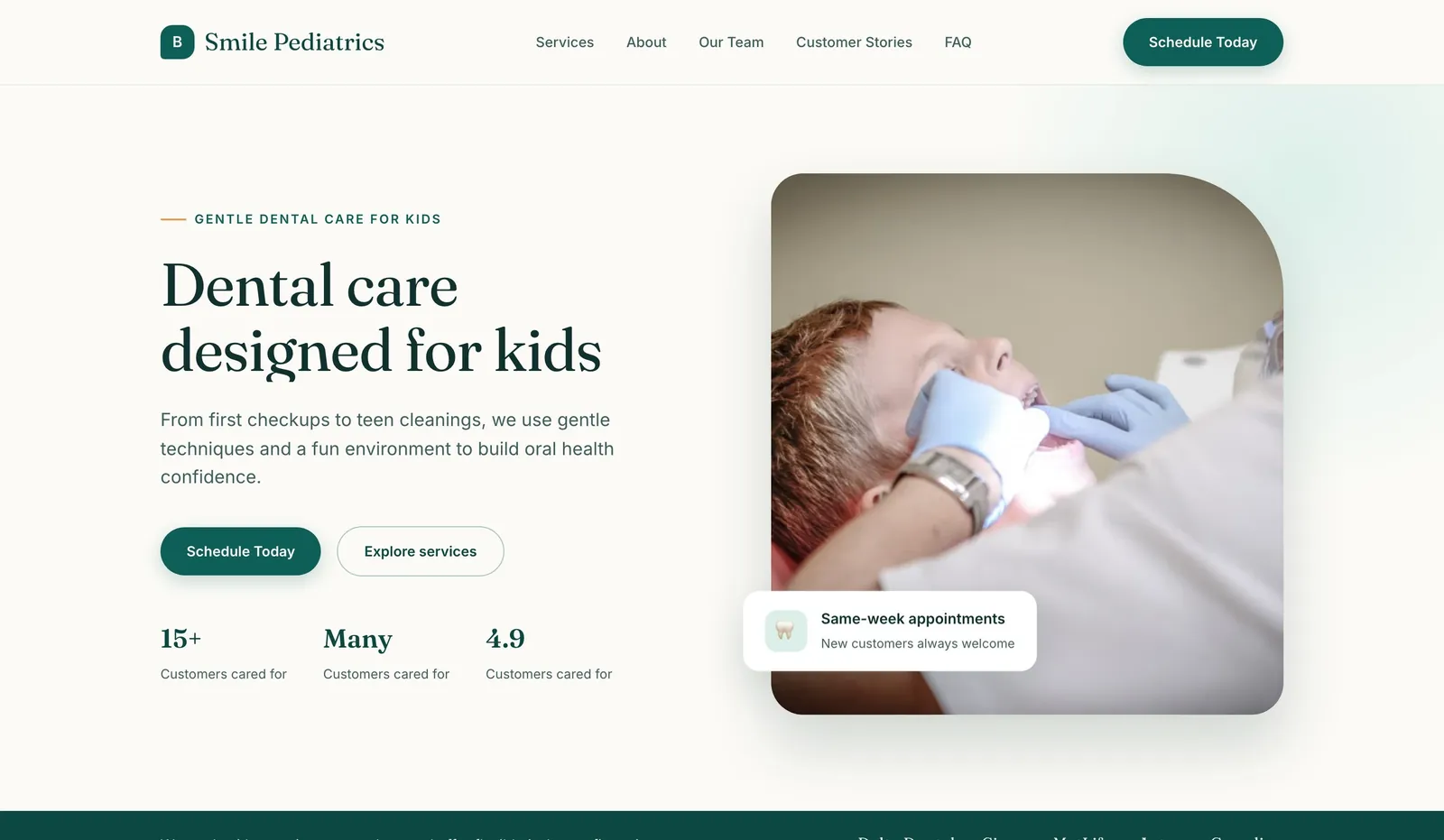
Example design: pediatric dentist. Softer colours and parent-focused copy, with the appointment request kept one click away.
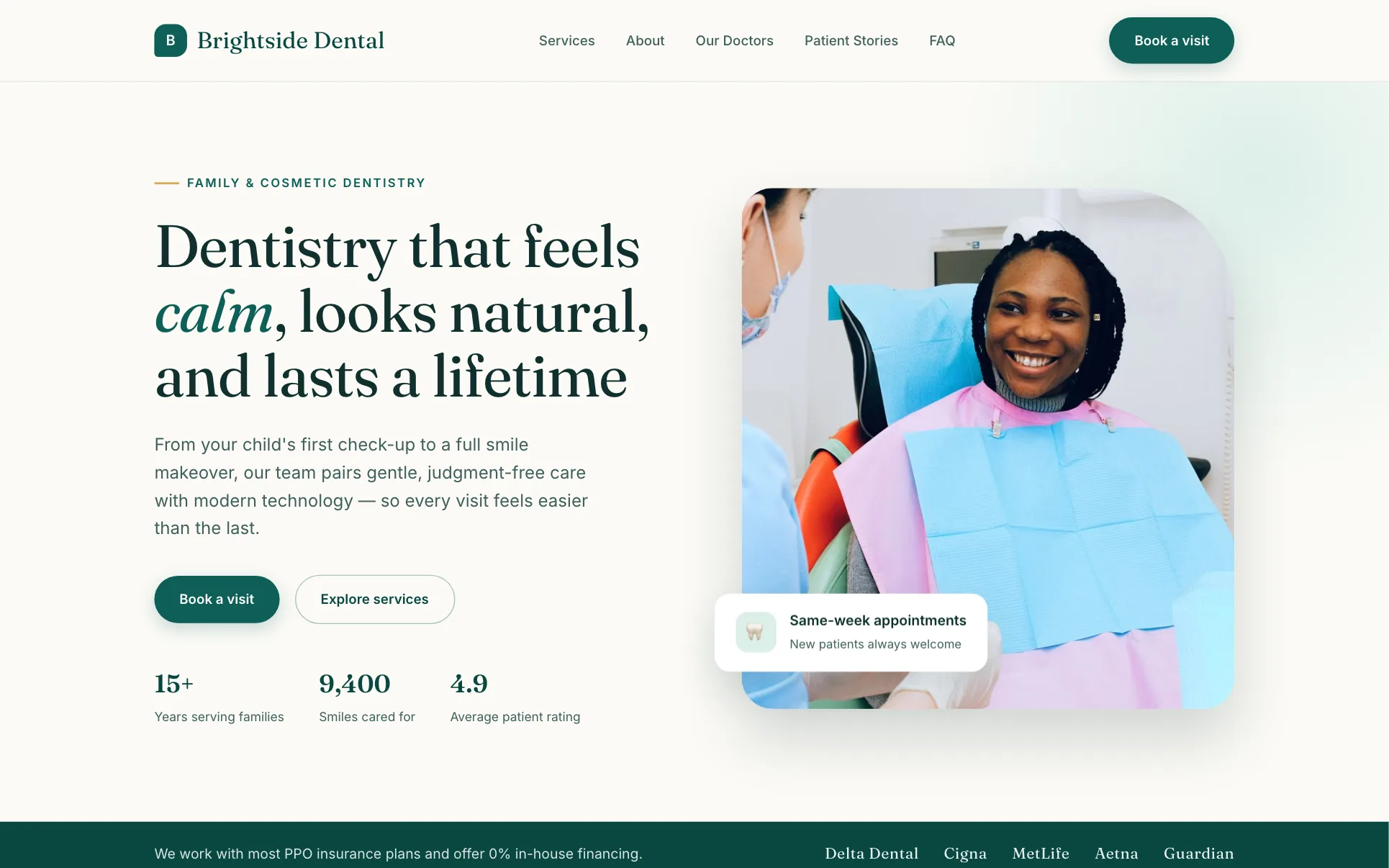
Template design: Brightside Dental. A clean clinical layout you can start from on the free plan.
See every page and feature set up for practices on the dentist website builder.
Dental website templates: how to use one well
Templates are a fine starting point. A healthcare layout already has the right sections in roughly the right order. To make it yours:
- Replace every stock photo with your practice, team and treatment rooms.
- Rewrite treatment descriptions in your own voice and add your own FAQs.
- Add your real fees, insurance list and booking link.
- Use your brand colours and logo consistently.
- Delete sections you do not need rather than leaving placeholder text.
Browse the healthcare website templates for layouts built for clinics and practices.
Dentist website design cost
| Route | Typical upfront | Typical ongoing | Notes |
|---|---|---|---|
| Website builder (DIY or AI) | $0 to a few hundred dollars | $0 to about $40 a month | You manage edits |
| Freelance designer | $2,000 to $8,000 | Hosting plus optional care plan | Custom look |
| Dental marketing agency | $5,000 to $20,000+ | Often several hundred to a few thousand a month | Usually bundles SEO and ads |
| Booking and patient-forms software | Varies | Monthly subscription | Usually separate from the website |
*Typical 2026 ranges, not quotes. Domain names add roughly $10 to $20 a year.*
SEO for dental websites
- Treatment plus town in each page title: "Dental Implants in Plano, TX | Bright Smile Dental".
- Google Business Profile completed with categories, hours, photos, booking link and regular posts.
- Reviews. Ask every happy patient. Reply to all of them, never sharing health details in a reply.
- Schema. A Dentist or LocalBusiness schema block with name, address, phone and hours.
- Speed and mobile. Many dental searches happen on phones.
How to build a dentist website fast
An AI website builder can get you from nothing to a full practice site in one sitting. On We.Inc you write one prompt such as "a website for a family dental practice in Plano, Texas, accepting new patients, with pages for checkups, whitening, implants, aligners and emergency care, an insurance page and a booking button", and the builder produces the complete multi-page site. You then add your team photos, fees and booking link, and publish. There is a free plan to try it first.
See what is set up for practices on the dentist website builder page. For the wider process, read how to make a website for your small business.
Dentist website checklist before launch
- Book button in the header and sticky on mobile
- Phone number tap-to-call on every page
- Real team photos with short bios
- A page for each main treatment with a cost range
- Insurance and payment options listed
- Emergency information easy to find
- Contact form asks for no health details
- Privacy notice and accessibility statement published
- Google Business Profile linked and reviews showing
A dentist website does not need to be clever. It needs to make a slightly nervous person feel they have found a friendly, competent practice, and let them book before they close the tab. Build your practice site free.
Build your dental website free
Type one prompt describing your business, services and area, and the We.Inc AI builder produces a complete dental website you can edit and publish. There is a free plan. Build your dental website free, or start from this design: Brightside Dental, Brightwell Dental, Verdant Family Health.
Frequently asked questions
What makes a good dentist website?
A good dentist website lets a new patient book in under a minute, shows which insurance plans you accept and roughly what treatments cost, introduces the dentists with real photos, explains each treatment on its own page and makes emergency contact details obvious. It loads fast on a phone and is easy to read for older patients.
How much does dental website design cost?
Typical 2026 ranges: $0 to about $40 a month on a website builder you run yourself, roughly $2,000 to $8,000 for a freelancer, and $5,000 to $20,000 or more for a dental marketing agency, often with a monthly fee for SEO and hosting. Online booking and patient-form software is usually a separate subscription.
Can dental websites collect patient information through forms?
Be careful. In the US, health information collected by a dental practice is generally covered by HIPAA, so any form that asks about symptoms, medical history or insurance details should run on a vendor that will sign a business associate agreement. A simple contact form should ask only for name, phone, email and preferred time. Check with your compliance adviser.
Are dental website templates good enough?
Yes, if you customise them. A template gives you a proven layout. What makes it yours is real photos of your team and practice, your own treatment descriptions, your fees and insurance list, and your booking link. Avoid leaving stock photos and placeholder copy in place.
What pages should a dental practice website have?
Home, about the team, a page per main treatment (checkups, hygiene, whitening, implants, Invisalign or aligners, emergency), new patients, insurance and fees, reviews, and contact with map and hours. Add a privacy policy and an accessibility statement.
How do I get my dental website to rank locally?
Use the town and treatment in page titles, create a page for each treatment, complete your Google Business Profile and link it to the site, keep your name, address and phone identical everywhere, ask patients for Google reviews, and make sure the site is fast and readable on a phone.
More in Blog
- Duda White Label in 2026: Pricing, Limits, Alternatives
- Durable AI Review (2026): Website Builder, Free Plan, Price
- Easiest Website Builders for Beginners (2026)
- Checkout Optimization: How to Reduce Cart Abandonment
- E-Commerce SEO: How to Rank Your Online Store
- E-Commerce Shipping Strategy: How to Choose the Right One
- Ecommerce Website Design Best Practices, Page by Page
- Electrician Website Design: Pages, Costs and a Template
Website builders for the businesses in this article
Related guides and tools
Start building
How we research, test and update this page: our editorial policy. We.Inc is our own product.
Product
Who It's For
- For Agencies
- For Freelancers
- For Hosting Providers
- For SaaS Platforms
- For Startups
- For Financial Services
- For Healthcare
Features
Resources
- Blog
- Help Center
- Free Business Tools
- Free UI Components
- Website Templates
- Template Collections
- Website Examples
- Guides
- Comparisons
- Alternatives
- Best Lists
- Reviews
- Pricing Guides
- Use Cases
- Glossary & Guides
- Integrations
- Developers
- Benchmark
- Windows App