Should an Agency Let Clients Edit Their Own Website? Access Levels, Rules and a Policy You Can Copy | How-to Guide
Most agencies should let clients make small content edits and keep structure, domains and publishing under control. Here are four access levels, who each suits, how to price them, and a copyable client editing policy.
Usually yes, but only for the parts they change most and can do least damage to. Let clients edit text, photos, opening hours, blog posts and simple promotions themselves; keep page structure, navigation, forms, domains, tracking and SEO settings with your team; and for clients who are nervous or careless, have their changes wait for your approval before going live. Write those rules down, match them to what your platform allows per client, and price the access levels differently. Clients who edit get speed; clients who do not get a done-for-you service, and both should know exactly what they bought.
The two ways this goes wrong
No access at all. The client waits three days for you to change their holiday hours. They feel held hostage, and your team spends expensive hours on two-minute jobs. When a competitor offers "you can update it yourself", they leave.
Full access for everyone. The client deletes the contact form while tidying a page, pastes a 4,000-pixel photo into the hero, changes the page title you spent a month on, or connects a domain without telling you and breaks their email. Then they call you, upset, about the site you "built badly".
The answer is in between, and it is different for different clients.
It also depends on what clients actually change. Track change requests for a quarter and you will usually find the same handful again and again: hours, prices, staff, photos, a seasonal offer, a news post. Those are exactly the edits that are safe to hand over. The rare requests (a new page, a new form, a new section of the menu) are the ones that need design judgement, and they are the ones worth keeping, because they are also the ones clients are happy to pay for.
Four access levels
| Level | Client can | Agency keeps | Suits |
|---|---|---|---|
| 0. View only | See their site and send change requests | Everything | Clients who never want to touch it; regulated businesses where every word is checked |
| 1. Content with approval | Edit text and images; changes wait for your OK | Publishing, structure, settings | Nervous clients, new clients, anyone with a history of breaking things |
| 2. Content, publish themselves | Edit and publish text, images, blog posts, simple promotions | Structure, forms, domains, SEO and tracking settings | Most established small-business clients |
| 3. Full control | Everything, including settings and domains | Support only | Clients with their own web staff, or who are leaving your care plan |
Start every new client at level 1 for the first month, then move them to level 2 if their edits have been fine. It is easier to grant access than to take it away.
What to keep with your team, and why
| Area | Risk if a client changes it |
|---|---|
| Forms | Leads go nowhere, and nobody notices for weeks |
| Navigation and page structure | Pages become unreachable; design breaks on mobile |
| Page titles, descriptions and URLs | Lost rankings; broken links from other sites |
| Domain connection | Site or email goes offline |
| Tracking and analytics | Your reporting breaks, so you cannot prove results |
| Code | Hard-to-diagnose faults; security problems |
| Store settings and payments | Wrong prices, lost orders, tax mistakes |
None of these are things clients need to change often. That is what makes the split work: clients get control over the frequent, low-risk changes, and you keep the rare, high-risk ones.
How to price the levels
Access levels map neatly onto care plans:
- Managed plan (level 0 or 1): higher monthly fee; includes a set number of changes done by your team, and approval of any client edits.
- Self-edit plan (level 2): lower monthly fee; client makes content changes; your team handles structural changes at an hourly or per-request rate, and fixes anything the client breaks (priced, not free).
- Full control (level 3): hosting and platform only, with support billed separately.
Make the "fix what you broke" rule explicit. It is the clause that stops self-edit clients from turning into unpaid support tickets. Our guide to website maintenance packages covers the rest of a care plan.
A client editing policy you can copy
Send this with onboarding and adapt it per plan:
- What you can change: text on existing pages, photos (we recommend under 500 KB each), opening hours, blog posts, team members, and promotional banners.
- What we change for you: new pages, menus, forms, page titles and search settings, your domain, tracking, and anything to do with payments.
- Approval: for the first month, your changes are sent to us before they go live. We review within one working day.
- Photos and text you add: you confirm you have the right to use them.
- If something breaks: tell us straight away. Fixes caused by your edits are billed at [rate], and we will always tell you before starting.
- Access: do not share your login. Ask us to add colleagues, and tell us when someone leaves.
When to change a client's level
Access is not set once. Review it when something changes:
| Signal | Move |
|---|---|
| A month of clean edits at level 1 | Up to level 2 |
| A client edit broke a form or layout | Back to level 1 for a month, with a short refresher |
| The client hires a marketing coordinator | Add the new person at level 1, keep the owner where they are |
| A busy season or big launch is coming | Temporarily to level 1 so nothing goes live unchecked |
| The client gives notice | Agree the handover; consider level 3 for the final weeks |
| A staff member at the client leaves | Remove their login the same day |
Note each change and the reason in the client's record. When a client later asks why they cannot publish, you can answer in one sentence instead of reconstructing history.
Handling the client who wants more access
Some clients will push for full control. Ask what they are trying to change. Most of the time it is something that level 2 already allows, or a one-off you can do for them today. If they genuinely need more, give it, write down that fixes for their changes are billed, and move on. Refusing outright tends to read as hiding something.
Train clients once, properly
A twenty-minute screen-share at launch prevents most problems. Show the three edits they will actually make (change text, swap a photo, post an update), show what approval looks like, and send a short video recording afterwards. Clients who know how to make the common edits rarely go looking for the dangerous ones.
Make the platform enforce the policy
A written policy only works if the software agrees with it. Look for per-client controls rather than one setting for everyone, because your clients will be at different levels. In We.Inc, a white-label brand sets defaults for what clients can do, then overrides them per client.
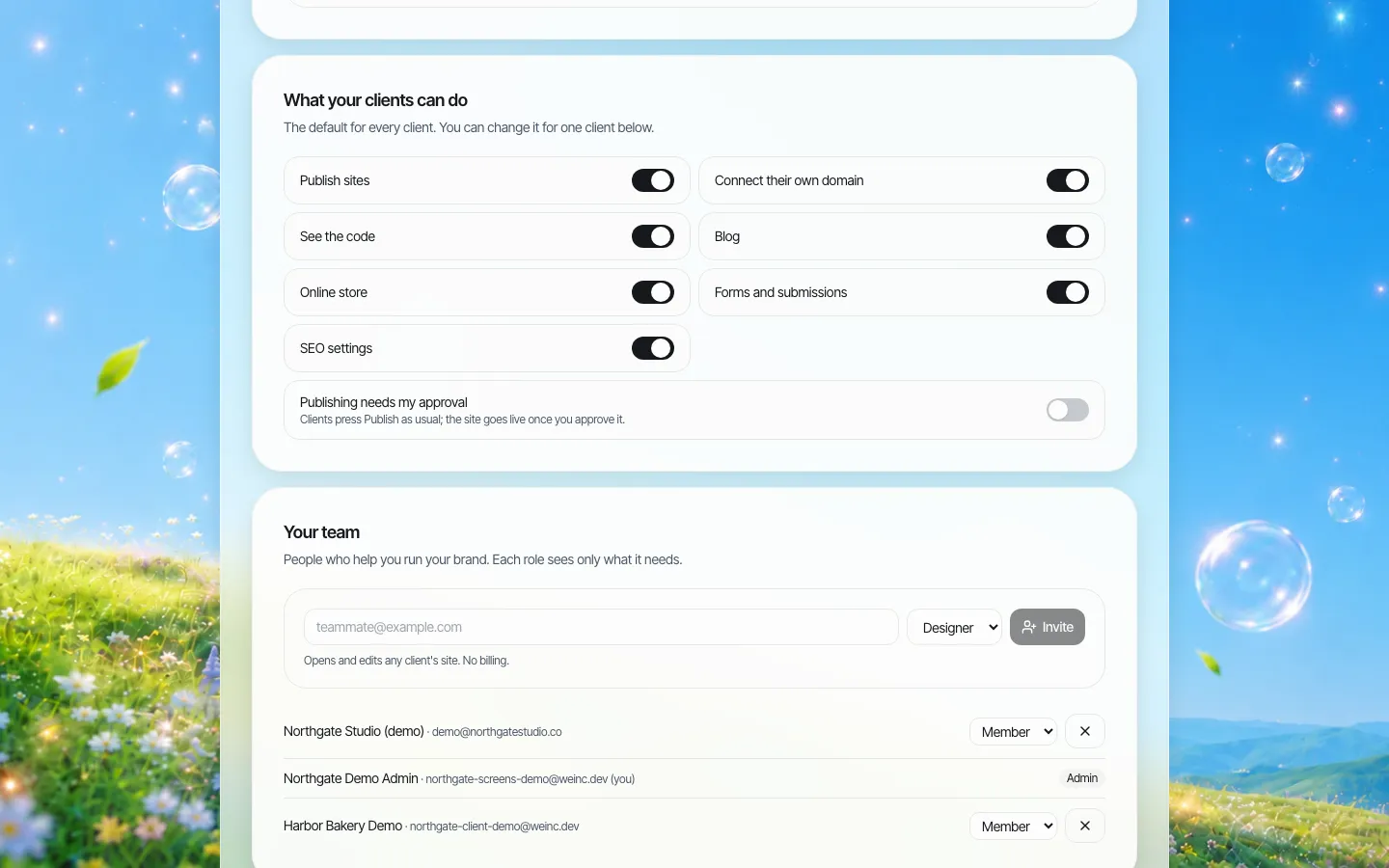
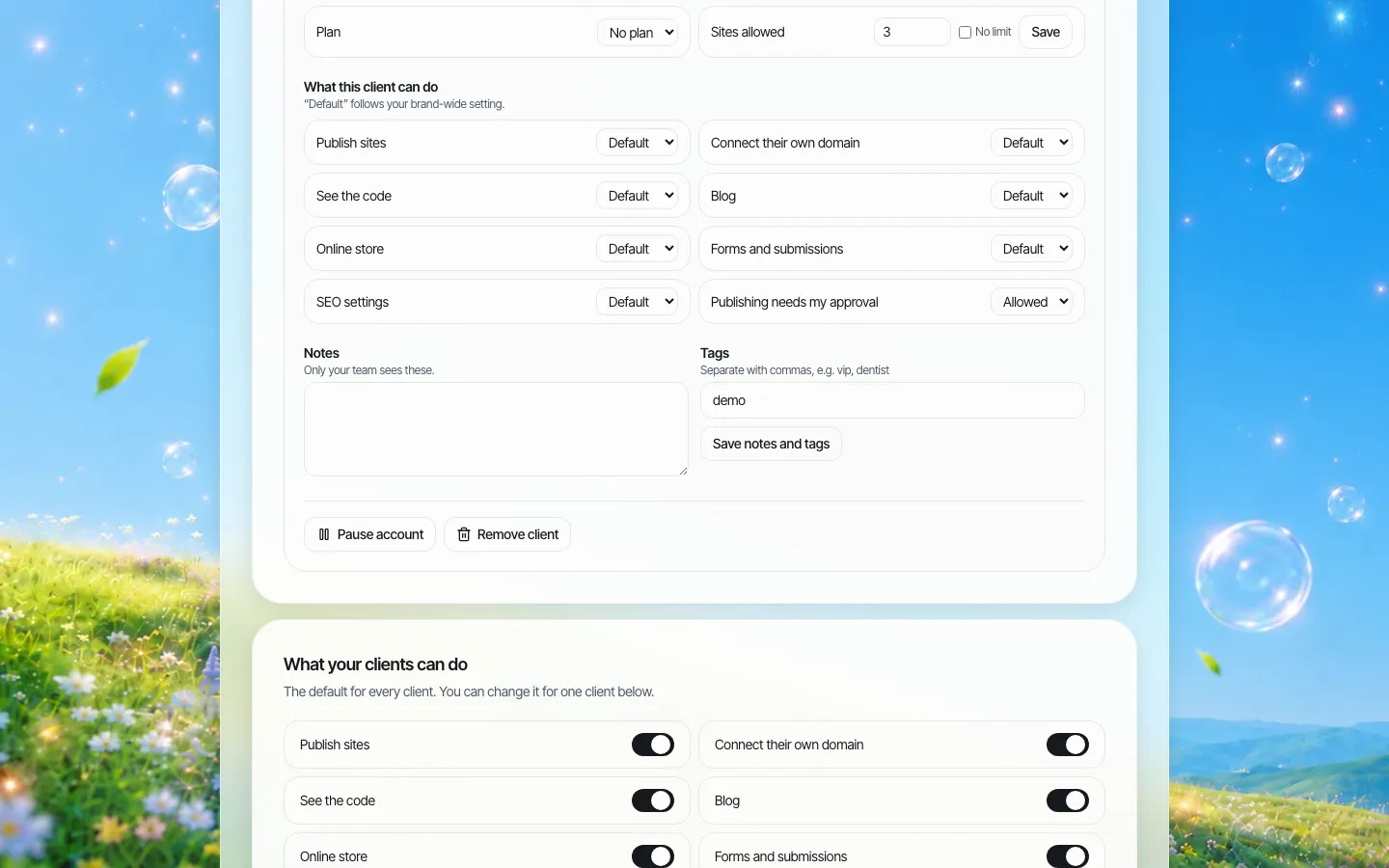
On a client's own page, you can switch publishing, connecting their own domain, seeing the code, blog, store, forms and SEO settings on or off, and turn on "Publishing needs my approval".
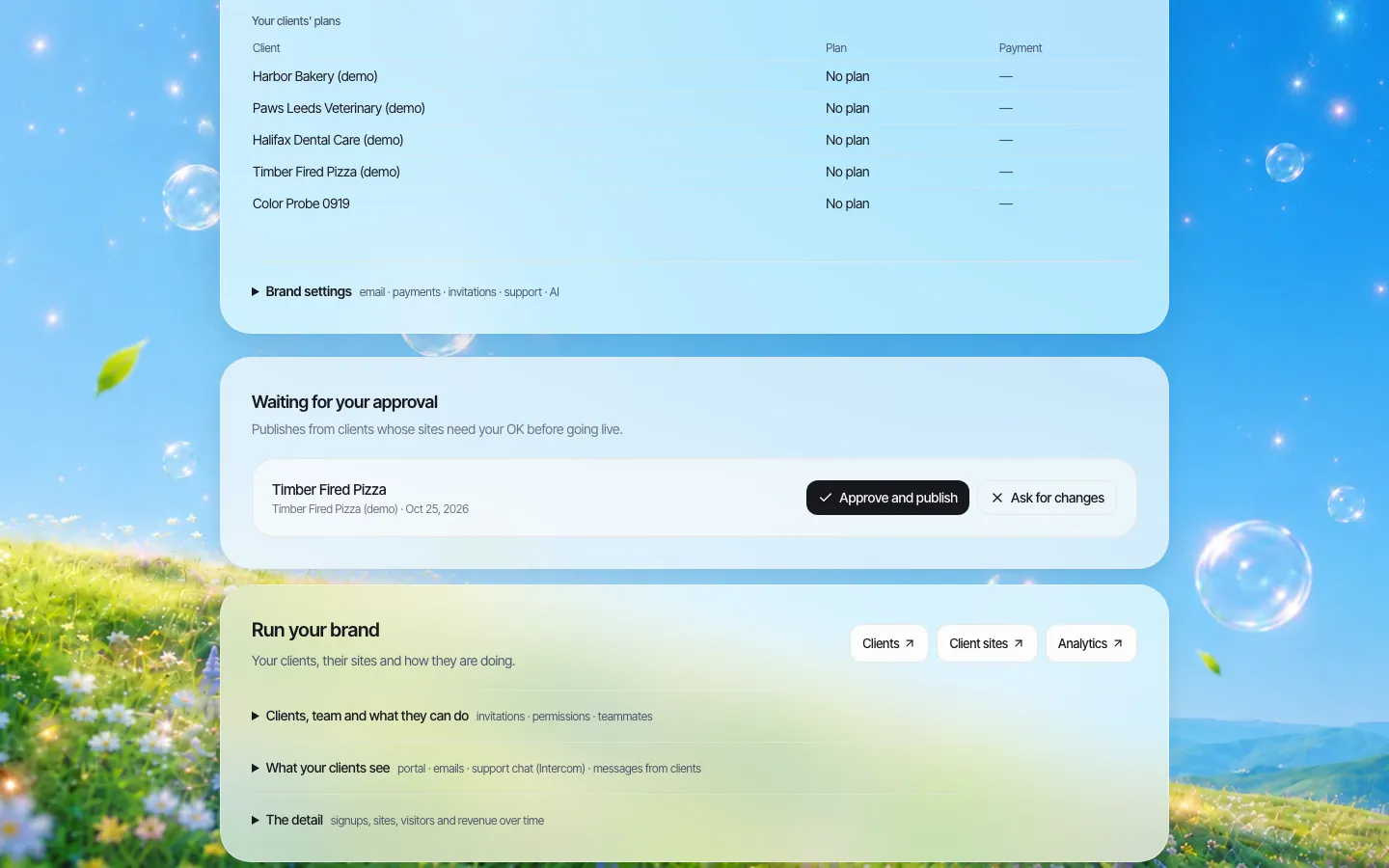
When approval is on, the client's change waits in a queue for a single-step approval before their site goes live, and you can approve and publish it or ask for changes.
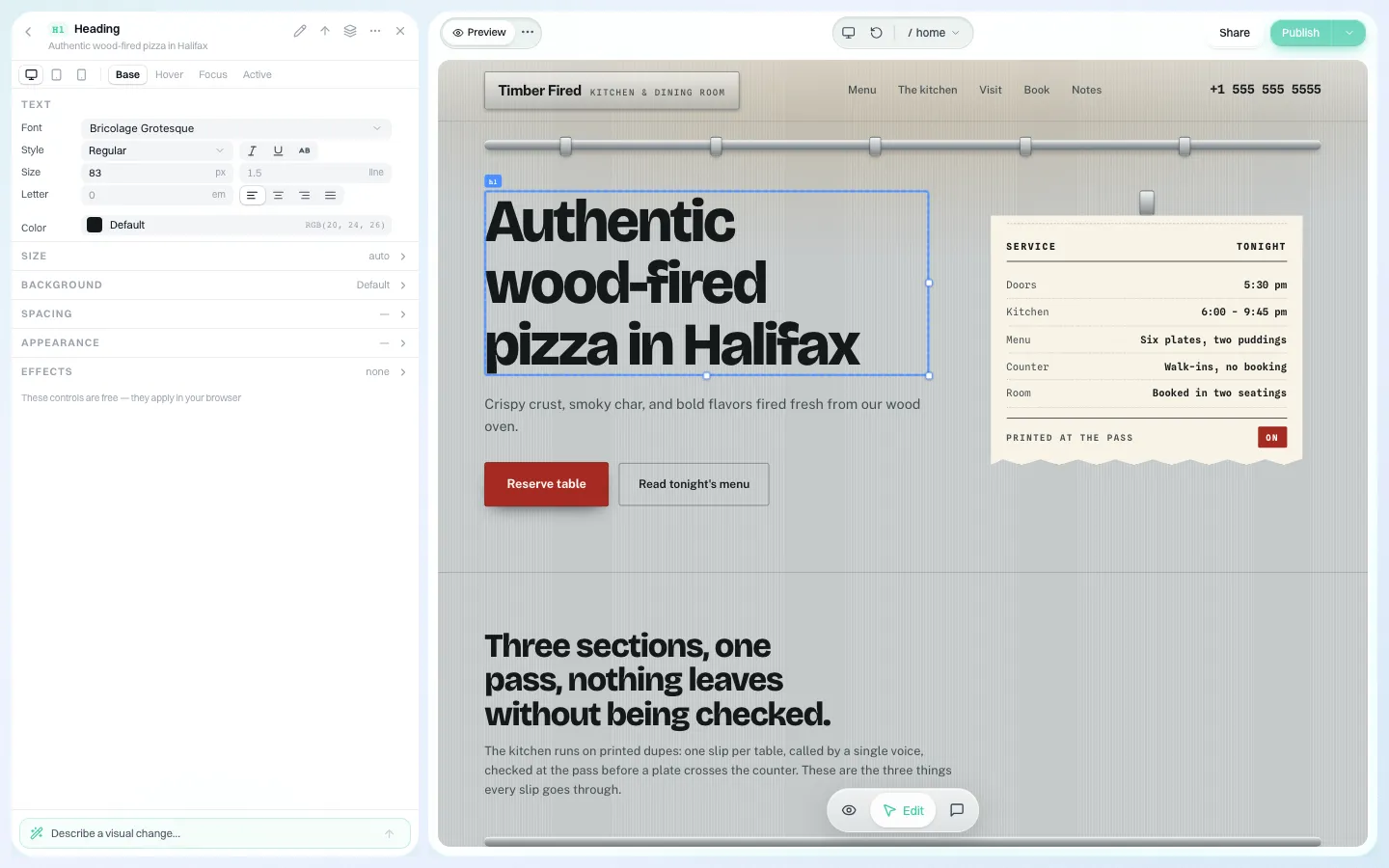
Edits clients are allowed to make happen in a visual editor: click the text or button and change it.
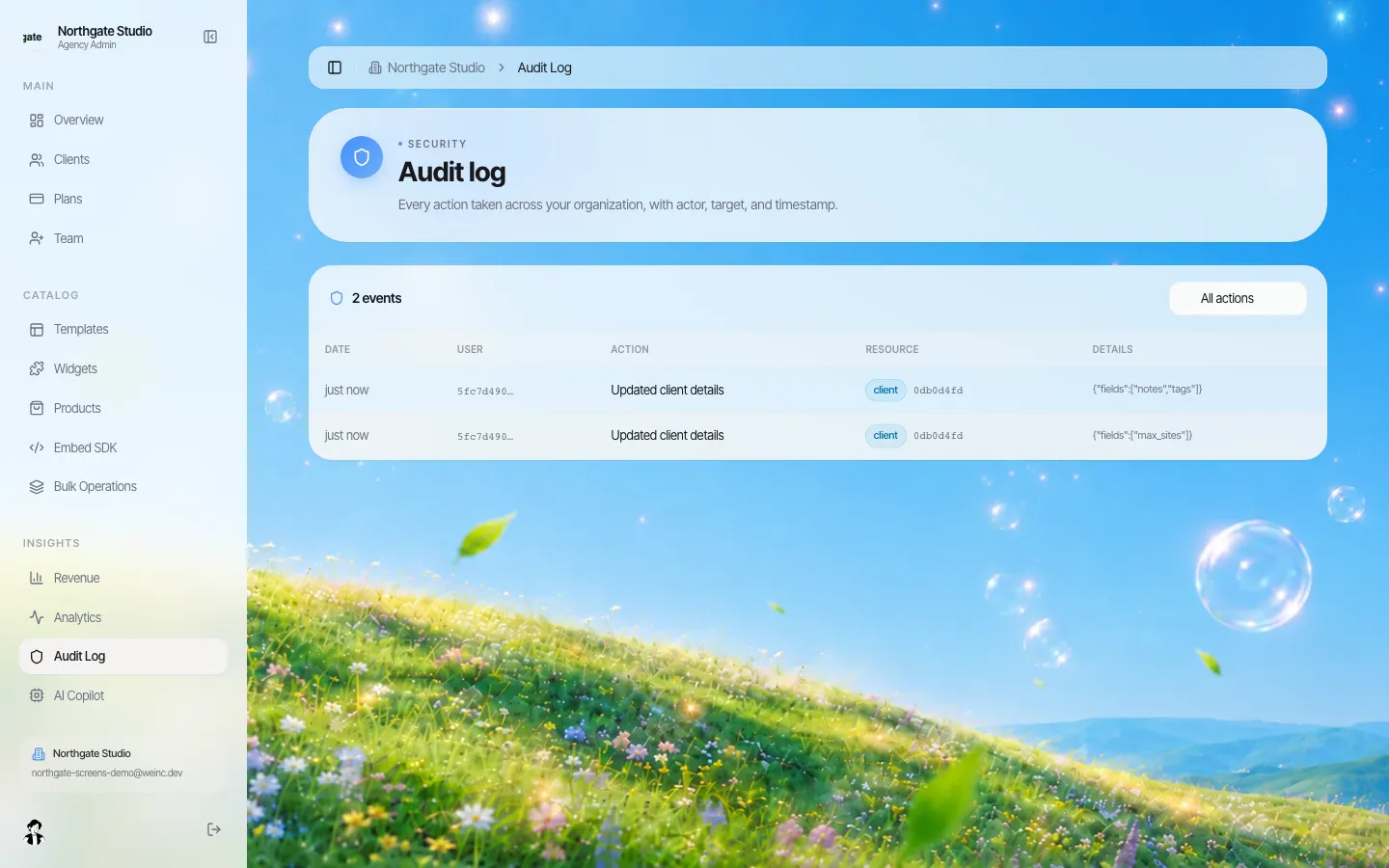
An audit log records organisation actions such as changes to a client's settings, which helps when you need to know who changed what.
For more on the controls themselves, see our client permissions page. To set up levels for your own clients, book a demo.
Frequently asked questions
Should agencies let clients edit their own websites?
Usually yes, for content like text, photos, hours and blog posts. Keep structure, forms, domains, SEO settings, tracking and payments with the agency, and use approval for new or nervous clients.
How do I stop clients breaking their website?
Limit what they can change per client, have their changes wait for your approval at first, train them on the three edits they actually make, and make fixes caused by their edits a billed service.
Should client self-editing be cheaper?
Often yes. A self-edit plan can cost less than a managed plan, as long as structural changes and fixes for client mistakes are billed separately.
Can We.Inc require approval before a client's changes go live?
Yes. A brand can turn on single-step approval per client, so the client's site does not go live until the agency approves and publishes it.
More in Guides
- Sitemap.xml and robots.txt Examples
- Small Business SEO: A Plain-English Guide and Checklist (2026) | How-to Guide
- Soft 404: When a Page Says Not Found but the Server Says OK
- Single Page Application SEO: A Practical Guide
- SPF, DKIM and DMARC: The Three Records Behind Trusted Email
- SQL Joins Explained with Live Examples
- SSE vs WebSocket: Pick the Right Stream
- SSL Certificate Types: DV, OV, EV, Wildcard and SAN
Related guides and tools
Start building
- how to make a website
- AI website builder
- free website builder
- website templates
- website builders by industry
Product
Who It's For
- For Agencies
- For Freelancers
- For Hosting Providers
- For SaaS Platforms
- For Startups
- For Financial Services
- For Healthcare
Features
Resources
- Blog
- Help Center
- Free Business Tools
- Free UI Components
- Website Templates
- Template Collections
- Website Examples
- Guides
- Comparisons
- Alternatives
- Best Lists
- Reviews
- Pricing Guides
- Use Cases
- Glossary & Guides
- Integrations
- Developers
- Benchmark
- Windows App