
Your art deserves a permanent online home.
A tattoo artist website is a portfolio first: healed work organized by style, then a clear booking process, deposit policy and aftercare. On we.inc the AI builds your gallery, a booking inquiry form that asks for placement, size and reference images description, and pages for flash, aftercare and FAQs, all sent to your email.
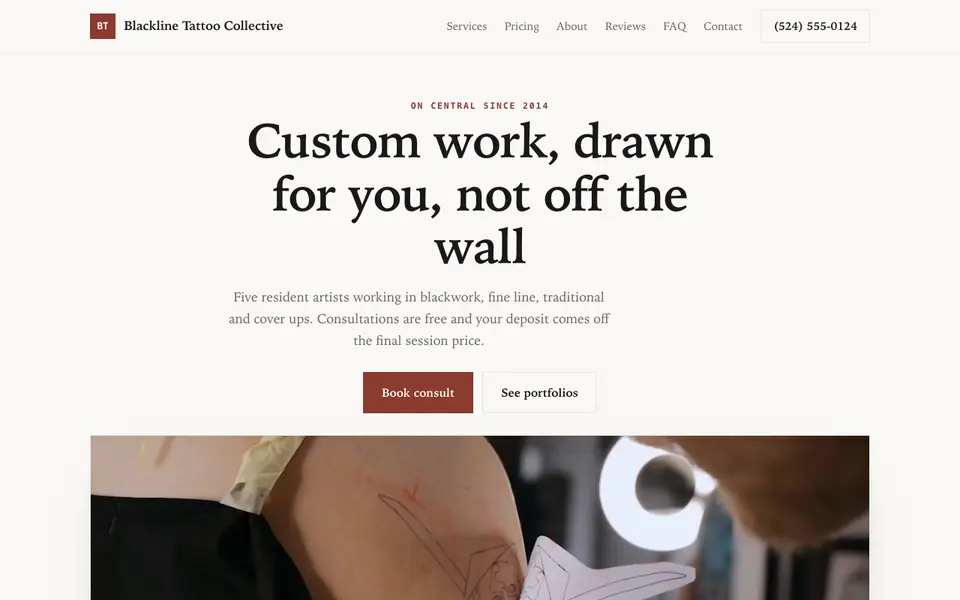
Attract clients with a bold portfolio showcasing your tattoo style and booking process.
Pages every tattoo artist website needs
- Portfolio: Organized by style, such as fine line, blackwork, neo-traditional or realism. Clients book the artist whose work matches their idea.
- Booking Inquiry: Asks for idea, placement, approximate size, color or black and grey, and budget so you can decide quickly whether it suits you.
- Flash: Available flash designs with sizes and prices. Great for flash days and first-timers.
- Deposits & Policies: Deposit amount, whether it is non-refundable, reschedule rules, age requirements and ID policy, all in writing.
- Aftercare: Clients lose the paper sheet. A page they can bookmark reduces healing problems and follow-up messages.
- Guest Spots & Travel: If you travel, list upcoming guest spots and conventions so clients in other cities can book.
Try this prompt
A website for Mara Voss Tattoo, a fine line and botanical tattoo artist working out of a private studio in Seattle, Washington. Include a portfolio split by style, a flash page, a booking inquiry form with placement, size and budget fields, a deposit and cancellation policy page, aftercare instructions, and upcoming guest spots. Minimal, black and cream, elegant typography.
What should a tattoo booking request ask for?
The idea, the placement, the rough size and a few reference images, plus the client's availability. Clear questions save you a long email chain. Say up front whether you do cover-ups, colour work or only your own designs. The form sends each request to your email, so you can reply with a time and the deposit details.
How do I set expectations about style before people book?
Show only the style you want to keep doing. If your portfolio is all fine line, people will come to you for fine line. Write a short line on what you do not tattoo, such as large realism or certain imagery, so clients go elsewhere without an awkward conversation.
Blackline Tattoo Collective
This is Blackline Tattoo Collective, a tattoo artist business we described to the AI in a sentence. See the Blackline Tattoo Collective example site.
Start from this design
Three designs that suit a tattoo artist website.
- Off-White Brand Designer Portfolio
- Black Custom Tattoo Studio
- Black & Gold Barbershop
Most tattoo artist sites are a template with the name swapped in. Describe what you do and the AI designs and writes a tattoo artist website around that business instead.
Features designed for your industry
- Portfolio Gallery: Showcase your tattoo work across different styles.
- Booking Process: Explain your consultation and booking process.
- Consultation Requests: Let clients submit tattoo ideas for review.
Perfect for:
- Traditional tattoo
- Realism artists
- Blackwork
- Japanese style
- Fine line artists
Books open, books closed
Many artists open books for set periods. The AI can add a banner saying books are open or closed and when they next open, and you change it with one chat message.
Deposits through Stripe
You can take a deposit through your own Stripe account once you accept a project. The inquiry form itself only emails you the request; nothing is booked until you confirm.
Age, ID and consent
Tattoo age rules and consent requirements vary by state and country. State your policy and ID requirement, but keep signed consent forms in the studio or a proper waiver tool rather than a website form.
Reference images
Clients love sending references. The form can ask for a description and a link to a shared album, or you can have them email images after you reply, which keeps your inbox manageable.
What it costs
On We.Inc you can build your site free, with no card and no trial needed to start. Paid plans start at $20 a month, and your own name as a domain needs a paid plan plus about $10 to $20 a year for the domain.
Building your site is free, no card needed. Paid plans from $20 a month. Compare plans
Frequently asked questions
Can clients book appointments online?
They submit a booking inquiry with their idea, placement, size and budget, and it is emailed to you. There is no synced calendar; you reply to schedule or link a booking tool you already use.
Can I take deposits?
Yes, through your own Stripe account. State clearly whether deposits are refundable and how they apply to the final price.
Can I show flash with prices?
Yes. A flash page can list each design with size and price, and mark pieces as claimed. You can update it by chat.
Should I post healed or fresh photos?
Both help, but healed photos show how your work settles, which experienced collectors look for. Label them so clients know which is which.
I work at a shop. Can I still have my own site?
Yes. Many artists have a personal portfolio site and link to the shop's address and policies. Check your shop agreement on bookings and deposits first.
Browse the templates: Tattoo website templates
Related industries and website guides
- artist website builder
- barbershops website builder
- esthetician websites
- hair salons website builder
- makeup artists website builder
- med spa websites
- tattoo artists website examples
- how to make a website
Related website builders: Beauty & Personal Care
- artist website builder
- barbershops website builder
- esthetician websites
- hair salons website builder
- makeup artists website builder
- med spa websites
Before you start
Product
Who It's For
- For Agencies
- For Freelancers
- For Hosting Providers
- For SaaS Platforms
- For Startups
- For Financial Services
- For Healthcare
Features
Resources
- Blog
- Help Center
- Free Business Tools
- Free UI Components
- Website Templates
- Template Collections
- Website Examples
- Guides
- Comparisons
- Alternatives
- Best Lists
- Reviews
- Pricing Guides
- Use Cases
- Glossary & Guides
- Integrations
- Developers
- Benchmark
- Windows App