
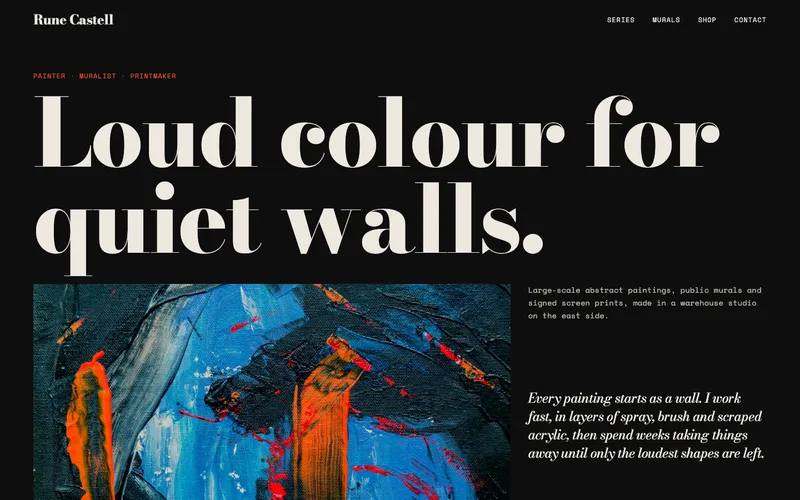
An artist website that sells the work, not just shows it
The best website builder for artists is one that keeps the design out of the way of the work, lets you add a new series in minutes and takes payment without a platform cut you did not agree to. On we.inc you describe your practice and the AI builds the galleries, statement, commissions page and shop, from $20 a month. If you only need a portfolio online, publish one of the artist templates free on a we.inc address.

A website builder for artists that puts the work first: galleries by series, an artist statement and CV, commission requests, prints and originals through your own Stripe account, and a mailing list for show announcements.
Pages every artist website needs
- Gallery by series: Group work by series, medium or year with large images and a caption for title, year, size, medium and price or "sold". Curators and collectors judge a body of work, not a mixed feed.
- Artist statement and CV: A short statement on what the work is about, plus exhibitions, residencies, awards and collections. Galleries, juries and grant panels read this page first.
- Shop for prints and small originals: Checkout through your own Stripe account. Larger pieces can carry a "price on request" button that names the piece in the enquiry.
- Commissions: A form that asks size, medium, subject, budget range and deadline, next to your starting price and turnaround.
- Exhibitions and news: Upcoming shows, open studios and fairs with dates and addresses, so people know where to see the work in person.
- Mailing list: A signup for new work and show dates. It is the channel you own when social reach drops.
Try this prompt
A website for Mara Okafor, a painter in Chicago working in oil on large canvases. Galleries for three series with size, medium and price on each piece, an artist statement and CV, a print shop through my Stripe account, a commission request form with my starting price, an exhibitions page and a mailing list signup. Plain white background so the paintings carry the page.
How should artwork be photographed for an artist website?
Straight on, evenly lit and cropped to the edge of the piece, plus one shot of it on a wall for scale. Daylight from a window with no direct sun works if you do not have lights. Add the title, year, medium and size beside every image. Collectors buying online rely on these details because they cannot stand in front of the work.
Should I list prices on my website?
Many artists do, at least as a range, because it saves time for you and the buyer. If you have gallery representation, check your agreement first and keep online prices in line with gallery prices. For work that is sold, mark it as sold rather than removing it; it shows demand.
Where should an artist build a website?
An artist's site needs to put the work first, keep it organized by series, and make it easy for collectors, galleries and commissioners to get in touch. The usual choices are a portfolio builder, a general builder, an art marketplace, or a site generated from a description of your practice.
| Option | Good for | Watch out for |
|---|---|---|
| Format, Cargo or other portfolio builders | Image-first layouts made for artists and photographers. | Selling originals and prints needs add-ons or a separate shop. |
| Squarespace | Elegant templates with a built-in shop for prints or small works. | You arrange every series and statement by hand. |
| Art marketplaces such as Saatchi Art or Etsy | Buyers who already browse for art, with checkout and shipping help. | Commissions, rules and competition with every other artist on the platform. |
| we.inc | Describe your medium, series and exhibitions to get a portfolio, artist statement, CV and commission inquiry form, with optional selling through your own Stripe account. | There is no print-on-demand or fulfilment service; you ship work yourself or link to a print partner. |
Galleries and curators often check an artist's CV and statement page before replying, so keep both current.
Start from this design
Three designs that suit an artist website.
- Black Gallery Painter Portfolio
- Minimal White Artist Commissions
- Off-White Brand Designer Portfolio
About artist website design on we.inc
Upload your pieces and let we.inc's AI build a gallery, an about page, and a way to inquire about commissions or prints. Free to start, AI from $20 a month.
An artist website designed around your actual services and prices, not a stock layout. Describe the business and the AI writes and builds every page.
Features designed for your industry
- Galleries that let the work breathe: Organize pieces by series, medium, or collection with large images and minimal clutter, so the art is the thing people look at, not the layout.
- Commission inquiry forms: A form that asks the right questions upfront (size, medium, budget range, timeline) so commission requests arrive ready to quote instead of back-and-forth emails.
- Links to where the work actually sells: Point to your Etsy shop, print-on-demand store, or gallery representation rather than trying to run checkout on the site itself.
Who this artist website design suits
- A painter with a portfolio organized by series and a commission inquiry form
- An illustrator linking their Etsy print shop and taking freelance client inquiries
- A ceramicist showcasing studio work with a link to their gallery representation
- A muralist with a project gallery, client list, and a quote request form
What makes an artist website work
What to check in any artist website builder
Before you pick a platform, check five things: can images display at full width without cropping, can you group work by series, does it take a cut of sales on top of card fees, can you use your own domain, and can you export or move your work later. Use this list on every builder you compare, including we.inc.
Let the work fill the screen
Artist sites fail when the design competes with the art. Ask for a plain background, large images and captions with title, year, size and medium. Upload images at least 2000 pixels on the long side so they stay sharp on large screens.
Price, or say how to ask
Collectors hesitate to email about a piece that might cost $300 or $30,000. Show prices on prints and small works, and for larger pieces add "price on request" with an enquiry button that names the piece.
Sales go to your own Stripe account
Prints and originals sell with checkout on your Stripe account, so the money lands with you at Stripe's standard fee. We.inc does not print, store or ship; you fulfil orders yourself or link a print-on-demand shop for prints.
Commissions need terms on the page
State your starting price, turnaround and how many revisions are included next to the request form. It filters out people who are not a fit before they write.
A mailing list you own
The AI can build a short signup form, or you can paste the embed code from your email tool so every signup goes straight into your list. Put it on the homepage and next to exhibition dates.
What it costs
The free plan publishes up to three template sites on a we.inc address, with no AI credits and no custom domain. AI building starts on Starter at $20 a month, then Pro at $49 and Max at $99; credits are spent when the AI generates or edits. A domain costs about $10 to $20 a year, and payment processing is Stripe's standard fee on your own account. Starter covers most single-artist sites that add new work and shows a few times a month.
Free for 3 template sites, without AI; AI building from $20 a month. Compare plans
Frequently asked questions
What is the best website builder for artists?
The one that shows your work large and uncluttered, groups it by series, lets you sell without an extra platform cut and lets you use your own domain. We.inc does those through AI building from $20 a month, and you can start with a free artist template on a we.inc address.
Can I make an artist website for free?
Yes, with a template. The free plan publishes up to three template sites on a we.inc address, with no AI and no custom domain. Having the AI build and keep editing the site starts at $20 a month.
Can I sell my art on my website?
Yes. Prints and originals can sell with checkout on your own Stripe account, so the money goes to you. You pack and ship, or link to a print-on-demand service for prints.
Can people request a commission?
Yes. The AI builds a commission request form that asks size, medium, subject, budget and deadline and emails it to you.
Can I show upcoming exhibitions?
Yes, as a list of shows with dates, venues and addresses that you or the AI update. Ticketing for paid events stays on your ticketing platform, linked from the page.
Do the artist templates look like other artists' sites?
Templates are starting designs. The AI swaps in your images, words and colours, and you can keep changing layout by chat, in the visual editor or in code.
Artist website builders: what to check, and how We.Inc handles it
We did not test other builders for this page, so there is no ranking here. Instead: the three jobs an artist site has to do, how each is handled in designs from our own library, and a plain list of what We.Inc does and does not do, so you can compare it with any other builder yourself.
How these were picked
Five artist samples from our library and one showcase build. Each is labelled; none is a customer site. Checked 27 September 2026. Every design here is from the We.Inc library and is labelled as a sample or template. None is a customer site, and no entry claims results.
1. Marisol Reyes Fine Art Photography
Sample site built by our AI (made-up business). Open it
Task: A collector buying an edition.
Design choice: "Browse editions" first; editions, commissions and licensing in one section.
Limitation: Sold status is updated by hand or by chat; there is no inventory system.
2. Kilnstone Sculpture Studio
Sample site built by our AI (made-up business). Open it
Task: A committee commissioning a public piece.
Design choice: "Discuss a commission" and the process: "Maquette, cast, patina, install".
Limitation: No list of finished works with dimensions in the sample.
3. Owen Marsh Illustration
Sample site built by our AI (made-up business). Open it
Task: An art director checking availability.
Design choice: "Request availability" and the medium, "Gouache first, then the screen".
Limitation: Usage rights are not spelled out.
4. Broad Brush Mural Co.
Sample site built by our AI (made-up business). Open it
Task: A building owner with a wall.
Design choice: "Send us a photo of the wall" as the first step.
Limitation: Needs a form that accepts the photo.
5. Ferro Contemporary
Sample site built by our AI (made-up business). Open it
Task: A collector checking a current show.
Design choice: "See current show" and "Book a viewing".
Limitation: No past exhibitions archive.
6. Austin Art Studio
Showcase build from a one-line prompt (made-up business). Open it
Task: Seeing what a one-line prompt produces.
Design choice: Work, Studio, Services and Contact in the menu, built from one sentence.
Limitation: Generic: a skyline photo instead of artwork. Give the AI your works and terms.
Task comparison
| Design | Artwork size, medium and sold status | Commission brief and usage rights | Exhibition archive and detail viewing |
|---|---|---|---|
| Marisol Reyes Fine Art Photography | Editions | Licensing mentioned | Viewing by appointment |
| Kilnstone Sculpture Studio | Not listed | Yes | No |
| Owen Marsh Illustration | Medium | Availability | Portfolio |
| Broad Brush Mural Co. | Wall size | Yes | Portfolio |
| Ferro Contemporary | Per show | No | Current only |
| Austin Art Studio | No | Services | Work page |
Walkthrough: adding a work with size and sold status
- Open your site in the editor and ask: "Add a works page with a grid of pieces; each shows title, year, size, medium and Available or Sold."
- Upload the images and click any caption to correct it.
- When a piece sells, ask "Mark Tidewater, 2024 as sold" or click the label and change it.
- For prints, ask for a buy button connected to your own Stripe account.
Copyable build brief
A website for [name], a [medium] artist in [city]. A works grid with title, year, size, medium and availability, large detail views, a commissions page with process, price ranges and usage rights plus a brief form, an exhibitions archive, a bio and CV, a mailing list signup and prints through my own Stripe account.
What We.Inc does and does not do here
| Checklist to compare any builder | Can each work show size, medium and sold status? Can you take a commission brief? Is there checkout that pays you directly? Can you keep an archive? Can you leave with your site? |
| Leaving | Every We.Inc site is real React and TypeScript you can export to GitHub. |
| Publishing for free | Free plan: up to 3 template sites on a we.inc address. No AI credits and no custom domain. |
| Having the AI write and change the site | Paid plans: Starter $20/mo, Pro $49/mo, Max $99/mo. You describe the business, then edit by clicking or by asking in chat. |
| Your own domain | Paid plans only. |
| Taking payments | Through your own Stripe account, so the money goes to you. We.Inc does not hold funds. |
| Forms | The AI builds contact and request forms. A synced booking calendar is not built in: link the scheduling tool you already use. |
What to adapt
- Size, medium and status on every work.
- Usage rights before the commission form.
What not to copy
- Stock photos in place of artwork.
- Unverified "best builder" claims, including ours.
Start from a suitable design
Start building this artist website. Or check costs with the website cost calculator, test a current site with the website grader, and see pricing.
Related industries and website guides
- musician website builder
- wedding planner website builder
- portfolio website builder
- newsletter website builder
- author website builder
- band website builder
- free portfolio website
- how to make a website
Related website builders: Creative & Entertainment
- musician website builder
- wedding planner website builder
- portfolio website builder
- newsletter website builder
- author website builder
- band website builder
Before you start
Product
Who It's For
- For Agencies
- For Freelancers
- For Hosting Providers
- For SaaS Platforms
- For Startups
- For Financial Services
- For Healthcare
Features
Resources
- Blog
- Help Center
- Free Business Tools
- Free UI Components
- Website Templates
- Template Collections
- Website Examples
- Guides
- Comparisons
- Alternatives
- Best Lists
- Reviews
- Pricing Guides
- Use Cases
- Glossary & Guides
- Integrations
- Developers
- Benchmark
- Windows App