The European Accessibility Act and Websites: Who It Covers and What to Do First | How-to Guide
A plain reading of the European Accessibility Act for websites: which services it covers, the microenterprise exemption and its exact thresholds, the 2030 transition for old contracts, a scoping test, a site-by-site worksheet and a first-90-days plan.
Since 28 June 2025, the European Accessibility Act has applied to a defined list of consumer products and services across the EU. Most of the online noise about it says either "every website in Europe must now be accessible" or "small businesses are exempt, relax". Both are wrong in ways that cost money. This guide reads the directive itself, shows you how to decide whether a given website is in scope, and gives you a worksheet you can run across every site you own or manage.
What the Act actually is
The European Accessibility Act is Directive (EU) 2019/882. A directive is not applied directly to businesses: each Member State writes it into its own national law. The European Commission says Member States had to transpose it by June 2022, and Article 31(2) says they "shall apply those measures from 28 June 2025". In practice that means two layers of reading. The directive tells you the shape of the obligation. The national law of each country where you serve consumers tells you the details that actually bind you: which authority enforces, what the penalties are, how complaints work.
That matters for anyone running websites in several EU countries. You do not comply with "the EAA" once; you comply with the German, French, Irish or Dutch implementation of it, which mostly line up but differ on enforcement. Your first job is therefore not a design change. It is a scoping exercise.
Which websites it covers
The Act does not cover "websites" as a category. It covers certain services provided to consumers, and the websites and apps through which those services are delivered. Article 2(2) lists the services. In short:
| Service in Article 2(2) | What that means for a website |
|---|---|
| E-commerce services | Any site where a consumer can conclude a contract at a distance: online shops, booking and ordering flows, paid subscriptions sold online. |
| Consumer banking services | Banking websites and apps used by consumers. |
| Electronic communications services | Telecom and internet providers' consumer sites and apps. |
| Services giving access to audiovisual media | Streaming and TV service websites, apps and players. |
| Elements of air, bus, rail and waterborne passenger transport | Websites, mobile services, e-tickets, real-time travel information (urban and regional transport have a narrower list). |
| E-books and dedicated software | Shops and reading software for e-books. |
The definition that catches most small and medium businesses is Article 3(30): e-commerce services are "services provided at a distance, through websites and mobile device-based services by electronic means and at the individual request of a consumer with a view to concluding a consumer contract". Read that slowly. A brochure site for a plumber that lists a phone number is not obviously concluding a consumer contract online. The same plumber's site with an online booking that takes a deposit is much closer to the line. A business-to-business portal with no consumer customers is generally outside it.
Public-sector websites are a different story. They were already covered by an earlier EU law, the Web Accessibility Directive, and are not the focus of the EAA.
The microenterprise exemption, read precisely
Article 4(5) says: "Microenterprises providing services shall be exempt from complying with the accessibility requirements". Article 3(23) defines a microenterprise as one that "employs fewer than 10 persons and which has an annual turnover not exceeding EUR 2 million or an annual balance sheet total not exceeding EUR 2 million".
Three things people get wrong about this:
- It is about the service provider, not the website. If a 9-person shop sells through a marketplace run by a large company, the marketplace's own pages are the marketplace's problem. If a 9-person agency builds a shop for a 200-person retailer, the retailer is in scope and the agency's size is irrelevant.
- Both tests apply. Fewer than 10 people, and turnover or balance sheet at or below 2 million euros. A 6-person business turning over 3 million euros with a large balance sheet is not a microenterprise.
- The exemption covers services only. Microenterprises that make covered products get a different, narrower relief. And businesses grow: an exemption you rely on this year can quietly disappear next year.
If you are an agency, you will almost certainly have clients on both sides of the line. Keep a record of which side each client sits on and why, and review it yearly.
The transition rules
Article 32 gives two kinds of breathing room. Member States must allow a transitional period, ending 28 June 2030, during which providers can keep using products they lawfully used before that date to provide similar services. And service contracts agreed before 28 June 2025 "may continue without alteration until they expire, but no longer than five years from that date". Self-service terminals in use before the date can be allowed to continue up to the end of their economic life, capped at 20 years.
None of that is a reason to leave a website alone. Websites are rebuilt and changed constantly, and a redesign, a new checkout or a new booking flow is new work that should be built accessibly from day one. The transition is best treated as time to fix legacy systems, not permission to keep shipping inaccessible new pages.
A scoping test for each site
Run every website you operate, or build for clients, through these questions. Write the answers down; the record is as valuable as the conclusion.
- Who is the service provider behind this site, and are they a microenterprise under both tests in Article 3(23)?
- Does the site serve consumers, or only businesses?
- Can a consumer conclude a contract on it: buy, book, subscribe or pay?
- Is the business in one of the listed sectors (banking, telecoms, audiovisual access, passenger transport, e-books)?
- Which EU countries are its consumers in? Which national laws therefore apply?
- Is any part of the service delivered under a contract signed before 28 June 2025?
- Which parts of the journey are in scope: the whole site, or the shop, booking and account pages?
If the answers to 2 and 3 are yes and 1 is no, treat the site as in scope and plan accordingly, then confirm with a lawyer for the relevant country.
Worksheet: one row per site
| Site | Provider size (staff / turnover) | Consumers? | Contract online? | Sector | Countries | Verdict | Owner | Review date |
|---|---|---|---|---|---|---|---|---|
| shop.example.eu | 42 / 8m | Yes | Yes, checkout | E-commerce | DE, AT | In scope | Head of digital | Every 12 months |
| example-plumbing.ie | 6 / 0.9m | Yes | Deposit booking | E-commerce | IE | Microenterprise, exempt; re-check on growth | Owner | Every 12 months |
| partners.example.com | 300 / 60m | No | Trade orders only | B2B | EU-wide | Likely out of scope; confirm | Legal | On change |
What "accessible" means in practice
Annex I of the directive sets out functional accessibility requirements: information must be perceivable, the interface operable, the content understandable and the site robust enough to work with assistive technology. The detail on how to meet those for web content comes through harmonised European standards. In day-to-day work, teams use the Web Content Accessibility Guidelines (WCAG) at level AA as their working target, because that is what the European standards for web content build on and what testing tools check against.
The defects that matter most on in-scope sites are the ones that block the transaction itself. Start where money and contracts change hands:
- Checkout and booking forms: every field has a visible label, errors are announced and explained, nothing depends on colour alone, the whole flow works by keyboard.
- Product and service information: images that convey information have text alternatives; prices and terms are real text, not pictures.
- Account and login: no time limits a user cannot extend; any one-time code flow can be completed with a screen reader.
- Cookie and consent banners: reachable and dismissable by keyboard, without trapping focus. A banner that blocks a screen reader blocks the whole site.
- Third-party widgets: payment iframes, chat, maps and review widgets are part of the service the consumer experiences. Ask each vendor what they have tested.
Our website accessibility checklist goes through page-level checks one by one, and the Section 508, ADA Title II and WCAG comparison explains how WCAG levels relate to the laws in the United States if you serve customers on both sides of the Atlantic.
The information you must publish
Annex V of the directive requires service providers to publish information on how their service meets the accessibility requirements, in their general terms and conditions or an equivalent document, describing the applicable requirements and how the design and operation of the service meet them. Many businesses meet this with an accessibility statement linked from the footer. A useful statement says what the service is, the standard you work to, what you know does not yet work and when you expect to fix it, how to get an alternative and how to contact you. Our free accessibility statement generator gives you a starting draft; check the wording against the national law in each country you serve.
A first-90-days plan
| Weeks | Work | Output |
|---|---|---|
| 1-2 | Inventory every consumer-facing site, app and subdomain. Run the scoping test. | Completed worksheet, signed off by an owner per site |
| 3-4 | Automated scan of in-scope sites, plus a manual keyboard and screen-reader run through the main transaction on each. | Issue list, ranked by "blocks a purchase or booking" first |
| 5-8 | Fix transaction blockers. Ask third-party vendors for their accessibility information. | Fixed checkout and booking flows; vendor answers on file |
| 9-10 | Publish the accessibility information and a feedback route. | Statement live, linked in footer and terms |
| 11-13 | Add accessibility checks to your release process so new pages do not regress. | A release checklist and named reviewer |
If you run many sites for clients
Agencies, franchisors and platforms that host sites for others carry the operational burden even when the legal duty sits with the client. The practical problems are the same each time: you need to know every site that exists, who can publish to it, and you need a gate before new pages go live so that a well-meaning edit does not break a checkout for keyboard users.
We.Inc's white-label platform runs many client sites under your own brand. It gives you a single client list with status and tags, per-client switches for what each client can do, an optional single-step approval before a client's site goes live, and an audit log of organisation actions, so the review step has somewhere to live.
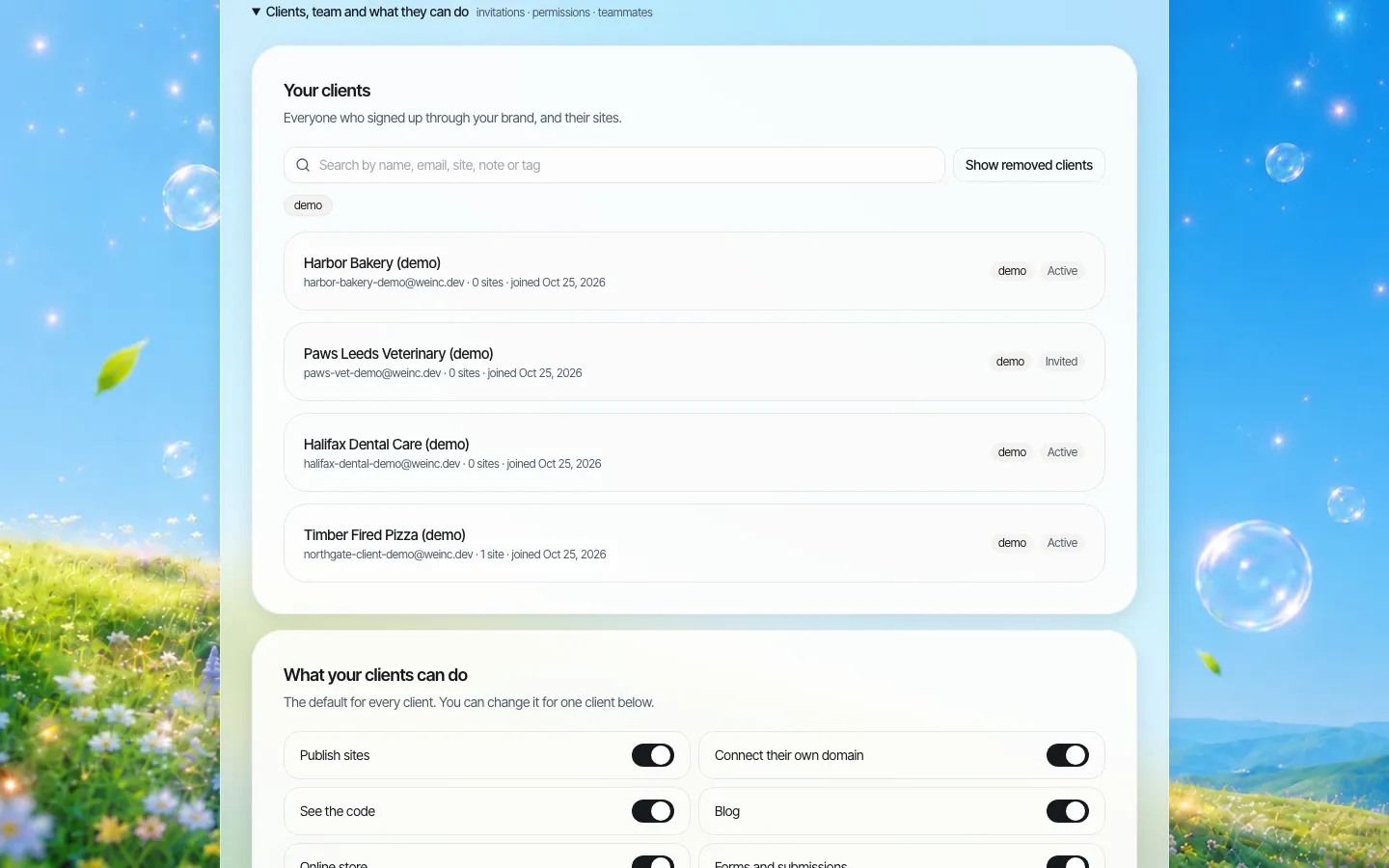
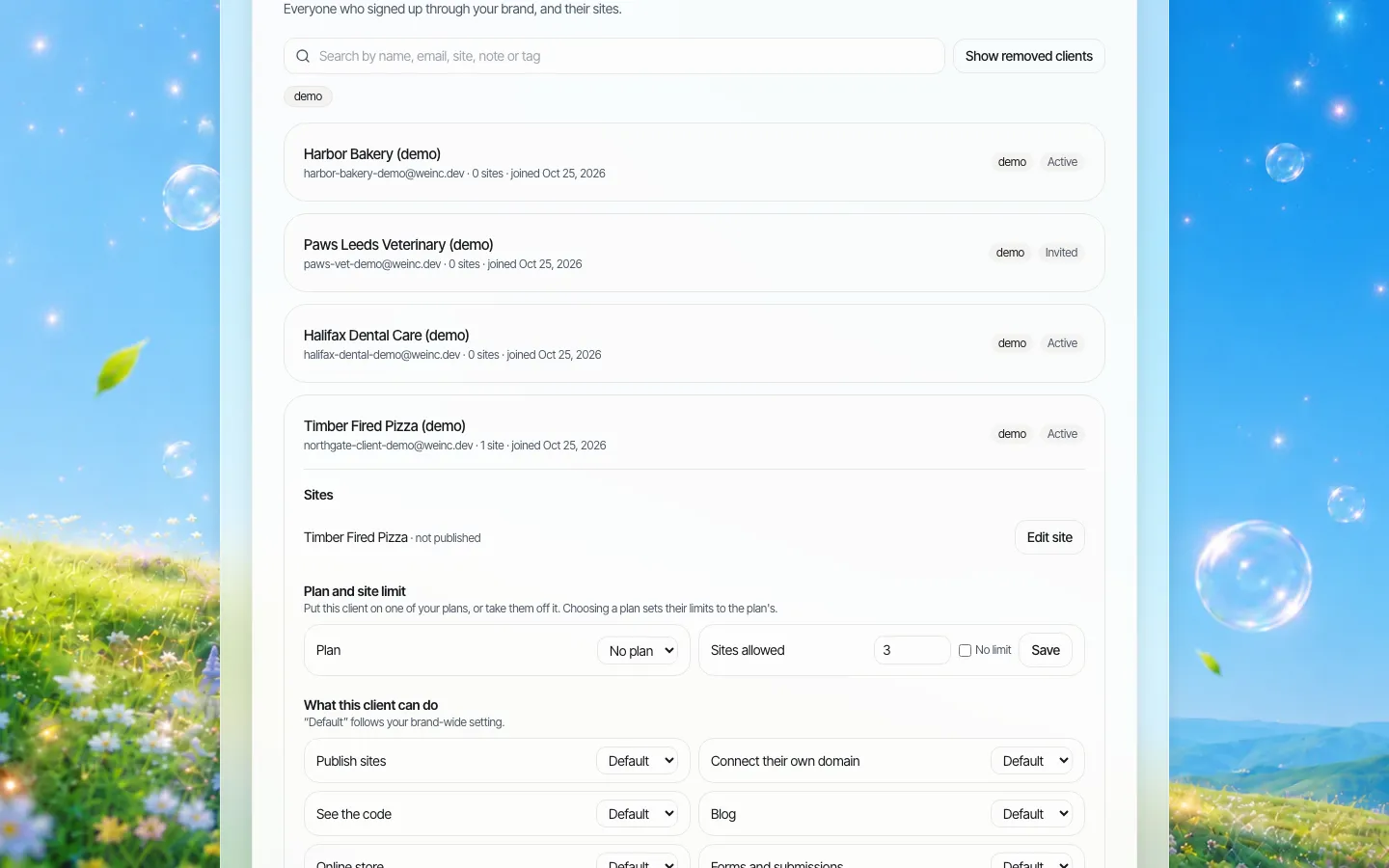
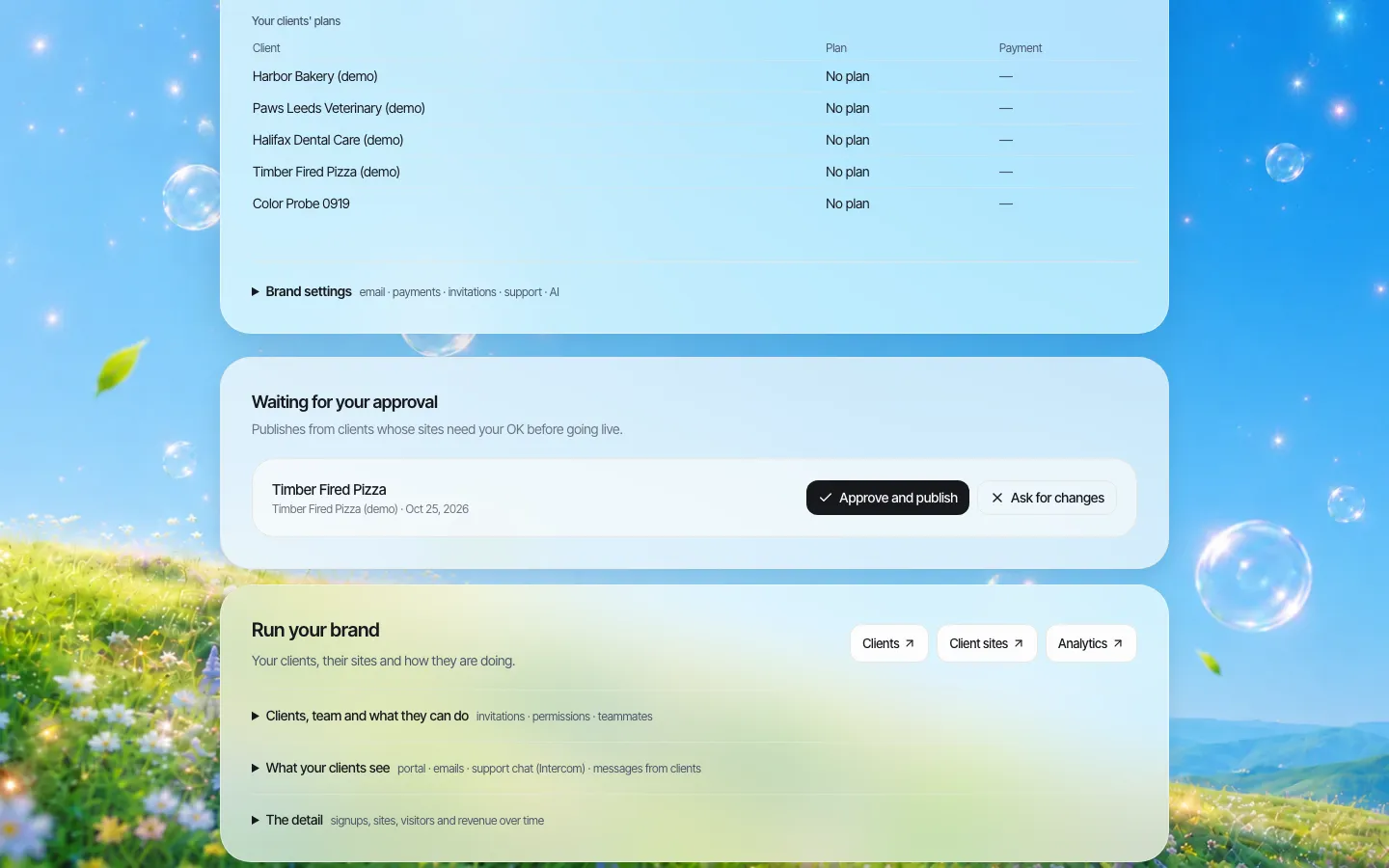
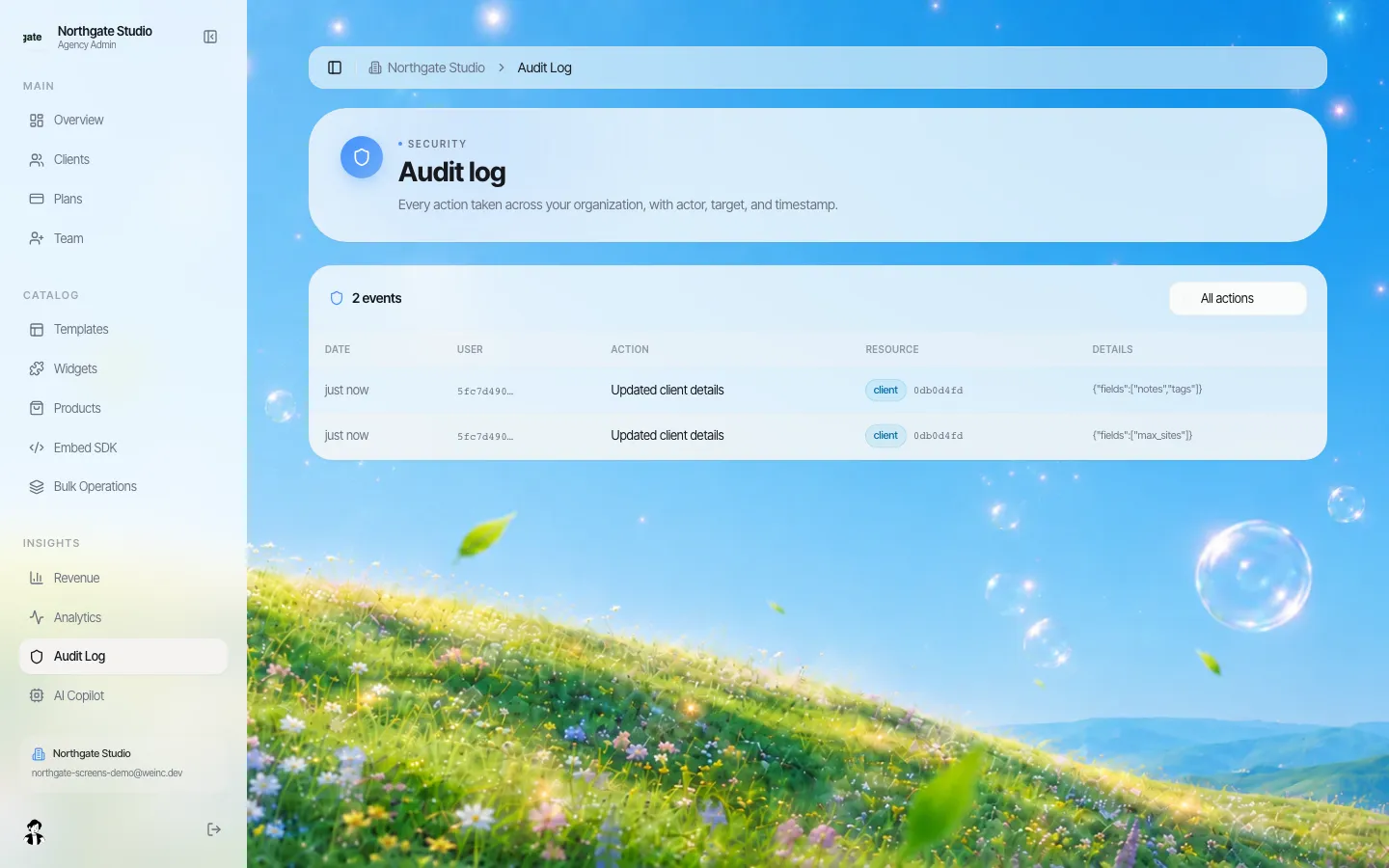
Be clear-eyed about the limit: sites on We.Inc are generated with AI from templates and prompts, and we do not claim that any site conforms to WCAG or meets the EAA. The platform is built to help you review and control what goes live; your team still has to test each in-scope site. To see the client list and approval step on a demo brand, book a demo. The wider agency overview is on our white-label for agencies page.
Common mistakes
- Buying an overlay and calling it done. A script that changes fonts or contrast does not fix an unlabelled checkout field. Fix the source.
- Scoping by country of incorporation. The directive is written around services provided to consumers in the Union. A company outside the EU selling to EU consumers should take advice rather than assume it is out of scope.
- Forgetting the app. Mobile device-based services are named alongside websites.
- Assuming the exemption is permanent. Re-test microenterprise status every year.
Sources
Last checked 2026-10-25.
- EUR-Lex, Directive (EU) 2019/882 on the accessibility requirements for products and services: Articles 2(2), 3(23), 3(30), 4(5), 31(2), 32 and Annexes I and V. We read the article text via the legislation.gov.uk copy of the EU text.
- European Commission, European Accessibility Act (covered products and services; transposition deadline).
This guide is general information, not legal advice. National laws implementing the directive differ; check the law of each country you serve.
Frequently asked questions
Does the European Accessibility Act apply to every website?
No. It applies to listed services provided to consumers, such as e-commerce, consumer banking, electronic communications, audiovisual media access, passenger transport and e-books, and to the websites and apps those services are delivered through.
When did the European Accessibility Act start to apply?
Article 31(2) of Directive (EU) 2019/882 says Member States apply their national measures from 28 June 2025.
Are small businesses exempt from the EAA?
Microenterprises providing services are exempt. A microenterprise employs fewer than 10 people and has annual turnover or balance sheet total of no more than 2 million euros. Both tests must be met, and the exemption does not pass to larger clients an agency builds for.
Is there a grace period until 2030?
Partly. Service contracts agreed before 28 June 2025 may continue unaltered until they expire, but no longer than five years from that date, and Member States must allow a transition to 28 June 2030 for products already used to provide services. New pages and redesigns should be built accessibly now.
Does We.Inc make my site EAA compliant?
No platform can promise that. We.Inc gives agencies a client list, per-client permissions, a single-step approval before a client's site goes live and an audit log, which help you control what is published. Each site still needs your own accessibility testing.
More in Guides
- Express.js Tutorial: Build a Node Server Step by Step
- Facebook UTM Parameters for Meta Ads
- Faceted Navigation SEO: Keeping Store Filters Under Control
- TypeError: Failed to fetch: What Blocked the Request
- FAQ Page Examples and a Template You Can Copy
- FastAPI WebSocket: Endpoints, Broadcasting and Testing
- Favicon Sizes and the Code to Add Them
- Figma to Code: Three Ways, and a Free CSS to Tailwind Converter
Website builders for the businesses in this article
Related guides and tools
Start building
Product
Who It's For
- For Agencies
- For Freelancers
- For Hosting Providers
- For SaaS Platforms
- For Startups
- For Financial Services
- For Healthcare
Features
- Drag & Drop Editor
- Built-in SEO Tools
- Custom Branding
- Client Dashboard
- Reseller Billing (Stripe Connect)
Resources
- Blog
- Help Center
- Free Business Tools
- Free UI Components
- Website Templates
- Template Collections
- Website Examples
- Guides
- Comparisons
- Alternatives
- Best Lists
- Reviews
- Pricing Guides
- Use Cases
- Glossary & Guides
- Integrations
- Developers
- Benchmark
- Windows App