Should an Agency Switch from WordPress to a No-Code Website Builder? | How-to Guide
A decision guide for agencies weighing WordPress against a hosted no-code or AI website builder: where each wins, the hidden costs of running many WordPress sites, which clients to move first, and which to leave alone.
Switch for the sites where the work is mostly upkeep, and stay on WordPress where the work is mostly custom. A hosted no-code builder usually wins for brochure sites, local service businesses and landing pages, because hosting, security updates and backups become the platform's job and your team's hours go to client work instead of plugin updates. WordPress still wins for sites built around specific plugins, complex content models, large editorial teams, or clients who insist on self-hosting. Most agencies that switch do it gradually: new small clients go on the builder, existing WordPress sites move only when they need a redesign anyway, and a few complex ones stay put for good.
The real question is where your hours go
Arguments about WordPress versus builders often turn into arguments about taste. For an agency, a better question is: on an average month, what does your team actually spend time on across the portfolio? Track it for four weeks. A typical split for a WordPress-heavy agency looks like this:
- Upkeep: core, theme and plugin updates, fixing what an update broke, backups, renewing licences, chasing hosting issues, cleaning up after a compromised site.
- Client changes: new pages, text edits, photos, seasonal promotions.
- New builds: design and build for new clients.
- Sales and account management.
If upkeep is a large share and most of it is spread across small sites that pay a flat monthly fee, those sites are the strongest case for moving. If most hours go into custom functionality, WordPress is doing what you need.
Where each one wins
| Situation | Better fit | Why |
|---|---|---|
| Local service business, 5-30 pages, contact forms | No-code builder | No plugins to update; hosting and HTTPS handled; faster to build and change |
| Campaign or event landing pages | No-code builder | Speed matters more than flexibility; pages are short-lived |
| Client wants to edit text and photos themselves | Either, depending on editor quality | Test both with a real client; a block editor and a visual editor suit different people |
| Site depends on a specific plugin (a booking engine, an LMS, a membership system) | WordPress | Rebuilding a mature plugin's features is rarely worth it |
| Large publication with many authors, workflows and custom content types | WordPress (or a headless CMS) | Editorial tooling and the plugin ecosystem are deep |
| Client requires self-hosting or a specific host | WordPress | A hosted builder runs on its own infrastructure |
| Large catalogue store with complex integrations | Specialist ecommerce platform or WooCommerce | Neither a simple builder store nor a basic WordPress site fits |
| Many similar small sites under your agency brand | White-label builder | One dashboard, your brand on the client login, per-client controls |
WordPress is open source, and its ecosystem is the reason it remains the default for complex sites. That is a real strength, not something to wave away. The case for switching is narrower: it is about the many small sites where that flexibility goes unused but the upkeep is still paid.
The costs that do not show up on an invoice
When agencies compare, they often compare hosting bills. The bigger costs on many WordPress portfolios are less visible:
- Update risk: every update across dozens of sites is a small chance of something breaking, which someone has to notice and fix.
- Licence sprawl: premium themes and plugins licensed per site or per year, often on a former employee's account.
- Security clean-up: an outdated plugin on one forgotten site can be the one that gets compromised.
- Inconsistency: five page builders across forty sites means every change needs whoever knows that builder.
- Knowledge risk: the person who built a site's custom setup leaves, and nobody else dares touch it.
A hosted builder replaces most of those with a predictable per-site cost. The trade is less freedom: you get the features the platform has, and you depend on the vendor. That dependency is why the next section matters.
Risks of switching, and how to limit them
| Risk | How to limit it |
|---|---|
| Lock-in: you cannot leave without rebuilding everything | Choose a platform that can export each site's code or content, and test the export during the trial |
| Losing search rankings during moves | Map every old URL with permanent redirects; move ranking sites carefully (see our migration plan) |
| Missing features you did not know you used | Inventory every plugin per site before deciding; each one is a feature to replace or a reason to stay |
| Clients dislike the new editor | Pilot with two friendly clients before committing |
| Vendor raises prices | Model your costs at next year's site count; prefer contracts with renewal caps (see how white-label licences are priced) |
| Your team's WordPress skills feel wasted | Keep WordPress for the complex sites; that is where those skills earn the most |
A decision score for each site
Score each site in your portfolio. Add one point for each "yes":
- Fewer than about 30 pages?
- No plugin that provides a core business function (bookings, memberships, courses, complex store)?
- Upkeep took more time last year than content changes?
- Due for a redesign within a year?
- The client wants to make small edits themselves?
- No requirement to self-host?
Five or six points: a strong candidate to move. Three or four: move when it next needs a redesign. Two or fewer: leave it on WordPress.
Questions to ask any builder before you switch
Take these into every demo or trial. The answers decide whether the switch saves time or just moves the work somewhere else.
| Question | Why it matters |
|---|---|
| Can I export a site's code or content, and in what format? | Your exit route, and the client's |
| Can I decide per client what they can edit and publish? | WordPress roles gave you this; a builder should too |
| How are forms delivered, and can I test them? | Lost leads are the commonest failure after a move |
| Can I set redirects, page titles and descriptions per page? | Needed to move ranking WordPress sites safely |
| Is there a blog, and can posts be imported? | Many WordPress sites are mostly blog |
| What happens if I stop paying? | Sites going dark for every client at once is the worst case |
| Can clients log in under my brand? | Otherwise you are training clients to call the vendor |
Ask for a live answer on a real site, not a slide. A platform that hesitates on export or redirects is telling you something.
How agencies usually make the switch
- New small clients first. Build every new brochure site on the builder for three months. You learn the platform on fresh work, with nothing to migrate.
- Redesigns second. When an existing WordPress client asks for a redesign, rebuild it on the builder instead of in WordPress.
- Upkeep-heavy sites third. Move the small sites with the worst upkeep history in batches.
- Leave the rest. Keep a small WordPress practice for the sites that need it, and price it to reflect the upkeep.
What We.Inc offers agencies making this move
We.Inc is a hosted builder you can run under your own agency brand. Clients log in on your brand to a dashboard with their sites.
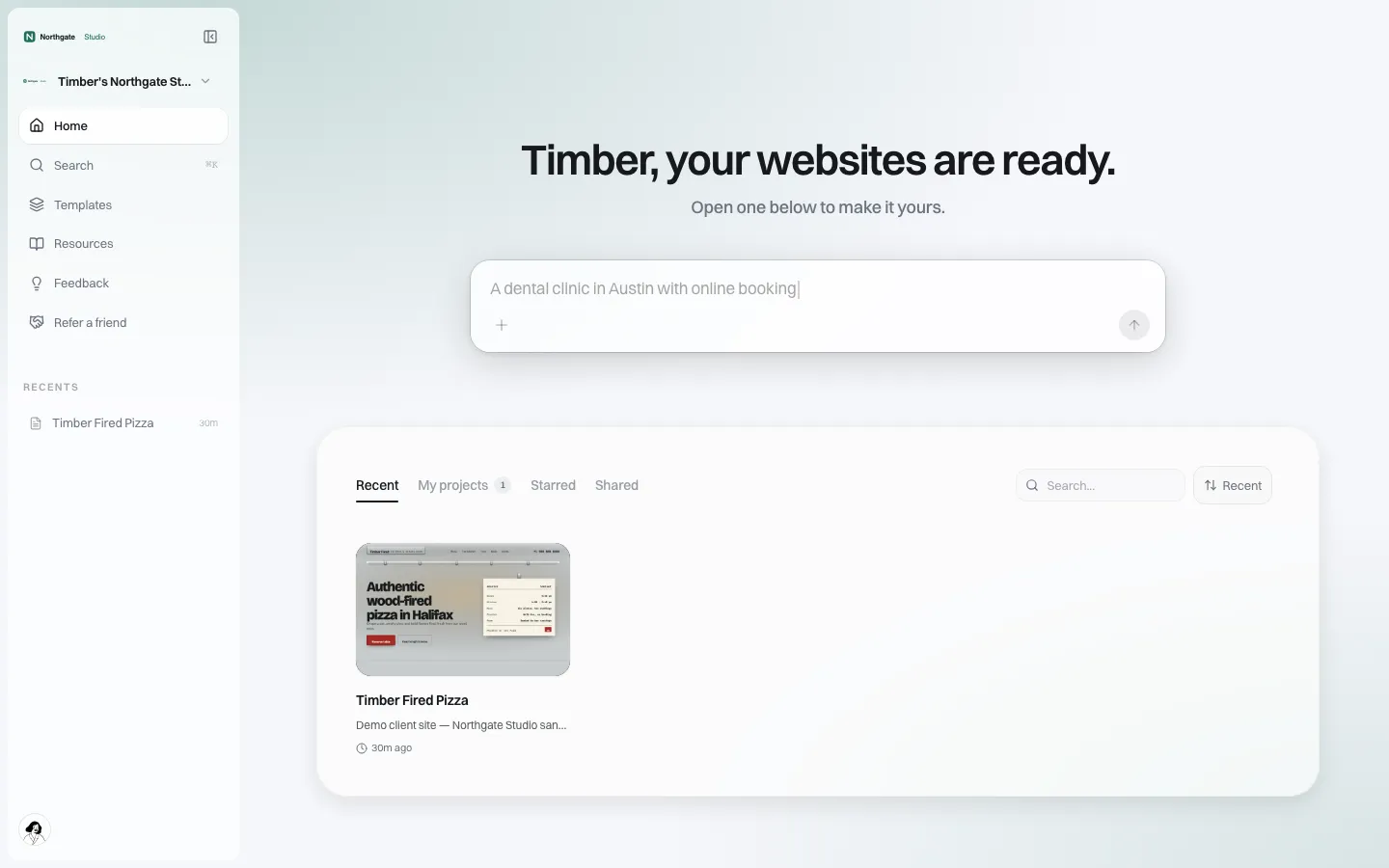
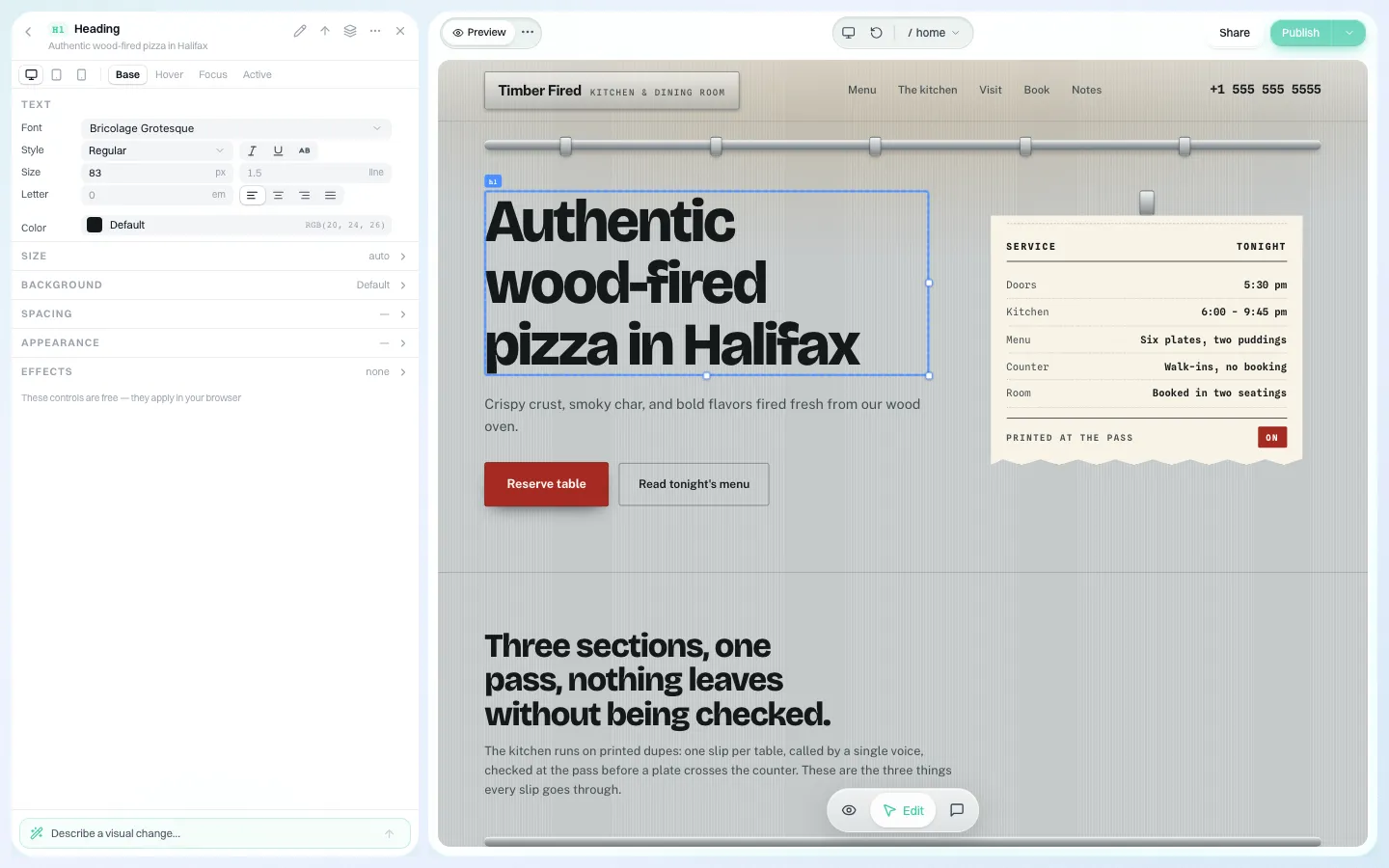
Sites are edited visually, and clients you allow to edit can change text, colours and buttons by clicking on them.
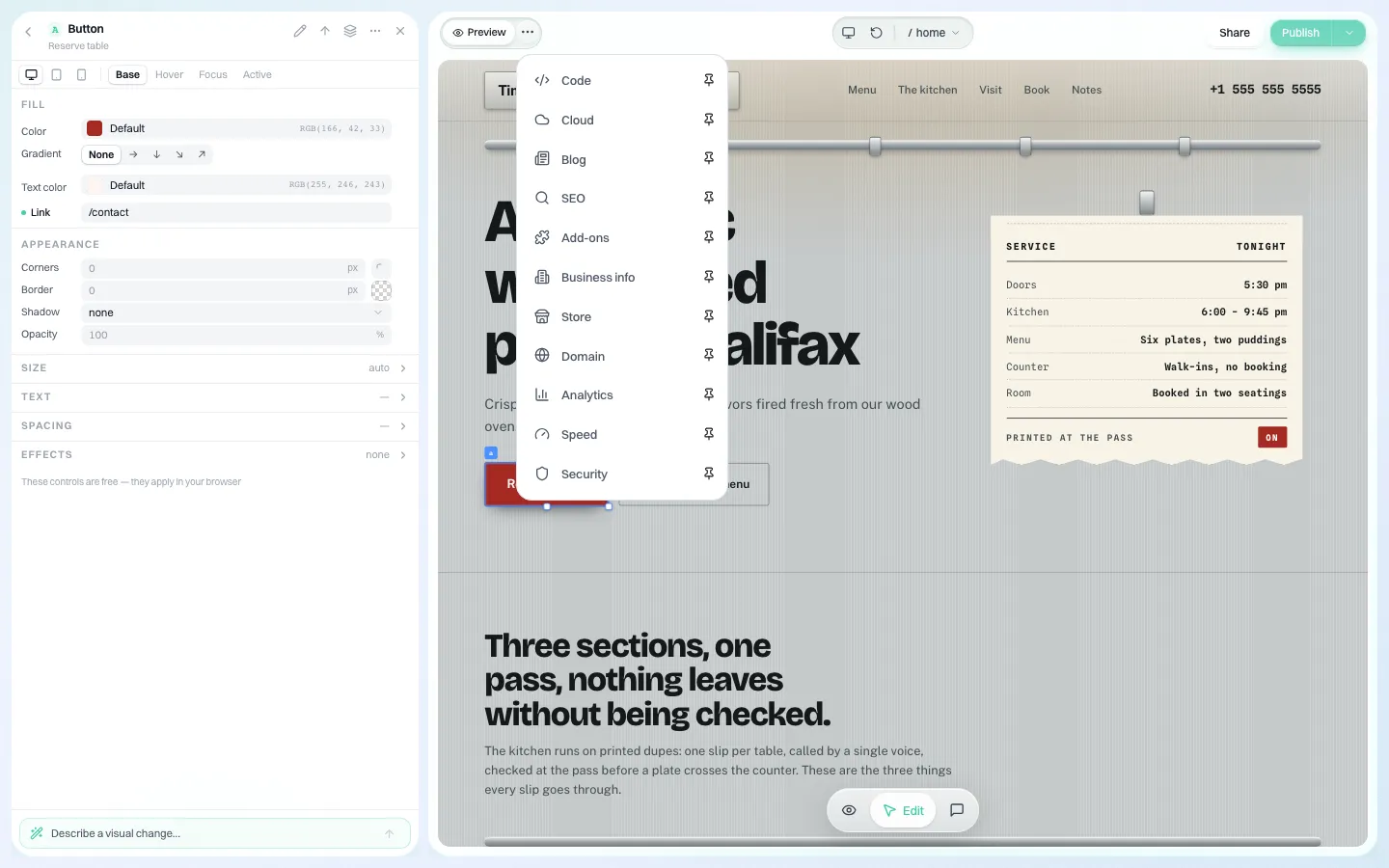
Blog, SEO settings, store, domain, analytics, speed and security sit in panels inside the editor, so a typical brochure site does not need add-ons.
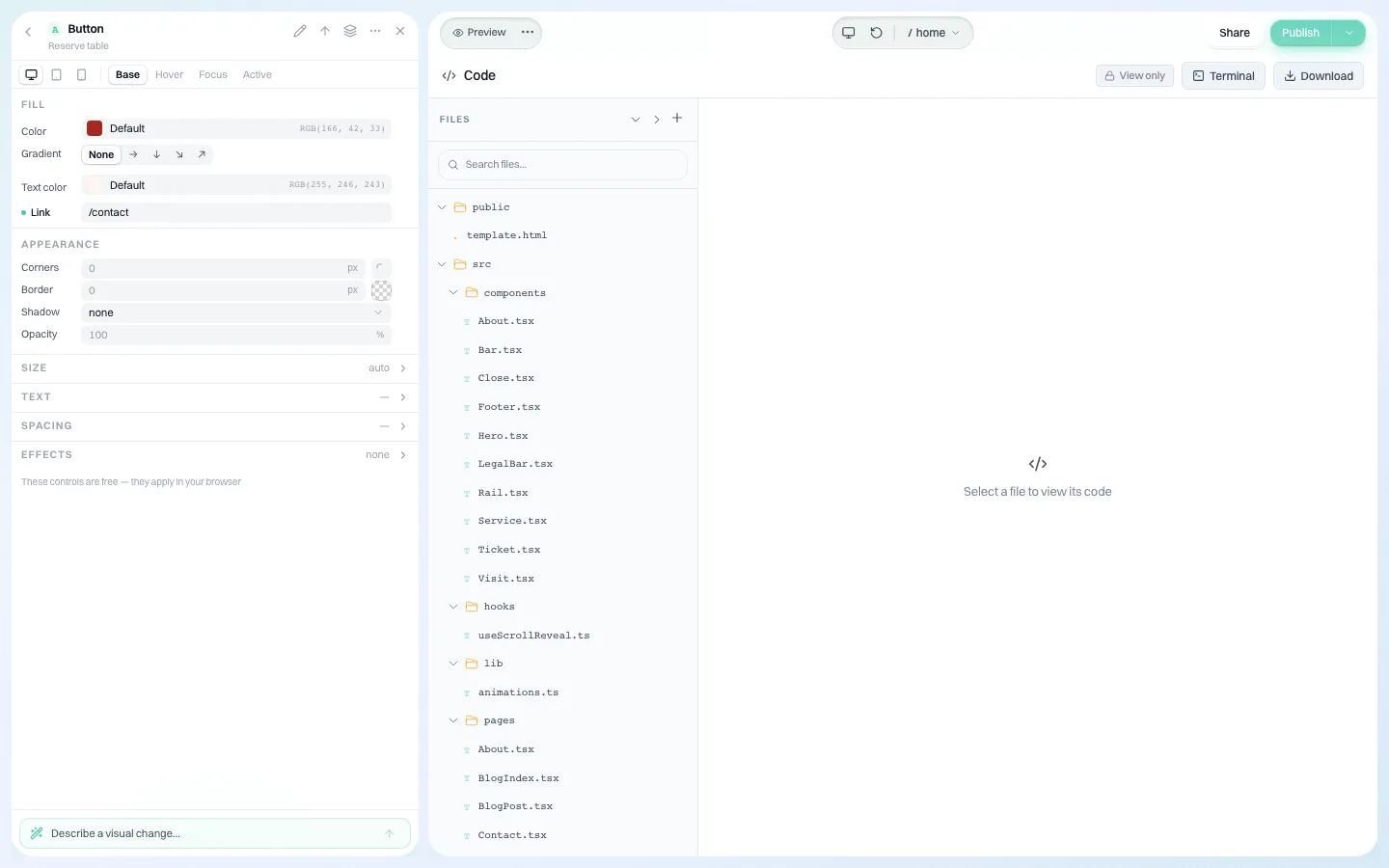
And because each site is real code you can download, the lock-in risk above is smaller: the code panel shows every file and exports a ZIP.
Where We.Inc is not the right fit: sites that depend on a particular WordPress plugin, large editorial publications, and clients who must self-host. Keep those on WordPress. For the rest, book a demo and bring two of your typical client sites.
Frequently asked questions
Is it worth switching from WordPress to a no-code builder for an agency?
For small brochure and local-business sites where most work is upkeep, usually yes. For sites built around specific plugins, large editorial teams or self-hosting requirements, WordPress is usually still the better fit.
Which client sites should move first?
New small clients first, then existing sites due for a redesign, then small sites with heavy upkeep. Leave complex plugin-dependent sites on WordPress.
What is the biggest risk of leaving WordPress?
Lock-in to the new vendor. Choose a platform that can export each site's code or content and test that export before committing.
Can an agency run both WordPress and a builder?
Yes, and most do. Use the builder for simple sites and keep a smaller, properly priced WordPress practice for complex ones.
More in Guides
- Should an Agency Let Clients Edit Their Own Website? Access Levels, Rules and a Policy You Can Copy | How-to Guide
- Sitemap.xml and robots.txt Examples
- Small Business SEO: A Plain-English Guide and Checklist (2026) | How-to Guide
- Soft 404: When a Page Says Not Found but the Server Says OK
- Single Page Application SEO: A Practical Guide
- SPF, DKIM and DMARC: The Three Records Behind Trusted Email
- SQL Joins Explained with Live Examples
- SSE vs WebSocket: Pick the Right Stream
Alternatives mentioned in this article
Related guides and tools
Start building
- AI website builder
- how to make a website
- free website builder
- website templates
- website builders by industry
Product
Who It's For
- For Agencies
- For Freelancers
- For Hosting Providers
- For SaaS Platforms
- For Startups
- For Financial Services
- For Healthcare
Features
Resources
- Blog
- Help Center
- Free Business Tools
- Free UI Components
- Website Templates
- Template Collections
- Website Examples
- Guides
- Comparisons
- Alternatives
- Best Lists
- Reviews
- Pricing Guides
- Use Cases
- Glossary & Guides
- Integrations
- Developers
- Benchmark
- Windows App